AI competitor review analyzer with Dumpling AI + GPT-4o + Google Sheets

Workflow preview

Workflow preview
100%
AI competitor review analyzer with Dumpling AI + GPT-4o + Google Sheets preview
Open on n8n.io

Important notice

This workflow is provided as-is. Please review and test before using in production.

1. Workflow Overview

Who is this for? This workflow is perfect for marketers, SEO specialists, product teams, and competitive analysts who want to monitor and summarize public reviews of their competitors. It’s especia...

Best for

  • Market Research automation workflows
  • AI Summarization automation workflows
  • intermediate n8n builders looking for reusable templates

Tools used

n8n-nodes-base.googlesheetstrigger, n8n-nodes-base.httprequest, n8n-nodes-base.splitout, n8n-nodes-base.aggregate, @n8n/n8n-nodes-langchain.openai, n8n-nodes-base.googlesheets, n8n-nodes-base.stickynote

Source and attribution

This workflow is cataloged by N8N Workflows and links back to its original n8n.io source page by Yang.

Original n8n.io source

1.1 Workflow description

Title
AI competitor review analyzer with Dumpling AI + GPT-4o + Google Sheets
Workflow name
AI competitor review analyzer with Dumpling AI + GPT-4o + Google Sheets

Who is this for?

This workflow is perfect for marketers, SEO specialists, product teams, and competitive analysts who want to monitor and summarize public reviews of their competitors. It’s especially helpful for small teams who want fast insights from Google reviews without spending hours manually reading and sorting them.


What problem is this workflow solving?

Manually going through competitor reviews is time-consuming and repetitive. You risk missing patterns or insights, and it’s hard to share summaries with your team quickly. This workflow automatically scrapes reviews from Google and generates a structured summary of pain points and positive feedback. That way, you can focus on strategy instead of sorting through dozens of reviews.


What this workflow does

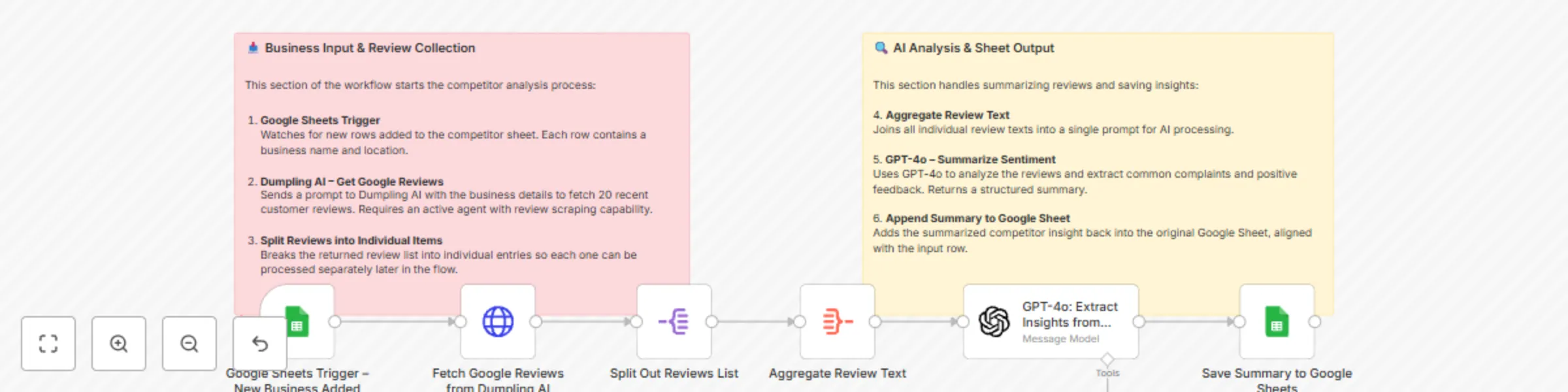
This automation watches for new competitor entries in a Google Sheet, then:

  1. Uses Dumpling AI to scrape the latest Google reviews (up to 20) for each business.
  2. Splits and cleans the reviews for analysis.
  3. Sends them to GPT-4o, which summarizes the most common complaints and praises.
  4. Saves the structured result back to the same Google Sheet.

You’ll instantly get an overview of what people are saying about any competitor.


Setup

  1. Google Sheet Setup

    • Create a Google Sheet with at least one column: Business
    • Add names or search queries for the competitors you want to analyze
    • Optional: Add columns for Summary of Reviews and Pain Points
  2. Connect Dumpling AI

    • Sign up at Dumpling AI
    • Create an agent using the get-google-reviews endpoint
    • Copy your agent key
    • Use it in the HTTP Request node in this workflow
  3. OpenAI Setup

    • Use your API key with GPT-4o access
    • The prompt is already structured to generate grouped summaries from reviews
  4. Run the Workflow

    • Trigger it manually or schedule it
    • Make sure your Google Sheets, OpenAI, and Dumpling AI connections are active

How to customize this workflow to your needs

  • You can expand the number of reviews retrieved by changing the Dumpling AI agent config
  • Replace Google Sheets with Airtable if you want more robust data views
  • Add more fields like star ratings or review dates in your agent for richer analysis
  • Change the GPT prompt to highlight emotional tone, urgency, or feature mentions

🧠 Node Details

  • Google Sheets Trigger: Watches for new competitor names
  • HTTP Request (Dumpling AI): Scrapes 20 recent reviews from Google
  • SplitOut Node: Breaks review array into individual items
  • Code Node: Extracts and combines review text
  • Edit Fields Node: Structures the review content before GPT
  • GPT-4o Node: Analyzes and summarizes top pain points and praise
  • Google Sheets Output: Saves the summary back to the same sheet

Dependencies

  • Dumpling AI account and review scraping agent setup
  • OpenAI API key with GPT-4o access
  • Google Sheets OAuth2 credentials

1.2 Logical Blocks

This catalog entry is organized from the workflow JSON. The node-level section below shows the executable blocks available for review before importing the template.

2. Block-by-Block Analysis

Block 1 - Google Sheets Trigger – New Business Added

Type / Role
n8n-nodes-base.googleSheetsTrigger - googleSheetsTrigger
Config choices
Version 1

Block 2 - Fetch Google Reviews from Dumpling AI

Type / Role
n8n-nodes-base.httpRequest - httpRequest
Config choices
Version 4.2

Block 3 - Split Out Reviews List

Type / Role
n8n-nodes-base.splitOut - splitOut
Config choices
Version 1

Block 4 - Aggregate Review Text

Type / Role
n8n-nodes-base.aggregate - aggregate
Config choices
Version 1

Block 5 - GPT-4o: Extract Insights from Reviews

Type / Role
@n8n/n8n-nodes-langchain.openAi - openAi
Config choices
Version 1.8

Block 6 - Save Summary to Google Sheets

Type / Role
n8n-nodes-base.googleSheets - googleSheets
Config choices
Version 4.5

Block 7 - Sticky Note

Type / Role
n8n-nodes-base.stickyNote - stickyNote
Config choices
Version 1

Block 8 - Sticky Note1

Type / Role
n8n-nodes-base.stickyNote - stickyNote
Config choices
Version 1

3. Summary Table

Workflow AI competitor review analyzer with Dumpling AI + GPT-4o + Google Sheets
Complexity intermediate
Nodes 8
Categories Market Research, AI Summarization
Author Yang
Published 14 May 2025

4. Reproducing the Workflow from Scratch

  1. 1. Download the workflow JSON

    Use the JSON export at /data/workflows/4032/4032.json as the source template for this automation.

  2. 2. Import the template into n8n

    Open n8n, import the downloaded JSON, and review each node before activating the workflow.

  3. 3. Configure credentials and variables

    Replace placeholder credentials, API keys, webhook URLs, account IDs, and environment-specific values with your own settings.

  4. 4. Test with sample data

    Run the workflow manually or in a staging workspace, inspect node output, and confirm downstream systems receive the expected data.

  5. 5. Activate and monitor

    Enable the workflow only after testing, then monitor executions, errors, and rate limits during the first production runs.

5. General Notes & Resources

Review imported nodes carefully before activation. This catalog entry is intended to help you inspect the workflow structure, understand required services, and find related templates faster.

Node names, credentials, schedules, webhook paths, and external service limits may need adjustment for your workspace.

Frequently asked questions

What does AI competitor review analyzer with Dumpling AI + GPT-4o + Google Sheets do?

Who is this for? This workflow is perfect for marketers, SEO specialists, product teams, and competitive analysts who want to monitor and summarize public reviews of their competitors. It’s especia...

What do I need before importing this workflow?

Review the workflow JSON, configure any required credentials in n8n, and test the automation in a safe workspace before using it in production.

Can I customize this workflow?

Yes. Use the block-by-block analysis and the downloadable JSON to inspect each node, then adjust credentials, prompts, schedules, filters, or destinations for your Market Research, AI Summarization use case.