Aggregate multi-source job boards into Supabase and Google Sheets

Workflow preview

Workflow preview
100%
Aggregate multi-source job boards into Supabase and Google Sheets preview
Open on n8n.io

1. Workflow Overview

Stop manually checking dozens of career pages. This workflow runs every morning, hits the public APIs of 8+ ATS platforms and job boards, normalizes every listing into a single clean schema, and sy...

Best for

  • Market Research automation workflows
  • intermediate n8n builders looking for reusable templates

Tools used

n8n-nodes-base.stickynote, n8n-nodes-base.code, n8n-nodes-base.httprequest, n8n-nodes-base.postgres, n8n-nodes-base.googlesheets, n8n-nodes-base.splitinbatches, n8n-nodes-base.scheduletrigger

Source and attribution

This workflow is cataloged by N8N Workflows and links back to its original n8n.io source page by Panth1823.

Original n8n.io source

1.1 Workflow description

Title
Aggregate multi-source job boards into Supabase and Google Sheets
Workflow name
Aggregate multi-source job boards into Supabase and Google Sheets

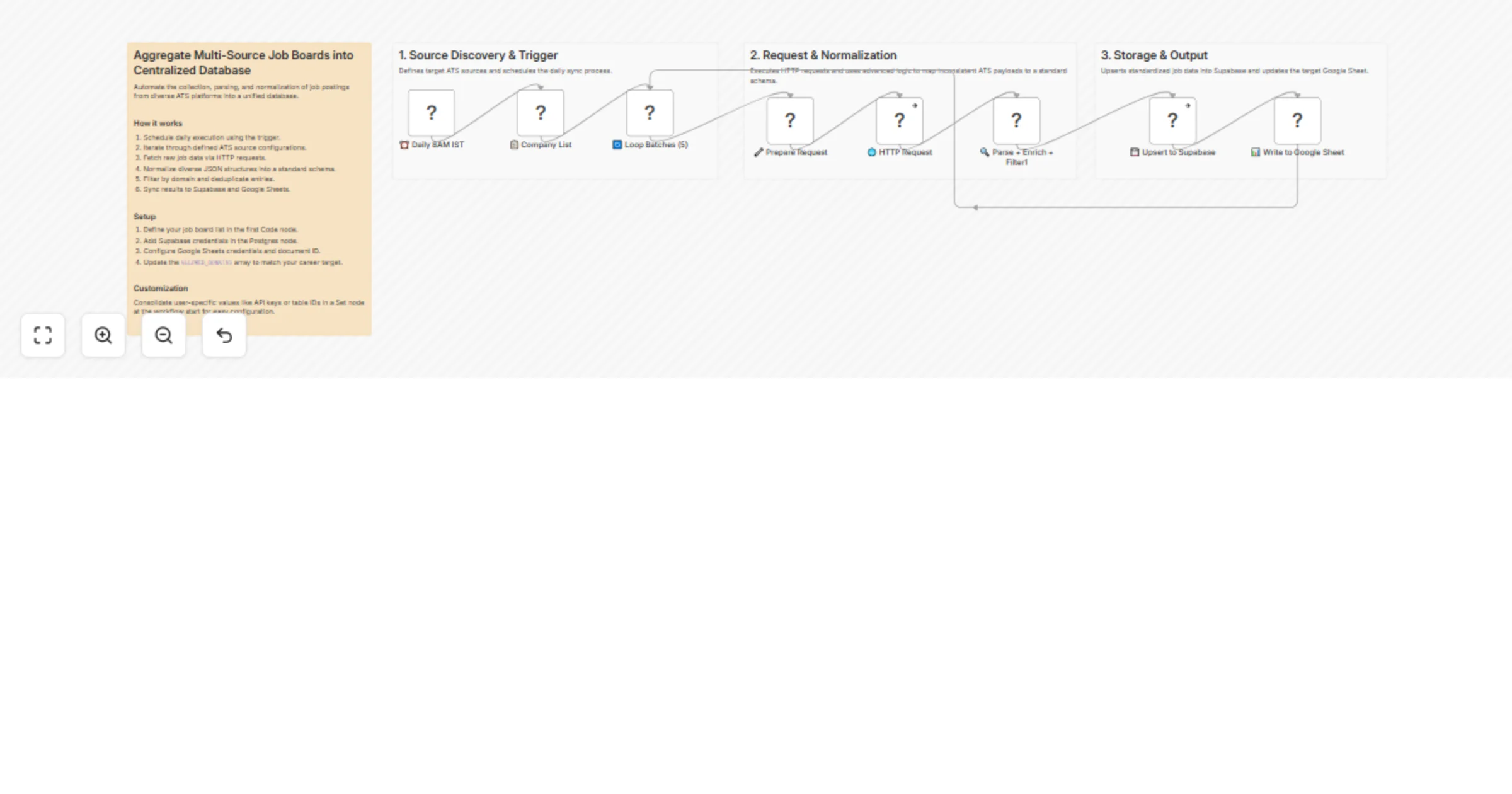
Stop manually checking dozens of career pages. This workflow runs every morning, hits the public APIs of 8+ ATS platforms and job boards, normalizes every listing into a single clean schema, and syncs everything to Supabase and Google Sheets deduplicated and ready to query.

Who it's for

Job seekers, recruiters, or career platforms that want a consolidated, up-to-date feed of openings from specific companies without scraping, without API keys, and without paying for a jobs aggregator.

How it works

  1. A Schedule Trigger fires daily at 8 AM IST
  2. A Company List code node defines all sources grouped by ATS type (Greenhouse, Lever, Ashby, Workable, SmartRecruiters, RemoteOK, and board APIs like Remotive, Himalayas, Arbeitnow, Jobicy)
  3. A Prepare Request node builds the correct API URL and headers for each source, including multi-page pagination for SmartRecruiters (up to 500 jobs via offset) and Himalayas (up to 500 via page param)
  4. An HTTP Request node fetches all sources in batches of 5
  5. A Parse + Enrich + Filter node normalizes all divergent JSON structures into a unified schema — resolving ISO country codes, Indian city detection, salary parsing across all formats, and domain-based filtering
  6. Deduplicated results are upserted to a Supabase (Postgres) table and written to Google Sheets

ATS platforms supported

Greenhouse, Lever, Ashby, Workable, SmartRecruiters, RemoteOK, Remotive, Himalayas, Arbeitnow, Jobicy

Normalized output schema

job_id, title, company, location, country, salary, job_type, apply_url, posted_at, source_ats

Setup

  1. Open the Company List node and edit the sources array — add or remove companies and their ATS slugs
  2. Update ALLOWED_DOMAINS in the Parse node to filter by location or job type relevant to you
  3. Add your Supabase credentials in the Postgres node and confirm your table name and schema match the output fields
  4. Connect your Google Sheets credentials and set the target spreadsheet and sheet ID
  5. (Optional) Adjust pagination limits per source in the Prepare Request node

Requirements

  • Self-hosted or cloud n8n instance
  • Supabase project with a jobs table
  • Google Sheets with headers matching the normalized schema
  • No external API keys required — all sources use public endpoints

1.2 Logical Blocks

This catalog entry is organized from the workflow JSON. The node-level section below shows the executable blocks available for review before importing the template.

2. Block-by-Block Analysis

Block 1 - Main Sticky

Type / Role
n8n-nodes-base.stickyNote - stickyNote
Config choices
Version 1

Block 2 - 📋 Company List

Type / Role
n8n-nodes-base.code - code
Config choices
Version 2

Block 3 - 🔧 Prepare Request

Type / Role
n8n-nodes-base.code - code
Config choices
Version 2

Block 4 - 🌐 HTTP Request

Type / Role
n8n-nodes-base.httpRequest - httpRequest
Config choices
Version 4.2

Block 5 - 💾 Upsert to Supabase

Type / Role
n8n-nodes-base.postgres - postgres
Config choices
Version 2.5

Block 6 - 📊 Write to Google Sheet

Type / Role
n8n-nodes-base.googleSheets - googleSheets
Config choices
Version 4

Block 7 - 🔄 Loop Batches (5)

Type / Role
n8n-nodes-base.splitInBatches - splitInBatches
Config choices
Version 3

Block 8 - ⏰ Daily 8AM IST

Type / Role
n8n-nodes-base.scheduleTrigger - scheduleTrigger
Config choices
Version 1.1

Block 9 - 🔍 Parse + Enrich + Filter1

Type / Role
n8n-nodes-base.code - code
Config choices
Version 2

Block 10 - Trigger & Config

Type / Role
n8n-nodes-base.stickyNote - stickyNote
Config choices
Version 1

Block 11 - Parsing & Enrichment

Type / Role
n8n-nodes-base.stickyNote - stickyNote
Config choices
Version 1

Block 12 - Destination

Type / Role
n8n-nodes-base.stickyNote - stickyNote
Config choices
Version 1

3. Summary Table

Workflow Aggregate multi-source job boards into Supabase and Google Sheets
Complexity intermediate
Nodes 12
Categories Market Research
Author Panth1823
Published 06 Apr 2026

4. Reproducing the Workflow from Scratch

  1. 1. Download the workflow JSON

    Use the JSON export at /data/workflows/14806/14806.json as the source template for this automation.

  2. 2. Import the template into n8n

    Open n8n, import the downloaded JSON, and review each node before activating the workflow.

  3. 3. Configure credentials and variables

    Replace placeholder credentials, API keys, webhook URLs, account IDs, and environment-specific values with your own settings.

  4. 4. Test with sample data

    Run the workflow manually or in a staging workspace, inspect node output, and confirm downstream systems receive the expected data.

  5. 5. Activate and monitor

    Enable the workflow only after testing, then monitor executions, errors, and rate limits during the first production runs.

5. General Notes & Resources

Review imported nodes carefully before activation. This catalog entry is intended to help you inspect the workflow structure, understand required services, and find related templates faster.

Node names, credentials, schedules, webhook paths, and external service limits may need adjustment for your workspace.

Frequently asked questions

What does Aggregate multi-source job boards into Supabase and Google Sheets do?

Stop manually checking dozens of career pages. This workflow runs every morning, hits the public APIs of 8+ ATS platforms and job boards, normalizes every listing into a single clean schema, and sy...

What do I need before importing this workflow?

Review the workflow JSON, configure any required credentials in n8n, and test the automation in a safe workspace before using it in production.

Can I customize this workflow?

Yes. Use the block-by-block analysis and the downloadable JSON to inspect each node, then adjust credentials, prompts, schedules, filters, or destinations for your Market Research use case.