Block 1 - Sticky Note
- Type / Role
- n8n-nodes-base.stickyNote - stickyNote
- Config choices
- Version 1


 Early Deal
This workflow is provided as-is. Please review and test before using in production.
Add LinkedIn Post Commenters to HubSpot CRM Who's it for This workflow is built for content creators, sales professionals, founders, and marketers who post regularly on LinkedIn and want to convert...
n8n-nodes-base.stickynote, n8n-nodes-base.formtrigger, n8n-nodes-connectsafely-ai.connectsafelylinkedin, n8n-nodes-base.splitout, n8n-nodes-base.splitinbatches, @apify/n8n-nodes-apify.apify, n8n-nodes-base.if, n8n-nodes-base.hubspot
This workflow is cataloged by N8N Workflows and links back to its original n8n.io source page by ConnectSafely.
Original n8n.io sourceThis workflow is built for content creators, sales professionals, founders, and marketers who post regularly on LinkedIn and want to convert engaged commenters into CRM leads automatically. Perfect for anyone who gets decent engagement on their posts but struggles to manually capture and follow up with everyone who comments.
If you're running thought leadership campaigns, generating inbound interest through content, or simply want to build relationships with people who engage with your posts, this automation captures every commenter and enriches them with full professional data before syncing to your CRM.
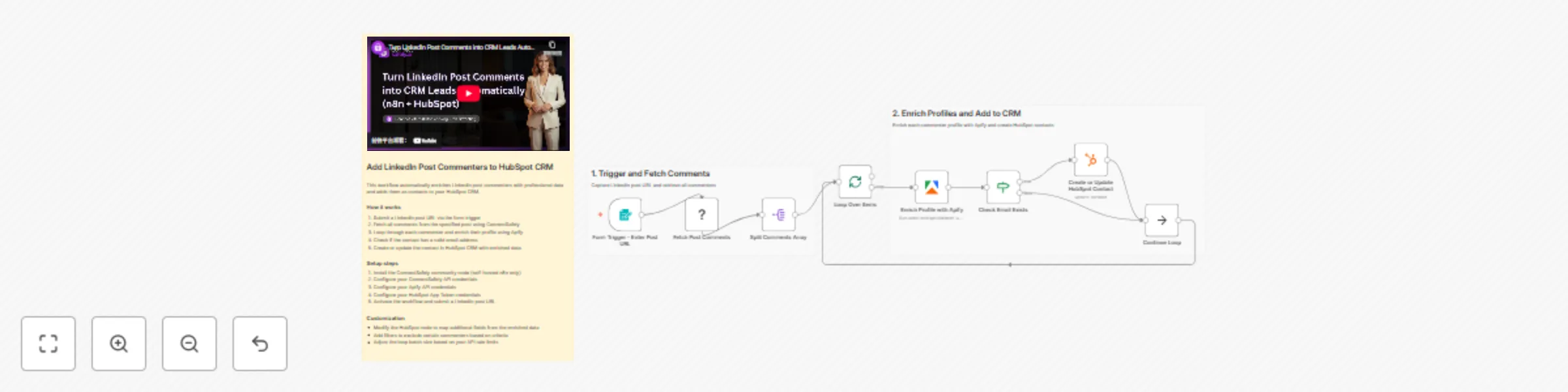
The workflow automatically captures LinkedIn post commenters and adds them to HubSpot CRM with enriched professional data.
The process flow:
Watch the complete step-by-step implementation guide:
This workflow requires the ConnectSafely community node, which is only available on self-hosted n8n instances.
n8n-nodes-connectsafely-aiNote: Community nodes are not available on n8n Cloud. You'll need a self-hosted instance.
https://console.apify.com/actors/UMdANQyqx3b2JVuxgcrm.objects.contacts.readcrm.objects.contacts.writeThe Create or update a contact node maps these fields by default:
To add more fields:
Available Apify fields include:
06_Linkedin_url - LinkedIn profile URL07_Title - Current job title08_Summary - Profile summary16_Company_name - Current company17_Company_industry - IndustryTo track that these contacts came from LinkedIn comments:
leadSource = LinkedIn Post CommentWant to skip low-effort comments like "Great post!" or emoji-only responses?
To use a different CRM instead of HubSpot:
Get notified when high-value commenters are captured:
Issue: ConnectSafely node not appearing in n8n
Issue: "Comments not loading" or empty results
https://www.linkedin.com/posts/username_activity-1234567890/), not a shortened version. Also verify the post actually has comments.Issue: Apify enrichment returning empty results
Issue: HubSpot contact not created
crm.objects.contacts.write scope enabled. Verify the email field is mapping correctly.Issue: Duplicate contacts in HubSpot
Issue: Rate limit errors from Apify
Issue: Missing email addresses for most commenters
| Service | Cost |
|---|---|
| ConnectSafely.ai | Free trial available, then subscription |
| Apify Enrichment | ~$1 per 1,000 records |
| HubSpot | Free tier works, or existing subscription |
| n8n | Free (self-hosted required for community nodes) |
Estimated cost per post with 50 commenters: ~$0.05 for Apify enrichment
Stay updated with the latest automation tips and LinkedIn strategies:
Looking to build sophisticated LinkedIn automation workflows tailored to your business needs?
Contact our team for custom automation development, strategy consulting, and enterprise solutions.
We specialize in:
This catalog entry is organized from the workflow JSON. The node-level section below shows the executable blocks available for review before importing the template.
| Workflow | Add LinkedIn post commenters to HubSpot CRM with Apify enrichment |
|---|---|
| Complexity | intermediate |
| Nodes | 11 |
| Categories | Lead Generation |
| Author | ConnectSafely |
| Published | 30 Dec 2025 |
Use the JSON export at /data/workflows/12310/12310.json as the source template for this automation.
Open n8n, import the downloaded JSON, and review each node before activating the workflow.
Replace placeholder credentials, API keys, webhook URLs, account IDs, and environment-specific values with your own settings.
Run the workflow manually or in a staging workspace, inspect node output, and confirm downstream systems receive the expected data.
Enable the workflow only after testing, then monitor executions, errors, and rate limits during the first production runs.
Review imported nodes carefully before activation. This catalog entry is intended to help you inspect the workflow structure, understand required services, and find related templates faster.
Node names, credentials, schedules, webhook paths, and external service limits may need adjustment for your workspace.
Add LinkedIn Post Commenters to HubSpot CRM Who's it for This workflow is built for content creators, sales professionals, founders, and marketers who post regularly on LinkedIn and want to convert...
Review the workflow JSON, configure any required credentials in n8n, and test the automation in a safe workspace before using it in production.
Yes. Use the block-by-block analysis and the downloadable JSON to inspect each node, then adjust credentials, prompts, schedules, filters, or destinations for your Lead Generation use case.