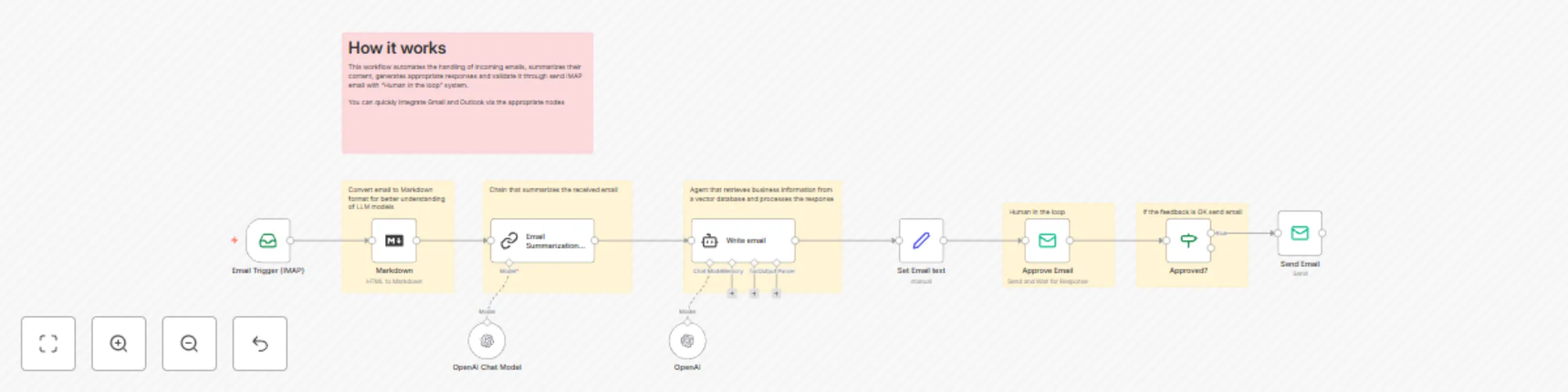
A very simple "Human in the Loop" email response system using AI and IMAP

Workflow preview

Workflow preview
100%
A very simple "Human in the Loop" email response system using AI and IMAP preview
Open on n8n.io

Important notice

This workflow is provided as-is. Please review and test before using in production.

1. Workflow Overview

Functionality This workflow automates the handling of incoming emails by summarizing their content, generating appropriate responses, and validating the responses through a "Human in the Loop" syst...

Best for

  • Ticket Management automation workflows
  • Multimodal AI automation workflows
  • advanced n8n builders looking for reusable templates

Tools used

n8n-nodes-base.emailreadimap, n8n-nodes-base.markdown, n8n-nodes-base.emailsend, @n8n/n8n-nodes-langchain.chainsummarization, @n8n/n8n-nodes-langchain.agent, @n8n/n8n-nodes-langchain.lmchatopenai, n8n-nodes-base.stickynote, n8n-nodes-base.set

Source and attribution

This workflow is cataloged by N8N Workflows and links back to its original n8n.io source page by Davide.

Original n8n.io source

1.1 Workflow description

Title
A very simple "Human in the Loop" email response system using AI and IMAP
Workflow name
A very simple "Human in the Loop" email response system using AI and IMAP

Functionality

This workflow automates the handling of incoming emails by summarizing their content, generating appropriate responses, and validating the responses through a "Human-in-the-Loop" system. It integrates with IMAP email services (e.g., Gmail, Outlook) and uses AI models to streamline the email response process.

The workflow ensures that all AI-generated responses are reviewed by a human before being sent, maintaining a high level of professionalism and accuracy. This approach is particularly useful for businesses that receive a high volume of emails and need to respond quickly while ensuring quality control.


How It Works

  1. Email Trigger:

    • The workflow starts with the Email Trigger (IMAP) node, which monitors an email inbox for new messages. When a new email arrives, it triggers the workflow.
  2. Email Preprocessing:

    • The Markdown node converts the email's HTML content into plain text for easier processing by the AI models.
  3. Email Summarization:

    • The Email Summarization Chain node uses an AI model (OpenAI) to generate a concise summary of the email. The summary is limited to 100 words and is written in a professional tone.
  4. Email Response Generation:

    • The Write email node uses an AI model (OpenAI) to draft a professional response to the email. The response is based on the email content and is limited to 100 words.
  5. Human-in-the-Loop Approval:

    • The Set Email text node prepares the drafted response for approval.
    • The Approve Email node sends the drafted response to a human approver (e.g., an internal email address) for review. The email includes:
      • The original message.
      • The AI-generated response.
    • The Approved? node checks if the response has been approved by the human reviewer. If approved, the workflow proceeds to send the response; otherwise, it stops.
  6. Sending the Response:

    • The Send Email node sends the approved response back to the original sender.

Key Features

  • Automated Email Summarization: Summarizes incoming emails to provide a quick overview of the content.
  • AI-Powered Response Generation: Drafts professional responses to emails using AI.
  • Human-in-the-Loop Approval: Ensures all AI-generated responses are reviewed and approved by a human before being sent.
  • IMAP Integration: Works with IMAP email services like Gmail and Outlook.
  • Efficient Email Management: Reduces the time and effort required to handle incoming emails while maintaining high-quality responses.

This workflow is ideal for businesses looking to automate their email response process while maintaining control over the quality of outgoing communications. It leverages AI to handle repetitive tasks and ensures that all responses are reviewed by a human, providing a balance between automation and human oversight.


Need help customizing?

Contact me for consulting and support or add me on Linkedin.

1.2 Logical Blocks

This catalog entry is organized from the workflow JSON. The node-level section below shows the executable blocks available for review before importing the template.

2. Block-by-Block Analysis

Block 1 - Email Trigger (IMAP)

Type / Role
n8n-nodes-base.emailReadImap - emailReadImap
Config choices
Version 2

Block 2 - Markdown

Type / Role
n8n-nodes-base.markdown - markdown
Config choices
Version 1

Block 3 - Send Email

Type / Role
n8n-nodes-base.emailSend - emailSend
Config choices
Version 2.1

Block 4 - Email Summarization Chain

Type / Role
@n8n/n8n-nodes-langchain.chainSummarization - chainSummarization
Config choices
Version 2

Block 5 - Write email

Type / Role
@n8n/n8n-nodes-langchain.agent - agent
Config choices
Version 1.7

Block 6 - OpenAI

Type / Role
@n8n/n8n-nodes-langchain.lmChatOpenAi - lmChatOpenAi
Config choices
Version 1.2

Block 7 - Sticky Note2

Type / Role
n8n-nodes-base.stickyNote - stickyNote
Config choices
Version 1

Block 8 - Sticky Note5

Type / Role
n8n-nodes-base.stickyNote - stickyNote
Config choices
Version 1

Block 9 - Sticky Note1

Type / Role
n8n-nodes-base.stickyNote - stickyNote
Config choices
Version 1

Block 10 - Sticky Note7

Type / Role
n8n-nodes-base.stickyNote - stickyNote
Config choices
Version 1

Block 11 - Approve Email

Type / Role
n8n-nodes-base.emailSend - emailSend
Config choices
Version 2.1

Block 12 - OpenAI Chat Model

Type / Role
@n8n/n8n-nodes-langchain.lmChatOpenAi - lmChatOpenAi
Config choices
Version 1.2

Block 13 - Set Email text

Type / Role
n8n-nodes-base.set - set
Config choices
Version 3.4

Block 14 - Sticky Note

Type / Role
n8n-nodes-base.stickyNote - stickyNote
Config choices
Version 1

Block 15 - Sticky Note11

Type / Role
n8n-nodes-base.stickyNote - stickyNote
Config choices
Version 1

Block 16 - Approved?

Type / Role
n8n-nodes-base.if - if
Config choices
Version 2.2

3. Summary Table

Workflow A very simple "Human in the Loop" email response system using AI and IMAP
Complexity advanced
Nodes 16
Categories Ticket Management, Multimodal AI
Author Davide
Published 14 Feb 2025

4. Reproducing the Workflow from Scratch

  1. 1. Download the workflow JSON

    Use the JSON export at /data/workflows/2907/2907.json as the source template for this automation.

  2. 2. Import the template into n8n

    Open n8n, import the downloaded JSON, and review each node before activating the workflow.

  3. 3. Configure credentials and variables

    Replace placeholder credentials, API keys, webhook URLs, account IDs, and environment-specific values with your own settings.

  4. 4. Test with sample data

    Run the workflow manually or in a staging workspace, inspect node output, and confirm downstream systems receive the expected data.

  5. 5. Activate and monitor

    Enable the workflow only after testing, then monitor executions, errors, and rate limits during the first production runs.

5. General Notes & Resources

Review imported nodes carefully before activation. This catalog entry is intended to help you inspect the workflow structure, understand required services, and find related templates faster.

Node names, credentials, schedules, webhook paths, and external service limits may need adjustment for your workspace.

Frequently asked questions

What does A very simple "Human in the Loop" email response system using AI and IMAP do?

Functionality This workflow automates the handling of incoming emails by summarizing their content, generating appropriate responses, and validating the responses through a "Human in the Loop" syst...

What do I need before importing this workflow?

Review the workflow JSON, configure any required credentials in n8n, and test the automation in a safe workspace before using it in production.

Can I customize this workflow?

Yes. Use the block-by-block analysis and the downloadable JSON to inspect each node, then adjust credentials, prompts, schedules, filters, or destinations for your Ticket Management, Multimodal AI use case.