Samir Saci
Workflows by Samir Saci
🔄️ AI warehouse inventory cycle count bot using GPT, Telegram and Google Sheets
*Tags: Logistics, Supply Chain, Warehouse Operations, Paperless Processes, Inventory Management* ### Context Hi! I’m [Samir](https://samirsaci.com), Supply Chain Engineer, Data Scientist based in Paris, and founder of [LogiGreen](https://logi-green.com). > Let's use AI with n8n to help SMEs digitalise their logistics operations! Traditional inventory cycle counts often require clipboards, scanners, and manual reconciliation. With this workflow, the operator walks through the warehouse, sends **voice messages**, and the bot automatically updates the inventory records. [](https://youtu.be/_EOJ3M7APsQ) Using AI-based transcription and structured extraction, we optimise the entire process with a simple mobile device connected to Telegram. 📬 For business inquiries, you can find me on [LinkedIn](https://www.linkedin.com/in/samir-saci) ### Demo of the workflow In this example, the bot guides the operator through the cycle count for three locations. [](https://youtu.be/_EOJ3M7APsQ) The workflow automatically records the results in Google Sheets. [](https://youtu.be/_EOJ3M7APsQ) ### Who is this template for? This template is ideal for companies with limited IT resources: - **Inventory controllers** who need a hands-free, mobile-friendly counting process - Small **3PLs** and retailers looking to digitalise stock control ### 🎥 Tutorial A complete tutorial (with explanations of every node) is available on YouTube: [](https://youtu.be/_EOJ3M7APsQ) ### What does this workflow do? This automation uses Telegram and OpenAI’s Whisper transcription: 1. The operator sends **/start** to the bot. 2. The bot identifies the **first location** that still needs to be counted. 3. The operator is guided to the location through a Telegram message. 4. The operator records a **voice message** with the `location ID` and the `number of units` counted. 5. AI nodes transcribe the audio and extract `location_id` and `quantity`. 6. If the message cannot be transcribed, the bot asks the operator to repeat. 7. If the location is valid and still pending, the Google Sheet is updated. 8. The bot sends the **next location**, until the final one is completed. 9. The operator receives a confirmation that the cycle count is finished. ### Next Steps Before running the workflow, follow the sticky notes and configure: - Connect your **Telegram Bot API** - Add your **OpenAI API Key** to the transcription and extraction nodes - Connect your **Google Sheets credentials** - Update the Google Sheet ID and the worksheet name in all Spreadsheet nodes - Adjust the AI prompts depending on your warehouse location naming conventions *Submitted: 20 November 2025* *Template designed with n8n version 1.116.2*
📦 AI-powered damage reporting tool for logistics with Gmail, Telegram and GPT
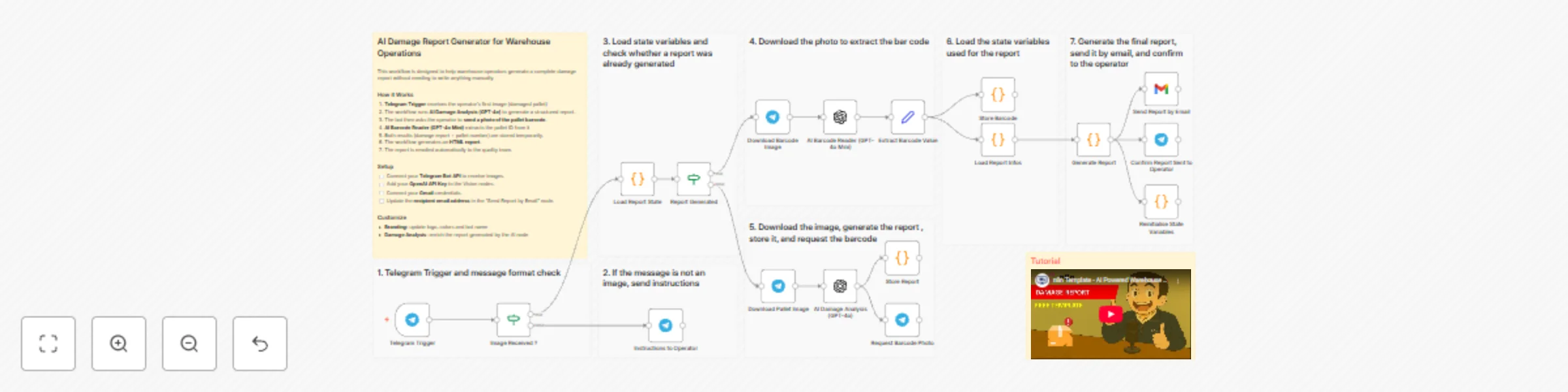
*Tags: Logistics, Supply Chain, Warehouse Operations, Paperless processes, Quality Management* ### Context Hi! I’m [Samir](https://samirsaci.com) — Supply Chain Engineer, Data Scientist based in Paris, and founder of [LogiGreen](https://logi-green.com). > Let us use n8n to help small companies digitalise their logistics and supply chain! This workflow helps warehouse operators generate a complete damage report without needing to write anything manually. [](https://youtu.be/3Xdo1pzd8rw) In warehouse operations, damaged pallets must be reported quickly and consistently. You can automate the entire process using **AI to analyse photos of the damages**. 📬 For business inquiries, you can find me on [LinkedIn](https://www.linkedin.com/in/samir-saci) ### Example of damage report The process starts with instructions sent with the operator: [](https://youtu.be/3Xdo1pzd8rw) A photo of the damaged pallets is shared with the bot:  A complete report is generated and sent by email: [](https://youtu.be/3Xdo1pzd8rw) ### 🎥 Tutorial A complete tutorial (with explanations of every node) is available on YouTube: [](https://youtu.be/3Xdo1pzd8rw) ### Who is this template for? This template is ideal for companies with limited IT ressources: - **Warehouse operators** who need a fast reporting tool - **Quality teams** who want consistent and structured reports - **3PLs and logistics providers** looking to digitalise damage claims - **Manufacturers and retailers** with high inbound pallet volumes - **Anyone using Telegram** on the warehouse floor for quick interactions ### What does this workflow do? This workflow acts as an **AI-powered damaged goods reporting assistant** using Telegram, OpenAI Vision and Gmail. 1. A operator sends a picture of the damaged pallet via **Telegram**. 2. The workflow downloads the image and sends it to **GPT-4o** for damage analysis. 3. The bot replies and asks for a **photo of the pallet barcode**. 4. The barcode picture is processed by **GPT-4o Mini** to extract the pallet number. 5. The workflow combines both results (damage analysis + pallet ID). 6. It generates an **HTML email report** with: damage summary, observed issues, severity level and recommended actions 7. The report is automatically sent via **Gmail** to the configured recipient. 8. The operator receives a confirmation message in Telegram. The processes does not require any data input form the operator, only to take pictures! ### Next Steps Before running the workflow, follow the sticky notes and configure: - Connect your **Telegram Bot API** - Add your **OpenAI API Key** in the AI nodes - Connect your **Gmail** credentials - Update the **recipient email** in the “Send Report by Email” node *Submitted: 20 November 2025* *Template designed with n8n version 1.116.2*
🗜️ Automate image compression in Google Drive with Tinify API and email reports
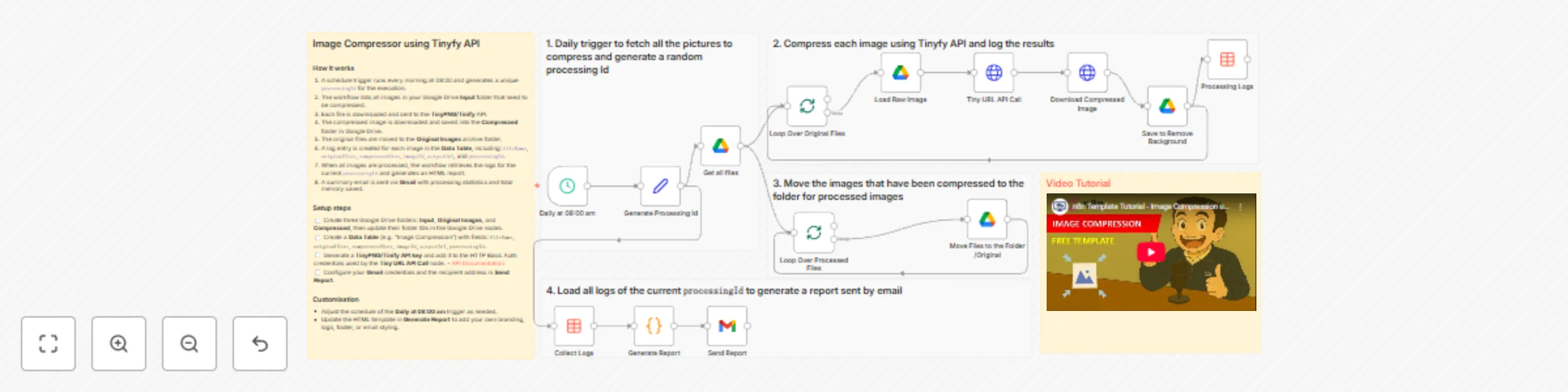
*Tags: Image Compression, Tinify API, TinyPNG, SEO Optimisation, E-commerce, Marketing* ### Context Hi! I’m [Samir Saci](https://samirsaci.com), Supply Chain Engineer, Data Scientist based in Paris, and founder of [LogiGreen](https://logi-green.com). I built this workflow for an agency specialising in e-commerce to automate the daily compression of their images stored in a Google Drive folder. [](https://youtu.be/qXQVcaJgwrA) This is particularly useful when managing large libraries of product photos, website assets or marketing visuals that need to stay lightweight for **SEO**, **website performance** or **storage optimisation**. > Test this workflow with the free tier of the API! 📬 For business inquiries, you can find me on [LinkedIn](https://www.linkedin.com/in/samir-saci) ### Who is this template for? This template is designed for: - **E-commerce managers** who need to keep product images optimised - **Marketing teams** handling large volumes of visuals - **Website owners** wanting automatic image compression for SEO - **Anyone using Google Drive** to store images that gradually become too heavy ### What does this workflow do? This workflow acts as an **automated image compressor and reporting system** using Tinify, Google Drive, and Gmail. 1. Runs **every day at 08:00** using a Schedule Trigger 2. Fetches all images from the Google Drive **Input** folder 3. Downloads each file and sends it to the **Tinify API** for compression 4. Downloads the optimised image and saves it to the **Compressed** folder 5. Moves the original file to the **Original Images** archive 6. Logs: `fileName`, `originalSize`, `compressedSize`, `imageId`, `outputUrl` and `processingId` into a **Data Table** 7. After processing, it retrieves all logs for the current batch 8. Generates a clean HTML report summarising the compression results 9. Sends the report via **Gmail**, including total space saved Here is an example from my personal folder: [](https://youtu.be/qXQVcaJgwrA) Here is the report generated for these images: [](https://youtu.be/qXQVcaJgwrA) *P.S.: You can customise the report to match your company branding or visual identity.* ### 🎥 Tutorial A complete tutorial (with explanations of every node) is available on YouTube: [](https://youtu.be/qXQVcaJgwrA) ### Next Steps Before running the workflow, follow the sticky notes and configure the following: - Get your Tinify API key for the free tier here: [Get your key](https://tinypng.com/developers/reference) - Replace Google Drive folder IDs in: **Input**, **Compressed**, and **Original Images** - Replace the **Data Table** reference with your own (fields required: `fileName`, `originalSize`, `compressedSize`, `imageId`, `outputUrl`, `processingId`) - Add your **Tinify API key** in the HTTP Basic Auth credentials - Set up your **Gmail** credentials and recipient email - (Optional) Customise the **HTML report** in the `Generate Report` Code node - (Optional) Adjust the **daily schedule** to your preferred time *Submitted: 18 November 2025* *Template designed with n8n version 1.116.2*
🏫 English lesson generator from podcasts with RSS, GPT-4, ElevenLabs and Gmail
*Tags: ESL, English Learning, Podcasts, RSS, AI Exercises, ElevenLabs* ### Context Hi! I’m [Samir](https://samirsaci.com), Supply Chain Engineer and Data Scientist based in Paris, and founder of the startup [LogiGreen](https://logi-green.com). I created this workflow for my mother, who is currently learning English, to turn the **BBC 6 Minute English** podcast into ready-to-use English lessons. [](https://www.youtube.com/watch?v=IKugAVZWgKM) The lesson includes vocabulary, exercises and discussion questions along with links to access the podcast content (audio and transcript). > Use this assistant to automatically share English lessons from a renowned podcast. 📬 For business inquiries, you can find me on [LinkedIn](https://www.linkedin.com/in/samir-saci) ### Who is this template for? This template is designed for: - **ESL teachers** who want a fresh, structured lesson every week from real-life audio - **Independent learners** who want a guided way to study English with podcasts - **Language schools or content creators** who send regular English lessons by email ### What does this workflow do? This workflow acts as an **AI-powered English lesson generator** from podcast episodes. 1. **Runs every Sunday at 20:00** using a Schedule Trigger and reads the BBC **6 Minute English** RSS feed 2. **Checks a Data Table of archived episodes** and filters out those already sent (using their `guid`) 3. **Keeps the latest unsent episode** and loads its web page content via HTTP 4. **Parses the HTML** in a Code node to extract the episode **description**, full **transcript** and BBC **vocabulary list** 5. **Calls three AI nodes** (OpenAI) to generate: - a motivational **email hook message** - **fill-in-the-blank vocabulary exercises** - **discussion questions** related to the topic 6. **Combines all vocabulary words** and sends them to **ElevenLabs** to generate a slow-paced audio track for listening practice 7. **Builds a prettify HTML email** that includes: title, description, hook, vocabulary list, exercises, discussion questions and resource links 8. **Sends the final lesson by email** via the Gmail node, with the vocabulary audio attached For example, this is the latest email generated by the workflow: [](https://www.youtube.com/watch?v=IKugAVZWgKM) *P.S.: You can customise the footer to your school or company identity.* ### 🎥 Tutorial I advise you to check the tutorial on my YouTube channel for the details on how to set up the nodes and customise the content: [](https://www.youtube.com/watch?v=IKugAVZWgKM) ### Next Steps Follow the stickers to set up all the nodes: - Replace the **Data Table** reference with your own (storing at least `guid`, `title`, `link`, `processed_date`) - Set up your **OpenAI** credentials in the three Model nodes - Set up your **ElevenLabs** credentials and choose a voice in the audio node - Configure your **Gmail** credentials and recipient email address in the Send Email node - Adapt the **RSS feed URL** if you want to track another podcast or source - Customise the **HTML email** (colours, logo, footer text) in the `Prepare Email` Code node - Adjust the **schedule** (time or frequency) if you prefer another cadence *Submitted: 18 November 2025* *Template designed with n8n version 1.116.2*
📰 EU sustainability news curation with RSS, GPT, Gmail, ElevenLabs & Telegram
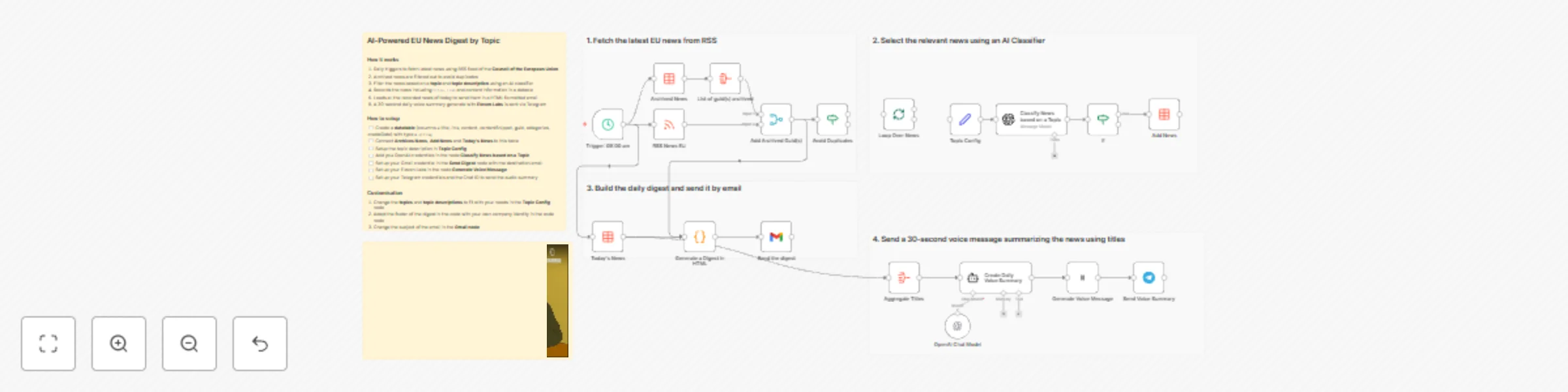
*Tags: EU News, RSS, AI Classifier, Data Table, Email Digest, Automation, n8n* ### Context Hi! I’m [Samir](https://samirsaci.com) , Supply Chain Engineer and Data Scientist based in Paris, and founder of the startup [LogiGreen](https://logi-green.com). This workflow helps me closely follow EU sustainability news that impacts my business. [](https://youtu.be/vNavNGRqcK4) > Use this assistant to automatically curate and summarize EU news tailored to the topics that matter most to you. By default, the workflow filters **sustainability-related news**, but you can easily adapt the topic description (e.g. AI, trade, digital, energy) using the edit node **Topic Config**. 📬 For business inquiries, you can find me on [LinkedIn](https://www.linkedin.com/in/samir-saci) ### Who is this template for? This template is designed for: - **Policy analysts and researchers** who want to track EU updates on a specific topic - **Consultants and sustainability teams** who need a daily view of relevant announcements - **Business owners or startup founders**, like myself, who need to adapt their business strategies to the recent news ### What does this workflow do? This workflow acts as an **AI-powered EU news filter and digest generator**. 1. **Fetches the latest press releases** from the Council of the EU RSS feed every morning at 09:00 2. **Filters out** all the news already recorded to avoid duplicates 3. **Uses an AI classifier** (OpenAI) to decide whether each article is relevant to your topic 4. **Stores only the relevant items** in an **n8n Data Table** 5. **Generates a formatted HTML newsletter** grouping the day’s relevant articles 6. **Sends the digest by email** using the Gmail node 7. **Generates an audio summary** with ElevenLabs that is sent via Telegram Here’s an example of the generated email: [](https://youtu.be/vNavNGRqcK4) ### 🎥 Tutorial A complete tutorial (with explanations of every node) is available on YouTube: [](https://youtu.be/vNavNGRqcK4) ### Next Steps 🗒️ Inside the workflow: - Replace the Data Table reference with your own - Set up your Gmail, OpenAI and ElevenLabs credentials - Update the recipient email address in the Gmail node - Customize the HTML digest (colors, logo, style) in the Code node - Adjust the schedule time if necessary *Submitted: 18 November 2025* *Template designed with n8n version 1.116.2*
👲 Monitor & debug n8n workflows with Claude AI assistant and MCP server
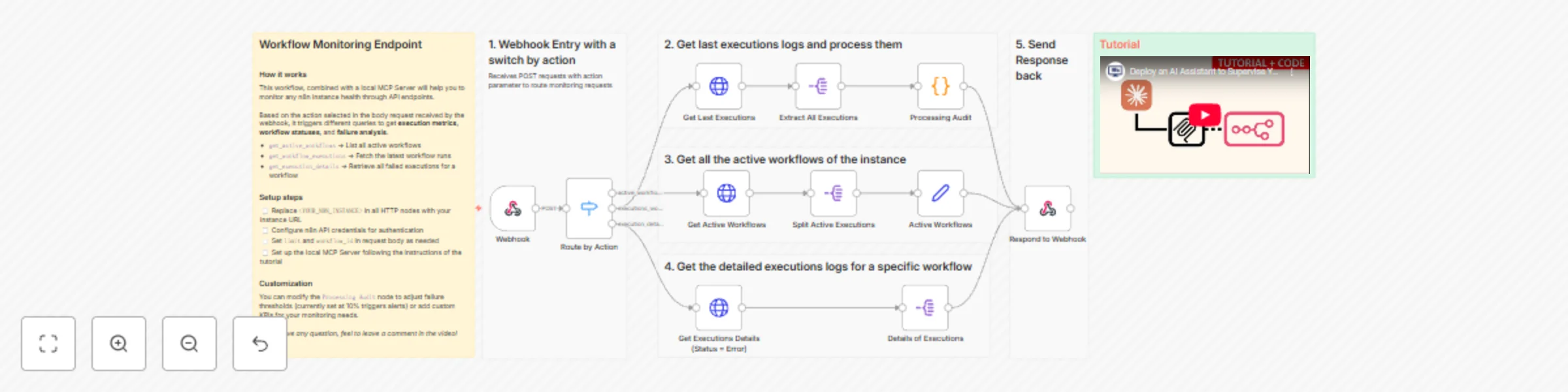
***Tags**: AI Agent, MCP Server, n8n API, Monitoring, Debugging, Workflow Analytics, Automation* ### Context Hi! I’m [Samir](https://samirsaci.com) — a Supply Chain Engineer and Data Scientist based in Paris, and founder of [LogiGreen Consulting](https://logi-green.com). This workflow is part of my latest project: an **AI assistant that automatically analyses n8n workflow executions, detects failures, and identifies root causes** through natural conversation with Claude Desktop. [](https://youtu.be/oJzNnHIusZs) > Turn your automation logs into intelligent conversations with an AI that understands your workflows. The idea is to use *Claude Desktop* to help monitor and debug your workflows deployed in production. The workflow shared here is part of the setup. 📬 For business inquiries, you can find me on [LinkedIn](https://www.linkedin.com/in/samir-saci) ### Who is this template for? This template is designed for **automation engineers**, **data professionals**, and **AI enthusiasts** who manage multiple workflows in **n8n** and want a smarter way to track errors or performance without manually browsing execution logs. If you’ve ever discovered a failed workflow hours after it happened — this is for you. ### What does this workflow do? This workflow acts as the **bridge** between your n8n instance and the **Claude MCP Server**. [](https://youtu.be/oJzNnHIusZs) It exposes three main routes that can be triggered via a webhook: 1. `get_active_workflows` → Fetches all currently active workflows 2. `get_workflow_executions` → Retrieves the latest executions and calculates health KPIs 3. `get_execution_details` → Extracts detailed information about failed executions for debugging Each request is automatically routed and processed, providing Claude with structured execution data for real-time analysis. ### How does it fit in the overall setup? Here’s the complete architecture: ``` Claude Desktop ←→ MCP Server ←→ n8n Monitor Webhook ←→ n8n API ``` - The **MCP Server** (Python-based) communicates with your n8n instance through this workflow. - The **Claude Desktop app** can then query workflow health, execution logs, and error patterns using natural language. - The **n8n workflow** aggregates, cleans, and returns the relevant metrics (failures, success rates, timing, alerts). 📘 The full concept and architecture are explained in my article published on my blog: 👉 [Deploy your AI Assistant to Monitor and Debug n8n Workflows using Claude and MCP](https://towardsdatascience.com/deploy-your-ai-assistant-to-monitor-and-debug-n8n-workflows-using-claude-and-mcp) ### 🎥 Tutorial The full setup tutorial (with source code and demo) is available on YouTube: [](https://youtu.be/oJzNnHIusZs) ### How does it work? - 🌐 Webhook Trigger receives the MCP server requests - 🔀 Switch node routes actions based on `"action"` parameter - ⚙️ HTTP Request nodes fetch execution and workflow data via the n8n API - 🧮 A Code node calculates KPIs (success/failure rates, timing, alerts) - 📤 The processed results are returned as JSON for Claude to interpret ### Example use cases Once connected, you can ask Claude questions like: - “Show me all workflows that failed in the last 25 executions.” - “Why is my `Bangkok Meetup Scraper` workflow failing?” - “Give me a health report of my n8n instance.” [](https://youtu.be/oJzNnHIusZs) Claude will reply with structured insights, including failure patterns, node diagnostics, and health status indicators (🟢🟡🔴). ### What do I need to get started? You’ll need: - A **self-hosted n8n instance** - **Claude Desktop** app installed - The **MCP server source code** (shared in the tutorial description) - The **webhook URL** from this workflow is configured in your `.env` file Follow the tutorial for more details, don't hesitate to leave your questions in the comment section. ### Next Steps 🗒️ Use the sticky notes inside the workflow to: - Replace <YOUR_N8N_INSTANCE> with your own URL - Test the webhook routes individually using the “Execute Workflow” button - Connect the MCP server and Claude Desktop to start monitoring *This template was built using n8n v.116.2* *Submitted: November 2025*
🔤 Inventory ABC & Pareto analysis with Google Sheets for supply chain
***Tags**: Supply Chain, Inventory Management, ABC Analysis, Pareto Principle, Demand Variability, Automation, Google Sheets* ### Context Hi! I’m [Samir Saci](https://samirsaci.com), a Supply Chain Engineer and Data Scientist based in Paris, and founder of [LogiGreen Consulting](https://logi-green.com). I help companies **optimise inventory and logistics operations** by combining **data analytics** and **workflow automation**. This workflow is part of our **inventory optimisation toolkit**, allowing businesses to perform **ABC classification and Pareto analysis** directly from their transactional sales data. > Automate inventory segmentation with n8n! 📬 For business inquiries, feel free to connect with me on [LinkedIn](https://www.linkedin.com/in/samir-saci) ### Who is this template for? This workflow is designed for **supply chain analysts**, **demand planners**, or **inventory managers** who want to: - Identify their top-performing items (Pareto 80/20 principle) - Classify products into **ABC categories** based on sales contribution - Evaluate demand variability (XYZ classification support) Imagine you have a **Google Sheet** where daily sales transactions are stored: [](https://www.youtube.com/watch?v=YbAA-cq9X_E) The workflow aggregates sales by item, calculates cumulative contribution, and assigns **A, B, or C** classes. It also computes **mean, standard deviation, and coefficient of variation (CV)** to highlight demand volatility. [](https://www.youtube.com/watch?v=YbAA-cq9X_E) ### How does it work? This workflow automates the process of **ABC & Pareto analysis from raw sales data**: - 📊 Google Sheets input provides daily transactional sales - 🧮 Aggregation & code nodes compute sales, turnover, and cumulative shares - 🧠 ABC class mapping assigns items into A/B/C buckets - 📈 Demand variability metrics (XYZ) are calculated - 📑 Results are appended into dedicated Google Sheets tabs for reporting [](https://www.youtube.com/watch?v=YbAA-cq9X_E) 🎥 [Watch My Tutorial](https://www.youtube.com/watch?v=YbAA-cq9X_E) ### Steps: 1. 📝 Load daily sales records from Google Sheets 2. 🔎 Filter out items with zero sales 3. 📊 Aggregate sales by **store**, **item**, and **day** 4. 📈 Perform Pareto analysis to calculate cumulative turnover share 5. 🧮 Compute demand variability (mean, stdev, CV) 6. 🧠 Assign ABC classes based on cumulative share thresholds 7. 📥 Append results into **ABC XYZ** and **Pareto** output sheets [](https://www.youtube.com/watch?v=YbAA-cq9X_E) ### What do I need to get started? You’ll need: - A **Google Sheet** with sales transactions (date, item, quantity, turnover) that is available here: [Test Sheet](https://docs.google.com/spreadsheets/d/1nsS_pj3o8yMEIQ59QBU80sx20HtkkTgCKJB32sOge1o/edit?usp=sharing) - A **Google Sheets account** connected in n8n - Basic knowledge of inventory analysis (ABC/XYZ) ### Next Steps 🗒️ Use the sticky notes in the n8n canvas to: - Add your Google Sheets credentials - Replace the Sheet ID with your own sales dataset - Run the workflow and check the output tabs: **ABC XYZ**, **Pareto**, and **Store Sales** *This template was built using n8n v1.107.3* *Submitted: September 15, 2025*
📈 Hourly monitoring of crypto rates with Alpha Vantage API and Google Sheets
***Tags**: Crypto, Currency Exchange, Alpha Vantage API, Google Sheets* ### Context Hi! I’m [Samir Saci](https://samirsaci.com), a Supply Chain Engineer and Data Scientist based in Paris, and founder of [LogiGreen Consulting](https://logi-green.com). I help companies automate data pipelines using **APIs**, **AI agents**, and **workflow automation** to improve operational visibility and decision-making. This workflow is part of our **financial monitoring toolkit**, allowing businesses to **track real-time cryptocurrency exchange rates** for assets like BTC and ETH. > Monitor crypto rates in real time and log the data to Google Sheets. 📬 For business inquiries, feel free to connect with me on [LinkedIn](https://www.linkedin.com/in/samir-saci) ### Who is this template for? This workflow is designed for **crypto analysts**, **finance teams**, or **automation enthusiasts** who want to collect and track crypto exchange rates automatically for reporting or analysis. Let’s imagine you want to monitor BTC and ETH prices against the EUR: [](https://bit.ly/playlist-n8n-supplyscience) The **Alpha Vantage API** is called every hour to collect the exchange rate, bid/ask prices, and timestamp. This data is saved in **Google Sheets** and can trigger a **Telegram alert**. ### How does it work? This workflow automates the hourly logging of crypto exchange rates: - ⏰ Schedule Trigger launches the workflow every hour - 🌐 Alpha Vantage API fetches BTC and ETH exchange rates (to EUR) - 📄 Google Sheets node appends each result to a tab (BTC or ETH) - 📲 Telegram node sends a summary alert with the latest rate info ### Steps: 1. ⏰ Trigger every hour via Schedule node 2. 🌐 Call Alpha Vantage API for BTC and ETH 3. 📊 Append rates, bid/ask prices, and timestamp to Google Sheets 4. 📲 Send a formatted Telegram message with the rate summary [](https://bit.ly/playlist-n8n-supplyscience) ### What do I need to get started? You’ll need: - A free [Alpha Vantage API key](https://www.alphavantage.co/support/#api-key) - A **Google Sheet** with BTC and ETH tabs - A **Telegram bot** and Chat ID to send notifications ### Next Steps 🗒️ Use the sticky notes in the n8n canvas to: - Add your Alpha Vantage API key and Google Sheet credentials - Set your Telegram Chat ID and bot connection - Monitor and visualise real-time crypto prices with no manual input ### 📺 Learn More with n8n Tutorials Get hands-on experience with automation through my comprehensive **n8n tutorial playlist**, featuring 18+ complete, step-by-step videos and ready-to-use templates. [](https://bit.ly/playlist-n8n-supplyscience) *This template was built using n8n v1.93.0* *Submitted: June 12, 2025*
✍️ Blog image SEO & size auditor with Ghost and Google Sheets
***Tags**: Ghost CMS, SEO Audit, Image Optimisation, Alt Text, Google Sheets, Automation* ### Context Hi! I’m [Samir](https://samirsaci.com) — a Supply Chain Engineer and Data Scientist based in Paris, and founder of [LogiGreen Consulting](https://logi-green.com). I help companies and content creators use automation and analytics to **improve visibility**, **enhance performance**, and **reduce manual work**. > Let’s use n8n to automate SEO audits to increase your traffic! 📬 For business inquiries, feel free to connect on [LinkedIn](https://www.linkedin.com/in/samir-saci) ### Who is this template for? This workflow is perfect for **bloggers, marketers, or content teams** using **Ghost CMS** who want to: - Extract and review **all images** from articles - Detect missing or short **alt texts** - Check image **file size** and **filename SEO compliance** - Push the audit results into a **Google Sheet** []((https://bit.ly/playlist-n8n-supplyscience)) ### How does it work? This n8n workflow extracts all blog posts from Ghost CMS, scans the HTML to collect all embedded images, then evaluates each image for: - ✅ Presence and length of `alt text` - 📏 File size in kilobytes - 🔤 Filename SEO quality (e.g. lowercase, hyphenated, no special chars) All findings are written to Google Sheets for **further analysis** or **manual cleanup**. ### 🧭 Workflow Steps: 1. 🚀 Trigger the workflow manually or on schedule 2. 📰 Extract blog post content from Ghost CMS 3. 🖼️ Parse all `<img>` tags with `src` and `alt` attributes 4. 📤 Store image metadata in a Google Sheet (step 1) 5. 🌐 Download each image using HTTP request 6. 🧮 Extract file size, extension, and filename SEO flag 7. 📄 Update the audit sheet with size and format insights []((https://bit.ly/playlist-n8n-supplyscience)) ### What do I need to get started? This workflow requires: - A **Ghost Content API key** - A **Google Sheet** (to log audit results) - No AI or external APIs required — works fully with built-in nodes - ### 📺 Learn More with n8n Tutorials Get hands-on experience with automation through my comprehensive **n8n tutorial playlist**, featuring 18+ complete, step-by-step videos and ready-to-use templates. [](https://bit.ly/playlist-n8n-supplyscience) ### Next Steps 🗒️ Follow the sticky notes inside the workflow to: - Plug in your Ghost blog credentials - Select or create a Google Sheet - Run the audit and start improving your SEO! *This template was built using n8n v1.93.0* *Submitted: June 8, 2025*
🚚 CO2 emissions of freight shipments with Carbon Interface API and GPT-4o
***Tags**: Sustainability, Supply Chain, AI Agent, CO2 Emissions, Carbon Interface API, Logistics, Automation* ### Context Hi! I’m [Samir](https://samirsaci.com) — a Supply Chain Engineer and Data Scientist based in Paris, and founder of [LogiGreen Consulting](https://logi-green.com). I help logistics teams reduce their environmental footprint by combining **AI automation** and **carbon estimation APIs**. This workflow is part of our **green logistics initiative**, allowing businesses to **track the CO₂ emissions** of last-mile or regional shipments. > Automate carbon tracking for shipping operations with n8n! 📬 For business inquiries, feel free to connect with me on [LinkedIn](https://www.linkedin.com/in/samir-saci) ### Who is this template for? This workflow is designed for **logistics coordinators**, **transportation planners**, or **sustainability officers** who want to estimate and record emissions for B2B shipments. Let’s imagine your carrier sends a **shipment confirmation email** after a pickup is scheduled: [](https://bit.ly/playlist-n8n-supplyscience) An **AI Agent** reads the email and extracts structured data: **addresses, distance, cargo weight, and delivery time**. The **Carbon Interface API** is then called to calculate **CO₂ emissions based on weight and distance**, and the results are stored in a **Google Sheet**. [](https://bit.ly/playlist-n8n-supplyscience) ### How does it work? This workflow automates the process of **tracking CO₂ emissions for scheduled shipments**: - 📨 Gmail Trigger captures shipment confirmation emails - 🧠 AI Agent parses the shipment info (pickup, delivery, weight, distance) - 🚚 Carbon Interface API estimates CO₂ emissions - 📊 Google Sheets is used to store shipment metadata and carbon results ### Steps: 1. 💌 Trigger on new shipment confirmation email 2. 🧠 Extract structured shipment info with AI Agent 3. 📋 Store metadata in Google Sheets 4. ⚙️ Call Carbon Interface API with weight and distance 5. 📥 Append estimated CO₂ emissions to the shipment row [](https://bit.ly/playlist-n8n-supplyscience) ### What do I need to get started? You’ll need: - A **Gmail account** to receive shipment confirmation emails - A **Google Sheet** to track shipment data and CO₂ - A free [Carbon Interface API key](https://www.carboninterface.com/docs) - OpenAI access for using the AI Agent parser - A few sample emails from your logistics provider to test ### 📺 Learn More with n8n Tutorials Get hands-on experience with automation through my comprehensive **n8n tutorial playlist**, featuring 18+ complete, step-by-step videos and ready-to-use templates. [](https://bit.ly/playlist-n8n-supplyscience) ### Next Steps 🗒️ Use the sticky notes in the n8n canvas to: - Add your Gmail and Carbon Interface credentials - Try with a sample shipment confirmation email - Check your Google Sheet to verify emissions and timestamps *This template was built using n8n v1.93.0* *Submitted: June 7, 2025*
✈️ CO2 emissions of business travels with Carbon Interface API and GPT-4o
***Tags**: Sustainability, Business Travel, Carbon Emissions, Flight Tracking, Carbon Interface API* ### Context Hi! I’m [Samir](https://samirsaci.com), a Supply Chain Engineer and Data Scientist based in Paris, and founder of [LogiGreen Consulting](https://logi-green.com). I help companies monitor and reduce their environmental footprint by combining **AI automation**, **carbon estimation APIs**, and **workflow automation**. This workflow is part of our **sustainability reporting initiative**, allowing businesses to **track the CO₂ emissions of employee flights**. > Automate carbon tracking for your business travel with AI-powered workflows in n8n! 📬 For business inquiries, feel free to connect with me on [LinkedIn](https://www.linkedin.com/in/samir-saci) ### Who is this template for? This workflow is designed for **travel managers**, **sustainability teams**, or **finance teams** who need to measure and report on emissions from business travel. Let’s imagine your company receives a **flight confirmation email**: [](https://bit.ly/playlist-n8n-supplyscience) The **AI Agent** reads the email and extracts structured data, such as **flight dates, airport codes, and number of passengers**. Then, the **Carbon Interface API** is called to estimate **CO₂ emissions**, which are stored in a **Google Sheet** for sustainability reporting. [](https://bit.ly/playlist-n8n-supplyscience) ### How does it work? This workflow automates the end-to-end process of **tracking flight emissions** from email to CO₂ estimation: - 📨 Gmail Trigger captures booking confirmations - 🧠 AI Agent extracts structured data (airports, dates, flight numbers) - ✈️ Each flight leg is processed individually - 🌍 Carbon Interface API returns distance and carbon emissions - 📄 A second Google Sheet node appends the emission data for reporting ### Steps: 1. 💌 Trigger on new flight confirmation email 2. 🧠 Extract structured trip data using AI Agent (flights, airports, dates) 3. 📑 Store flight metadata in Google Sheets 4. 🧭 For each leg, call the Carbon Interface API 5. 📥 Append distance, CO₂ in kg, and timestamp to the flight row [](https://bit.ly/playlist-n8n-supplyscience) ### What do I need to get started? You’ll need: - A **Gmail account** receiving SAP Concur or travel confirmation emails - A **Google Sheet** to record trip metadata and CO₂ emissions - A free [Carbon Interface API key](https://www.carboninterface.com/docs) - Access to OpenAI for parsing the email via AI Agent - A few sample flight confirmation emails to test ### 📺 Learn More with n8n Tutorials Get hands-on experience with automation through my comprehensive **n8n tutorial playlist**, featuring 18+ complete, step-by-step videos and ready-to-use templates. [](https://bit.ly/playlist-n8n-supplyscience) ### Next Steps 🗒️ Use the sticky notes in the n8n canvas to: - Add your Gmail and Carbon Interface credentials - Send a sample booking email to your inbox - Verify that emissions and distances are correctly added to your sheet *This template was built using n8n v1.93.0* *Submitted: June 7, 2025*
♻️ AI multi-stop planner for circular logistics with GPT-4o & Open Route API
***Tags**: AI Agent, Supply Chain, Logistics, Circular Economy, Route Planning, Transportation, GPS API* ### Context Hi! I’m [Samir](https://samirsaci.com) — a Supply Chain Engineer and Data Scientist based in Paris, and founder of [LogiGreen Consulting](https://logi-green.com). I help logistics teams reduce operational workload and errors by combining **AI automation**, **route optimisation APIs**, and **workflow automation**. This workflow is part of a **circular economy project**, where stores return **reusable packaging** (bins, crates, containers) to a central warehouse. > Let's create circular economies with AI-powered automation using n8n! 📬 For business inquiries, you can find me on [LinkedIn](https://www.linkedin.com/in/samir-saci) ### Who is this template for? This workflow is designed for logistics teams participating in **circular economy loops**. Let us imagine your transportation company receives this **pickup request**: [](https://bit.ly/playlist-n8n-supplyscience) The two **AI Agent nodes** connected to **Openroute Service API** will process the information and reply with the **detailed route plan**. [](https://bit.ly/playlist-n8n-supplyscience) The results include **driving time** and the **optimal sequence** of stops generated by the multi-stop optimization endpoint of the API. ### How does it work? This workflow automates the end-to-end processing of **multi-stop pickup requests for reusable packaging**: - 📨 Gmail Trigger listens for collection request emails - 🧠 AI Agent parses the email into structured data (store ID, address, date) - 📍 Each stop is geocoded into GPS coordinates - 🗺️ OpenRouteService **optimizes the stop sequence** using truck-specific routing - 📄 A second AI Agent formats a **confirmation email in HTML** with the ordered pickup plan - 📧 The reply is sent back with all details including duration and route ### Steps: 1. 💌 Trigger on a new Gmail message 2. 🧠 Extract data using AI Agent (e.g., stores, addresses, times) 3. 📑 Store raw and processed data in Google Sheets 4. 📍 Enrich with GPS coordinates 5. 🚚 Optimize route using OpenRouteService (truck profile) 6. 📄 Format the confirmation using an AI Agent 7. 📬 Send reply to requester with route and timing [](https://bit.ly/playlist-n8n-supplyscience) ### What do I need to get started? You’ll need: - A **Gmail account** to receive collection requests - A **Google Sheet** to store and review data - A free [OpenRouteService API key](https://openrouteservice.org/dev/#/signup) - Access to OpenAI for using AI Agent nodes - Sample pickup request emails to test ### Next Steps 🗒️ Use the sticky notes inside the n8n canvas to: - Plug in your Gmail and OpenRouteService credentials - Try with a sample store collection email - Validate the confirmation format and route accuracy ### 📺 Learn More with n8n Tutorials Get hands-on experience with automation through my comprehensive **n8n tutorial playlist**, featuring 18+ complete, step-by-step videos and ready-to-use templates. [](https://bit.ly/playlist-n8n-supplyscience) *This template was built using n8n v1.93.0* *Submitted: June 7, 2025*
🤖🚚 AI agent for transportation orders management with GPT-4o and Open Route API
***Tags**: AI Agent, Supply Chain, Logistics, Route Planning, Transportation, GPS API* ### Context Hi! I’m [Samir](https://samirsaci.com), a Supply Chain Engineer and Data Scientist based in Paris, and founder of [LogiGreen Consulting](https://logi-green.com). I help companies improve their **logistics operations** using data, AI, and automation to **reduce costs and minimize environmental footprint**. > Let’s use n8n to automate order management for transportation companies! 📬 For business inquiries, you can add find me on [LinkedIn](https://www.linkedin.com/in/samir-saci) ### Who is this template for? This workflow is designed for **small transportation companies and carriers** that handle their delivery request **by email**. [](https://youtu.be/0InkUBOUMQQ) Two **AI Agent nodes** and a connection to **Openroute Service API** are used to parse the content of pickup requests [](https://youtu.be/0InkUBOUMQQ) The results include **driving time** and **driving distance** in a comprehensive and concise reply generated by the second AI Agent. ### How does it work? This n8n workflow automates the processing of **shipment request emails** and enriches them with **distance and driving time** using the OpenRouteService API. - 📥 Extract structured logistics data (pickup, delivery, contact) using an AI Agent - 📌 Geocode pickup and delivery addresses into GPS coordinates - 🚚 Query OpenRouteService using the **truck (driving-hgv)** profile - 📏 Get the driving distance (in km) and estimated time (in minutes) - 📤 Store all data in a connected Google Sheet - 📧 Send back a professional confirmation email to the customer ### Steps: 1. 📩 Trigger the workflow from a new Gmail message 2. 🧠 Use the AI Agent to extract structured data from the email 3. 📊 Record and enrich shipment details in a Google Sheet 4. 🗺️ Geocode addresses into coordinates 5. 🚦 Get driving distance & time via OpenRouteService 6. 📬 Generate and send back a confirmation email using AI [](https://youtu.be/0InkUBOUMQQ) ### What do I need to get started? This workflow requires: - A **Gmail account** to receive shipment requests - A **Google Sheet** to log and update shipment info - A **free OpenRouteService API key** [👉 Get one here](https://openrouteservice.org/dev/#/signup) - OpenAI API access to use the **AI Agent node** ### Next Steps 🗒️ Follow the sticky notes inside the workflow canvas to: - Plug your Gmail and Google credentials - Add your OpenRouteService API key - Test by sending a sample email and see the response! [](https://youtu.be/0InkUBOUMQQ) [🎥 Check the Tutorial](https://youtu.be/0InkUBOUMQQ) *This template was built using n8n v1.93.0* *Submitted: June 5, 2025*
🚛🗺️ Geocoding for logistics with Open Route API and Google Sheets
***Tags**: Supply Chain, Logistics, Geocoding, Transportation, GPS API* ### Context Hi! I’m [Samir Saci](https://samirsaci.com), a Supply Chain Engineer and Data Scientist based in Paris, and founder of [LogiGreen Consulting](https://logi-green.com). I help companies improve their **logistics operations** using data, AI, and automation to **reduce costs and minimize environmental footprint**.  > Let’s use n8n to analyze geographical data! 📬 For business inquiries, you can add find me on [LinkedIn](https://www.linkedin.com/in/samir-saci) ### Who is this template for? This workflow is designed for **logistics and transport teams** but also **market analytics experts** that need to process geocoding data (get GPS coordinates from addresses).  Ideal for: - Transportation Planning - Supply Chain Network Design - Route optimization studies  ### How does it work? This n8n workflow connects to a **Google Sheet** where you store addresses with country codes, and uses the **OpenRouteService API** to calculate: - 📏 GPS Coordinates (longitude, latitude) - 🗺️ Neighbourhood, City and local information ### Steps: 1. ✅ Load addresses with country codes 2. 🔁 Loop through each record 3. 🚚 Query OpenRouteService 4. 🧾 Extract and store results: longitude, latitude, neighbourhood 5. 📤 Update the Google Sheet with new values ### What do I need to get started? This workflow is beginner-friendly and requires: - A **Google Sheet** with route pairs (departure and destination coordinates) - A free **OpenRouteService API key** [👉 Get one here](https://openrouteservice.org/dev/#/signup) ### Next Steps 🗒️ Follow the sticky notes inside the workflow to: - Select your sheet - Plug in your API key - Launch the flow! [](https://www.youtube.com/watch?v=IlblIlKcL0k) **[🎥 Check the Tutorial](https://www.youtube.com/watch?v=IlblIlKcL0k)** 🚀 You can customise the workflow to: - Add additional outputs from the API - Connect to your TMS via API or EDI *This template was built using n8n v1.93.0* *Submitted: June 1, 2025*
🚚 Estimate driving time and distance for logistics with Open Route API
***Tags**: Supply Chain, Logistics, Route Planning, Transportation, GPS API* ### Context Hi! I’m [Samir](https://samirsaci.com), a Supply Chain Engineer and Data Scientist based in Paris, and founder of [LogiGreen Consulting](https://logi-green.com). I help companies improve their **logistics operations** using data, AI, and automation to **reduce costs and minimize environmental footprint**. > Let’s use n8n to build smarter and greener transport operations! 📬 For business inquiries, you can add find me on [LinkedIn](https://www.linkedin.com/in/samir-saci) ### Who is this template for? This workflow is designed for **logistics and transport teams** who want to automate **distance and travel time calculations for truck shipments**. [](https://www.youtube.com/watch?v=uJtp2NsmR2E) Ideal for: - Control tower dashboards - Transport cost simulations - Route optimisation studies [](https://www.youtube.com/watch?v=uJtp2NsmR2E) ### How does it work? This n8n workflow connects to a **Google Sheet** where you store city-to-city shipment lanes, and uses the **OpenRouteService API** to calculate: - 📏 Distance (in meters) - ⏱️ Travel time (in seconds) - 🪪 Number of route steps ### Steps: 1. ✅ Load departure/destination city coordinates from a Google Sheet 2. 🔁 Loop through each record 3. 🚚 Query OpenRouteService using the **truck (driving-hgv)** profile 4. 🧾 Extract and store results: distance, duration, number of steps 5. 📤 Update the Google Sheet with new values ### What do I need to get started? This workflow is beginner-friendly and requires: - A **Google Sheet** with route pairs (departure and destination coordinates) - A free **OpenRouteService API key** [👉 Get one here](https://openrouteservice.org/dev/#/signup) ### Next Steps 🗒️ Follow the sticky notes inside the workflow to: - Select your sheet - Plug in your API key - Launch the flow! [](https://www.youtube.com/watch?v=uJtp2NsmR2E) [🎥 Check the Tutorial](https://www.youtube.com/watch?v=uJtp2NsmR2E) 🚀 You can customize the workflow to: - Add **CO2 emission estimates** for Sustainability Reporting - Connect to your TMS via API or EDI *This template was built using n8n v1.93.0* *Submitted: June 1, 2025*
🏤 Scrapping of European Union events with Google Sheets
*Tags: Scrapping, Events, European Union, Networking* ### Context Hey! I’m [Samir](https://samirsaci.com) , a Supply Chain Engineer and Data Scientist from Paris, and the founder of [LogiGreen Consulting](https://logi-green.com). We use **AI, automation, and data** to support sustainable and data-driven operations across all types of organizations. This workflow is part of our networking strategy (as a business) to **track official EU events** that may relate to topics we cover. [](https://www.youtube.com/watch?v=ngGB2yEPPRk) > Want to stay ahead of critical EU meetings and events without checking the website every day? This n8n workflow automatically scrapes the **EU’s official event portal** and logs the latest entries with clean metadata including date, location, category, and link. 📬 For collaborations, feel free to connect with me on [LinkedIn](https://www.linkedin.com/in/samir-saci) ### Who is this template for? This workflow is useful for: - **Policy & public affairs teams** following institutional activities - **Sustainability teams** watching for relevant climate-related summits - **NGOs and researchers** interested in event calendars - **Data teams** building dashboards on public event trends ### What does it do? This n8n workflow: 1. 🌐 Scrapes the **EU events portal** for new meetings and conferences 2. 📅 Extracts event metadata (title, date, location, type, and link) 3. 🔁 Handles **pagination** across multiple pages 4. 🚫 Checks for **duplicates** already stored 5. 📊 Saves new records into a connected **Google Sheet** ### How it works [](https://www.youtube.com/watch?v=ngGB2yEPPRk) 1. **Triggered daily via cron** 2. **HTTP node loads the event listing HTML** 3. **Extract HTML blocks** for each event article 4. **Parse event name, link, type, location, and full date** 5. **Concatenate and clean dates** for easy tracking 6. **Store non-duplicate entries** in Google Sheets The workflow uses static data to track pagination and ensure only **new events are stored**, making it ideal for building up a clean dataset over time. ### What do I need to get started? You’ll need: - A **Google Sheet** connected to your n8n instance - No code or AI tools needed — just n8n and this template ### Follow the Guide! Sticky notes are included directly inside the workflow to guide you step-by-step through setup and customisation. [](https://www.youtube.com/watch?v=ngGB2yEPPRk)  ### Notes - This is ideal for analysts and consultants who want **clean, structured data** from the EU portal - You can add filtering, email alerts, or AI classifiers later *This workflow was built using n8n version 1.93.0* *Submitted: June 1, 2025*
📸 Automate photo background removal with Photoroom API and Google Drive
*Tags: Marketing, Image Processing, Automation* ### Context Hey! I’m [Samir](https://samirsaci.com) , a Data Scientist from Paris and the founder of [LogiGreen Consulting](https://logi-green.com). We use **AI, automation, and data** to support sustainable business practices for small, medium and large companies. I implemented this workflow to support an event agency to automate **image processing like background removal** using Photoroom API. [](https://www.youtube.com/watch?v=gBn9wd0fJ54) > Automate your photos processing with n8n! This n8n workflow collects all images in a **Google Drive** folder shared with multiple photographers. For each image, it calls the **Photoroom API**: - A processed image w/o a background is saved in a subfolder **Remove Background** - The original pictures are saved in the subfolder **Original** This workflow, triggered every morning, will **process the backlog of images**. [](https://www.youtube.com/watch?v=gBn9wd0fJ54) 📬 For business inquiries, feel free to connect with me on [LinkedIn](https://www.linkedin.com/in/samir-saci) ### Who is this template for? This workflow is useful for: - **Digital Marketing** teams that use images for content creation - **Photographs** or **Event Organisers** that collect large amounts of photos that need processing ### What does it do? This n8n workflow: 1. ⏰ Triggers automatically every morning 2. 🖼️ Collects the names and IDs of all images in the folder 3. 🧹 HTTP POST request to Photoroom API to remove the background 4. 📄 Stores the processed image and the original image in two separate sub-folders [](https://www.youtube.com/watch?v=gBn9wd0fJ54) ### What do I need to get started? You’ll need: - A **Google Drive Account** connected to your n8n instance with credentials - A **Photoroom API** key that you can get for free (trial) here: [Photoroom API](https://docs.photoroom.com/) ### Follow the Guide! Follow the **sticky notes** inside the workflow or check out my step-by-step tutorial on how to configure and deploy it. [](https://www.youtube.com/watch?v=gBn9wd0fJ54) 🎥 [Watch My Tutorial](https://www.youtube.com/watch?v=gBn9wd0fJ54) *This workflow was built using n8n version 1.93.0* *Submitted: May 26, 2025*
🗞️ AI-powered sustainability newsletter for marketing with Gmail, GPT-4o
*Tags: Sustainability, Web Scraping, OpenAI, Google Sheets, Newsletter, Marketing* ### Context Hey! I’m [Samir](https://samirsaci.com), a Supply Chain Engineer and Data Scientist from Paris, and the founder of [LogiGreen Consulting](https://logi-green.com). We use **AI, automation, and data** to support sustainable business practices for small, medium and large companies. I use this workflow to bring **awareness about sustainability** and **promote my business** by delivering automated daily news digests. [](https://www.youtube.com/watch?v=q8VCAUbuat8) > Promote your business with a fully automated newsletter powered by AI! This n8n workflow scrapes articles from the official EU news website and sends a **daily curated digest**, highlighting only the **most relevant sustainability news**. 📬 For business inquiries, feel free to connect with me on [LinkedIn](https://www.linkedin.com/in/samir-saci) ### Who is this template for? This workflow is useful for: - **Business owners** who want to promote their service or products with a fully automated newsletter - **Sustainability professionals** staying informed on EU climate news - **Consultants and analysts** working on CSRD, Green Deal, or ESG initiatives - **Corporate communications teams** tracking relevant EU activity - **Media curators** building newsletters ### What does it do? This n8n workflow: 1. ⏰ Triggers automatically every morning 2. 🌍 Scrapes articles from the EU Commission News Portal 3. 🧠 Uses **OpenAI GPT-4o** to classify each article for sustainability relevance 4. 📄 Stores the results in a **Google Sheet** for tracking 5. 🧾 Generates a **beautiful HTML digest email**, including titles, summaries, and images 6. 📬 Sends the digest via **Gmail** to your mailing list ### How it works [](https://www.youtube.com/watch?v=q8VCAUbuat8) 1. **Trigger** at 08:30 every morning 2. **Scrape and extract** article blocks from the EU news site 3. **Use OpenAI** to decide if articles are sustainability-related 4. **Store relevant entries** in Google Sheets 5. **Generate HTML email** with a professional layout and logo 6. **Send the digest** via Gmail to a configured recipient list ### What do I need to get started? You’ll need: - A **Google Sheet** connected to your n8n instance - An **OpenAI account** with GPT-4 or GPT-4o access - A **Gmail OAuth credential** setup ### Follow the Guide! Follow the **sticky notes** inside the workflow or check out my step-by-step tutorial on how to configure and deploy it. [](https://www.youtube.com/watch?v=q8VCAUbuat8) 🎥 [Watch My Tutorial](https://www.youtube.com/watch?v=q8VCAUbuat8) ### Notes - You can customise the system prompt to adjust how AI classifies “sustainability” - Works well for tracking updates relevant to **climate action**, **green transition**, and **circular economy** *This workflow was built using n8n version 1.85.4* *Submitted: April 24, 2025*
🌳 EU green legislation tracker with GPT-4o, Google Sheets and Tasks
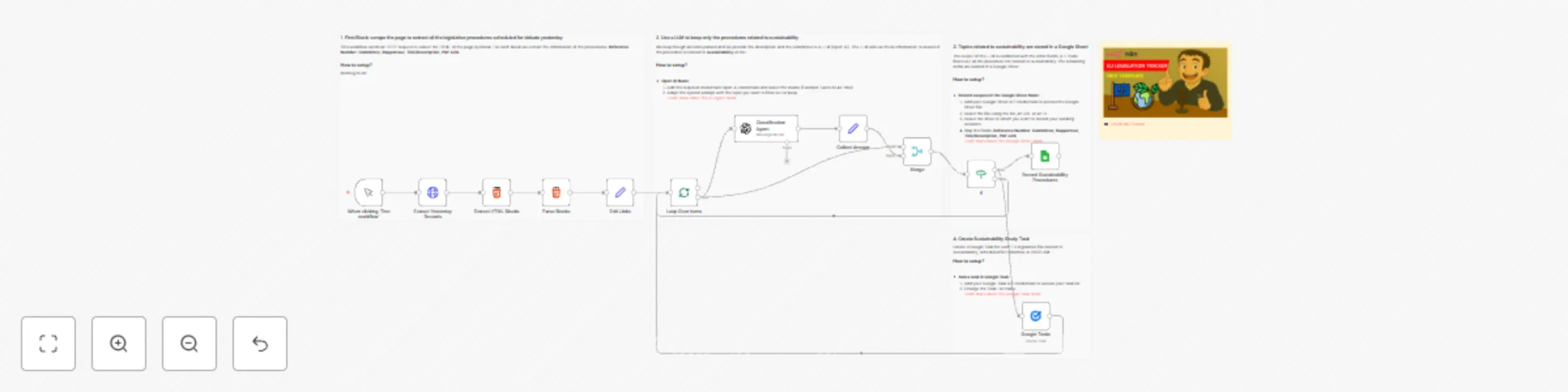
*Tags: EU Legislation, Sustainability, Automation, Web Scraping, OpenAI, Google Sheets, Policy Monitoring, Climate* ### Context Hey! I’m [Samir](https://samirsaci.com), a Supply Chain Engineer and Data Scientist from Paris, and the founder of [LogiGreen Consulting](https://logi-green.com). We use **AI, automation, and data** to support sustainable business practices for small, medium and large companies. This workflow is part of our broader initiative to **monitor and act on sustainability legislation** in Europe. [](https://www.youtube.com/watch?v=f_nyArpH6kk) > How do you know if new EU laws will impact your business's sustainability goals? This n8n workflow automatically scrapes the EU Parliament’s legislative portal to find and flag procedures related to **environmental sustainability**. 📬 For business inquiries, feel free to connect with me on [LinkedIn](https://www.linkedin.com/in/samir-saci) ### Who is this template for? This workflow is useful for: - **Sustainability consultants** monitoring legal frameworks - **NGOs and researchers** tracking environmental regulations - **Companies** aligning with **CSRD** or **EU Green Deal** objectives - **Policy analysts** looking for automation tools ### What does it do? This n8n workflow: 1. 🌐 Scrapes the **EU Parliament legislative portal** for yesterday’s entries 2. 🧠 Uses **OpenAI** to classify if each procedure is related to **sustainability** 3. 🗂️ Filters out irrelevant items 4. 📊 Saves the results in a **Google Sheet** 5. ✅ Creates a **Google Task** for each relevant file to review the legislation ### How it works [](https://www.youtube.com/watch?v=f_nyArpH6kk) 1. **Trigger manually or on schedule** 2. **Scrape HTML blocks** for scheduled debates 3. **Parse each procedure** to extract Title, Committee, Rapporteur, PDF link 4. **Call GPT-4-turbo** to check if the topic matches sustainability criteria 5. **Filter responses** based on “yes” or “no” 6. **Store valid items** into Google Sheets 7. **Generate tasks** in Google Tasks The AI only flags procedures that **directly impact the environment, circular economy, or pollution control**. ### What do I need to get started? You’ll need: - A **Google Sheet** connected to your n8n instance - An **OpenAI account** with GPT-4 access - A **Google Task List** ### Follow the Guide! Follow the sticky notes in the workflow or **check my tutorial** to configure each node and start using AI to monitor sustainability regulations in Europe. [](https://www.youtube.com/watch?v=f_nyArpH6kk) 🎥 [Watch My Tutorial](https://www.youtube.com/watch?v=f_nyArpH6kk) ### Notes - AI filters are strict — you can customise the system prompt to match your needs - This is ideal for tracking **legislative risk** for **climate regulations** *This workflow was built using n8n version 1.85.4* *Submitted: April 21, 2025*
🧑🦯Improve your website accessibility with GPT-4o and Google Sheet
*Tags: Accessibility, SEO, Blogging, Marketing, Automation, AI, Web Auditing* ### Context Hey! I’m [Samir](https://samirsaci.com), a Supply Chain Engineer and Data Scientist from Paris, and the founder of [LogiGreen Consulting](https://logi-green.com). In my personal blog, I share insights on how to use **AI, automation, and data analytics** to improve logistics, operations, and digital sustainability practices.  > Have you heard about accessibility? In this workflow, I use n8n to improve the quality of alternative texts for images **on my personal website.** 📬 For business inquiries, you can connect with me on [LinkedIn](https://www.linkedin.com/in/samir-saci) ### Who is this template for? This workflow is for: - **Bloggers** and **website owners** who want to **improve accessibility** - **SEO professionals** looking to boost page performance - **Web developers** and **product teams** automating web audits ### What does it do? This n8n workflow: 1. 🔍 Downloads the HTML of a blog or web page 2. 🖼️ Extracts all `<img>` tags and their `alt` attributes 3. 📉 Detects missing or too-short alt texts 4. 🤖 Sends those images to **GPT-4o (with vision)** to generate new alt descriptions 5. 📄 Saves the results into a **Google Sheet**, updating the alt text when needed ### How it works  1. **Set a page URL** using the `Set` node 2. **Download HTML** content 3. **Extract image `src` and `alt`** using a `Code` node 4. **Store results** in a Google Sheet 5. **Filter images** with `altLength < 50` 6. **Send image URL** to GPT-4o 7. **Update the Google Sheet** with the newly generated `newAlt` text The AI alt texts are concise, descriptive, and accessibility-compliant. ### What do I need to get started? You’ll need: - A **Google Sheet** to store the audit results - An **OpenAI account with GPT-4o access** ### Follow the Guide! Follow the sticky notes in the workflow or check my tutorial to configure each node and start using AI to **improve the accessibility of your website.** [](https://www.youtube.com/watch?v=LwTIro6Rapk) 🎥 [Watch My Tutorial](https://www.youtube.com/watch?v=LwTIro6Rapk) ### Notes - GPT-generated alt texts are limited to ~125–150 characters for best results - Use this to comply with **WCAG** and improve Google indexing - Easily adapt it to audit multiple domains or e-commerce catalogues *This workflow was built using n8n version 1.85.4* *Submitted: April 21, 2025*
💰 Automate currency rates update in invoices with Google Sheet, ExchangeRate API
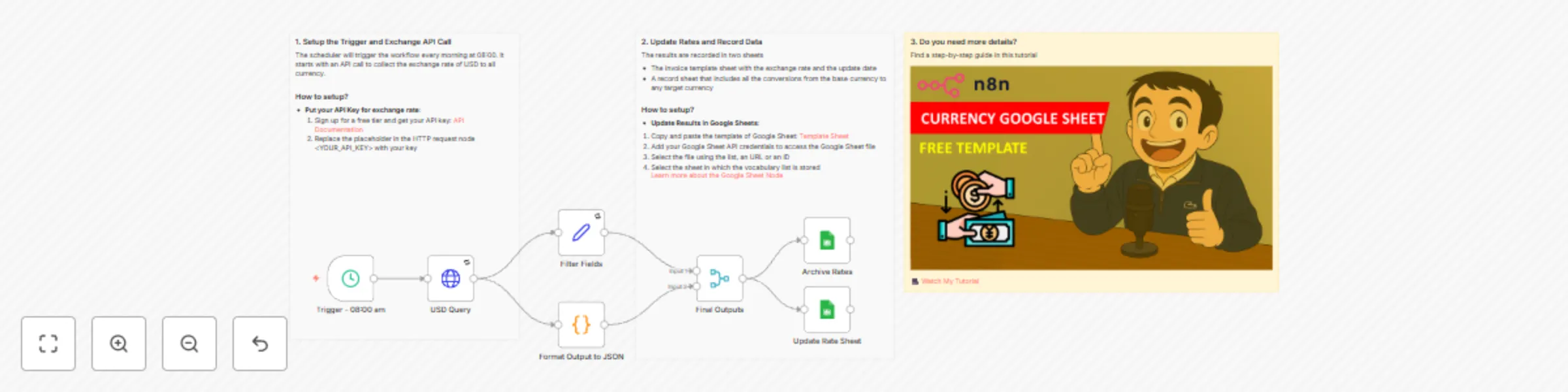
*Tags: Automation, Finance, Google Sheets, API* *Note: This workflow uses the Exchange rate API and requires a valid API key.* ### Context I’m [Samir Saci](https://samirsaci.com), a **Supply Chain Data Scientist** who builds automations to streamline operations, reduce manual tasks, and boost decision-making through real-time data. In this workflow, I automated the task of **fetching live currency exchange rates**, updating a **Google Sheet** with the latest values, and **archiving historical records** — all without writing any code. > Improve your productivity by automating admin tasks with n8n! 📬 For business inquiries, you can add me on [LinkedIn](https://www.linkedin.com/in/samir-saci) ### Who is this template for? This template is perfect for: - **Finance teams** tracking multi-currency cashflows - **Analysts** building dashboards or models requiring updated FX data - **Anyone working with spreadsheets** who needs up-to-date exchange rates It updates: - A live sheet with the latest USD-based exchange rates - An archive tab to track historical changes over time  ### How does it work? This workflow runs in N8N and performs the following steps: 1. 🌐 **Calls the ExchangeRate API** to get the latest rates based on USD 2. 🧠 **Extracts and formats key fields**: base currency, timestamp, and conversion values 3. 📊 **Updates a main Google Sheet** with the latest data (using upsert logic) 4. 🗂️ **Appends all rates** to a second Google Sheet tab for historical tracking You can schedule this workflow to run daily, hourly, or on-demand. ### What do I need to start? You don’t need to write a single line of code. #### Prerequisites: - A **Google Sheet** with two tabs: `Rate Sheet` and `Archives` *(Link of the publicly available example in the template)* - A **valid Exchangerate API key** - **Google Sheets API** connected via OAuth2 ### Next Steps Use the sticky notes in the workflow to understand how to: - Add your Exchangerate API key - Map the fields to match your Google Sheet layout - Schedule the run frequency using the **Cron node** - Optionally add Slack or email alerts if the base rate changes For more information, check my tutorial: [](https://www.youtube.com/watch?v=Lhi6hV6rWEo) [🎥 Watch My Tutorial](https://www.youtube.com/watch?v=Lhi6hV6rWEo) 🚀 Want to build finance automation workflows like this? 📬 Let’s connect on [LinkedIn](https://www.linkedin.com/in/samir-saci) ### Notes - You can adapt this template for **other currencies** by changing the API endpoint *This workflow was built using **n8n 1.85.4** Submitted: April 15th, 2025*
✍️ AI agent to create Linkedin posts for blog promotion with GPT-4o
*Tags: Automation, AI, Marketing, Content Creation* ### Context I’m a [**Supply Chain Data Scientist**](https://samirsaci.com) and content creator who writes regularly about **data-driven optimization, logistics, and sustainability**. Promoting blog articles on LinkedIn used to be a manual task — until I decided to **automate it with N8N and GPT-4o**. This workflow lets you **automatically extract blog posts**, clean the content, and generate a **professional LinkedIn post** using an **AI Agent powered by GPT-4o** — all in one seamless automation. >Save hours of repetitive work and boost your reach with AI. 📬 For business inquiries, you can add me on [LinkedIn](https://www.linkedin.com/in/samir-saci) ### Who is this template for? This template is perfect for: - **Bloggers and writers** who want to promote their content on LinkedIn - **Marketing teams** looking to automate professional post-generation - **Content creators** using Ghost platforms It generates polished LinkedIn posts with: - A hook - A quick summary - A call-to-action - A signature to drive readers to your contact page [](https://www.youtube.com/watch?v=Lhi6hV6rWEo) ### How does it work? This workflow runs in N8N and performs the following steps: 1. 🚀 **Triggers manually** or you can add a scheduler 2. 📰 **Pulls recent blog posts** from your Ghost site (via API) 3. 🧼 **Cleans the HTML** content for AI input 4. 🤖 **Sends content to GPT-4o** with a tailored prompt to create a LinkedIn post 5. 📄 **Records all data** (post content + LinkedIn output) in a Google Sheet [](https://www.youtube.com/watch?v=Lhi6hV6rWEo) ### What do I need to start? You don’t need to write a single line of code. #### Prerequisites: - A **Ghost CMS account** with blog content - A **Google Sheet** to store generated posts - An **OpenAI API Key** - **Google Sheets API** connected via OAuth2 ### Next Steps Use the sticky notes in the workflow to understand how to: - Add your Ghost API credentials - Link your Google Sheet - Customize the AI prompt (e.g., change the author name or tone) - Optionally add auto-posting to LinkedIn using tools like Buffer or Make [](https://www.youtube.com/watch?v=Lhi6hV6rWEo) [🎥 Watch My Tutorial](https://www.youtube.com/watch?v=Lhi6hV6rWEo) 🚀 Want to explore how automation can scale your brand or business? 📬 Let’s connect on [LinkedIn](https://www.linkedin.com/in/samir-saci) ### Notes - You can adapt this template for **Twitter, Facebook**, or even **email newsletters** by adjusting the prompt and output channel. - This workflow was built using **n8n 1.85.4** Submitted: April 9th, 2025
🌲 AI agent for sustainability report audit with Gmail and GPT-40
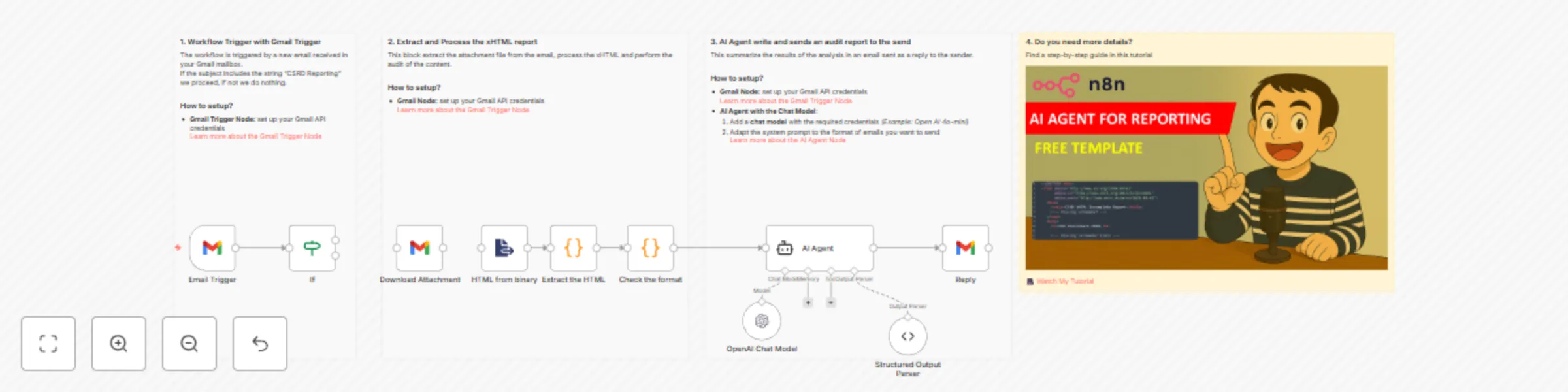
*Tags: Sustainability, CSRD, Reporting, ESG, Compliance, Automation* ### Context Hey! I'm [Samir](https://samirsaci.com), a **Supply Chain Engineer and Data Scientist from Paris**, founder of [LogiGreen Consulting](https://www.logi-green.com/) We help **companies automate sustainability workflows** using AI, Data Analytics, and No-Code tools like N8N. > Sustainability Reporting meets Automation with n8n! 📬 For business inquiries, you can add me on [Here](https://www.linkedin.com/in/samir-saci) ### What is a CSRD XHTML Report? Under the **Corporate Sustainability Reporting Directive (CSRD)**, companies must publish their ESG disclosures in a **machine-readable XHTML format**, embedding **XBRL tags** that make the report structured and standardized. [](https://youtu.be/npeJZv5U7og) These files must follow strict formatting and tagging rules to ensure **compliance**, **traceability**, and **accessibility** for both regulators and analysts. ### Who is this template for? This workflow is designed for **sustainability teams, ESG consultants**, or **developers** who want to **automatically check the structure and format** of CSRD reports submitted in XHTML. ### How does it work? This N8N workflow automates the audit process: 1. **📤 Input Node** → Uploads or fetches the XHTML file via URL or Webhook. 2. **🧪 Validates Structure** → Uses a custom code node to parse HTML and identify required tags (e.g., `<ix:nonNumeric>`, namespaces). 3. **📋 Outputs a Report** → Returns a summary report of errors, warnings, and key metadata (like entity name, reporting period). 4. **📤 Export Option** → Save the results in Google Sheets or send via email. ### Prerequisite - A sample XHTML file that you can find in my [GitHub Repository](https://github.com/samirsaci/n8n-templates) - **Google Sheets API** and **OpenAI API** credentials ### Next Steps Follow the **sticky notes** inside each node to adjust parsing rules or extend validation to specific XBRL tags relevant to your sector (e.g., GHG emissions, water usage). **📺 Check my complete tutorial to understand how to use it: ** [](https://youtu.be/npeJZv5U7og) 🎥 [Check My Tutorial](https://youtu.be/npeJZv5U7og) 🚀 Interested in combining **CSRD compliance** with **automation and analytics**? Let’s connect on [LinkedIn](https://www.linkedin.com/in/samir-saci) ### Notes - This workflow includes an example XHTML file to test the validator. - You can plug this into your internal systems or even extend it with AI to **auto-summarize the sustainability report**. *This workflow has been created with N8N 1.82.1* *Submitted: April 3rd, 2025*
🛻 AI agent for logistics order processing with GPT-4o, Gmail and Google Sheet
*Tags: Supply Chain, Logistics, AI Agents* ### Context Hey! I’m [Samir](https://samirsaci.com), a Supply Chain Data Scientist from Paris, and the founder of [LogiGreen Consulting](https://logi-green.com). We design tools to help companies improve their **logistics processes** using data analytics, AI, and automation—to **reduce costs and minimize environmental impacts**. >Let’s use N8N to improve logistics operations! 📬 For business inquiries, you can add me on [LinkedIn](https://www.linkedin.com/in/samir-saci) ### Who is this template for? This workflow template is designed for **logistics or manufacturing operations** that receive orders by email. [](https://www.youtube.com/watch?v=kQ8dO_30SB0) The example above illustrate the challenge we want to tackle using an **AI Agent** to parse the information and load them in a **Google sheet**. If you want to understand how I built this workflow, check my detailed tutorial: [](https://www.youtube.com/watch?v=kQ8dO_30SB0) [🎥 Step-by-Step Tutorial](https://www.youtube.com/watch?v=kQ8dO_30SB0) ### How does it work? The workflow is connected to a **Gmail Trigger** to open all the emails that include *Inbound Order* in their subject. The email is parsed by an **AI Agent** equipped with **OpenAI's GPT** to collect all the information. The results are pulled in a **Google Sheet**. [](https://www.youtube.com/watch?v=kQ8dO_30SB0) These orderlines can then be **transferred to warehouse teams** to prepare ***order receiving**. ### What do I need to get started? You’ll need: - **Gmail and Google Drive Accounts** with the API credentials to access it via n8n - An **OpenAI API key** (GPT-4o) for the chat model. - A **Google Sheet** with these columns: **PO_NUMBER, EXPECTED_DELIVERY DATE, SKU_ID, QUANTITY** ### Next Steps Follow the sticky notes in the workflow to configure each node and start using **AI to support your logistic operations**. 🚀 Curious how N8N can transform your logistics operations? 📬 Let’s connect on [LinkedIn](https://www.linkedin.com/in/samir-saci) ### Notes - An example of email is included in the template so you can try it with your mailbox. *This workflow was built using N8N version 1.82.1* *Submitted: March 28, 2025*