Cuong Nguyen
Workflows by Cuong Nguyen
Analyze competitor strategy from YouTube & RSS with Gemini AI to Notion & Telegram
#### Description: Turn your n8n workflow into an automated competitive intelligence unit. This template monitors competitor activities across blog feeds and YouTube channels to detect strategic shifts. Instead of simply aggregating links, it uses **Apify** to fetch full video transcripts and **Google Gemini** to analyze the content's underlying message, tone, and positioning. The final output is a structured strategic briefing sent to Telegram and archived in Notion for long-term research. ## Who is this for This workflow is designed for **market researchers, founders,** and **content strategists** who need deep insights into competitor activities without manually scrubbing video timelines or reading daily blog posts. ## How it works 1. **Ingest:** The workflow pulls the latest articles from configured RSS feeds and searches for new videos on specific YouTube channels. 2. **Deep Dive:** It automatically triggers an Apify actor to scrape the full transcript of any new video, ensuring the AI analyzes the spoken content rather than just metadata. 3. **Analyze:** Google Gemini processes the consolidated text to identify core messages, hidden strategies, and suggests potential counter-tactics. 4. **Report:** - **Telegram:** Delivers a concise HTML executive summary with direct source links. - **Notion:** Appends a comprehensive report to a database using formatted Notion Blocks (Headings, Toggles, and Bullet points). ## Requirements - **Apify Account:** A free account is sufficient to run the `youtube-transcript-scraper`. - **Services:** Google Gemini (PaLM), YouTube Data API, Telegram, Notion. ## How to set up 1. **Credentials:** Configure your API keys for YouTube, Apify, Google Gemini, Telegram, and Notion. 2. **Notion Setup:** Create a new Database with two properties: Name (Title) and date (Date). Copy the Database ID from the URL into the Notion node. 3. **Data Sources:** - Update the **Channel ID** in the YouTube nodes to track your target competitors. - Update the **Feed URL** in the RSS nodes. ## How to customize the workflow - **Scale Up:** To monitor more competitors, duplicate the YouTube or RSS nodes in the "Data Sources" section and connect them to the Merge node. - **Adjust Analysis:** Modify the system prompt in the **Google Gemini** node to focus on specific intelligence needs (e.g., "Focus on pricing changes" or "Identify new feature releases"). - **Token Optimization:** Use the configuration in the `Code - Data Prep` node to limit the number of items processed daily if you are using free-tier API limits. ## Need Help or Want to Customize This? Contact me for consulting and support: **Email:** [email protected]
Daily news digest from RSS and YouTube using AI for Telegram
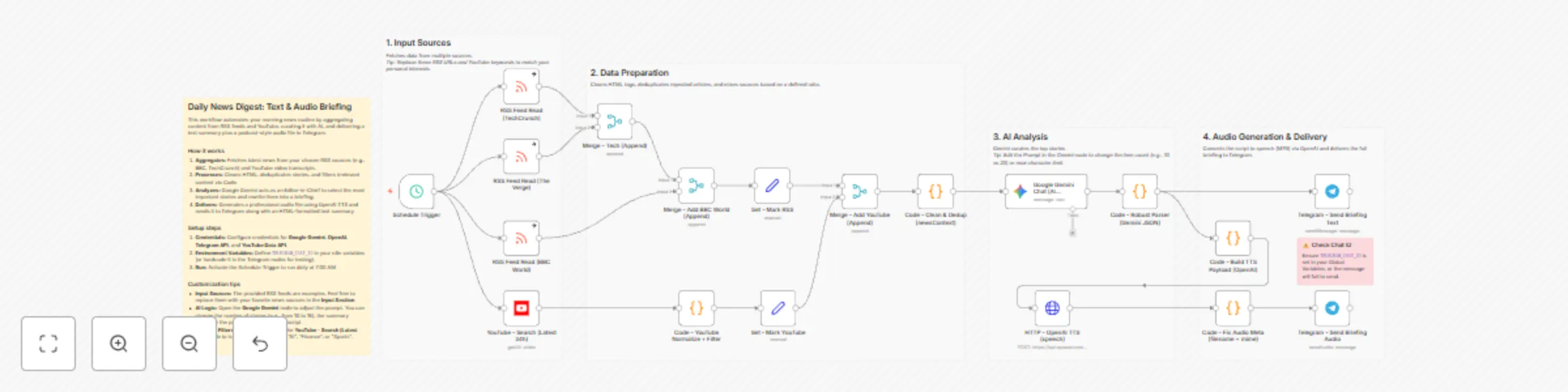
### Description: Start your day with a **personalized news podcast** delivered directly to your Telegram. This workflow helps you stay informed without scrolling through endless feeds. It automatically collects news from your favorite websites and YouTube channels, filters out the noise, and uses AI to turn them into a short, listenable audio briefing. It’s like having a personal news assistant that reads the most important updates to you while you commute or drink your morning coffee. ## Who is this for This template is **perfect** for **busy professionals, commuters, and learners** who want to keep up with specific topics (like Tech, Finance, or AI) but don't have time to read dozens of articles every morning. ## How it works 1. **Collects News:** The workflow automatically checks your chosen RSS feeds (e.g., TechCrunch, BBC) and searches for trending YouTube videos on topics you care about. 2. **Filters Noise:** It smartly removes duplicate stories and filters out promotional content or spam, ensuring you only get high-quality news. 3. **Summarizes:** Google Gemini (AI) reads the collected data, picks the top stories, and rewrites them into a clear, engaging script. 4. **Creates Audio:** OpenAI turns that script into a natural-sounding MP3 file (Text-to-Speech). 5. **Delivers:** You receive a neat text summary and the audio file in your Telegram chat, ready to play. ## Requirements **API Keys:** - Google Gemini (PaLM) - OpenAI - YouTube Data API - Telegram Bot Token ## How to set up 1. **Get Credentials:** Sign up for the required services (Google, OpenAI, Telegram) and get your API keys. 2. **Connect Nodes:** Use your API credentials into the respective nodes in the workflow. 3. **Set Chat ID:** Enter your Telegram Chat ID in the Telegram nodes (or set it as a variable) so the bot knows where to send the message. 4. **Turn on:** Activate the workflow switch to let it run automatically every morning at 7:00 AM (or any time you want). ## How to customize the workflow - **Your Interests:** Simply change the URLs in the RSS Feed Read nodes to follow your favorite blogs. - **Your Topics:** Update the keywords in the YouTube - Search node (e.g., change "AI" to "Football" or "Marketing") to get relevant video news. - **Your Voice:** You can change the voice style (e.g., from `alloy` to `echo`) in the `Code - Build TTS Payload` node to suit your preference. ## Contact me for consulting and support Email: [email protected]
AI expense tracker: Telegram voice/photo/text to sheets
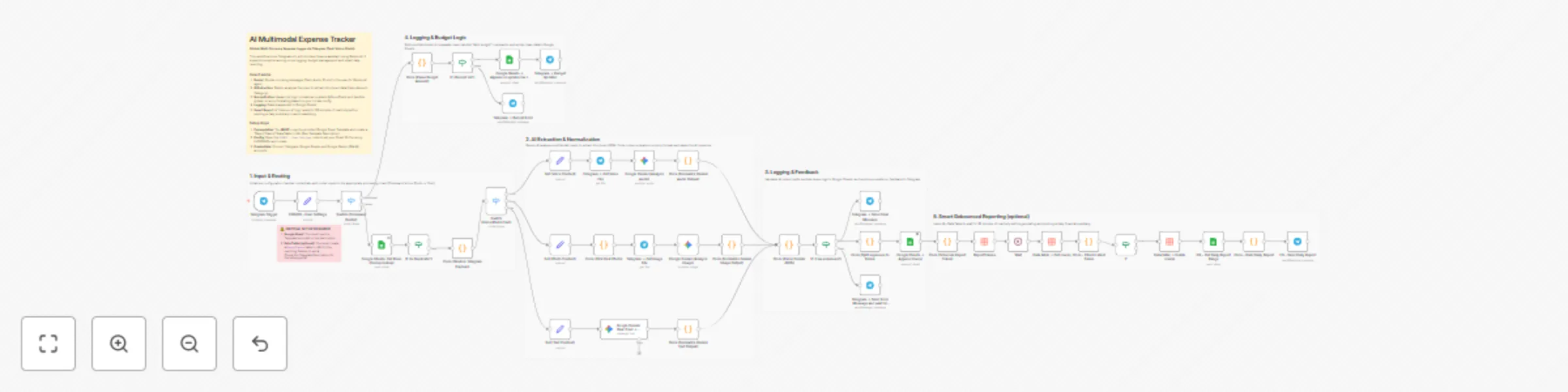
## Why I built this? (The Problem) Most expense tracker apps (like Money Lover, Spendee, or Wallet) have a common friction point: **Data Entry**. You have to unlock your phone, find the app, wait for it to load, navigate menus, and manually select categories. It’s tedious, so we often forget to log small expenses. I wanted a solution that lives where I already spend my time: **Telegram**. This workflow allows you to log expenses in seconds—just by **sending a text**, a **voice note while driving**, or **a photo of a receipt**. No UI navigation required. ### Comparison: This Workflow vs. Traditional Apps |Feature|Traditional Expense Apps|This n8n Workflow| |-|-|-| |**Data Ownership**|Data is locked in their proprietary database.|**100% Yours**. It lives in your Google Sheet. You can export, pivot, or connect it to Looker Studio.| |**Input Speed**|Slow. Requires multiple taps/clicks.|**Instant**. Send a text/voice/photo to a Telegram bot.| |**Flexibility**|Rigid categories & logic.|**Infinite**. You can customize the AI prompt, categories, and currency logic.| |**Cost**|Often requires monthly subscriptions for premium features.|**Low Cost**. Runs on your n8n instance + Gemini Flash API (which is currently free/very cheap).| |**UI/UX**|Beautiful, pre-built mobile dashboards.|**Raw Data**. You view data in Google Sheets (though you can build a dashboard there)| ## Key Features - **Multi-Modal Input:** Just send what you have. -- ***Text***: "Lunch 50k, Taxi 30k" (Splits into 2 rows). -- ***Voice***: Speak naturally, AI transcribes and extracts data. -- ***Photo***: OCRs receipts and parses details. - **Global Currency Support:** Uses Gemini AI to intelligently detect currency. You can set a default currency (e.g., USD, VND) in the Config node. - **Smart Extraction & Categorization:** -- *Automatically splits* multiple items in one message (e.g., "Lunch 20k and Grab 50k" → 2 separate rows). -- *AI automatically* assigns *categories* (Food, Transport, Bills, etc.) based on the item name. - **Budget Management:** Use the command `/add budget 500` to instantly top up your monthly budget. - **"Quiet" Reporting:** Instead of spamming you after every message, the system waits for **30 minutes of inactivity** before sending a daily summary report (Debounce logic). ## Setup Instructions **1. Prerequisites** - **Google Sheet:** You **MUST** make a copy of this template: **[[Google Sheet Template here]](https://docs.google.com/spreadsheets/d/1bVdxslvMkTA1DDQv6kQ5j-COC8ZOH8AfEWmn31Rq6l4/edit?usp=sharing)** - **n8n Data Table:** This workflow requires a Data Table named `ReportTokens` for the reporting feature. Please read the setup guide below. **[Setup Guide: AI Expense Tracker](https://heavenly-slash-181.notion.site/Setup-Guide-AI-Expense-Tracker-2d1bb04db1cf80c6ad88cc15e83a7c47?source=copy_link)** **2. Configure the Workflow** - **Credentials:** Connect **Telegram**, **Google Sheets**, and **Google Gemini (PaLM)**. - **Config Node:** Open the `CONFIG - User Settings` node and update these fields. -- `spreadsheet_id`: The ID of your copied Google Sheet -- `sheet_gid_dashboard`: The ID of your sheet Dashboard -- `sheet_gid_budget`: he ID of your sheet Budget_Topups -- `currency_code`: Your currency code (e.g., USD, EUR, VND). -- `currency_symbol`: Your currency symbol (e.g., $, €, ₫). -- `locale`: Your locale for number formatting (e.g., en-US, vi-VN). - **Data Table**: Create a table in n8n with columns: `chat_id`, `report_token`, `updated_at` (All type: String). Link this table to the relevant nodes in the workflow. **3. Usage** - **Log Expense**: Send *"Coffee $5"* or a photo. - **Add Budget**: Send command `/add budget 1000` ## Need Help or Want to Customize This? Contact me for consulting and support: **Email**: [email protected]
Publish Google Docs to WordPress with advance RankMath SEO & Gemini analysis
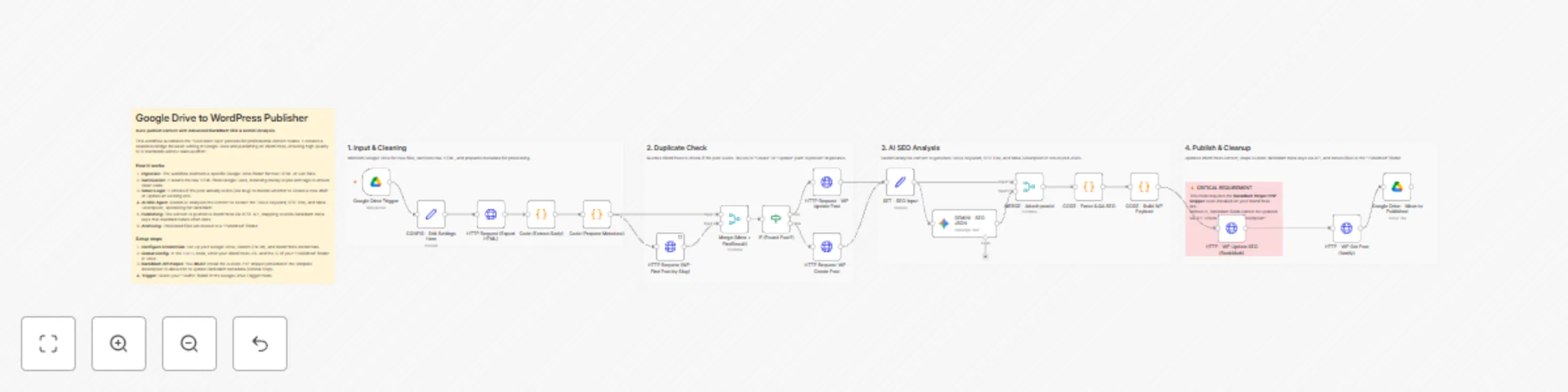
 ## Who is this for? This workflow is designed for **Content Marketing Teams, Agencies**, and **Professional Editors** who prefer writing in **Google Docs** but need a seamless way to publish to **WordPress**. Unlike generic "AI Writers" that generate content from scratch (which often fails AI detection), this workflow focuses on "**Document Ops**"—automating the tedious task of moving, cleaning, and optimizing existing human-written content. ## Why use this workflow? (The SEO Advantage) Most automation templates leave your SEO score at **0/100** because they fail to map RankMath metadata. This workflow hits the ground running with an immediate **65-70/100 RankMath Score**. By using a **Gemini AI Agent** to analyze your content and mapping it to hidden RankMath API fields, it automatically passes these critical checks: - ✅ **Focus Keyword in SEO Title**: AI automatically inserts the target keyword at the beginning. - ✅ **Focus Keyword in Meta Description**: AI crafts a compelling description containing the keyword. - ✅ **Focus Keyword in URL**: AI generates a clean, short, keyword-rich slug. - ✅ **Focus Keyword at the Start**: The workflow intelligently injects a "hook" sentence containing the keyword at the very top of your post. - ✅ **Content Length**: Preserves your original long-form content. ## How it works 1. **Monitors Google Drive:** Watches for new HTML/Doc files in a specific "Drafts" folder. 2. **Cleans Content**: Sanitizes raw HTML from Google Docs (removing messy styles and tags). 3. **Smart Duplicate Check**: Checks if the post already exists on WordPress (via slug) to decide whether to **Create** a new draft or **Update** an existing one. 4. **AI Analysis (Gemini)**: Extracts the best Focus Keyword, SEO Title, and Meta Description from your content. 5. **RankMath Integration**: Pushes these SEO values directly into **RankMath's custom meta keys**. 6. **Archiving**: Moves processed files to a "Published" folder to keep your Drive organized. ## Critical Prerequisites (Must Read) To allow n8n to update RankMath SEO data and prevent `401 Unauthorized errors`, you **MUST** add a helper snippet to your WordPress site. 1. Access your WordPress files via FTP/File Manager. 2. Navigate to `wp-content/mu-plugins/` (Create the `folder mu-plugins` if it doesn't exist). 3. Create a file named `n8n-rankmath-helper.php` and paste the following code: ``` <?php /* Plugin Name: n8n RankMath & Auth Helper Description: Fixes Basic Auth Header for n8n and exposes RankMath meta keys to REST API. */ // 1. Fix Authorization Header (Solves 401 Errors on Apache/LiteSpeed) add_filter('wp_is_application_passwords_available', '__return_true'); if ( !function_exists('aiops_enable_basic_auth') ) { function aiops_enable_basic_auth() { if ( isset( $_SERVER['HTTP_AUTHORIZATION'] ) ) { $auth = $_SERVER['HTTP_AUTHORIZATION']; if ( strpos( $auth, 'Basic ' ) === 0 ) { list( $username, $password ) = explode( ':', base64_decode( substr( $auth, 6 ) ) ); $_SERVER['PHP_AUTH_USER'] = $username; $_SERVER['PHP_AUTH_PW'] = $password; } } } add_action('init', 'aiops_enable_basic_auth'); } // 2. Expose RankMath Meta Keys to REST API add_action( 'rest_api_init', function () { $meta_keys = [ 'rank_math_title', 'rank_math_description', 'rank_math_focus_keyword', 'rank_math_robots', 'rank_math_canonical_url' ]; foreach ( $meta_keys as $meta_key ) { register_meta( 'post', $meta_key, [ 'show_in_rest' => true, 'single' => true, 'type' => 'string', 'auth_callback' => function() { return current_user_can( 'edit_posts' ); } ] ); } }); ?>; ``` ## How to set up **1. Configure Credentials:** - **Google Drive OAuth2** (Drive scopes). - **Google Gemini (PaLM)** API Key. - **WordPress**: Connect using **Application Passwords** (Users > Profile > Application Passwords). **2. Global Configuration (First Node):** - Open the node named `CONFIG - Edit Settings Here`. - **wp_base_url**: Enter your site URL (e.g., `https://your-site.com` - no trailing slash). - **drive_published_folder_id**: Enter the ID of the Google Drive folder where you want to move published files. **3. Trigger Setup:** - Open the `Google Drive Trigger` node. - Select your specific **"Drafts" folder** in the Folder to Watch field. ## Future Roadmap We are actively improving this template. Upcoming V2 will feature: **AI Featured Image Generation**: Auto-create branded thumbnails. **Content Illustrations**: Auto-insert relevant images into the body content. ## Need Help or Want to Customize This? Contact me for consulting and support: **Email**: [email protected]