Block 1 - Schedule Trigger
- Type / Role
- n8n-nodes-base.scheduleTrigger - scheduleTrigger
- Config choices
- Version 1.3


 Early Deal
This workflow is provided as-is. Please review and test before using in production.
Description: Start your day with a personalized news podcast delivered directly to your Telegram. This workflow helps you stay informed without scrolling through endless feeds. It automatically col...
n8n-nodes-base.scheduletrigger, n8n-nodes-base.rssfeedread, n8n-nodes-base.merge, n8n-nodes-base.code, n8n-nodes-base.youtube, n8n-nodes-base.set, @n8n/n8n-nodes-langchain.googlegemini, n8n-nodes-base.telegram
This workflow is cataloged by N8N Workflows and links back to its original n8n.io source page by Cuong Nguyen.
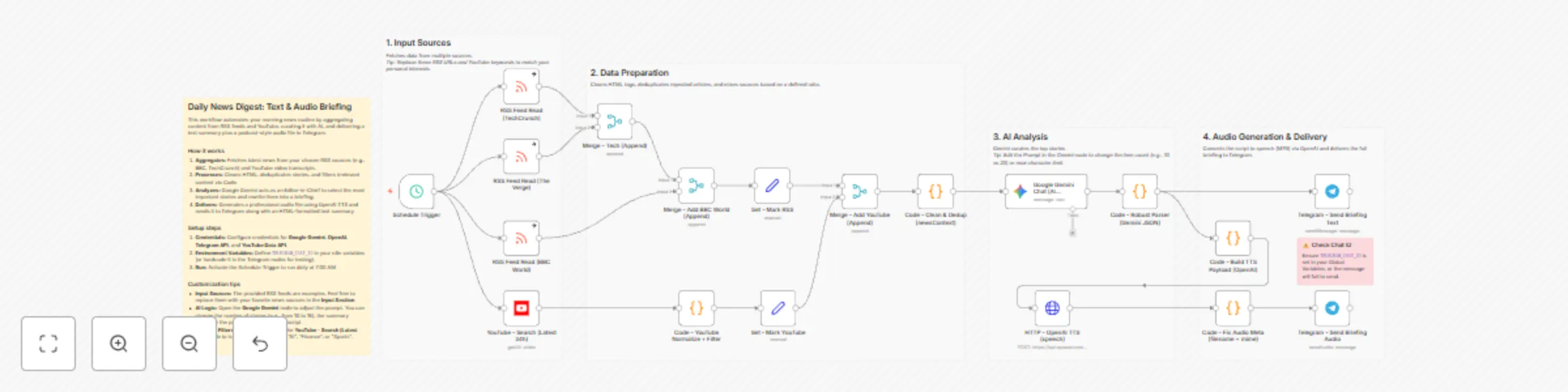
Original n8n.io sourceStart your day with a personalized news podcast delivered directly to your Telegram. This workflow helps you stay informed without scrolling through endless feeds. It automatically collects news from your favorite websites and YouTube channels, filters out the noise, and uses AI to turn them into a short, listenable audio briefing. It’s like having a personal news assistant that reads the most important updates to you while you commute or drink your morning coffee.
This template is perfect for busy professionals, commuters, and learners who want to keep up with specific topics (like Tech, Finance, or AI) but don't have time to read dozens of articles every morning.
Collects News: The workflow automatically checks your chosen RSS feeds (e.g., TechCrunch, BBC) and searches for trending YouTube videos on topics you care about.
Filters Noise: It smartly removes duplicate stories and filters out promotional content or spam, ensuring you only get high-quality news.
Summarizes: Google Gemini (AI) reads the collected data, picks the top stories, and rewrites them into a clear, engaging script.
Creates Audio: OpenAI turns that script into a natural-sounding MP3 file (Text-to-Speech).
Delivers: You receive a neat text summary and the audio file in your Telegram chat, ready to play.
API Keys:
Get Credentials: Sign up for the required services (Google, OpenAI, Telegram) and get your API keys.
Connect Nodes: Use your API credentials into the respective nodes in the workflow.
Set Chat ID: Enter your Telegram Chat ID in the Telegram nodes (or set it as a variable) so the bot knows where to send the message.
Turn on: Activate the workflow switch to let it run automatically every morning at 7:00 AM (or any time you want).
Your Interests: Simply change the URLs in the RSS Feed Read nodes to follow your favorite blogs.
Your Topics: Update the keywords in the YouTube - Search node (e.g., change "AI" to "Football" or "Marketing") to get relevant video news.
Your Voice: You can change the voice style (e.g., from alloy to echo) in the Code - Build TTS Payload node to suit your preference.
Email: [email protected]
This catalog entry is organized from the workflow JSON. The node-level section below shows the executable blocks available for review before importing the template.
Showing the first 24 of 25 workflow blocks. Download the JSON for the full node graph.
| Workflow | Daily news digest from RSS and YouTube using AI for Telegram |
|---|---|
| Complexity | advanced |
| Nodes | 25 |
| Categories | Content Creation, Multimodal AI |
| Author | Cuong Nguyen |
| Published | 25 Dec 2025 |
Use the JSON export at /data/workflows/12141/12141.json as the source template for this automation.
Open n8n, import the downloaded JSON, and review each node before activating the workflow.
Replace placeholder credentials, API keys, webhook URLs, account IDs, and environment-specific values with your own settings.
Run the workflow manually or in a staging workspace, inspect node output, and confirm downstream systems receive the expected data.
Enable the workflow only after testing, then monitor executions, errors, and rate limits during the first production runs.
Review imported nodes carefully before activation. This catalog entry is intended to help you inspect the workflow structure, understand required services, and find related templates faster.
Node names, credentials, schedules, webhook paths, and external service limits may need adjustment for your workspace.
Description: Start your day with a personalized news podcast delivered directly to your Telegram. This workflow helps you stay informed without scrolling through endless feeds. It automatically col...
Review the workflow JSON, configure any required credentials in n8n, and test the automation in a safe workspace before using it in production.
Yes. Use the block-by-block analysis and the downloadable JSON to inspect each node, then adjust credentials, prompts, schedules, filters, or destinations for your Content Creation, Multimodal AI use case.