Block 1 - Google Sheets: Get Rows (Dedup lookup)
- Type / Role
- n8n-nodes-base.googleSheets - googleSheets
- Config choices
- Version 4.7


 Early Deal
This workflow is provided as-is. Please review and test before using in production.
Why I built this? (The Problem) Most expense tracker apps (like Money Lover, Spendee, or Wallet) have a common friction point: Data Entry . You have to unlock your phone, find the app, wait for it ...
n8n-nodes-base.googlesheets, n8n-nodes-base.if, n8n-nodes-base.switch, n8n-nodes-base.code, n8n-nodes-base.set, @n8n/n8n-nodes-langchain.googlegemini, n8n-nodes-base.telegram, n8n-nodes-base.telegramtrigger
This workflow is cataloged by N8N Workflows and links back to its original n8n.io source page by Cuong Nguyen.
Original n8n.io sourceMost expense tracker apps (like Money Lover, Spendee, or Wallet) have a common friction point: Data Entry. You have to unlock your phone, find the app, wait for it to load, navigate menus, and manually select categories. It’s tedious, so we often forget to log small expenses.
I wanted a solution that lives where I already spend my time: Telegram. This workflow allows you to log expenses in seconds—just by sending a text, a voice note while driving, or a photo of a receipt. No UI navigation required.
| Feature | Traditional Expense Apps | This n8n Workflow |
|---|---|---|
| Data Ownership | Data is locked in their proprietary database. | 100% Yours. It lives in your Google Sheet. You can export, pivot, or connect it to Looker Studio. |
| Input Speed | Slow. Requires multiple taps/clicks. | Instant. Send a text/voice/photo to a Telegram bot. |
| Flexibility | Rigid categories & logic. | Infinite. You can customize the AI prompt, categories, and currency logic. |
| Cost | Often requires monthly subscriptions for premium features. | Low Cost. Runs on your n8n instance + Gemini Flash API (which is currently free/very cheap). |
| UI/UX | Beautiful, pre-built mobile dashboards. | Raw Data. You view data in Google Sheets (though you can build a dashboard there) |
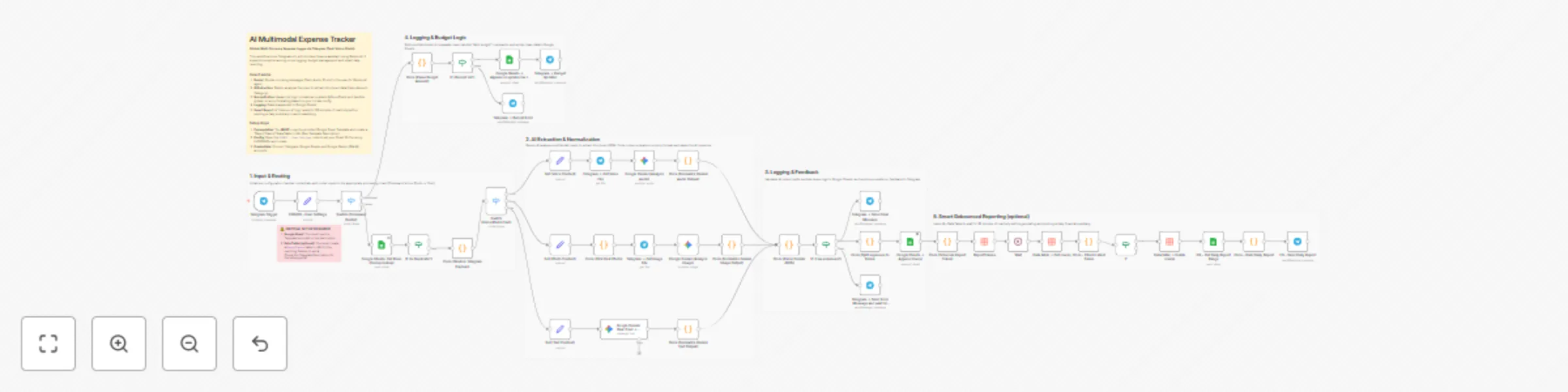
Multi-Modal Input: Just send what you have. -- Text: "Lunch 50k, Taxi 30k" (Splits into 2 rows). -- Voice: Speak naturally, AI transcribes and extracts data. -- Photo: OCRs receipts and parses details.
Global Currency Support: Uses Gemini AI to intelligently detect currency. You can set a default currency (e.g., USD, VND) in the Config node.
Smart Extraction & Categorization: -- Automatically splits multiple items in one message (e.g., "Lunch 20k and Grab 50k" → 2 separate rows). -- AI automatically assigns categories (Food, Transport, Bills, etc.) based on the item name.
Budget Management: Use the command /add budget 500 to instantly top up your monthly budget.
"Quiet" Reporting: Instead of spamming you after every message, the system waits for 30 minutes of inactivity before sending a daily summary report (Debounce logic).
1. Prerequisites
Google Sheet: You MUST make a copy of this template: [Google Sheet Template here]
n8n Data Table: This workflow requires a Data Table named ReportTokens for the reporting feature. Please read the setup guide below. Setup Guide: AI Expense Tracker
2. Configure the Workflow
Credentials: Connect Telegram, Google Sheets, and Google Gemini (PaLM).
Config Node: Open the CONFIG - User Settings node and update these fields.
-- spreadsheet_id: The ID of your copied Google Sheet
-- sheet_gid_dashboard: The ID of your sheet Dashboard
-- sheet_gid_budget: he ID of your sheet Budget_Topups
-- currency_code: Your currency code (e.g., USD, EUR, VND).
-- currency_symbol: Your currency symbol (e.g., $, €, ₫).
-- locale: Your locale for number formatting (e.g., en-US, vi-VN).
Data Table: Create a table in n8n with columns: chat_id, report_token, updated_at (All type: String). Link this table to the relevant nodes in the workflow.
3. Usage
/add budget 1000Contact me for consulting and support: Email: [email protected]
This catalog entry is organized from the workflow JSON. The node-level section below shows the executable blocks available for review before importing the template.
Showing the first 24 of 47 workflow blocks. Download the JSON for the full node graph.
| Workflow | AI expense tracker: Telegram voice/photo/text to sheets |
|---|---|
| Complexity | advanced |
| Nodes | 47 |
| Categories | Personal Productivity, AI Chatbot |
| Author | Cuong Nguyen |
| Published | 22 Dec 2025 |
Use the JSON export at /data/workflows/12006/12006.json as the source template for this automation.
Open n8n, import the downloaded JSON, and review each node before activating the workflow.
Replace placeholder credentials, API keys, webhook URLs, account IDs, and environment-specific values with your own settings.
Run the workflow manually or in a staging workspace, inspect node output, and confirm downstream systems receive the expected data.
Enable the workflow only after testing, then monitor executions, errors, and rate limits during the first production runs.
Review imported nodes carefully before activation. This catalog entry is intended to help you inspect the workflow structure, understand required services, and find related templates faster.
Node names, credentials, schedules, webhook paths, and external service limits may need adjustment for your workspace.
Why I built this? (The Problem) Most expense tracker apps (like Money Lover, Spendee, or Wallet) have a common friction point: Data Entry . You have to unlock your phone, find the app, wait for it ...
Review the workflow JSON, configure any required credentials in n8n, and test the automation in a safe workspace before using it in production.
Yes. Use the block-by-block analysis and the downloadable JSON to inspect each node, then adjust credentials, prompts, schedules, filters, or destinations for your Personal Productivity, AI Chatbot use case.