Block 1 - HTTP Request (Export HTML)
- Type / Role
- n8n-nodes-base.httpRequest - httpRequest
- Config choices
- Version 4.3


 Early Deal
This workflow is provided as-is. Please review and test before using in production.
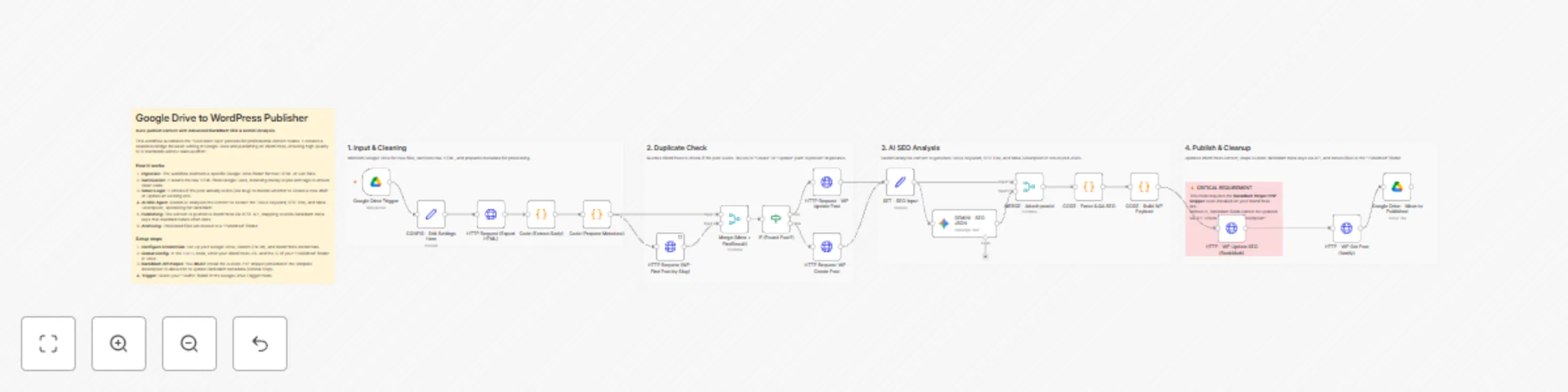
Who is this for? This workflow is designed for Content Marketing Teams, Agencies , and Professional Editors who prefer writing in Google Docs but need a sea...
n8n-nodes-base.httprequest, n8n-nodes-base.code, n8n-nodes-base.merge, n8n-nodes-base.if, n8n-nodes-base.set, @n8n/n8n-nodes-langchain.googlegemini, n8n-nodes-base.googledrive, n8n-nodes-base.googledrivetrigger
This workflow is cataloged by N8N Workflows and links back to its original n8n.io source page by Cuong Nguyen.
Original n8n.io sourceThis workflow is designed for Content Marketing Teams, Agencies, and Professional Editors who prefer writing in Google Docs but need a seamless way to publish to WordPress.
Unlike generic "AI Writers" that generate content from scratch (which often fails AI detection), this workflow focuses on "Document Ops"—automating the tedious task of moving, cleaning, and optimizing existing human-written content.
Most automation templates leave your SEO score at 0/100 because they fail to map RankMath metadata. This workflow hits the ground running with an immediate 65-70/100 RankMath Score.
By using a Gemini AI Agent to analyze your content and mapping it to hidden RankMath API fields, it automatically passes these critical checks:
To allow n8n to update RankMath SEO data and prevent 401 Unauthorized errors, you MUST add a helper snippet to your WordPress site.
wp-content/mu-plugins/ (Create the folder mu-plugins if it doesn't exist).n8n-rankmath-helper.php and paste the following code:<?php
/*
Plugin Name: n8n RankMath & Auth Helper
Description: Fixes Basic Auth Header for n8n and exposes RankMath meta keys to REST API.
*/
// 1. Fix Authorization Header (Solves 401 Errors on Apache/LiteSpeed)
add_filter('wp_is_application_passwords_available', '__return_true');
if ( !function_exists('aiops_enable_basic_auth') ) {
function aiops_enable_basic_auth() {
if ( isset( $_SERVER['HTTP_AUTHORIZATION'] ) ) {
$auth = $_SERVER['HTTP_AUTHORIZATION'];
if ( strpos( $auth, 'Basic ' ) === 0 ) {
list( $username, $password ) = explode( ':', base64_decode( substr( $auth, 6 ) ) );
$_SERVER['PHP_AUTH_USER'] = $username;
$_SERVER['PHP_AUTH_PW'] = $password;
}
}
}
add_action('init', 'aiops_enable_basic_auth');
}
// 2. Expose RankMath Meta Keys to REST API
add_action( 'rest_api_init', function () {
$meta_keys = [
'rank_math_title',
'rank_math_description',
'rank_math_focus_keyword',
'rank_math_robots',
'rank_math_canonical_url'
];
foreach ( $meta_keys as $meta_key ) {
register_meta( 'post', $meta_key, [
'show_in_rest' => true,
'single' => true,
'type' => 'string',
'auth_callback' => function() { return current_user_can( 'edit_posts' ); }
] );
}
});
?>;
1. Configure Credentials:
2. Global Configuration (First Node):
CONFIG - Edit Settings Here.https://your-site.com - no trailing slash).3. Trigger Setup:
Google Drive Trigger node.We are actively improving this template. Upcoming V2 will feature:
AI Featured Image Generation: Auto-create branded thumbnails.
Content Illustrations: Auto-insert relevant images into the body content.
Contact me for consulting and support: Email: [email protected]
This catalog entry is organized from the workflow JSON. The node-level section below shows the executable blocks available for review before importing the template.
| Workflow | Publish Google Docs to WordPress with advance RankMath SEO & Gemini analysis |
|---|---|
| Complexity | advanced |
| Nodes | 24 |
| Categories | Content Creation, AI Summarization |
| Author | Cuong Nguyen |
| Published | 20 Dec 2025 |
Use the JSON export at /data/workflows/11989/11989.json as the source template for this automation.
Open n8n, import the downloaded JSON, and review each node before activating the workflow.
Replace placeholder credentials, API keys, webhook URLs, account IDs, and environment-specific values with your own settings.
Run the workflow manually or in a staging workspace, inspect node output, and confirm downstream systems receive the expected data.
Enable the workflow only after testing, then monitor executions, errors, and rate limits during the first production runs.
Review imported nodes carefully before activation. This catalog entry is intended to help you inspect the workflow structure, understand required services, and find related templates faster.
Node names, credentials, schedules, webhook paths, and external service limits may need adjustment for your workspace.
Who is this for? This workflow is designed for Content Marketing Teams, Agencies , and Professional Editors who prefer writing in Google Docs but need a sea...
Review the workflow JSON, configure any required credentials in n8n, and test the automation in a safe workspace before using it in production.
Yes. Use the block-by-block analysis and the downloadable JSON to inspect each node, then adjust credentials, prompts, schedules, filters, or destinations for your Content Creation, AI Summarization use case.