YouTube video to AI-powered auto blogging and affiliate automation

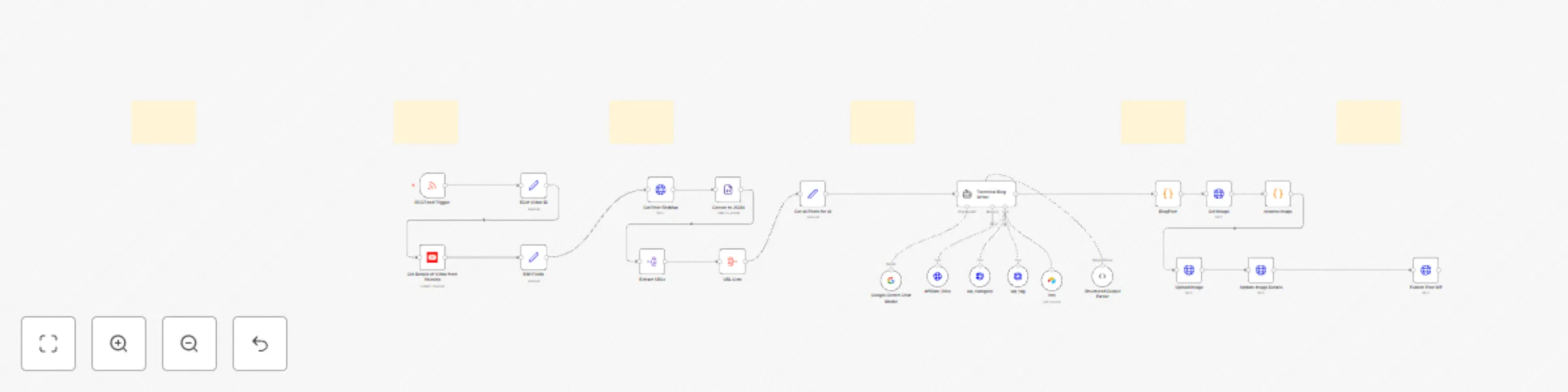
Workflow preview

Workflow preview
100%
YouTube video to AI-powered auto blogging and affiliate automation preview
Open on n8n.io

Important notice

This workflow is provided as-is. Please review and test before using in production.

1. Workflow Overview

YouTube to WordPress AI Powered Automation Transform your YouTube content into professional blog posts automatically! This n8n template seamlessly converts your YouTube videos into fully formatt...

Best for

  • Content Creation automation workflows
  • Multimodal AI automation workflows
  • advanced n8n builders looking for reusable templates

Tools used

n8n-nodes-base.set, @n8n/n8n-nodes-langchain.lmchatgooglegemini, n8n-nodes-base.rssfeedreadtrigger, @n8n/n8n-nodes-langchain.toolhttprequest, n8n-nodes-base.httprequest, n8n-nodes-base.youtube, @n8n/n8n-nodes-langchain.outputparserstructured, n8n-nodes-base.stickynote

Source and attribution

This workflow is cataloged by N8N Workflows and links back to its original n8n.io source page by Amjid Ali.

Original n8n.io source

1.1 Workflow description

Title
YouTube video to AI-powered auto blogging and affiliate automation
Workflow name
YouTube video to AI-powered auto blogging and affiliate automation

πŸš€ YouTube to WordPress AI-Powered Automation

Transform your YouTube content into professional blog posts automatically!
This n8n template seamlessly converts your YouTube videos into fully-formatted, SEO-optimized WordPress blog posts using AI-powered content generationβ€”all without lifting a finger.


🎯 What This Automation Does

  • πŸ“Ί Monitors your YouTube channel for new video uploads
  • πŸ” Extracts key video information (title, description, URL, thumbnail)
  • πŸ€– Leverages AI to generate comprehensive blog content based on video material
  • ✏️ Creates SEO-optimized titles, excerpts, and tags
  • πŸ–ΌοΈ Formats posts beautifully with embedded videos and proper HTML structure
  • πŸ“ Publishes directly to WordPress via secure API connection
  • ⏱️ Runs on your schedule β€” daily, weekly, or after each new upload


πŸ§‘β€πŸ« Step-by-Step Video Tutorial

πŸŽ₯ Watch the implementation tutorial:

πŸ“Œ See the complete workflow setup and content transformation in action.


🌐 Useful Links


πŸ›  Prerequisites

  • βœ… n8n installation (self-hosted or cloud)
  • βœ… YouTube Data API key
  • βœ… AI provider API key (OpenAI, Google Gemini, etc.)
  • βœ… WordPress website with REST API enabled
  • βœ… WordPress application password for secure authentication

πŸ“‹ Step-by-Step Implementation

1️⃣ YouTube Video Detection

  • Youtube RSS Feedlink to fetch new video automatically
  • Implement filtering to process only videos not yet published to WordPress

2️⃣ Content Preparation

  • Extract essential video metadata (ID, title, description, thumbnail URL)
  • Structure the information for AI processing and WordPress publication
  • Format video thumbnails for use as featured images in blog posts

3️⃣ AI Content Generation

  • Configure your preferred AI provider (OpenAI, Gemini, etc.)
  • Create detailed prompts that instruct the AI to:
    • Maintain your brand voice and writing style
    • Structure content with proper headings and subheadings
    • Creates Internal Links from existing blogposts
    • Creators Extenal links using affilaite links and other link database.
    • Engaging SEO frendly.
    • Automatically monetizes by embedding social PartnerStack Links
    • Include key points from the video
    • Generate SEO-friendly paragraphs and conclusions

4️⃣ Content Enhancement

  • Format the AI-generated content with proper HTML structure
  • Add responsive embedded YouTube player
  • Include attribution links back to original video
  • Create custom intro and conclusion sections

5️⃣ WordPress Publishing

  • Securely connect to WordPress via REST API
  • Set post parameters (title, content, excerpt, categories, tags)
  • Configure post status (publish immediately or save as draft)
  • Add featured image using video thumbnail

6️⃣ Notification & Logging

  • Receive email or Slack notifications when new posts are published
  • Log workflow executions for troubleshooting
  • Track successful publications for reporting

πŸ’° Automatic Affiliate Marketing Integration

Transform your blog posts into passive income generators by automatically embedding relevant affiliate links based on your video content:

PartnerStack Integration

  • Dynamically fetch relevant affiliate links from your PartnerStack account
  • Intelligently match products to video content using AI-powered relevance scoring
  • Automatically insert formatted affiliate links with proper disclosure notices
  • Track performance metrics for each generated post's affiliate conversions
Example setup: Connect PartnerStack API β†’ Filter relevant products β†’ Insert links in strategic post positions

Custom Affiliate Database via Airtable

  • Create a centralized product-keyword Airtable database:
    • Product name and description
    • Affiliate link with your unique ID
    • Category and keyword triggers
    • Commission rates and expiration dates
  • Auto-scan blog content to identify keyword matches
  • Insert highest-converting links based on historical performance
  • Rotate affiliate links to test different products and placements

Advanced Monetization Features

  • Amazon Associates product matching based on video content
  • Time-sensitive promo codes inserted for limited-time offers
  • Geo-targeted affiliate links based on visitor location
  • A/B testing system to optimize link placement and conversion
  • Automated disclosure statements to maintain FTC compliance

Implementation Steps

  1. Connect to your PartnerStack account via API
  2. Create an Airtable base with your affiliate product database
  3. Configure the AI to identify product-mention opportunities
  4. Add a post-processing node to insert relevant affiliate links
  5. Implement tracking parameters to measure performance

This integration not only saves time manually adding affiliate links, but also increases conversion rates through intelligent product matching and optimal placement within your automatically generated blog content.

> πŸ’‘ Pro Tip: Create separate tracking IDs for your automated YouTube-to-WordPress posts to measure this specific channel's performance in your affiliate dashboards.

πŸ’‘ Advanced Customizations

Content Templates

Create specialized formatting based on video categories:

  • Tutorial videos: Step-by-step instructions with timestamps
  • Review videos: Pros/cons sections with ratings
  • Interview videos: Question-answer format with speaker attribution

Category & Tag Management

Automatically organize your WordPress content:

  • Assign categories based on video topics or playlists
  • Generate tags from video keywords and descriptions
  • Create custom taxonomies for video series

Multi-Platform Distribution

Extend your content reach by adding:

  • Social media announcement posts
  • Email newsletter inclusion
  • Content syndication to Medium or LinkedIn

⚠️ Troubleshooting

Issue Solution
AI generation timeout Increase timeout settings or use chunked processing
WordPress API errors Verify application password and user permissions
Missing video embedding Check oEmbed settings in WordPress
Duplicate posts Implement content fingerprinting for detection
Poor content quality Refine AI prompts with better instructions

πŸ™Œ Why Use This Template

Content creators typically spend 2-4 hours converting each video into a quality blog post. This automation:

  • ⏱️ Saves 10+ hours weekly for active YouTube creators
  • πŸ” Boosts SEO performance with multi-platform content
  • 🌐 Expands audience reach to text-preferring visitors
  • πŸ’° Increases monetization opportunities across platforms
  • 🧠 Frees creative energy for producing better videos

Don't choose between video and written contentβ€”have both automatically!


πŸš€ Get Started Now

Import the template β†’ Connect your accounts β†’ Watch your blog grow alongside your channel.

πŸ‘‰ AMJID ALI'S PROFILE
πŸ‘‰ website
πŸ‘‰ Explore more on youtube


Knowledge Base: youtube-api, wordpress-automation, content-repurposing, ai-blog-generation, n8n-workflow, creator-tools, video-to-text, multi-platform-publishing

1.2 Logical Blocks

This catalog entry is organized from the workflow JSON. The node-level section below shows the executable blocks available for review before importing the template.

2. Block-by-Block Analysis

Block 1 - Edit Fields

Type / Role
n8n-nodes-base.set - set
Config choices
Version 3.4

Block 2 - Google Gemini Chat Model

Type / Role
@n8n/n8n-nodes-langchain.lmChatGoogleGemini - lmChatGoogleGemini
Config choices
Version 1

Block 3 - Get all Posts for AI

Type / Role
n8n-nodes-base.set - set
Config choices
Version 3.4

Block 4 - RSS Feed Trigger

Type / Role
n8n-nodes-base.rssFeedReadTrigger - rssFeedReadTrigger
Config choices
Version 1

Block 5 - affiliate_links

Type / Role
@n8n/n8n-nodes-langchain.toolHttpRequest - toolHttpRequest
Config choices
Version 1.1

Block 6 - Get Image

Type / Role
n8n-nodes-base.httpRequest - httpRequest
Config choices
Version 4.2

Block 7 - Upload Image

Type / Role
n8n-nodes-base.httpRequest - httpRequest
Config choices
Version 4.2

Block 8 - Update Image Details

Type / Role
n8n-nodes-base.httpRequest - httpRequest
Config choices
Version 4.2

Block 9 - Get Details of Video from Youtube

Type / Role
n8n-nodes-base.youTube - youTube
Config choices
Version 1

Block 10 - EGet Video ID

Type / Role
n8n-nodes-base.set - set
Config choices
Version 3.4

Block 11 - Structured Output Parser

Type / Role
@n8n/n8n-nodes-langchain.outputParserStructured - outputParserStructured
Config choices
Version 1.2

Block 12 - Sticky Note

Type / Role
n8n-nodes-base.stickyNote - stickyNote
Config choices
Version 1

Block 13 - Get Post SiteMap

Type / Role
n8n-nodes-base.httpRequest - httpRequest
Config choices
Version 4.2

Block 14 - Conver to JSON

Type / Role
n8n-nodes-base.xml - xml
Config choices
Version 1

Block 15 - Extract URLs

Type / Role
n8n-nodes-base.splitOut - splitOut
Config choices
Version 1

Block 16 - URL Lists

Type / Role
n8n-nodes-base.aggregate - aggregate
Config choices
Version 1

Block 17 - wp_category

Type / Role
@n8n/n8n-nodes-langchain.toolHttpRequest - toolHttpRequest
Config choices
Version 1.1

Block 18 - wp_tag

Type / Role
@n8n/n8n-nodes-langchain.toolHttpRequest - toolHttpRequest
Config choices
Version 1.1

Block 19 - lms

Type / Role
n8n-nodes-base.airtableTool - airtableTool
Config choices
Version 2.1

Block 20 - Technical Blog Writer

Type / Role
@n8n/n8n-nodes-langchain.agent - agent
Config choices
Version 1.8

Block 21 - Publish Post WP

Type / Role
n8n-nodes-base.httpRequest - httpRequest
Config choices
Version 4.2

Block 22 - BlogPost

Type / Role
n8n-nodes-base.code - code
Config choices
Version 2

Block 23 - rename image

Type / Role
n8n-nodes-base.code - code
Config choices
Version 2

Block 24 - Sticky Note1

Type / Role
n8n-nodes-base.stickyNote - stickyNote
Config choices
Version 1

Showing the first 24 of 28 workflow blocks. Download the JSON for the full node graph.

3. Summary Table

Workflow YouTube video to AI-powered auto blogging and affiliate automation
Complexity advanced
Nodes 28
Categories Content Creation, Multimodal AI
Author Amjid Ali
Published 26 Apr 2025

4. Reproducing the Workflow from Scratch

  1. 1. Download the workflow JSON

    Use the JSON export at /data/workflows/3714/3714.json as the source template for this automation.

  2. 2. Import the template into n8n

    Open n8n, import the downloaded JSON, and review each node before activating the workflow.

  3. 3. Configure credentials and variables

    Replace placeholder credentials, API keys, webhook URLs, account IDs, and environment-specific values with your own settings.

  4. 4. Test with sample data

    Run the workflow manually or in a staging workspace, inspect node output, and confirm downstream systems receive the expected data.

  5. 5. Activate and monitor

    Enable the workflow only after testing, then monitor executions, errors, and rate limits during the first production runs.

5. General Notes & Resources

Review imported nodes carefully before activation. This catalog entry is intended to help you inspect the workflow structure, understand required services, and find related templates faster.

Node names, credentials, schedules, webhook paths, and external service limits may need adjustment for your workspace.

Frequently asked questions

What does YouTube video to AI-powered auto blogging and affiliate automation do?

YouTube to WordPress AI Powered Automation Transform your YouTube content into professional blog posts automatically! This n8n template seamlessly converts your YouTube videos into fully formatt...

What do I need before importing this workflow?

Review the workflow JSON, configure any required credentials in n8n, and test the automation in a safe workspace before using it in production.

Can I customize this workflow?

Yes. Use the block-by-block analysis and the downloadable JSON to inspect each node, then adjust credentials, prompts, schedules, filters, or destinations for your Content Creation, Multimodal AI use case.