YouTube trends finding agent

Workflow preview

Workflow preview
100%
YouTube trends finding agent preview
Open on n8n.io

Important notice

This workflow is provided as-is. Please review and test before using in production.

1. Workflow Overview

Who this is for This workflow is for content creators , digital marketers , or YouTube strategists who want to automatically discover trending videos in their niche, analyze engagement metrics, and...

Best for

  • Market Research automation workflows
  • Multimodal AI automation workflows
  • advanced n8n builders looking for reusable templates

Tools used

n8n-nodes-base.youtube, n8n-nodes-base.formtrigger, n8n-nodes-base.set, n8n-nodes-base.code, n8n-nodes-base.noop, n8n-nodes-base.googlesheets, n8n-nodes-base.form, n8n-nodes-base.httprequest

Source and attribution

This workflow is cataloged by N8N Workflows and links back to its original n8n.io source page by Rakin Jakaria.

Original n8n.io source

1.1 Workflow description

Title
YouTube trends finding agent
Workflow name
YouTube trends finding agent

Who this is for

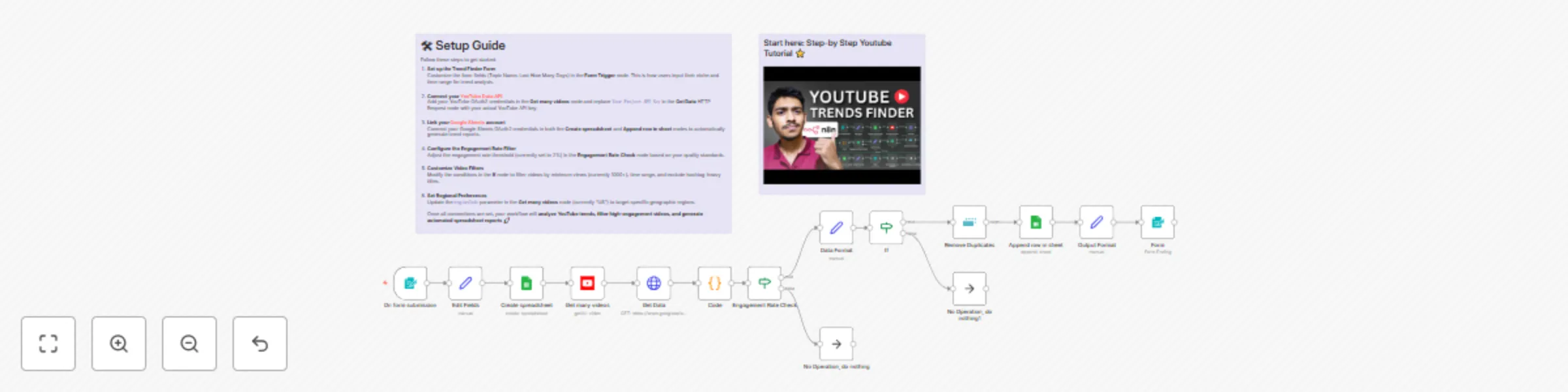
This workflow is for content creators, digital marketers, or YouTube strategists who want to automatically discover trending videos in their niche, analyze engagement metrics, and get data-driven insights for their content strategy — all from one simple form submission.

What this workflow does

This workflow starts every time someone submits the YouTube Trends Finder Form. It then:

  • Searches YouTube videos based on your topic and specified time range using the YouTube Data API.
  • Fetches detailed analytics (views, likes, comments, engagement rates) for each video found.
  • Calculates engagement rates and filters out low-performing content (below 2% engagement).
  • Applies smart filters to exclude videos with less than 1000 views, content outside your timeframe, and hashtag-heavy titles.
  • Removes duplicate videos to ensure clean data.
  • Creates a Google Spreadsheet with all trending video data organized by performance metrics.
  • Delivers the results via a completion form with a direct link to your analytics report.

Setup

To set this workflow up:

  1. Form Trigger – Customize the "YouTube Trends Finder" form fields if needed (Topic Name, Last How Many Days).
  2. YouTube Data API – Add your YouTube OAuth2 credentials and API key in the respective nodes.
  3. Google Sheets – Connect your Google Sheets account for automatic report generation.
  4. Engagement Filters – Adjust the 2% engagement rate threshold based on your quality standards.
  5. View Filters – Modify the minimum view count (currently 1000+) in the filter conditions.
  6. Regional Settings – Update the region code (currently "US") to target specific geographic markets.

How to customize this workflow to your needs

  • Change the engagement rate threshold to be more or less strict based on your niche requirements.
  • Add additional filters like video duration, subscriber count, or specific keywords to refine results.
  • Modify the Google Sheets structure to include extra metrics like "Channel Name", "Video Duration", or "Trending Score".
  • Switch to different output formats like CSV export or direct email reports instead of Google Sheets.

1.2 Logical Blocks

This catalog entry is organized from the workflow JSON. The node-level section below shows the executable blocks available for review before importing the template.

2. Block-by-Block Analysis

Block 1 - Get many videos

Type / Role
n8n-nodes-base.youTube - youTube
Config choices
Version 1

Block 2 - On form submission

Type / Role
n8n-nodes-base.formTrigger - formTrigger
Config choices
Version 2.2

Block 3 - Edit Fields

Type / Role
n8n-nodes-base.set - set
Config choices
Version 3.4

Block 4 - Code

Type / Role
n8n-nodes-base.code - code
Config choices
Version 2

Block 5 - No Operation, do nothing

Type / Role
n8n-nodes-base.noOp - noOp
Config choices
Version 1

Block 6 - Create spreadsheet

Type / Role
n8n-nodes-base.googleSheets - googleSheets
Config choices
Version 4.7

Block 7 - Append row in sheet

Type / Role
n8n-nodes-base.googleSheets - googleSheets
Config choices
Version 4.7

Block 8 - Form

Type / Role
n8n-nodes-base.form - form
Config choices
Version 1

Block 9 - No Operation, do nothing1

Type / Role
n8n-nodes-base.noOp - noOp
Config choices
Version 1

Block 10 - Get Data

Type / Role
n8n-nodes-base.httpRequest - httpRequest
Config choices
Version 4.2

Block 11 - Data Format

Type / Role
n8n-nodes-base.set - set
Config choices
Version 3.4

Block 12 - Output Format

Type / Role
n8n-nodes-base.set - set
Config choices
Version 3.4

Block 13 - Engagement Rate Check

Type / Role
n8n-nodes-base.if - if
Config choices
Version 2.2

Block 14 - If

Type / Role
n8n-nodes-base.if - if
Config choices
Version 2.2

Block 15 - Remove Duplicates

Type / Role
n8n-nodes-base.removeDuplicates - removeDuplicates
Config choices
Version 2

Block 16 - Sticky Note

Type / Role
n8n-nodes-base.stickyNote - stickyNote
Config choices
Version 1

Block 17 - Sticky Note3

Type / Role
n8n-nodes-base.stickyNote - stickyNote
Config choices
Version 1

3. Summary Table

Workflow YouTube trends finding agent
Complexity advanced
Nodes 17
Categories Market Research, Multimodal AI
Author Rakin Jakaria
Published 26 Aug 2025

4. Reproducing the Workflow from Scratch

  1. 1. Download the workflow JSON

    Use the JSON export at /data/workflows/7888/7888.json as the source template for this automation.

  2. 2. Import the template into n8n

    Open n8n, import the downloaded JSON, and review each node before activating the workflow.

  3. 3. Configure credentials and variables

    Replace placeholder credentials, API keys, webhook URLs, account IDs, and environment-specific values with your own settings.

  4. 4. Test with sample data

    Run the workflow manually or in a staging workspace, inspect node output, and confirm downstream systems receive the expected data.

  5. 5. Activate and monitor

    Enable the workflow only after testing, then monitor executions, errors, and rate limits during the first production runs.

5. General Notes & Resources

Review imported nodes carefully before activation. This catalog entry is intended to help you inspect the workflow structure, understand required services, and find related templates faster.

Node names, credentials, schedules, webhook paths, and external service limits may need adjustment for your workspace.

Frequently asked questions

What does YouTube trends finding agent do?

Who this is for This workflow is for content creators , digital marketers , or YouTube strategists who want to automatically discover trending videos in their niche, analyze engagement metrics, and...

What do I need before importing this workflow?

Review the workflow JSON, configure any required credentials in n8n, and test the automation in a safe workspace before using it in production.

Can I customize this workflow?

Yes. Use the block-by-block analysis and the downloadable JSON to inspect each node, then adjust credentials, prompts, schedules, filters, or destinations for your Market Research, Multimodal AI use case.