YouTube report generator

Workflow preview

Workflow preview
100%
YouTube report generator preview
Open on n8n.io

Important notice

This workflow is provided as-is. Please review and test before using in production.

1. Workflow Overview

YouTube Subtitles Report Generator Overview This template enables users to generate analytical reports from YouTube video subtitles, providing insights into the thematic content of the video. Desig...

Best for

  • Market Research automation workflows
  • AI Summarization automation workflows
  • intermediate n8n builders looking for reusable templates

Tools used

n8n-nodes-base.webhook, n8n-nodes-base.code, n8n-nodes-base.httprequest, @n8n/n8n-nodes-langchain.chainllm, @n8n/n8n-nodes-langchain.lmchatgooglegemini, n8n-nodes-base.respondtowebhook, n8n-nodes-base.stickynote

Source and attribution

This workflow is cataloged by N8N Workflows and links back to its original n8n.io source page by Mauricio Perera.

Original n8n.io source

1.1 Workflow description

Title
YouTube report generator
Workflow name
YouTube report generator

YouTube Subtitles Report Generator

Overview

This template enables users to generate analytical reports from YouTube video subtitles, providing insights into the thematic content of the video. Designed for efficiency and simplicity, it processes video subtitles without requiring an API key, making it an accessible solution for content analysis. The system assumes videos already have subtitles available, excluding live streams and videos without subtitle data.


Key Features

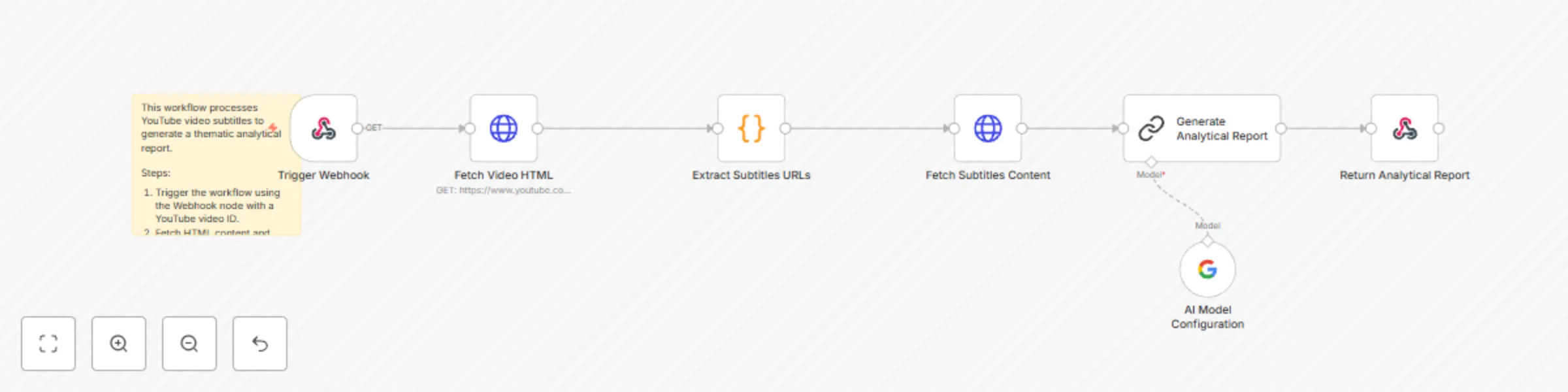
  1. Trigger Webhook: Seamlessly receive video IDs through a webhook trigger.
  2. Fetch Video HTML: Retrieves the video’s HTML content directly from YouTube.
  3. Extract Subtitles URLs: Processes the HTML content to find and decode subtitle URLs.
  4. Fetch Subtitles Content: Downloads the subtitles from the decoded URLs in XML format.
  5. Generate Analytical Report: Utilizes an AI model to summarize and analyze the thematic essence of video content.
    • The system supports models such as Google Gemini, OpenAI, and other compatible language models.
    • The quality of the results may vary depending on the model used, with better models providing faster and more accurate summaries.
    • The default prompt focuses on identifying and summarizing the main theme of the video while excluding content related to promotions, subscriptions, or sponsored content.
  6. Return Analytical Report: Delivers concise analytical reports as the final response to the webhook, suitable for various use cases like research, content creation, or consumption as plain text.

Setup Instructions

Step 1: Webhook Configuration
  • Set up the webhook URL in your external system (e.g., app, API) to send YouTube video IDs to this workflow.
Step 2: API Access
  • Ensure that your environment has access to YouTube’s public HTML content. An API key is not required since the workflow parses publicly available data.
Step 3: AI Integration
  • Verify the connection to the AI model used for report generation. Supported models include Google Gemini and OpenAI.
  • Note that the system can be customized by modifying the provided prompt to suit specific analysis needs.
Step 4: Testing
  • Run a sample test with a YouTube video ID to ensure subtitles are correctly retrieved and the report is generated successfully.

Expected Outcomes

  • Effortless Content Analysis: Generate thematic reports with minimal setup.
  • No API Key Dependency: Simplified access by leveraging YouTube’s public HTML.
  • Actionable Insights: Gain valuable information on video content for business, research, or personal projects.
  • Cost Considerations: The execution cost depends primarily on the model used and the length of the video (affecting token usage). Leveraging the free tier of Google Gemini models is recommended to minimize costs.
  • Main Theme Extraction: The default prompt excludes irrelevant promotional content, providing clear and focused thematic summaries.

Estimated setup time: 15–20 minutes with a ready environment.


Prompt Description

The workflow includes a customizable prompt used to process subtitles in XML format and generate analytical reports. The generated report includes:

  1. Title: A brief phrase capturing the essence of the main theme.
  2. Body: An analytical description of the main theme, structured into a maximum of three concise paragraphs. It focuses on summarizing key ideas, recurring themes, and connections without referencing the source explicitly (e.g., avoiding phrases like “this video”). The system also removes content related to sales, subscriptions, or promotions to maintain a clear thematic focus.

Example Output

Title: The Ethical Challenges of Artificial Intelligence

Report:
Artificial intelligence presents significant challenges in areas such as privacy, fairness, and automated decision-making. Its implementation in critical sectors such as healthcare, justice, and security has sparked debates about inherent biases and lack of transparency. Additionally, there is growing concern over the ethical implications of automation, including its impact on employment and the global economy. Finally, the importance of establishing strong regulatory frameworks is highlighted to balance technological innovation with the protection of human rights.

1.2 Logical Blocks

This catalog entry is organized from the workflow JSON. The node-level section below shows the executable blocks available for review before importing the template.

2. Block-by-Block Analysis

Block 1 - Trigger Webhook

Type / Role
n8n-nodes-base.webhook - webhook
Config choices
Version 2

Block 2 - Extract Subtitles URLs

Type / Role
n8n-nodes-base.code - code
Config choices
Version 2

Block 3 - Fetch Video HTML

Type / Role
n8n-nodes-base.httpRequest - httpRequest
Config choices
Version 4.2

Block 4 - Fetch Subtitles Content

Type / Role
n8n-nodes-base.httpRequest - httpRequest
Config choices
Version 4.2

Block 5 - Generate Analytical Report

Type / Role
@n8n/n8n-nodes-langchain.chainLlm - chainLlm
Config choices
Version 1.5

Block 6 - AI Model Configuration

Type / Role
@n8n/n8n-nodes-langchain.lmChatGoogleGemini - lmChatGoogleGemini
Config choices
Version 1

Block 7 - Return Analytical Report

Type / Role
n8n-nodes-base.respondToWebhook - respondToWebhook
Config choices
Version 1.1

Block 8 - Workflow Overview

Type / Role
n8n-nodes-base.stickyNote - stickyNote
Config choices
Version 1

3. Summary Table

Workflow YouTube report generator
Complexity intermediate
Nodes 8
Categories Market Research, AI Summarization
Author Mauricio Perera
Published 20 Dec 2024

4. Reproducing the Workflow from Scratch

  1. 1. Download the workflow JSON

    Use the JSON export at /data/workflows/2663/2663.json as the source template for this automation.

  2. 2. Import the template into n8n

    Open n8n, import the downloaded JSON, and review each node before activating the workflow.

  3. 3. Configure credentials and variables

    Replace placeholder credentials, API keys, webhook URLs, account IDs, and environment-specific values with your own settings.

  4. 4. Test with sample data

    Run the workflow manually or in a staging workspace, inspect node output, and confirm downstream systems receive the expected data.

  5. 5. Activate and monitor

    Enable the workflow only after testing, then monitor executions, errors, and rate limits during the first production runs.

5. General Notes & Resources

Review imported nodes carefully before activation. This catalog entry is intended to help you inspect the workflow structure, understand required services, and find related templates faster.

Node names, credentials, schedules, webhook paths, and external service limits may need adjustment for your workspace.

Frequently asked questions

What does YouTube report generator do?

YouTube Subtitles Report Generator Overview This template enables users to generate analytical reports from YouTube video subtitles, providing insights into the thematic content of the video. Desig...

What do I need before importing this workflow?

Review the workflow JSON, configure any required credentials in n8n, and test the automation in a safe workspace before using it in production.

Can I customize this workflow?

Yes. Use the block-by-block analysis and the downloadable JSON to inspect each node, then adjust credentials, prompts, schedules, filters, or destinations for your Market Research, AI Summarization use case.