Block 1 - Receive Product Request
- Type / Role
- n8n-nodes-base.webhook - webhook
- Config choices
- Version 2


 Early Deal
This workflow is provided as-is. Please review and test before using in production.
This workflow automates the extraction of product data from Product Hunt by combining webhook interactions, HTML processing, AI based data analysis, and structured output formatting. It is designed...
n8n-nodes-base.webhook, n8n-nodes-base.httprequest, n8n-nodes-base.code, @n8n/n8n-nodes-langchain.chainllm, @n8n/n8n-nodes-langchain.lmchatgooglegemini, @n8n/n8n-nodes-langchain.outputparserstructured, n8n-nodes-base.respondtowebhook, n8n-nodes-base.stickynote
This workflow is cataloged by N8N Workflows and links back to its original n8n.io source page by Mauricio Perera.
Original n8n.io sourceWorkflow Description: Product Data Extractor
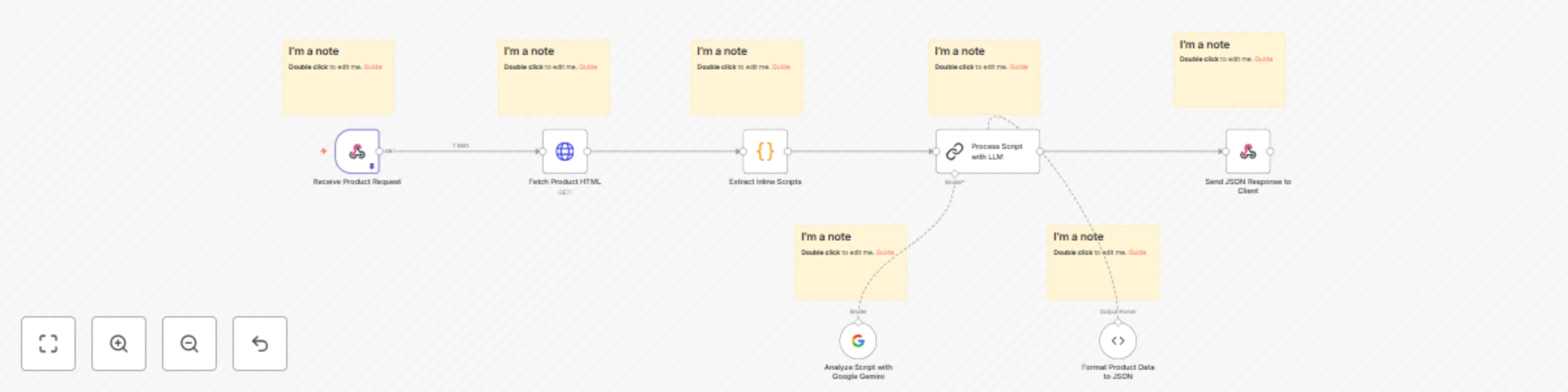
This workflow automates the extraction of product data from Product Hunt by combining webhook interactions, HTML processing, AI-based data analysis, and structured output formatting. It is designed to handle incoming requests dynamically and return detailed JSON responses for further usage.
The workflow processes a product name submitted through a webhook. It fetches the corresponding Product Hunt page, extracts and analyzes inline scripts, and structures the data into a well-defined JSON format using AI tools. The final JSON response is returned to the client through the webhook.
product parameter from the query string, such as <custom_webhook_url>/?product=epigram.<head> section.src attributes and validates the presence of inline scripts.<custom_webhook_url>.Dependency on Product Hunt: Significant changes to the way Product Hunt loads data on its pages might require modifications to the workflow.
Adaptability: Even if changes occur, the workflow can be updated to maintain functionality due to its reliance on AI and not direct DOM selectors.
Modify the webhook path to suit your application.
Adjust the prompt for the language model to include additional fields.
Extend the JSON schema to capture more data fields as needed.
Performance Metrics
A JSON object containing detailed information about the specified product. Below is an example of a complete response for the product Epigram:
{
  "id": "861675",
  "slug": "epigram",
  "followersCount": 181,
  "name": "Epigram",
  "tagline": "Open-Source, Free, and AI-Powered News in Short",
  "reviewsRating": 0,
  "logoUuid": "735c2528-554c-467c-9dcf-745ee4b8bbdd.png",
  "postsCount": 1,
  "websiteUrl": "https://epigram.news",
  "websiteDomain": "epigram.news",
  "metaTitle": "Epigram - Open-source, free, and ai-powered news in short",
  "postName": "Epigram",
  "postTagline": "Open-source, free, and ai-powered news in short",
  "dailyRank": "3",
  "description": "An open-source, AI-powered news app for busy people. Stay updated with bite-sized news, real-time updates, and in-depth analysis. Experience balanced, trustworthy reporting tailored for fast-paced lifestyles in a sleek, user-friendly interface.",
  "pricingType": "free",
  "userName": "Fazle Rahman",
  "userHeadline": "Co-founder & CEO, Hashnode",
  "userUsername": "fazlerocks",
  "userAvatarUrl": "https://ph-avatars.imgix.net/129147/f84e1796-548b-4d6f-9dcf-745ee4b8bbdd.jpeg",
  "makerName1": "Fazle Rahman",
  "makerHeadline1": "Co-founder & CEO, Hashnode",
  "makerUsername1": "fazlerocks",
  "makerAvatarUrl1": "https://ph-avatars.imgix.net/129147/f84e1796-548b-4d6f-9dcf-745ee4b8bbdd.jpeg",
  "makerName2": "Sandeep Panda",
  "makerHeadline2": "Co-Founder @ Hashnode",
  "makerUsername2": "sandeepg33k",
  "makerAvatarUrl2": "https://ph-avatars.imgix.net/101872/80b0b618-a540-4110-a6d1-74df39675ad0.jpeg",
  "primaryLinkUrl": "https://epigram.news/",
  "media1OriginalHeight": 1080,
  "media1OriginalWidth": 1440,
  "media1ImageUuid": "ac426fd1-3854-4734-b43d-34a5e06347ea.gif",
  "media1MediaType": "video",
  "media1MetadataUrl": "https://www.loom.com/share/b1a48a9b3cac4ba89ce772a3fbcc2847?sid=75efc771-25fa-4ac0-bb1b-5e38fc447deb",
  "media1VideoId": "b1a48a9b3cac4ba89ce772a3fbcc2847",
  "media2OriginalHeight": 630,
  "media2OriginalWidth": 1200,
  "media2ImageUuid": "8521a6bd-7640-487b-abd6-29b9f65fee32",
  "media2MediaType": "image",
  "media2MetadataUrl": null,
  "launchState": "featured",
  "thumbnailImageUuid": "735c2528-554c-467c-9dcf-745ee4b8bbdd.png",
  "link1StoreName": "Website",
  "link1WebsiteName": "epigram.news",
  "link2StoreName": "Github",
  "link2WebsiteName": "github.com",
  "latestScore": 233,
  "launchDayScore": 233,
  "userId": "129147",
  "topic1": "News",
  "topic2": "Open Source",
  "topic3": "Artificial Intelligence",
  "weeklyRank": "24",
  "commentsCount": 20,
  "postUrl": "https://www.producthunt.com/posts/epigram"
}
This workflow is ideal for developers, marketers, and data analysts seeking to automate the extraction and structuring of product data from Product Hunt for analytics, reporting, or integration with other tools.
This catalog entry is organized from the workflow JSON. The node-level section below shows the executable blocks available for review before importing the template.
| Workflow | Scrape ProductHunt using Google Gemini |
|---|---|
| Complexity | intermediate |
| Nodes | 14 |
| Categories | Market Research, AI Summarization |
| Author | Mauricio Perera |
| Published | 05 Jan 2025 |
Use the JSON export at /data/workflows/2698/2698.json as the source template for this automation.
Open n8n, import the downloaded JSON, and review each node before activating the workflow.
Replace placeholder credentials, API keys, webhook URLs, account IDs, and environment-specific values with your own settings.
Run the workflow manually or in a staging workspace, inspect node output, and confirm downstream systems receive the expected data.
Enable the workflow only after testing, then monitor executions, errors, and rate limits during the first production runs.
Review imported nodes carefully before activation. This catalog entry is intended to help you inspect the workflow structure, understand required services, and find related templates faster.
Node names, credentials, schedules, webhook paths, and external service limits may need adjustment for your workspace.
This workflow automates the extraction of product data from Product Hunt by combining webhook interactions, HTML processing, AI based data analysis, and structured output formatting. It is designed...
Review the workflow JSON, configure any required credentials in n8n, and test the automation in a safe workspace before using it in production.
Yes. Use the block-by-block analysis and the downloadable JSON to inspect each node, then adjust credentials, prompts, schedules, filters, or destinations for your Market Research, AI Summarization use case.