Block 1 - Webhook3
- Type / Role
- n8n-nodes-base.webhook - webhook
- Config choices
- Version 2.1


 Early Deal
This workflow is provided as-is. Please review and test before using in production.
WhatsApp Receipt OCR & Data Extraction Suite Categories: Accounting Automation • OCR Processing • AI Data Extraction • Business Tools This workflow transforms WhatsApp into a fully automated receip...
n8n-nodes-base.webhook, n8n-nodes-base.if, n8n-nodes-base.wait, n8n-nodes-base.httprequest, @n8n/n8n-nodes-langchain.lmchatopenrouter, @n8n/n8n-nodes-langchain.lmchatgooglegemini, n8n-nodes-base.googledrive, n8n-nodes-base.googlesheets
This workflow is cataloged by N8N Workflows and links back to its original n8n.io source page by Gabriela Macovei.
Original n8n.io sourceCategories: Accounting Automation • OCR Processing • AI Data Extraction • Business Tools
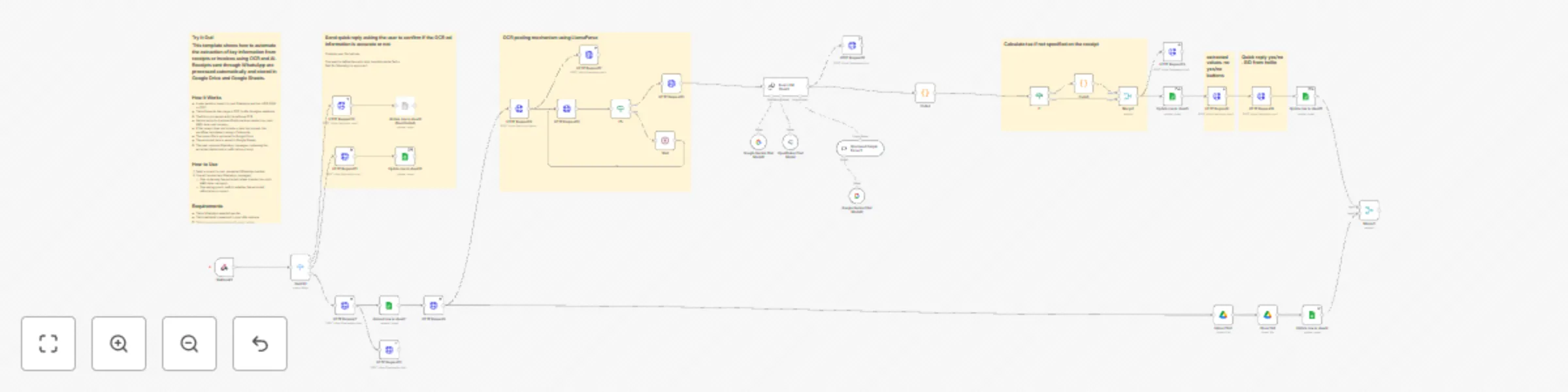
This workflow transforms WhatsApp into a fully automated receipt-processing system using advanced OCR, multi-model AI parsing, and structured data storage. By combining LlamaParse, Claude (OpenRouter), Gemini, Google Sheets, and Twilio, it eliminates manual data entry and delivers instant, reliable receipt digitization for any business.
When a user sends a receipt photo or PDF via WhatsApp, the automation:
The result is a fast, scalable, human-free system for converting raw receipt photos into clean, structured accounting data.
The workflow starts when a WhatsApp message containing a media file hits your Twilio webhook.
The MessageSid is appended to your tracking sheet to ensure every receipt is traceable.
The file is sent to LlamaParse with the invoice preset, high-resolution OCR, and table extraction enabled.
The workflow checks job completion before moving further.
The OCR markdown is analyzed using:
The system extracts:
The uploaded receipt is stored, shared, and linked back to the record in Sheets.
Fields are appended/updated following a clean schema:
The user receives a summary of extracted data via WhatsApp.
Buttons allow them to approve or reject accuracy.
The Google Sheet updates accordingly.
This workflow is ideal for:
Want to see exactly how I built this entire AI design system from scratch? I walk through the complete development process on my YouTube channel
This catalog entry is organized from the workflow JSON. The node-level section below shows the executable blocks available for review before importing the template.
Showing the first 24 of 41 workflow blocks. Download the JSON for the full node graph.
| Workflow | WhatsApp receipt OCR & AI data extraction with Twilio, LlamaParse & Gemini |
|---|---|
| Complexity | advanced |
| Nodes | 41 |
| Categories | Invoice Processing, AI Summarization |
| Author | Gabriela Macovei |
| Published | 28 Nov 2025 |
Use the JSON export at /data/workflows/11332/11332.json as the source template for this automation.
Open n8n, import the downloaded JSON, and review each node before activating the workflow.
Replace placeholder credentials, API keys, webhook URLs, account IDs, and environment-specific values with your own settings.
Run the workflow manually or in a staging workspace, inspect node output, and confirm downstream systems receive the expected data.
Enable the workflow only after testing, then monitor executions, errors, and rate limits during the first production runs.
Review imported nodes carefully before activation. This catalog entry is intended to help you inspect the workflow structure, understand required services, and find related templates faster.
Node names, credentials, schedules, webhook paths, and external service limits may need adjustment for your workspace.
WhatsApp Receipt OCR & Data Extraction Suite Categories: Accounting Automation • OCR Processing • AI Data Extraction • Business Tools This workflow transforms WhatsApp into a fully automated receip...
Review the workflow JSON, configure any required credentials in n8n, and test the automation in a safe workspace before using it in production.
Yes. Use the block-by-block analysis and the downloadable JSON to inspect each node, then adjust credentials, prompts, schedules, filters, or destinations for your Invoice Processing, AI Summarization use case.