Block 1 - WhatsApp Trigger
- Type / Role
- n8n-nodes-base.whatsAppTrigger - whatsAppTrigger
- Config choices
- Version 1


 Early Deal
This workflow is provided as-is. Please review and test before using in production.
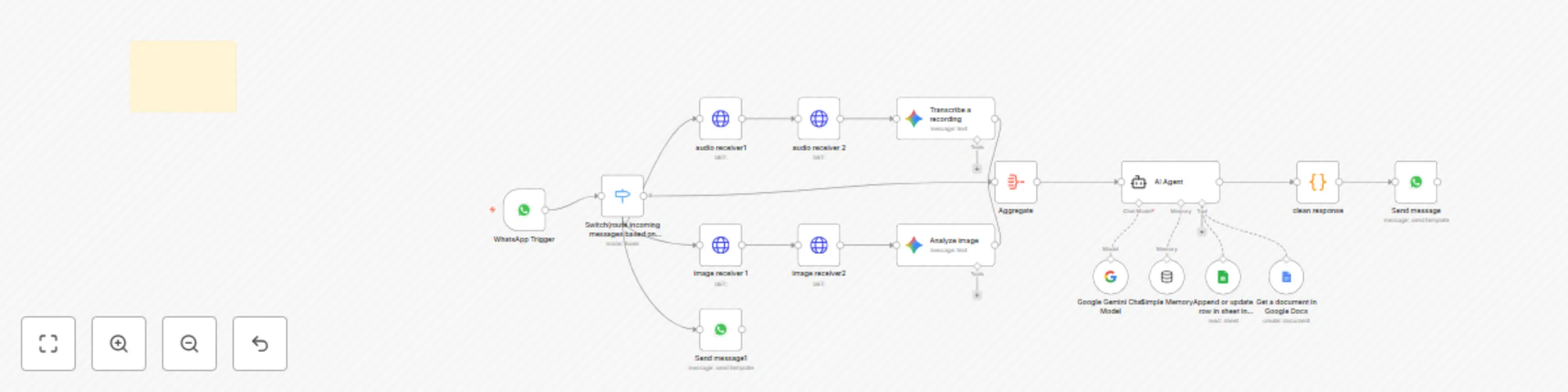
Overview This template is a multimodal WhatsApp assistant that understands text, images, and audio, aggregates media inputs, and returns intelligent replies using Google Gemini. It can fetch kno...
n8n-nodes-base.whatsapptrigger, @n8n/n8n-nodes-langchain.googlegemini, @n8n/n8n-nodes-langchain.agent, @n8n/n8n-nodes-langchain.lmchatgooglegemini, @n8n/n8n-nodes-langchain.memorybufferwindow, n8n-nodes-base.googlesheetstool, n8n-nodes-base.aggregate, n8n-nodes-base.whatsapp
This workflow is cataloged by N8N Workflows and links back to its original n8n.io source page by Tharwat Mohamed.
Original n8n.io sourceOverview 📌
This template is a multimodal WhatsApp assistant that understands text, images, and audio, aggregates media inputs, and returns intelligent replies using Google Gemini. It can fetch knowledge from Google Docs, log conversations into Google Sheets, and respond via WhatsApp — all orchestrated inside n8n.
Features ✨
Multimodal input handling: Receives images and audio from WhatsApp, analyzes them, and sends contextual responses. 🖼️🎧
Audio transcription: Converts voice messages to text for analysis. 🔊➡️📝
Image analysis: Extracts objects/labels/text from images to inform responses. 🖼️🔍
Knowledge fetch: Pulls relevant documents from Google Docs for richer answers. 📄📚
Conversation logging: Appends each interaction to Google Sheets for auditing or analytics. 📈
Modular design: Clear subflows for media reception, transcription, image analysis, aggregation, and the AI Agent. ⚙️
Ready for customization: Swap models, change providers, or extend with a vector store. 🔁
Requirements ✅
n8n instance (self-hosted or n8n.cloud) with public webhook access
Google Cloud project with these APIs enabled: Vertex AI (Gemini), Cloud Vision API, Cloud Speech-to-Text, Drive & Docs & Sheets 🧠
Google Service Account JSON key (with permissions for above services) 🔐
WhatsApp Business API provider credentials (Twilio, 360dialog, or similar) 📞
(Optional) Pinecone or another vector store if you want embeddings / retrieval augmentation 🗂️
Setup Instructions 🔧
Import the workflow
Download the .json from your package and in n8n Editor → Import → From File → select JSON. Save.
Create credentials
Google Service Account: Create service account in GCP, grant Vertex AI, Vision, Speech, Drive, Docs, Sheets roles, download JSON → create n8n Google Service Account credential and upload JSON.
WhatsApp: Add your WhatsApp API credentials (API key/token, phone ID, webhook secret).
(Optional) Vector store: Add Pinecone credentials if using embeddings.
Configure media receiver nodes
WhatsApp Trigger: Ensure webhook URL is set on your WhatsApp provider to forward incoming messages/media to n8n. 🌐
Audio Receiver nodes: point to incoming audio payload path or download URL. 🎧
Image Receiver nodes: point to image URL or attachment field. 🖼️
Transcription & Image Analysis
Transcribe Audio: Select Google Speech-to-Text via your Google Service Account credential. Confirm language and sampling settings. 🗣️➡️📝
Analyze Image: Point to Vision API via same Google credential. Choose required outputs (labels, landmarks, OCR). 🔎
Aggregate media
Confirm the Aggregate node collects text + transcribed audio + image analysis results into a single payload for the AI Agent. 🧩
AI Agent (Gemini)
Open AI Agent node → choose your Google Gemini/Vertex AI credentials.
Edit System Prompt to include: how to prioritize image/audio text, where to look up knowledge (Docs), and style/tone. Replace placeholders (business name, policies). ✍️
Knowledge Fetch (Google Docs)
Configure Get a document in Google Docs node to point to your knowledge docs folder or specific document IDs. 📂
Conversation Logging
Configure Google Sheets node to append rows to your chosen spreadsheet (structure below). 🧾
WhatsApp Reply
Map AI Agent output to the WhatsApp Send message node and choose template messaging if needed. 💬
Test end-to-end
Activate the workflow, send a text message, an image, and an audio message to your WhatsApp test number. Verify the AI reply and that logs appear in Google Sheets. 🧪
Google Sheet: Conversation Log (suggested columns) 🗒️ Column Type Description Timestamp Date/Time When the message arrived UserID Text WhatsApp user identifier (phone) MessageType Text text / image / audio / mixed MessageText Text Original text or transcribed text ImageAnalysis Text Vision API summary / labels / OCR text AttachmentURL Text Link to image/audio file AIResponse Text Final text reply sent to user Notes Text Any extra flags (e.g., escalation) Customization 🔁
Swap Gemini with another model provider by changing the AI node credentials and prompt structure. 🔄
Add a vector store (Pinecone) to enable retrieval-augmented generation from indexed docs. 🧠
Extend image analysis to OCR for receipts/invoices or barcode detection. 📑
Add an escalation path (send to human) by adding an “If → Escalate” node when confidence is low. 🚨
Suggested Node Renaming (for clarity) 🏷️
Rename generic nodes to explicit names so reviewers and users instantly understand flow:
WhatsApp Trigger → WhatsApp Trigger (Inbound)
Switch → Message Type Router
audio receiver1/2 → Audio Receiver (Download) / Audio Receiver (Fallback) 🎧
Transcribe a recording → Transcribe Audio (Speech-to-Text) 📝
image receiver1/2 → Image Receiver (Download) / Image Receiver (Fallback) 🖼️
Analyze image → Image Analysis (Vision API) 🔍
Aggregate → Aggregate Media Inputs 🧩
AI Agent → Multimodal AI Agent (Gemini) 🤖
Get a document in Google Docs → Fetch Knowledge Doc 📂
Code → Format AI Response 🧾
Send message → WhatsApp – Send Reply 💬
Testing & Going Live 🚀
Ensure n8n webhook is publicly reachable (use an SSL domain/tunnel). 🔒
Test in a sandbox WhatsApp number first. 🧪
Monitor n8n Executions and enable an Error Workflow for graceful failure handling. ⚠️
If you expect high media volume, consider storage/retention policy for attachments. 🗄️
Support & Notes 🤝
I offer setup assistance and will help troubleshoot credential issues or prompt tuning until your workflow is working perfectly. Include contact info and a short support pledge in your template description to build trust. Feel free to ping me anytime—even after launch!👉 Contact: [email protected] | +20 106 180 3236
This catalog entry is organized from the workflow JSON. The node-level section below shows the executable blocks available for review before importing the template.
| Workflow | WhatsApp AI agent that understand text, image , audio |
|---|---|
| Complexity | advanced |
| Nodes | 18 |
| Categories | Support Chatbot, AI Chatbot |
| Author | Tharwat Mohamed |
| Published | 04 Sept 2025 |
Use the JSON export at /data/workflows/8251/8251.json as the source template for this automation.
Open n8n, import the downloaded JSON, and review each node before activating the workflow.
Replace placeholder credentials, API keys, webhook URLs, account IDs, and environment-specific values with your own settings.
Run the workflow manually or in a staging workspace, inspect node output, and confirm downstream systems receive the expected data.
Enable the workflow only after testing, then monitor executions, errors, and rate limits during the first production runs.
Review imported nodes carefully before activation. This catalog entry is intended to help you inspect the workflow structure, understand required services, and find related templates faster.
Node names, credentials, schedules, webhook paths, and external service limits may need adjustment for your workspace.
Overview This template is a multimodal WhatsApp assistant that understands text, images, and audio, aggregates media inputs, and returns intelligent replies using Google Gemini. It can fetch kno...
Review the workflow JSON, configure any required credentials in n8n, and test the automation in a safe workspace before using it in production.
Yes. Use the block-by-block analysis and the downloadable JSON to inspect each node, then adjust credentials, prompts, schedules, filters, or destinations for your Support Chatbot, AI Chatbot use case.