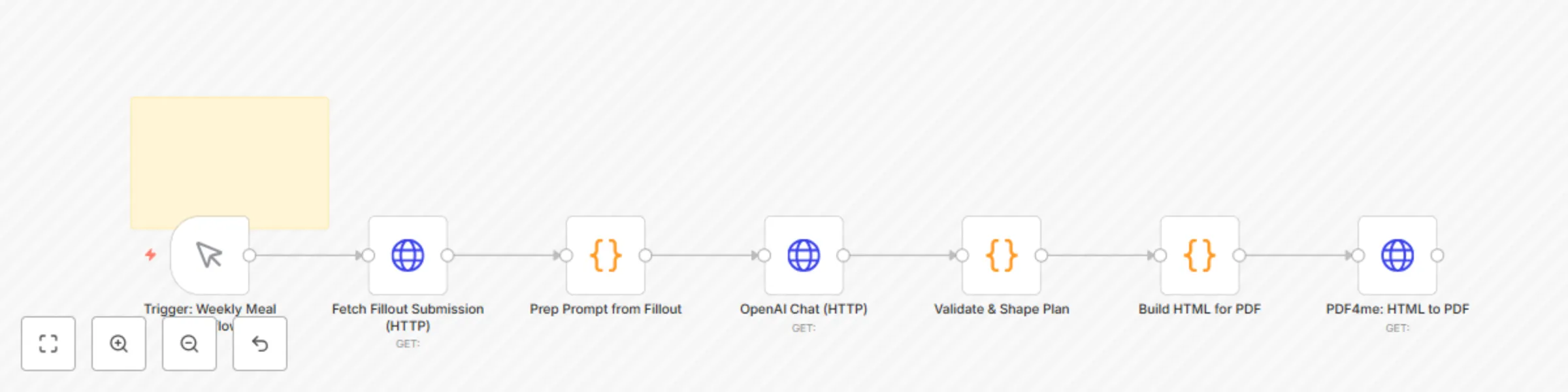
Block 1 - Trigger: Weekly Meal Workflow
- Type / Role
- n8n-nodes-base.manualTrigger - manualTrigger
- Config choices
- Version 1


 Early Deal
This workflow is provided as-is. Please review and test before using in production.
Weekly Meal Planner with Auto Grocery Lists using Fillout, FluentC AI & WhatsApp ️ Automate Your Weekly Family Meal Planning with AI and WhatsApp Say goodbye to mealtime stress. This workflow aut...
n8n-nodes-base.manualtrigger, n8n-nodes-base.stickynote, n8n-nodes-base.httprequest, n8n-nodes-base.code
This workflow is cataloged by N8N Workflows and links back to its original n8n.io source page by Shelly-Ann Davy.
Original n8n.io sourceSay goodbye to mealtime stress. This workflow automates your entire weekly meal planning process — from family input to a WhatsApp-sent grocery list — using AI and no-code tools.
Perfect for:
The workflow:
Fully automated, beginner-friendly, and designed to bring calm to your home.
Before using this workflow, ensure you have the following accounts and tools:
| Service | Purpose | Free Tier Available? |
|---|---|---|
| Fillout | Collect family meal preferences | Yes |
| FluentC AI or OpenAI | AI-powered meal and grocery list generation | Yes (if using OpenAI) |
| Scrappey | Scrape real-time prices from stores | Yes (150 free scrapes) |
| PDF4me | Generate clean, printable PDFs | Yes |
| WhatsAble | Send WhatsApp messages via API | Yes |
| n8n | Orchestrate the automation | Yes |
💡 You’ll need API keys for: FluentC, Scrappey, PDF4me, WhatsAble
🔐 All credentials should be stored securely in n8n
Your form must include the following fields to work with this workflow:
| Field Name | Type | Example |
|---|---|---|
Meal Choices |
Multiple Choice or Long Text | “Pasta, Tacos, Stir Fry” |
Dietary Notes |
Short Text (Optional) | “No dairy, vegetarian” |
Preferred Days |
Checkbox | Mon, Tue, Wed |
Submit Timestamp |
Hidden Field | Auto-generated |
📌 Tip: Name your form “Weekly Family Meal Poll” and set it to auto-save responses.
🔗 After publishing, copy the form URL and add it to the Fillout node in n8n.
For each service, go to Credentials > Add New and enter your API key:
🔐 Never hardcode keys — always use n8n’s credential system.
In the FluentC: Generate Meal Plan node:
Based on these meal preferences: {{ $json["Meal Choices"] }}.
Create a 5-day dinner plan (Mon-Fri) with simple, family-friendly recipes. Then generate a categorized grocery list. Consider dietary notes: {{ $json["Dietary Notes"] }}.
Use a warm, friendly tone.

Output format:
{
  "mealPlan": "Monday: Creamy Garlic Pasta\nTuesday: Black Bean Tacos...",
  "groceryList": "Produce: Bell peppers, onions, spinach\nPantry: Canned black beans, pasta, olive oil..."
}
This catalog entry is organized from the workflow JSON. The node-level section below shows the executable blocks available for review before importing the template.
| Workflow | Weekly meal planner: AI-generated grocery lists with price comparison to WhatsApp |
|---|---|
| Complexity | intermediate |
| Nodes | 8 |
| Categories | Personal Productivity |
| Author | Shelly-Ann Davy |
| Published | 04 Sept 2025 |
Use the JSON export at /data/workflows/8241/8241.json as the source template for this automation.
Open n8n, import the downloaded JSON, and review each node before activating the workflow.
Replace placeholder credentials, API keys, webhook URLs, account IDs, and environment-specific values with your own settings.
Run the workflow manually or in a staging workspace, inspect node output, and confirm downstream systems receive the expected data.
Enable the workflow only after testing, then monitor executions, errors, and rate limits during the first production runs.
Review imported nodes carefully before activation. This catalog entry is intended to help you inspect the workflow structure, understand required services, and find related templates faster.
Node names, credentials, schedules, webhook paths, and external service limits may need adjustment for your workspace.
Weekly Meal Planner with Auto Grocery Lists using Fillout, FluentC AI & WhatsApp ️ Automate Your Weekly Family Meal Planning with AI and WhatsApp Say goodbye to mealtime stress. This workflow aut...
Review the workflow JSON, configure any required credentials in n8n, and test the automation in a safe workspace before using it in production.
Yes. Use the block-by-block analysis and the downloadable JSON to inspect each node, then adjust credentials, prompts, schedules, filters, or destinations for your Personal Productivity use case.