Block 1 - Firecrawl_Links
- Type / Role
- n8n-nodes-base.httpRequest - httpRequest
- Config choices
- Version 4.2


 Early Deal
This workflow is provided as-is. Please review and test before using in production.
Who is this template for? This workflow is perfect for competitive‑intel analysts, product managers, content marketers, and anyone who tracks multiple company blogs or news sources. If you need a w...
n8n-nodes-base.httprequest, n8n-nodes-base.splitout, @n8n/n8n-nodes-langchain.outputparserstructured, @n8n/n8n-nodes-langchain.agent, n8n-nodes-base.stickynote, @n8n/n8n-nodes-langchain.lmchatgooglegemini, n8n-nodes-base.code, n8n-nodes-base.scheduletrigger
This workflow is cataloged by N8N Workflows and links back to its original n8n.io source page by Michael Yang.
Original n8n.io sourceWho is this template for? This workflow is perfect for competitive‑intel analysts, product managers, content marketers, and anyone who tracks multiple company blogs or news sources. If you need a weekly snapshot of fresh, on‑topic articles—without wading through dozens of tabs—this template is for you.
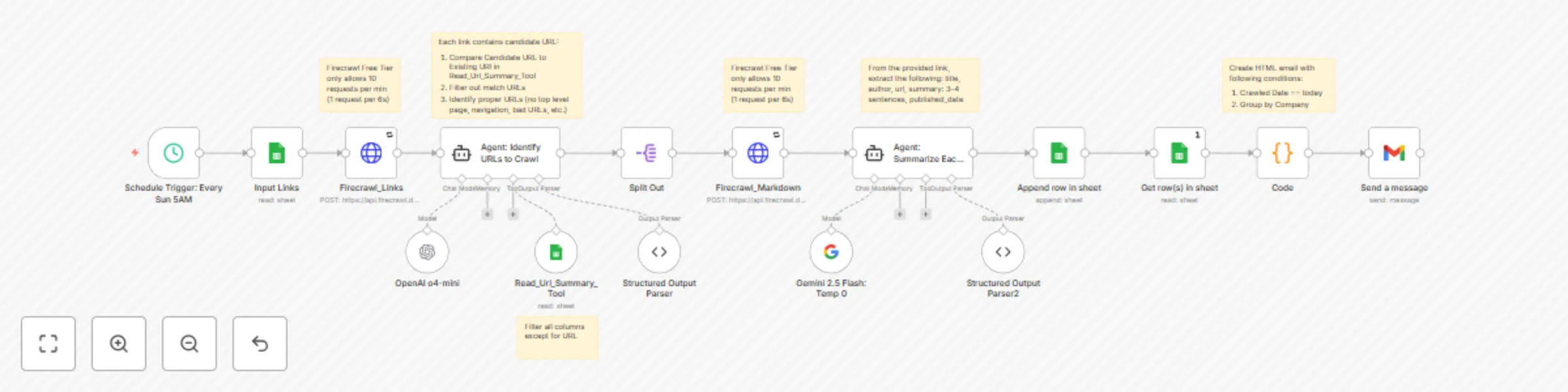
What does it do? The workflow reads a curated list of candidate URLs from Google Sheets, filters out duplicates and off‑topic pages with an AI agent, scrapes the surviving links, generates three‑sentence summaries, logs the results back to Sheets, and delivers a polished HTML digest to your inbox every week.
Why is it useful? Instead of manually opening competitor links, checking for relevance, copying highlights, and pasting them into reports, this automation does the grunt work for you. It turns scattered URLs into a searchable knowledge base and a ready‑to‑share email, freeing you to focus on insights and strategy—not housekeeping.
How does it work? A Sunday‑morning cron trigger kicks things off. The workflow pulls links from the Input Links tab, compares them to the existing Summary tab, and passes fresh candidates to an AI “bouncer” that keeps only blog posts, tutorials, news, and product updates. Firecrawl then scrapes each page; Gemini 2.5‑Flash and OpenAI condense the content into title, author, date, and summary. The structured data is appended to your Summary sheet and formatted into a company‑grouped HTML digest, which lands in your email before the workweek starts.
Set up steps
Tip: The Firecrawl Free tier limits you to ~10 requests/min. If you scale beyond that, raise the batching interval in both Firecrawl nodes or upgrade your Firecrawl plan.
This catalog entry is organized from the workflow JSON. The node-level section below shows the executable blocks available for review before importing the template.
| Workflow | Weekly competitor content digest with Gemini & OpenAI, Google Sheets, and Firecrawl |
|---|---|
| Complexity | advanced |
| Nodes | 22 |
| Categories | Market Research, AI Summarization |
| Author | Michael Yang |
| Published | 29 Jul 2025 |
Use the JSON export at /data/workflows/6637/6637.json as the source template for this automation.
Open n8n, import the downloaded JSON, and review each node before activating the workflow.
Replace placeholder credentials, API keys, webhook URLs, account IDs, and environment-specific values with your own settings.
Run the workflow manually or in a staging workspace, inspect node output, and confirm downstream systems receive the expected data.
Enable the workflow only after testing, then monitor executions, errors, and rate limits during the first production runs.
Review imported nodes carefully before activation. This catalog entry is intended to help you inspect the workflow structure, understand required services, and find related templates faster.
Node names, credentials, schedules, webhook paths, and external service limits may need adjustment for your workspace.
Who is this template for? This workflow is perfect for competitive‑intel analysts, product managers, content marketers, and anyone who tracks multiple company blogs or news sources. If you need a w...
Review the workflow JSON, configure any required credentials in n8n, and test the automation in a safe workspace before using it in production.
Yes. Use the block-by-block analysis and the downloadable JSON to inspect each node, then adjust credentials, prompts, schedules, filters, or destinations for your Market Research, AI Summarization use case.