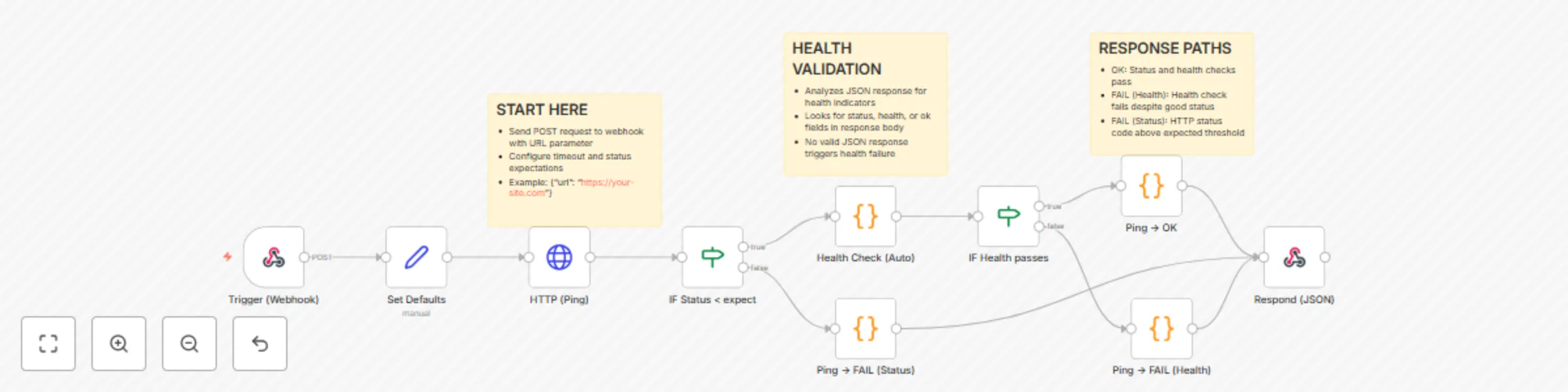
Website & API health monitoring system with HTTP status validation

Workflow preview

Workflow preview
100%
Website & API health monitoring system with HTTP status validation preview
Open on n8n.io

Important notice

This workflow is provided as-is. Please review and test before using in production.

1. Workflow Overview

Website & API Health Monitoring System with HTTP Status Validation How it works Performs HTTP health checks on websites and APIs with automatic health status validation Checks HTTP status codes and...

Best for

  • DevOps automation workflows
  • intermediate n8n builders looking for reusable templates

Tools used

n8n-nodes-base.webhook, n8n-nodes-base.set, n8n-nodes-base.httprequest, n8n-nodes-base.if, n8n-nodes-base.code, n8n-nodes-base.respondtowebhook, n8n-nodes-base.stickynote

Source and attribution

This workflow is cataloged by N8N Workflows and links back to its original n8n.io source page by Ibrahim Emre POLAT.

Original n8n.io source

1.1 Workflow description

Title
Website & API health monitoring system with HTTP status validation
Workflow name
Website & API health monitoring system with HTTP status validation

Website & API Health Monitoring System with HTTP Status Validation

How it works

  • Performs HTTP health checks on websites and APIs with automatic health status validation
  • Checks HTTP status codes and analyzes JSON responses for common health indicators
  • Returns detailed status information including response times and health status
  • Implements conditional logic to handle different response scenarios
  • Perfect for monitoring dashboards, alerts, and automated health checks

Set up steps

  • Deploy the workflow and activate it
  • Get the webhook URL from the trigger node
  • Configure your monitoring system to call the webhook endpoint
  • Send POST requests with target URLs for health monitoring
  • Receive JSON responses with health status, HTTP codes, and timestamps

Usage

  • Send POST requests to the webhook URL with target URL parameter
  • Optionally configure timeout and status expectations in request body
  • Receive JSON responses with health status, HTTP codes, and timestamps
  • Perfect for monitoring dashboards, alerts, and automated health checks
  • Use with external monitoring tools like Nagios, Zabbix, or custom dashboards
  • Set up scheduled monitoring calls for continuous health validation
  • Example request: Send POST with {"url": "https://your-site.com", "timeoutMs": 5000}
  • Success response returns: {"ok": true, "statusCode": 200, "healthStatus": "ok"}
  • Failure response returns: {"ok": false, "error": "Health check failed", "statusCode": 503}

Benefits

  • Proactive monitoring to identify issues before they impact users
  • Detailed diagnostics with comprehensive health data for troubleshooting
  • Integration ready - works with existing monitoring and alerting systems
  • Customizable timeout settings, expected status codes, and health indicators
  • Scalable solution to monitor multiple services with single workflow endpoint

Use Cases

  • E-commerce platforms: Monitor payment APIs, inventory systems, user authentication
  • Microservices: Health validation for distributed service architectures
  • API gateways: Endpoint monitoring with response time validation
  • Database connections: Track connectivity and performance metrics
  • Third-party integrations: Monitor external API dependencies and SLA compliance

Target Audience

  • DevOps Engineers implementing production monitoring
  • System Administrators managing server uptime
  • Site Reliability Engineers building monitoring systems
  • Development Teams tracking API health in staging/production
  • IT Support Teams for proactive issue detection

1.2 Logical Blocks

This catalog entry is organized from the workflow JSON. The node-level section below shows the executable blocks available for review before importing the template.

2. Block-by-Block Analysis

Block 1 - Trigger (Webhook)

Type / Role
n8n-nodes-base.webhook - webhook
Config choices
Version 2

Block 2 - Set Defaults

Type / Role
n8n-nodes-base.set - set
Config choices
Version 3

Block 3 - HTTP (Ping)

Type / Role
n8n-nodes-base.httpRequest - httpRequest
Config choices
Version 4

Block 4 - IF Status < expect

Type / Role
n8n-nodes-base.if - if
Config choices
Version 2

Block 5 - Health Check (Auto)

Type / Role
n8n-nodes-base.code - code
Config choices
Version 2

Block 6 - IF Health passes

Type / Role
n8n-nodes-base.if - if
Config choices
Version 2

Block 7 - Ping → OK

Type / Role
n8n-nodes-base.code - code
Config choices
Version 2

Block 8 - Ping → FAIL (Health)

Type / Role
n8n-nodes-base.code - code
Config choices
Version 2

Block 9 - Ping → FAIL (Status)

Type / Role
n8n-nodes-base.code - code
Config choices
Version 2

Block 10 - Respond (JSON)

Type / Role
n8n-nodes-base.respondToWebhook - respondToWebhook
Config choices
Version 1

Block 11 - Sticky Note

Type / Role
n8n-nodes-base.stickyNote - stickyNote
Config choices
Version 1

Block 12 - Sticky Note1

Type / Role
n8n-nodes-base.stickyNote - stickyNote
Config choices
Version 1

Block 13 - Sticky Note2

Type / Role
n8n-nodes-base.stickyNote - stickyNote
Config choices
Version 1

3. Summary Table

Workflow Website & API health monitoring system with HTTP status validation
Complexity intermediate
Nodes 13
Categories DevOps
Author Ibrahim Emre POLAT
Published 09 Sept 2025

4. Reproducing the Workflow from Scratch

  1. 1. Download the workflow JSON

    Use the JSON export at /data/workflows/8412/8412.json as the source template for this automation.

  2. 2. Import the template into n8n

    Open n8n, import the downloaded JSON, and review each node before activating the workflow.

  3. 3. Configure credentials and variables

    Replace placeholder credentials, API keys, webhook URLs, account IDs, and environment-specific values with your own settings.

  4. 4. Test with sample data

    Run the workflow manually or in a staging workspace, inspect node output, and confirm downstream systems receive the expected data.

  5. 5. Activate and monitor

    Enable the workflow only after testing, then monitor executions, errors, and rate limits during the first production runs.

5. General Notes & Resources

Review imported nodes carefully before activation. This catalog entry is intended to help you inspect the workflow structure, understand required services, and find related templates faster.

Node names, credentials, schedules, webhook paths, and external service limits may need adjustment for your workspace.

Frequently asked questions

What does Website & API health monitoring system with HTTP status validation do?

Website & API Health Monitoring System with HTTP Status Validation How it works Performs HTTP health checks on websites and APIs with automatic health status validation Checks HTTP status codes and...

What do I need before importing this workflow?

Review the workflow JSON, configure any required credentials in n8n, and test the automation in a safe workspace before using it in production.

Can I customize this workflow?

Yes. Use the block-by-block analysis and the downloadable JSON to inspect each node, then adjust credentials, prompts, schedules, filters, or destinations for your DevOps use case.