Webpage change detection & alerts with Google Suite and hash tracking

Workflow preview

Workflow preview
100%
Webpage change detection & alerts with Google Suite and hash tracking preview
Open on n8n.io

Important notice

This workflow is provided as-is. Please review and test before using in production.

1. Workflow Overview

This n8n template can monitor and detect changes to a webpage's contents and notify you only when a change occurs. Great to keep an eye on and track publicly available documents such as company TOS...

Best for

  • Market Research automation workflows
  • intermediate n8n builders looking for reusable templates

Tools used

n8n-nodes-base.scheduletrigger, n8n-nodes-base.crypto, n8n-nodes-base.gmail, n8n-nodes-base.markdown, n8n-nodes-base.set, n8n-nodes-base.removeduplicates, n8n-nodes-base.googlesheets, n8n-nodes-base.stickynote

Source and attribution

This workflow is cataloged by N8N Workflows and links back to its original n8n.io source page by Jimleuk.

Original n8n.io source

1.1 Workflow description

Title
Webpage change detection & alerts with Google Suite and hash tracking
Workflow name
Webpage change detection & alerts with Google Suite and hash tracking

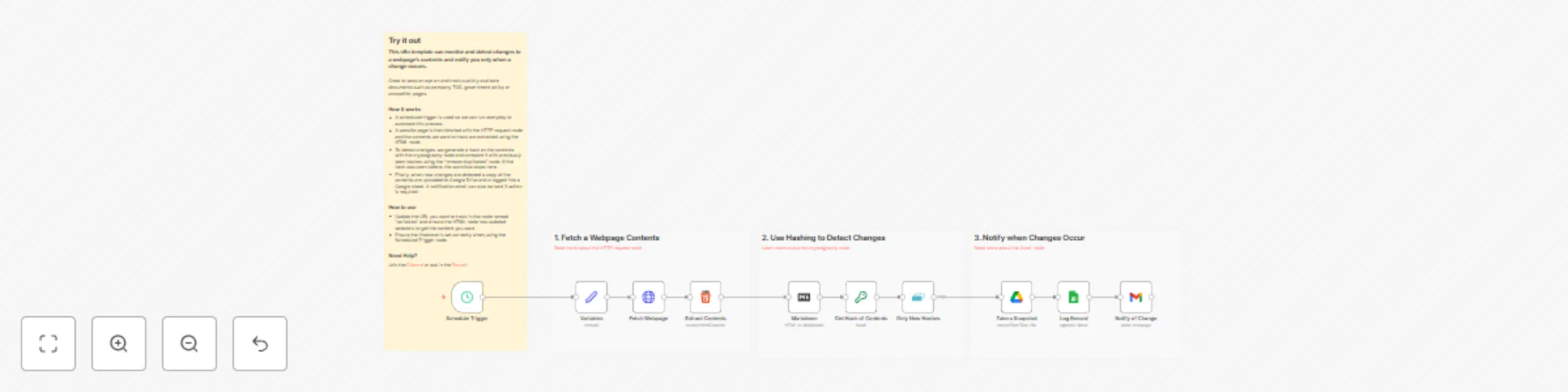
This n8n template can monitor and detect changes to a webpage's contents and notify you only when a change occurs.

Great to keep an eye on and track publicly available documents such as company TOS, government policy or competitor pages.

How it works

  • A scheduled trigger is used so we can run everyday to automate this process.
  • A website page is then fetched with the HTTP request node and the contents we want to track are extracted using the HTML node.
  • To detect changes, we generate a hash on the contents with the cryptography node and compare it with previously seen hashes using the "remove duplicates" node. If the hash was seen before, the workflow stops here.
  • Finally, when new changes are detected a copy of the contents are uploaded to Google Drive and a logged into a Google sheet. A notification email can also be sent if action is required.

How to use

  • Update the URL you want to track in the node named "variables" and ensure the HTML node has updated selectors to get the content you want.
  • Ensure the timezone is set correctly when using the Scheduled Trigger node.

Requirements

  • Google Sheets, Drive and Gmail for storing and notifying about changes.
  • Webpages should ideally be publicly accessible. If not, you may need to switch the HTTP request node with a webscraping service.

Customising this workflow

  • Not using Google? Easier swap to other Service providers such as Miscrosoft365.
  • Need more URLs? Try modifing the variables node to accept multiple URLs though the HTML node will need to be customised.

1.2 Logical Blocks

This catalog entry is organized from the workflow JSON. The node-level section below shows the executable blocks available for review before importing the template.

2. Block-by-Block Analysis

Block 1 - Schedule Trigger

Type / Role
n8n-nodes-base.scheduleTrigger - scheduleTrigger
Config choices
Version 1.2

Block 2 - Get Hash of Contents

Type / Role
n8n-nodes-base.crypto - crypto
Config choices
Version 1

Block 3 - Notify of Change

Type / Role
n8n-nodes-base.gmail - gmail
Config choices
Version 2.1

Block 4 - Markdown

Type / Role
n8n-nodes-base.markdown - markdown
Config choices
Version 1

Block 5 - Variables

Type / Role
n8n-nodes-base.set - set
Config choices
Version 3.4

Block 6 - Only New Hashes

Type / Role
n8n-nodes-base.removeDuplicates - removeDuplicates
Config choices
Version 2

Block 7 - Log Record

Type / Role
n8n-nodes-base.googleSheets - googleSheets
Config choices
Version 4.5

Block 8 - Sticky Note

Type / Role
n8n-nodes-base.stickyNote - stickyNote
Config choices
Version 1

Block 9 - Sticky Note1

Type / Role
n8n-nodes-base.stickyNote - stickyNote
Config choices
Version 1

Block 10 - Fetch Webpage

Type / Role
n8n-nodes-base.httpRequest - httpRequest
Config choices
Version 4.2

Block 11 - Extract Contents

Type / Role
n8n-nodes-base.html - html
Config choices
Version 1.2

Block 12 - Sticky Note2

Type / Role
n8n-nodes-base.stickyNote - stickyNote
Config choices
Version 1

Block 13 - Take a Snapshot

Type / Role
n8n-nodes-base.googleDrive - googleDrive
Config choices
Version 3

Block 14 - Sticky Note3

Type / Role
n8n-nodes-base.stickyNote - stickyNote
Config choices
Version 1

3. Summary Table

Workflow Webpage change detection & alerts with Google Suite and hash tracking
Complexity intermediate
Nodes 14
Categories Market Research
Author Jimleuk
Published 30 Mar 2025

4. Reproducing the Workflow from Scratch

  1. 1. Download the workflow JSON

    Use the JSON export at /data/workflows/3366/3366.json as the source template for this automation.

  2. 2. Import the template into n8n

    Open n8n, import the downloaded JSON, and review each node before activating the workflow.

  3. 3. Configure credentials and variables

    Replace placeholder credentials, API keys, webhook URLs, account IDs, and environment-specific values with your own settings.

  4. 4. Test with sample data

    Run the workflow manually or in a staging workspace, inspect node output, and confirm downstream systems receive the expected data.

  5. 5. Activate and monitor

    Enable the workflow only after testing, then monitor executions, errors, and rate limits during the first production runs.

5. General Notes & Resources

Review imported nodes carefully before activation. This catalog entry is intended to help you inspect the workflow structure, understand required services, and find related templates faster.

Node names, credentials, schedules, webhook paths, and external service limits may need adjustment for your workspace.

Frequently asked questions

What does Webpage change detection & alerts with Google Suite and hash tracking do?

This n8n template can monitor and detect changes to a webpage's contents and notify you only when a change occurs. Great to keep an eye on and track publicly available documents such as company TOS...

What do I need before importing this workflow?

Review the workflow JSON, configure any required credentials in n8n, and test the automation in a safe workspace before using it in production.

Can I customize this workflow?

Yes. Use the block-by-block analysis and the downloadable JSON to inspect each node, then adjust credentials, prompts, schedules, filters, or destinations for your Market Research use case.