Block 1 - Working Scraper Note
- Type / Role
- n8n-nodes-base.stickyNote - stickyNote
- Config choices
- Version 1


 Early Deal
This workflow is provided as-is. Please review and test before using in production.
A reliable, no frills web scraper that extracts content directly from websites using their sitemaps. Perfect for content audits, migrations, and research when you need straightforward HTML extracti...
n8n-nodes-base.stickynote, n8n-nodes-base.manualtrigger, n8n-nodes-base.set, n8n-nodes-base.httprequest, n8n-nodes-base.xml, n8n-nodes-base.splitout, n8n-nodes-base.limit, n8n-nodes-base.splitinbatches
This workflow is cataloged by N8N Workflows and links back to its original n8n.io source page by Wolf Bishop.
Original n8n.io sourceA reliable, no-frills web scraper that extracts content directly from websites using their sitemaps. Perfect for content audits, migrations, and research when you need straightforward HTML extraction without external dependencies.
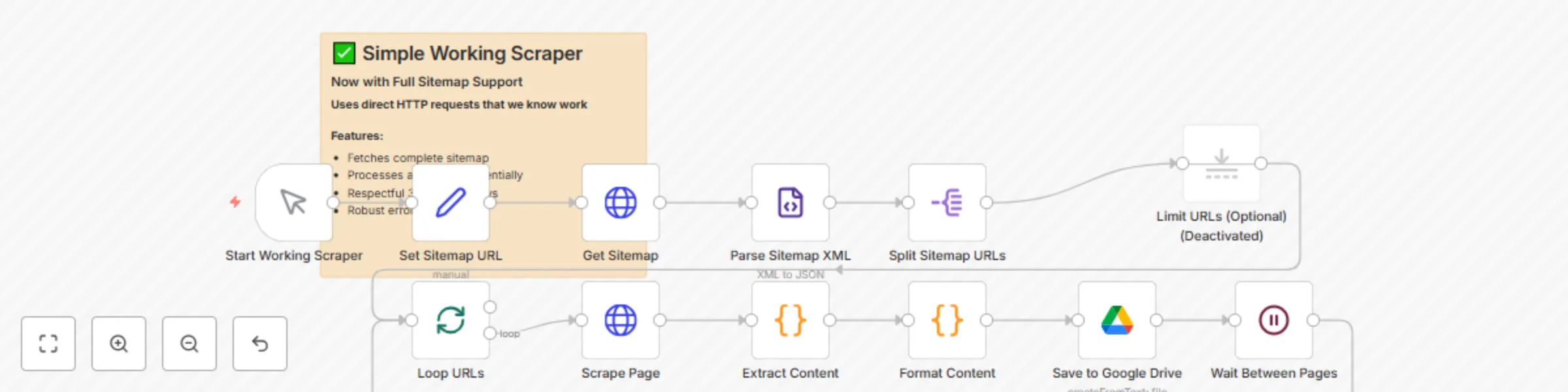
How It Works This streamlined workflow takes a practical approach to web scraping by leveraging XML sitemaps and direct HTTP requests. Here's how it delivers consistent results:
Direct Sitemap Processing: The workflow starts by fetching your target website's XML sitemap and parsing it to extract all available page URLs. This eliminates guesswork and ensures comprehensive coverage of the site's content structure.
Robust HTTP Scraping: Each page is scraped using direct HTTP requests with realistic browser headers that mimic legitimate web traffic. The scraper includes comprehensive error handling and timeout protection to handle various website configurations gracefully.
Intelligent Content Extraction: The workflow uses sophisticated JavaScript parsing to extract meaningful content from raw HTML. It automatically identifies page titles through multiple methods (title tags, Open Graph metadata, H1 headers) and converts HTML structure into readable text format.
Framework Detection: Built-in detection identifies whether sites use WordPress, Divi themes, or heavy JavaScript frameworks. This helps explain content extraction quality and provides valuable insights about the site's technical architecture.
Rich Metadata Collection: Each scraped page includes detailed metadata like word count, HTML size, response codes, and technical indicators. This data is formatted into comprehensive markdown files with YAML frontmatter for easy analysis and organization.
Respectful Rate Limiting: The workflow includes a 3-second delay between page requests to respect server resources and avoid overwhelming target websites. The processing is sequential and controlled to maintain ethical scraping practices.
Detailed Success Reporting: Every scraped page generates a report showing extraction success, potential issues (like JavaScript dependencies), and technical details about the site's structure and framework.
Setup Steps
Configure Google Drive Integration
Connect your Google Drive account in the "Save to Google Drive" node Replace YOUR_GOOGLE_DRIVE_CREDENTIAL_ID with your actual Google Drive credential ID Create a dedicated folder for your scraped content in Google Drive Copy the folder ID from the Google Drive URL (the long string after /folders/) Replace YOUR_GOOGLE_DRIVE_FOLDER_ID_HERE with your actual folder ID in both the folderId field and cachedResultUrl Update YOUR_FOLDER_NAME_HERE with your folder's actual name
Set Your Target Website
In the "Set Sitemap URL" node, replace https://yourwebsitehere.com/page-sitemap.xml with your target website's sitemap URL Common sitemap locations include /sitemap.xml, /page-sitemap.xml, or /sitemap_index.xml Tip: Not sure where your sitemap is? Use a free online tool like https://seomator.com/sitemap-finder Verify the sitemap URL loads correctly in your browser before running the workflow
Update Workflow IDs (Automatic)
When you import this workflow, n8n will automatically generate new IDs for YOUR_WORKFLOW_ID_HERE, YOUR_VERSION_ID_HERE, YOUR_INSTANCE_ID_HERE, and YOUR_WEBHOOK_ID_HERE No manual changes needed for these placeholders
Adjust Processing Limits (Optional)
The "Limit URLs (Optional)" node is currently disabled for full site scraping Enable this node and set a smaller number (like 5-10) for initial testing For large websites, consider running in batches to manage processing time and storage
Customize Rate Limiting (Optional)
The "Wait Between Pages" node is set to 3 seconds by default Increase the delay for more respectful scraping of busy sites Decrease only if you have permission and the target site can handle faster requests
Test Your Configuration
Enable the "Limit URLs (Optional)" node and set it to 3-5 pages for testing Click "Test workflow" to verify the setup works correctly Check your Google Drive folder to confirm files are being created with proper content Review the generated markdown files to assess content extraction quality
Run Full Extraction
Disable the "Limit URLs (Optional)" node for complete site scraping Execute the workflow and monitor the execution log for any errors Large websites may take considerable time to process completely (plan for several hours for sites with hundreds of pages)
Review Results
Each generated file includes technical metadata to help you assess extraction quality Look for indicators like "Limited Content" warnings for JavaScript-heavy pages Files include word counts and framework detection to help you understand the site's structure
Framework Compatibility: This scraper is specifically designed to work well with WordPress sites, Divi themes, and many JavaScript-heavy frameworks. The intelligent content extraction handles dynamic content effectively and provides detailed feedback about framework detection. While some single-page applications (SPAs) that render entirely through JavaScript may have limited content extraction, most modern websites including those built with popular CMS platforms will work excellently with this scraper. Important Notes: Always ensure you have permission to scrape your target website and respect their robots.txt guidelines. The workflow includes respectful delays and error handling, but monitor your usage to maintain ethical scraping practices.RetryClaude can make mistakes. Please double-check responses.
This catalog entry is organized from the workflow JSON. The node-level section below shows the executable blocks available for review before importing the template.
| Workflow | Web scraper: extract website content from sitemaps to Google Drive |
|---|---|
| Complexity | intermediate |
| Nodes | 13 |
| Categories | Market Research, Multimodal AI |
| Author | Wolf Bishop |
| Published | 08 Aug 2025 |
Use the JSON export at /data/workflows/7186/7186.json as the source template for this automation.
Open n8n, import the downloaded JSON, and review each node before activating the workflow.
Replace placeholder credentials, API keys, webhook URLs, account IDs, and environment-specific values with your own settings.
Run the workflow manually or in a staging workspace, inspect node output, and confirm downstream systems receive the expected data.
Enable the workflow only after testing, then monitor executions, errors, and rate limits during the first production runs.
Review imported nodes carefully before activation. This catalog entry is intended to help you inspect the workflow structure, understand required services, and find related templates faster.
Node names, credentials, schedules, webhook paths, and external service limits may need adjustment for your workspace.
A reliable, no frills web scraper that extracts content directly from websites using their sitemaps. Perfect for content audits, migrations, and research when you need straightforward HTML extracti...
Review the workflow JSON, configure any required credentials in n8n, and test the automation in a safe workspace before using it in production.
Yes. Use the block-by-block analysis and the downloadable JSON to inspect each node, then adjust credentials, prompts, schedules, filters, or destinations for your Market Research, Multimodal AI use case.