Web crawler: Convert websites to AI-ready markdown in Google Sheets

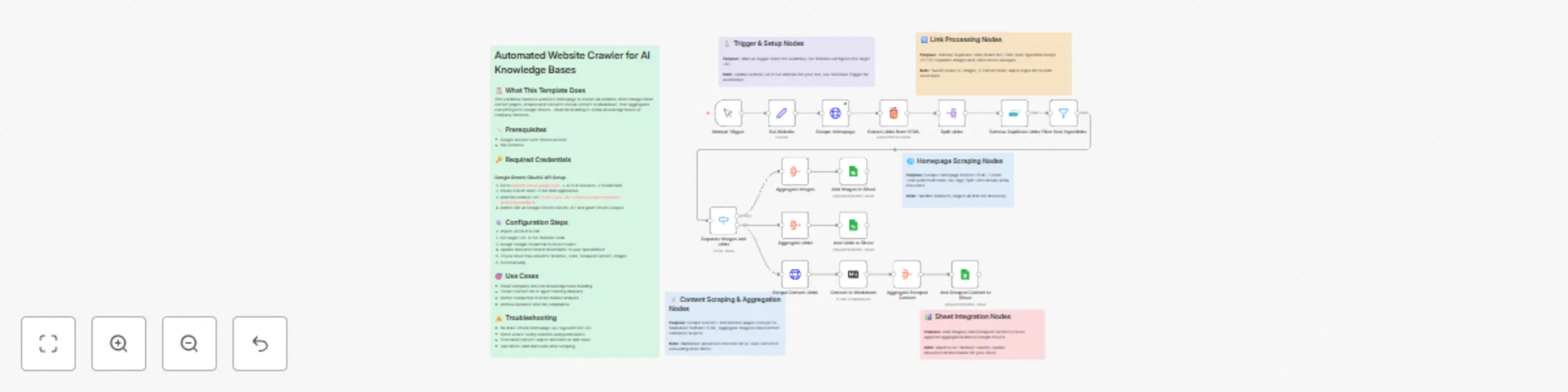
Workflow preview

Workflow preview
100%
Web crawler: Convert websites to AI-ready markdown in Google Sheets preview
Open on n8n.io

Important notice

This workflow is provided as-is. Please review and test before using in production.

1. Workflow Overview

Transform any website into a structured knowledge repository with this intelligent crawler that extracts hyperlinks from the homepage, intelligently filters images and content pages, and aggregates...

Best for

  • Document Extraction automation workflows
  • AI RAG automation workflows
  • advanced n8n builders looking for reusable templates

Tools used

n8n-nodes-base.stickynote, n8n-nodes-base.set, n8n-nodes-base.manualtrigger, n8n-nodes-base.httprequest, n8n-nodes-base.html, n8n-nodes-base.splitout, n8n-nodes-base.removeduplicates, n8n-nodes-base.filter

Source and attribution

This workflow is cataloged by N8N Workflows and links back to its original n8n.io source page by Daniel Nkencho.

Original n8n.io source

1.1 Workflow description

Title
Web crawler: Convert websites to AI-ready markdown in Google Sheets
Workflow name
Web crawler: Convert websites to AI-ready markdown in Google Sheets

Transform any website into a structured knowledge repository with this intelligent crawler that extracts hyperlinks from the homepage, intelligently filters images and content pages, and aggregates full Markdown-formatted content—perfect for fueling AI agents or building comprehensive company dossiers without manual effort.

📋 What This Template Does

This advanced workflow acts as a lightweight web crawler: it scrapes the homepage to discover all internal links (mimicking a sitemap extraction), deduplicates and validates them, separates image assets from textual pages, then fetches and converts non-image page content to clean Markdown. Results are seamlessly appended to Google Sheets for easy analysis, export, or integration into vector databases.

  • Automatically discovers and processes subpage links from the homepage
  • Filters out duplicates and non-HTTP links for efficient crawling
  • Converts scraped content to Markdown for AI-ready formatting
  • Categorizes and stores images, links, and full content in a single sheet row per site

🔧 Prerequisites

  • Google account with Sheets access for data storage
  • n8n instance (cloud or self-hosted)
  • Basic understanding of URLs and web links

🔑 Required Credentials

Google Sheets OAuth2 API Setup

  1. Go to console.cloud.google.com → APIs & Services → Credentials
  2. Click "Create Credentials" → Select "OAuth client ID" → Choose "Web application"
  3. Add authorized redirect URIs: https://your-n8n-instance.com/rest/oauth2-credential/callback (replace with your n8n URL)
  4. Download the client ID and secret, then add to n8n as "Google Sheets OAuth2 API" credential type
  5. During setup, grant access to Google Sheets scopes (e.g., spreadsheets) and test the connection by listing a sheet

⚙️ Configuration Steps

  1. Import the workflow JSON into your n8n instance
  2. In the "Set Website" node, update the website_url value to your target site (e.g., https://example.com)
  3. Assign your Google Sheets credential to the three "Add ... to Sheet" nodes
  4. Update the documentId and sheetName in those nodes to your target spreadsheet ID and sheet name/ID
  5. Ensure your sheet has columns: "Website", "Links", "Scraped Content", "Images"
  6. Activate the workflow and trigger manually to test scraping

🎯 Use Cases

  • Knowledge base creation: Crawl a company's site to aggregate all content into Sheets, then export to Notion or a vector DB for internal wikis
  • AI agent training: Extract structured Markdown from industry sites to fine-tune LLMs on domain-specific data like legal docs or tech blogs
  • Competitor intelligence: Build dossiers by crawling rival websites, separating assets and text for SEO audits or market analysis
  • Content archiving: Preserve dynamic sites (e.g., news portals) as static knowledge dumps for compliance or historical research

⚠️ Troubleshooting

  • No links extracted: Verify the homepage has tags; test with a simple site like example.com and check HTTP response in executions
  • Sheet update fails: Confirm column names match exactly (case-sensitive) and credential has edit permissions; try a new blank sheet
  • Content truncated: Google Sheets limits cells to ~50k chars—adjust the .slice(0, 50000) in "Add Scraped Content to Sheet" or split into multiple rows
  • Rate limiting errors: Add a "Wait" node after "Scrape Links" with 1-2s delay if the site blocks rapid requests

1.2 Logical Blocks

This catalog entry is organized from the workflow JSON. The node-level section below shows the executable blocks available for review before importing the template.

2. Block-by-Block Analysis

Block 1 - Overview Note

Type / Role
n8n-nodes-base.stickyNote - stickyNote
Config choices
Version 1

Block 2 - Note: Trigger and Setup

Type / Role
n8n-nodes-base.stickyNote - stickyNote
Config choices
Version 1

Block 3 - Set Website

Type / Role
n8n-nodes-base.set - set
Config choices
Version 3.4

Block 4 - Manual Trigger

Type / Role
n8n-nodes-base.manualTrigger - manualTrigger
Config choices
Version 1

Block 5 - Scrape Homepage

Type / Role
n8n-nodes-base.httpRequest - httpRequest
Config choices
Version 4.2

Block 6 - Note: Homepage Scraping

Type / Role
n8n-nodes-base.stickyNote - stickyNote
Config choices
Version 1

Block 7 - Extract Links from HTML

Type / Role
n8n-nodes-base.html - html
Config choices
Version 1.2

Block 8 - Split Links

Type / Role
n8n-nodes-base.splitOut - splitOut
Config choices
Version 1

Block 9 - Remove Duplicate Links

Type / Role
n8n-nodes-base.removeDuplicates - removeDuplicates
Config choices
Version 2

Block 10 - Filter Real Hyperlinks

Type / Role
n8n-nodes-base.filter - filter
Config choices
Version 2.2

Block 11 - Note: Link Processing

Type / Role
n8n-nodes-base.stickyNote - stickyNote
Config choices
Version 1

Block 12 - Separate Images and Links

Type / Role
n8n-nodes-base.switch - switch
Config choices
Version 3.2

Block 13 - Aggregate Images

Type / Role
n8n-nodes-base.aggregate - aggregate
Config choices
Version 1

Block 14 - Aggregate Links

Type / Role
n8n-nodes-base.aggregate - aggregate
Config choices
Version 1

Block 15 - Scrape Content Links

Type / Role
n8n-nodes-base.httpRequest - httpRequest
Config choices
Version 4.2

Block 16 - Note: Content Scraping

Type / Role
n8n-nodes-base.stickyNote - stickyNote
Config choices
Version 1

Block 17 - Convert to Markdown

Type / Role
n8n-nodes-base.markdown - markdown
Config choices
Version 1

Block 18 - Aggregate Scraped Content

Type / Role
n8n-nodes-base.aggregate - aggregate
Config choices
Version 1

Block 19 - Add Images to Sheet

Type / Role
n8n-nodes-base.googleSheets - googleSheets
Config choices
Version 4.7

Block 20 - Add Links to Sheet

Type / Role
n8n-nodes-base.googleSheets - googleSheets
Config choices
Version 4.7

Block 21 - Add Scraped Content to Sheet

Type / Role
n8n-nodes-base.googleSheets - googleSheets
Config choices
Version 4.7

Block 22 - Note: Sheet Integration

Type / Role
n8n-nodes-base.stickyNote - stickyNote
Config choices
Version 1

3. Summary Table

Workflow Web crawler: Convert websites to AI-ready markdown in Google Sheets
Complexity advanced
Nodes 22
Categories Document Extraction, AI RAG
Author Daniel Nkencho
Published 13 Oct 2025

4. Reproducing the Workflow from Scratch

  1. 1. Download the workflow JSON

    Use the JSON export at /data/workflows/9594/9594.json as the source template for this automation.

  2. 2. Import the template into n8n

    Open n8n, import the downloaded JSON, and review each node before activating the workflow.

  3. 3. Configure credentials and variables

    Replace placeholder credentials, API keys, webhook URLs, account IDs, and environment-specific values with your own settings.

  4. 4. Test with sample data

    Run the workflow manually or in a staging workspace, inspect node output, and confirm downstream systems receive the expected data.

  5. 5. Activate and monitor

    Enable the workflow only after testing, then monitor executions, errors, and rate limits during the first production runs.

5. General Notes & Resources

Review imported nodes carefully before activation. This catalog entry is intended to help you inspect the workflow structure, understand required services, and find related templates faster.

Node names, credentials, schedules, webhook paths, and external service limits may need adjustment for your workspace.

Frequently asked questions

What does Web crawler: Convert websites to AI-ready markdown in Google Sheets do?

Transform any website into a structured knowledge repository with this intelligent crawler that extracts hyperlinks from the homepage, intelligently filters images and content pages, and aggregates...

What do I need before importing this workflow?

Review the workflow JSON, configure any required credentials in n8n, and test the automation in a safe workspace before using it in production.

Can I customize this workflow?

Yes. Use the block-by-block analysis and the downloadable JSON to inspect each node, then adjust credentials, prompts, schedules, filters, or destinations for your Document Extraction, AI RAG use case.