Block 1 - Google Sheets Trigger
- Type / Role
- n8n-nodes-base.googleSheetsTrigger - googleSheetsTrigger
- Config choices
- Version 1


 Early Deal
This workflow is provided as-is. Please review and test before using in production.
What problem does this workflow solve? Logistics teams spend hours manually validating shipment data, checking compliance, generating freight documents, and emailing stakeholders. Errors in HSN c...
n8n-nodes-base.googlesheetstrigger, n8n-nodes-base.splitinbatches, @n8n/n8n-nodes-langchain.lmchatopenai, @n8n/n8n-nodes-langchain.outputparserstructured, n8n-nodes-base.gmail, n8n-nodes-base.extractfromfile, n8n-nodes-base.httprequest, n8n-nodes-base.code
This workflow is cataloged by N8N Workflows and links back to its original n8n.io source page by InfyOm Technologies.
Original n8n.io sourceLogistics teams spend hours manually validating shipment data, checking compliance, generating freight documents, and emailing stakeholders. Errors in HSN codes, weights, or carrier details can lead to shipment delays, penalties, and rework.
This workflow automates the entire shipment validation and documentation process using AI, ensuring compliance, reducing errors, and generating professional freight documents automatically.
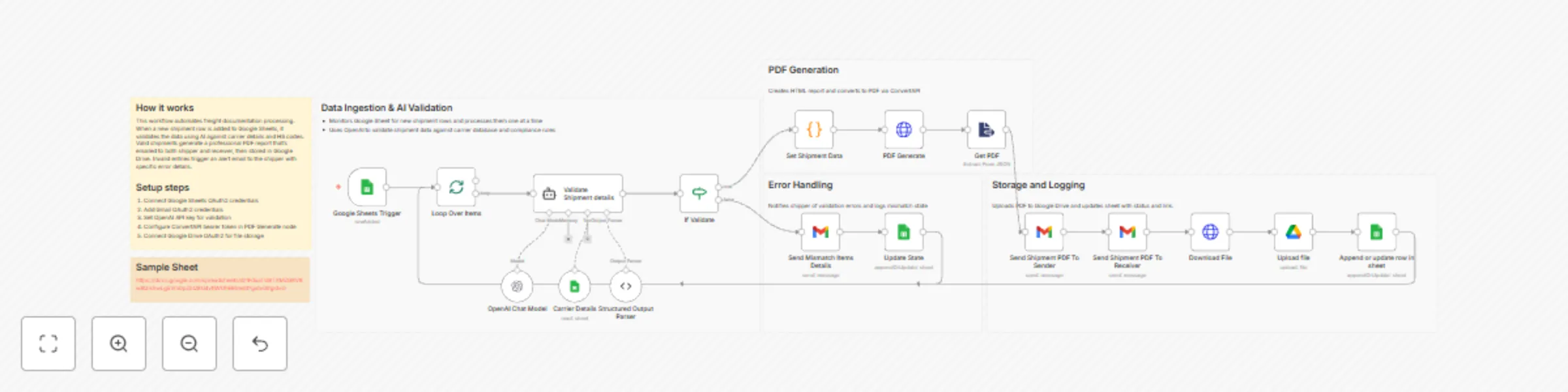
The workflow starts when new shipment data is added to a shared Google Sheet. Each row represents a shipment with details like:
An AI agent (OpenAI) validates each shipment against defined rules:
The AI returns a structured result:
valid: true/falsereason: Explanation of the first detected issueIf the shipment is invalid:
If the shipment is valid:
A dynamic HTML shipment report is created.
The HTML is converted into a professional PDF using ConvertAPI.
The PDF includes:
The generated shipment PDF is automatically emailed to:
Each email includes shipment reference details and a download link.
The shipment PDF is uploaded to a dedicated Google Drive folder.
Google Sheets is updated with:
shipment_pdf_dispatch)This creates a complete audit trail for compliance and tracking.
This workflow is ideal for:
If your shipping process involves repetitive checks, document creation, and manual emails—this automation can save hours per shipment.
This catalog entry is organized from the workflow JSON. The node-level section below shows the executable blocks available for review before importing the template.
| Workflow | Validate shipments & generate freight documents with GPT-4o, Google Sheets & Drive |
|---|---|
| Complexity | advanced |
| Nodes | 23 |
| Categories | Document Extraction, AI Summarization |
| Author | InfyOm Technologies |
| Published | 18 Dec 2025 |
Use the JSON export at /data/workflows/11913/11913.json as the source template for this automation.
Open n8n, import the downloaded JSON, and review each node before activating the workflow.
Replace placeholder credentials, API keys, webhook URLs, account IDs, and environment-specific values with your own settings.
Run the workflow manually or in a staging workspace, inspect node output, and confirm downstream systems receive the expected data.
Enable the workflow only after testing, then monitor executions, errors, and rate limits during the first production runs.
Review imported nodes carefully before activation. This catalog entry is intended to help you inspect the workflow structure, understand required services, and find related templates faster.
Node names, credentials, schedules, webhook paths, and external service limits may need adjustment for your workspace.
What problem does this workflow solve? Logistics teams spend hours manually validating shipment data, checking compliance, generating freight documents, and emailing stakeholders. Errors in HSN c...
Review the workflow JSON, configure any required credentials in n8n, and test the automation in a safe workspace before using it in production.
Yes. Use the block-by-block analysis and the downloadable JSON to inspect each node, then adjust credentials, prompts, schedules, filters, or destinations for your Document Extraction, AI Summarization use case.