Validate QR tickets in real time with Google Forms and Sheets

Workflow preview

Workflow preview
100%
Validate QR tickets in real time with Google Forms and Sheets preview
Open on n8n.io

1. Workflow Overview

Automated QR Ticket Scanner & Validator This workflow is the perfect companion to the "Automated e Ticket PDF Generator". It acts as a lightweight, automated check in system for events. By pairing ...

Best for

  • Miscellaneous automation workflows
  • intermediate n8n builders looking for reusable templates

Tools used

n8n-nodes-base.stickynote, n8n-nodes-base.googlesheetstrigger, n8n-nodes-base.googlesheets, n8n-nodes-base.switch, n8n-nodes-base.set, n8n-nodes-base.code

Source and attribution

This workflow is cataloged by N8N Workflows and links back to its original n8n.io source page by Scale On Fajar.

Original n8n.io source

1.1 Workflow description

Title
Validate QR tickets in real time with Google Forms and Sheets
Workflow name
Validate QR tickets in real time with Google Forms and Sheets

Automated QR Ticket Scanner & Validator

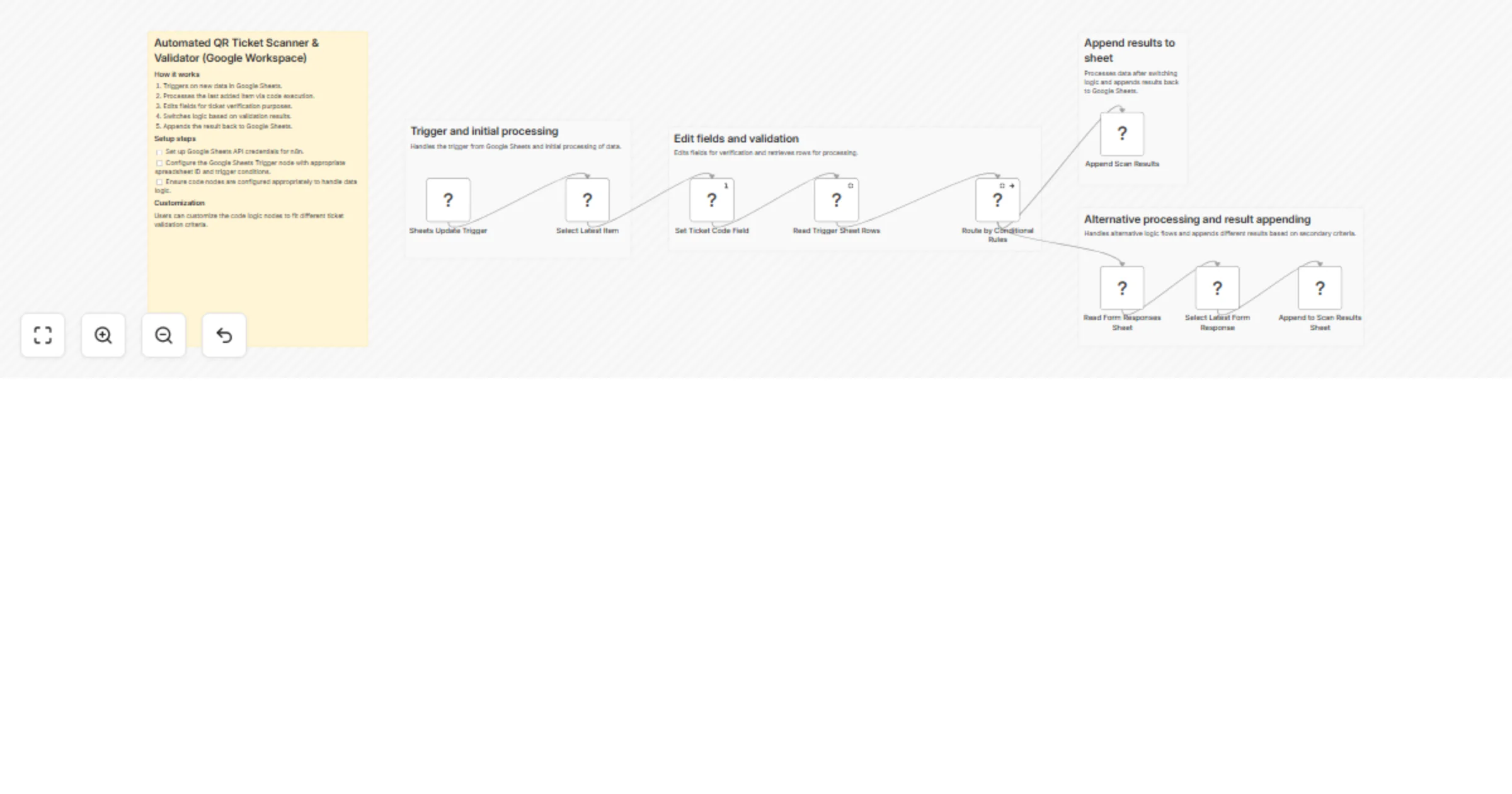
This workflow is the perfect companion to the "Automated e-Ticket PDF Generator". It acts as a lightweight, automated check-in system for events. By pairing a simple Google Form with a mobile scanning app, it validates QR codes against your master database in real-time and logs the attendance status.

How it works

  1. Trigger: The workflow triggers instantly when a new response is submitted to a Google Form (which acts as your QR code scanner input).
  2. Data Extraction: It isolates the scanned QR code string from the new Google Sheet row.
  3. Database Lookup: It cross-references the scanned code with your Master Participant Database in Google Sheets.
  4. Validation (Switch): A logic node checks if the scanned ticket exists and matches the database.
  5. Log Results: - VALID: If matched, it logs the participant's details into a "Scan Results" sheet with a "VALID" status.
  • INVALID: If not matched, it logs the scanned code with an "INVALID" status, alerting you to an unregistered ticket.

Field Setup (Pro-Tip)

To make this work seamlessly at an actual event venue:

  1. Create a Google Form: Make a simple form with one short-answer text input for the QR code.
  2. Use "Scan to Web" App: Install the Scan to Web app (or a similar keyboard scanner app) on an Android smartphone.
  3. Scan Away: Open your Google Form link on the phone, tap the text input field, and use the app to scan the attendee's physical or digital QR code. The app will automatically type the code and submit the form, triggering this n8n workflow instantly!

Requirements

  • A Google Workspace account (Google Forms & Google Sheets).
  • A basic understanding of mapping Google Sheets columns in n8n.
  • An Android smartphone with the "Scan to Web" app installed for field scanning.

1.2 Logical Blocks

This catalog entry is organized from the workflow JSON. The node-level section below shows the executable blocks available for review before importing the template.

2. Block-by-Block Analysis

Block 1 - Sticky Note

Type / Role
n8n-nodes-base.stickyNote - stickyNote
Config choices
Version 1

Block 2 - Sticky Note1

Type / Role
n8n-nodes-base.stickyNote - stickyNote
Config choices
Version 1

Block 3 - Sticky Note2

Type / Role
n8n-nodes-base.stickyNote - stickyNote
Config choices
Version 1

Block 4 - Sticky Note3

Type / Role
n8n-nodes-base.stickyNote - stickyNote
Config choices
Version 1

Block 5 - Sticky Note4

Type / Role
n8n-nodes-base.stickyNote - stickyNote
Config choices
Version 1

Block 6 - Sheets Update Trigger

Type / Role
n8n-nodes-base.googleSheetsTrigger - googleSheetsTrigger
Config choices
Version 1

Block 7 - Read Trigger Sheet Rows

Type / Role
n8n-nodes-base.googleSheets - googleSheets
Config choices
Version 4.6

Block 8 - Append Scan Results

Type / Role
n8n-nodes-base.googleSheets - googleSheets
Config choices
Version 4.6

Block 9 - Append to Scan Results Sheet

Type / Role
n8n-nodes-base.googleSheets - googleSheets
Config choices
Version 4.6

Block 10 - Route by Conditional Rules

Type / Role
n8n-nodes-base.switch - switch
Config choices
Version 3.2

Block 11 - Set Ticket Code Field

Type / Role
n8n-nodes-base.set - set
Config choices
Version 3.4

Block 12 - Select Latest Item

Type / Role
n8n-nodes-base.code - code
Config choices
Version 2

Block 13 - Read Form Responses Sheet

Type / Role
n8n-nodes-base.googleSheets - googleSheets
Config choices
Version 4.6

Block 14 - Select Latest Form Response

Type / Role
n8n-nodes-base.code - code
Config choices
Version 2

3. Summary Table

Workflow Validate QR tickets in real time with Google Forms and Sheets
Complexity intermediate
Nodes 14
Categories Miscellaneous
Author Scale On Fajar
Published 29 Mar 2026

4. Reproducing the Workflow from Scratch

  1. 1. Download the workflow JSON

    Use the JSON export at /data/workflows/14431/14431.json as the source template for this automation.

  2. 2. Import the template into n8n

    Open n8n, import the downloaded JSON, and review each node before activating the workflow.

  3. 3. Configure credentials and variables

    Replace placeholder credentials, API keys, webhook URLs, account IDs, and environment-specific values with your own settings.

  4. 4. Test with sample data

    Run the workflow manually or in a staging workspace, inspect node output, and confirm downstream systems receive the expected data.

  5. 5. Activate and monitor

    Enable the workflow only after testing, then monitor executions, errors, and rate limits during the first production runs.

5. General Notes & Resources

Review imported nodes carefully before activation. This catalog entry is intended to help you inspect the workflow structure, understand required services, and find related templates faster.

Node names, credentials, schedules, webhook paths, and external service limits may need adjustment for your workspace.

Frequently asked questions

What does Validate QR tickets in real time with Google Forms and Sheets do?

Automated QR Ticket Scanner & Validator This workflow is the perfect companion to the "Automated e Ticket PDF Generator". It acts as a lightweight, automated check in system for events. By pairing ...

What do I need before importing this workflow?

Review the workflow JSON, configure any required credentials in n8n, and test the automation in a safe workspace before using it in production.

Can I customize this workflow?

Yes. Use the block-by-block analysis and the downloadable JSON to inspect each node, then adjust credentials, prompts, schedules, filters, or destinations for your Miscellaneous use case.