Block 1 - GitHub PR Webhook
- Type / Role
- n8n-nodes-base.webhook - webhook
- Config choices
- Version 1


 Early Deal
This workflow is provided as-is. Please review and test before using in production.
GitHub PR Deep Link & Routing Validator (ExecuteCommand + GitHub Comment) Quick Start TL;DR 1. Import the workflow JSON into n8n (Cloud or self hosted). 2. Create a GitHub Personal Access Token ...
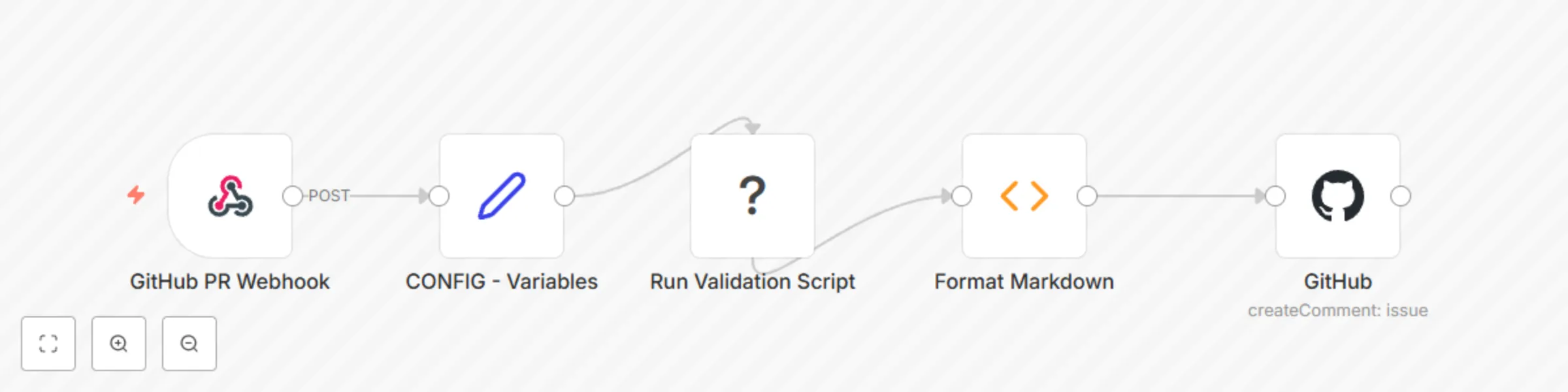
n8n-nodes-base.webhook, n8n-nodes-base.set, n8n-nodes-base.executecommand, n8n-nodes-base.function, n8n-nodes-base.github
This workflow is cataloged by N8N Workflows and links back to its original n8n.io source page by WeblineIndia.
Original n8n.io sourcerepo:public_repo (or repo) scope and add it to n8n credentials. manifestPath – path to your deep-link manifest (AndroidManifest.xml, Info.plist, etc.).scriptPath – helper script that boots the emulator & checks each route.This workflow delivers an automated, CI-friendly smoke-test of every deep link defined in your mobile app. On each push to an open GitHub PR, it:
| Requirement | Notes |
|---|---|
| n8n Cloud / CE | Works everywhere; self-hosted users need Docker with Android / Xcode if validating on-runner. |
| GitHub Personal Access Token | Used for posting PR comments. |
| Emulator-capable runner | Local dev hardware or CI image that can run adb / xcrun simctl. |
pull_request → synchronize (i.e., each push to the PR branch). CONFIG - Variables) centralises repo URL, manifest path, script path, timeout, and comment mode. Settings → Import workflow and paste the JSON above. scripts/validate_deeplinks.sh into your repo (see sample below). validate_deeplinks.sh#!/usr/bin/env bash
set -e
while getopts "m:" opt; do
case $opt in
m) MANIFEST="$OPTARG" ;;
esac
done
echo "⇨ Parsing deep links from $MANIFEST"
# rudimentary parser—replace with something smarter for XML/Plist
grep -oE 'http[s]?://[^" ]+' "$MANIFEST" | while read -r uri; do
if adb shell am start -W -a android.intent.action.VIEW -d "$uri" >/dev/null 2>&1; then
echo "$uri,OK"
else
echo "$uri,FAIL"
fi
done
commentMode to replace-latest and update the GitHub node to search for the newest bot comment before editing. | Add-On | Idea |
|---|---|
| Multi-platform sweep | Loop over Android + iOS manifests and aggregate results. |
| Slack/Teams alert | Push failures into your chat of choice via Incoming-Webhook node. |
| Parallel device grid | Trigger multiple emulators (API 19 → 34) to catch OS-specific issues. |
| Issue | Possible Cause | Solution |
|---|---|---|
| Workflow hangs at “Execute – Validate” | Emulator image isn’t installed | Pre-install SDK & start the emulator in a startup script |
| PR comment missing | Token lacks repo scope |
Regenerate PAT with proper scopes |
| All links marked FAIL | Manifest path incorrect | Update manifestPath in CONFIG |
| Command node hits timeout | Huge manifest / slow CI | Increase timeoutSecs in CONFIG |
Stuck or want to extend this with multi-platform coverage? WeblineIndia’s automation experts can help. Drop us a note to fine-tune or scale out your n8n workflows — fast.
This catalog entry is organized from the workflow JSON. The node-level section below shows the executable blocks available for review before importing the template.
| Workflow | Validate mobile app deep links in GitHub PRs with automated testing |
|---|---|
| Complexity | intermediate |
| Nodes | 5 |
| Categories | DevOps |
| Author | WeblineIndia |
| Published | 07 Aug 2025 |
Use the JSON export at /data/workflows/7124/7124.json as the source template for this automation.
Open n8n, import the downloaded JSON, and review each node before activating the workflow.
Replace placeholder credentials, API keys, webhook URLs, account IDs, and environment-specific values with your own settings.
Run the workflow manually or in a staging workspace, inspect node output, and confirm downstream systems receive the expected data.
Enable the workflow only after testing, then monitor executions, errors, and rate limits during the first production runs.
Review imported nodes carefully before activation. This catalog entry is intended to help you inspect the workflow structure, understand required services, and find related templates faster.
Node names, credentials, schedules, webhook paths, and external service limits may need adjustment for your workspace.
GitHub PR Deep Link & Routing Validator (ExecuteCommand + GitHub Comment) Quick Start TL;DR 1. Import the workflow JSON into n8n (Cloud or self hosted). 2. Create a GitHub Personal Access Token ...
Review the workflow JSON, configure any required credentials in n8n, and test the automation in a safe workspace before using it in production.
Yes. Use the block-by-block analysis and the downloadable JSON to inspect each node, then adjust credentials, prompts, schedules, filters, or destinations for your DevOps use case.