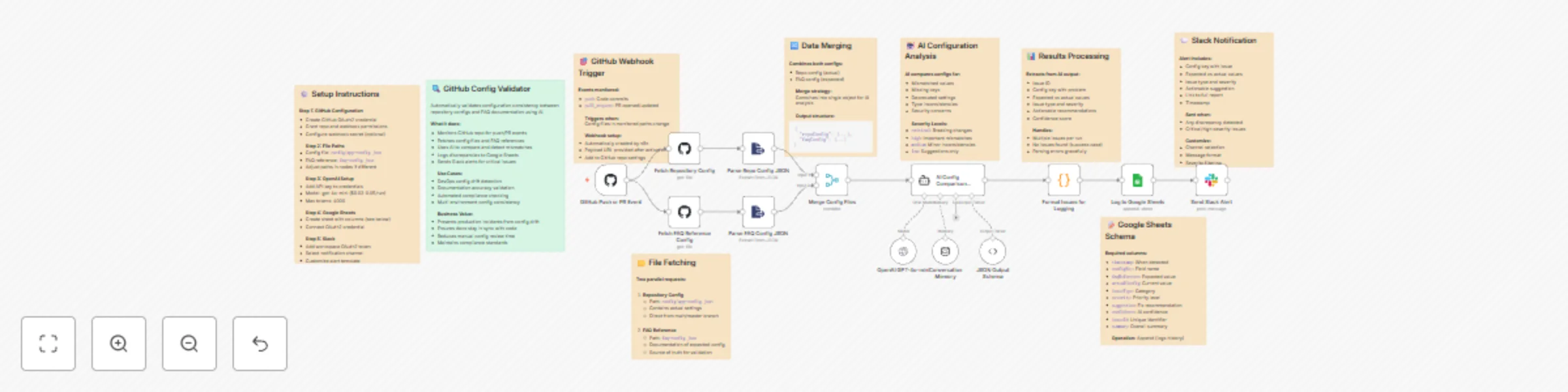
Validate GitHub configurations with GPT-4o-mini and log issues to sheets and Slack

Workflow preview

Workflow preview
100%
Validate GitHub configurations with GPT-4o-mini and log issues to sheets and Slack preview
Open on n8n.io

Important notice

This workflow is provided as-is. Please review and test before using in production.

1. Workflow Overview

Description Ensure your GitHub repositories stay configuration accurate and documentation compliant with this intelligent AI powered validation workflow. This automation monitors repository u...

Best for

  • DevOps automation workflows
  • AI Summarization automation workflows
  • advanced n8n builders looking for reusable templates

Tools used

n8n-nodes-base.stickynote, n8n-nodes-base.githubtrigger, n8n-nodes-base.github, n8n-nodes-base.extractfromfile, n8n-nodes-base.merge, @n8n/n8n-nodes-langchain.agent, @n8n/n8n-nodes-langchain.lmchatopenai, @n8n/n8n-nodes-langchain.outputparserstructured

Source and attribution

This workflow is cataloged by N8N Workflows and links back to its original n8n.io source page by Rahul Joshi.

Original n8n.io source

1.1 Workflow description

Title
Validate GitHub configurations with GPT-4o-mini and log issues to sheets and Slack
Workflow name
Validate GitHub configurations with GPT-4o-mini and log issues to sheets and Slack

📊 Description

Ensure your GitHub repositories stay configuration-accurate and documentation-compliant with this intelligent AI-powered validation workflow. 🤖 This automation monitors repository updates, compares configuration files against documentation references, detects inconsistencies, and alerts your team instantly—streamlining DevOps and compliance reviews. ⚡

What This Template Does

  • Step 1: Triggers automatically on GitHub push or pull_request events. 🔄
  • Step 2: Fetches both configuration files (config/app-config.json and faq-config.json) from the repository. đź“‚
  • Step 3: Uses GPT-4o-mini to compare configurations and detect mismatches, missing keys, or deprecated fields. đź§ 
  • Step 4: Categorizes issues by severity—critical, high, medium, or low—and generates actionable recommendations. 🚨
  • Step 5: Logs all discrepancies to Google Sheets for tracking and audit purposes. đź“‘
  • Step 6: Sends Slack alerts summarizing key issues and linking to the full report. đź’¬

Key Benefits

âś… Prevents production incidents due to config drift âś… Ensures documentation stays in sync with code changes âś… Reduces manual review effort with AI-driven validation âś… Improves team response with Slack-based alerts âś… Maintains audit logs for compliance and traceability

Features

  • Real-time GitHub webhook integration
  • AI-powered config comparison using GPT-4o-mini
  • Severity-based issue classification
  • Automated Google Sheets logging
  • Slack alerts with detailed issue context
  • Error handling for malformed JSON or parsing issues

Requirements

  • GitHub OAuth2 credentials with repo and webhook permissions
  • OpenAI API key (GPT-4o-mini or compatible model)
  • Google Sheets OAuth2 credentials
  • Slack API token with chat:write permissions

Target Audience

  • DevOps teams ensuring consistent configuration across environments
  • Engineering leads maintaining documentation accuracy
  • QA and Compliance teams tracking configuration changes and risks

Setup Instructions

  • Create GitHub OAuth2 credentials and enable webhook access.
  • Connect your OpenAI API key under credentials.
  • Add your Google Sheets and Slack integrations.
  • Update file paths (config/app-config.json and faq-config.json) if your repo uses different names.
  • Activate the workflow — it will start validating on every push or PR. 🚀

1.2 Logical Blocks

This catalog entry is organized from the workflow JSON. The node-level section below shows the executable blocks available for review before importing the template.

2. Block-by-Block Analysis

Block 1 - Workflow Overview

Type / Role
n8n-nodes-base.stickyNote - stickyNote
Config choices
Version 1

Block 2 - Setup Guide

Type / Role
n8n-nodes-base.stickyNote - stickyNote
Config choices
Version 1

Block 3 - Trigger Configuration

Type / Role
n8n-nodes-base.stickyNote - stickyNote
Config choices
Version 1

Block 4 - File Fetching Logic

Type / Role
n8n-nodes-base.stickyNote - stickyNote
Config choices
Version 1

Block 5 - Merge Strategy

Type / Role
n8n-nodes-base.stickyNote - stickyNote
Config choices
Version 1

Block 6 - AI Analysis Details

Type / Role
n8n-nodes-base.stickyNote - stickyNote
Config choices
Version 1

Block 7 - Data Processing

Type / Role
n8n-nodes-base.stickyNote - stickyNote
Config choices
Version 1

Block 8 - Sheets Configuration

Type / Role
n8n-nodes-base.stickyNote - stickyNote
Config choices
Version 1

Block 9 - Slack Alerts

Type / Role
n8n-nodes-base.stickyNote - stickyNote
Config choices
Version 1

Block 10 - GitHub Push or PR Event

Type / Role
n8n-nodes-base.githubTrigger - githubTrigger
Config choices
Version 1

Block 11 - Fetch Repository Config

Type / Role
n8n-nodes-base.github - github
Config choices
Version 1

Block 12 - Fetch FAQ Reference Config

Type / Role
n8n-nodes-base.github - github
Config choices
Version 1

Block 13 - Parse Repo Config JSON

Type / Role
n8n-nodes-base.extractFromFile - extractFromFile
Config choices
Version 1

Block 14 - Parse FAQ Config JSON

Type / Role
n8n-nodes-base.extractFromFile - extractFromFile
Config choices
Version 1

Block 15 - Merge Config Files

Type / Role
n8n-nodes-base.merge - merge
Config choices
Version 3

Block 16 - AI Config Comparison Agent

Type / Role
@n8n/n8n-nodes-langchain.agent - agent
Config choices
Version 2.1

Block 17 - OpenAI GPT-4o-mini

Type / Role
@n8n/n8n-nodes-langchain.lmChatOpenAi - lmChatOpenAi
Config choices
Version 1.2

Block 18 - JSON Output Schema

Type / Role
@n8n/n8n-nodes-langchain.outputParserStructured - outputParserStructured
Config choices
Version 1.3

Block 19 - Conversation Memory

Type / Role
@n8n/n8n-nodes-langchain.memoryBufferWindow - memoryBufferWindow
Config choices
Version 1.3

Block 20 - Format Issues for Logging

Type / Role
n8n-nodes-base.code - code
Config choices
Version 2

Block 21 - Log to Google Sheets

Type / Role
n8n-nodes-base.googleSheets - googleSheets
Config choices
Version 4.7

Block 22 - Send Slack Alert

Type / Role
n8n-nodes-base.slack - slack
Config choices
Version 2.2

3. Summary Table

Workflow Validate GitHub configurations with GPT-4o-mini and log issues to sheets and Slack
Complexity advanced
Nodes 22
Categories DevOps, AI Summarization
Author Rahul Joshi
Published 30 Oct 2025

4. Reproducing the Workflow from Scratch

  1. 1. Download the workflow JSON

    Use the JSON export at /data/workflows/10329/10329.json as the source template for this automation.

  2. 2. Import the template into n8n

    Open n8n, import the downloaded JSON, and review each node before activating the workflow.

  3. 3. Configure credentials and variables

    Replace placeholder credentials, API keys, webhook URLs, account IDs, and environment-specific values with your own settings.

  4. 4. Test with sample data

    Run the workflow manually or in a staging workspace, inspect node output, and confirm downstream systems receive the expected data.

  5. 5. Activate and monitor

    Enable the workflow only after testing, then monitor executions, errors, and rate limits during the first production runs.

5. General Notes & Resources

Review imported nodes carefully before activation. This catalog entry is intended to help you inspect the workflow structure, understand required services, and find related templates faster.

Node names, credentials, schedules, webhook paths, and external service limits may need adjustment for your workspace.

Frequently asked questions

What does Validate GitHub configurations with GPT-4o-mini and log issues to sheets and Slack do?

Description Ensure your GitHub repositories stay configuration accurate and documentation compliant with this intelligent AI powered validation workflow. This automation monitors repository u...

What do I need before importing this workflow?

Review the workflow JSON, configure any required credentials in n8n, and test the automation in a safe workspace before using it in production.

Can I customize this workflow?

Yes. Use the block-by-block analysis and the downloadable JSON to inspect each node, then adjust credentials, prompts, schedules, filters, or destinations for your DevOps, AI Summarization use case.