US stocks earnings calendar AI updates to Telegram (Finnhub + Gemini)

Workflow preview

Workflow preview
100%
US stocks earnings calendar AI updates to Telegram (Finnhub + Gemini) preview
Open on n8n.io

Important notice

This workflow is provided as-is. Please review and test before using in production.

1. Workflow Overview

Purpose & Audience This n8n workflow is designed for investors, traders, financial analysts, and community managers who want real time, structured US stocks upcoming earnings calendar updates direc...

Best for

  • Crypto Trading automation workflows
  • advanced n8n builders looking for reusable templates

Tools used

n8n-nodes-base.stickynote, n8n-nodes-base.set, n8n-nodes-base.code, @n8n/n8n-nodes-langchain.agent, @n8n/n8n-nodes-langchain.outputparserstructured, n8n-nodes-base.telegram, n8n-nodes-base.scheduletrigger, n8n-nodes-base.httprequest

Source and attribution

This workflow is cataloged by N8N Workflows and links back to its original n8n.io source page by Malik Hashir.

Original n8n.io source

1.1 Workflow description

Title
US stocks earnings calendar AI updates to Telegram (Finnhub + Gemini)
Workflow name
US stocks earnings calendar AI updates to Telegram (Finnhub + Gemini)

Purpose & Audience

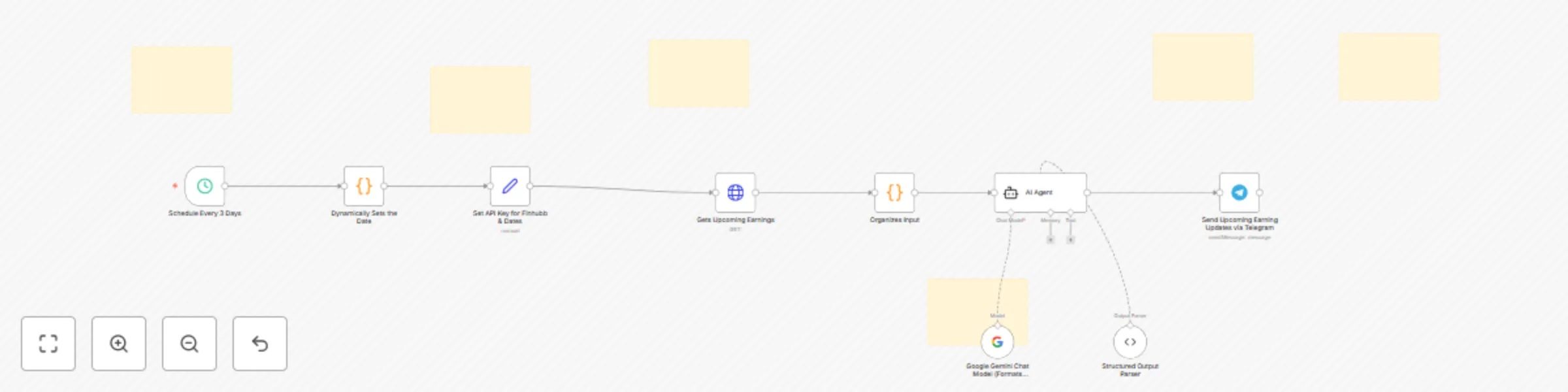
This n8n workflow is designed for investors, traders, financial analysts, and community managers who want real-time, structured US stocks upcoming earnings calendar updates directly to their Telegram channels or chats. It’s perfect for anyone running a financial community, managing a trading group, or tracking earnings for personal investment decisions.

What It Does

  1. Fetches upcoming earnings calendar for US-listed stocks using the Finnhub API (free-tier), with a default window of the next 3 days (customizable to any date range).
  2. Uses Google Gemini AI to automatically format and structure the earnings data into a clean, grouped, and enhanced message, including company names, tickers, quarters, estimated EPS, and revenue (with intelligent scaling for billions/millions).
  3. Sends the formatted earnings update directly to your chosen Telegram chat or channel via a Telegram bot.

Who Is It For?

  • Retail and professional investors
  • Financial influencers and Telegram group admins
  • Trading desk or community managers
  • Anyone who wants hands-off, AI-powered earnings alerts for US stocks

How to Set Up

  1. Get Finnhub API Key: Sign up at https://www.finnhub.io and copy your API key.
  2. Connect Google Gemini (or OpenAI) Model: Add your Gemini API credentials in n8n for advanced AI formatting and structuring of earnings updates.
  3. Set Up Your Telegram Bot: Create a bot with @BotFather, get your API token, and add it to n8n’s Telegram credentials. Obtain your Telegram chat or group ID (use @RawDataBot for this).
  4. Customize Date Range (Optional): By default, the workflow fetches earnings for the next 3 days, but you can adjust it to any custom window (e.g., today to 7 days in the future).
  5. Activate the Workflow: Schedule how often you want updates (default: every 3 days; can be as frequent as daily). The workflow will automatically fetch, format, and send the latest US earnings calendar to your Telegram.

Key Features

  • No coding required—fully automated and customizable.
  • Handles Telegram’s message length limit by default.
  • AI-enhanced formatting for maximum readability and engagement.
  • Free to use with Finnhub’s free API tier.

1.2 Logical Blocks

This catalog entry is organized from the workflow JSON. The node-level section below shows the executable blocks available for review before importing the template.

2. Block-by-Block Analysis

Block 1 - Sticky Note

Type / Role
n8n-nodes-base.stickyNote - stickyNote
Config choices
Version 1

Block 2 - Sticky Note1

Type / Role
n8n-nodes-base.stickyNote - stickyNote
Config choices
Version 1

Block 3 - Sticky Note2

Type / Role
n8n-nodes-base.stickyNote - stickyNote
Config choices
Version 1

Block 4 - Sticky Note3

Type / Role
n8n-nodes-base.stickyNote - stickyNote
Config choices
Version 1

Block 5 - Sticky Note4

Type / Role
n8n-nodes-base.stickyNote - stickyNote
Config choices
Version 1

Block 6 - Set API Key for Finhubb & Dates

Type / Role
n8n-nodes-base.set - set
Config choices
Version 3.4

Block 7 - Dynamically Sets the Date

Type / Role
n8n-nodes-base.code - code
Config choices
Version 2

Block 8 - AI Agent

Type / Role
@n8n/n8n-nodes-langchain.agent - agent
Config choices
Version 1.9

Block 9 - Structured Output Parser

Type / Role
@n8n/n8n-nodes-langchain.outputParserStructured - outputParserStructured
Config choices
Version 1.2

Block 10 - Send Upcoming Earning Updates via Telegram

Type / Role
n8n-nodes-base.telegram - telegram
Config choices
Version 1.2

Block 11 - Schedule Every 3 Days

Type / Role
n8n-nodes-base.scheduleTrigger - scheduleTrigger
Config choices
Version 1.2

Block 12 - Organizes Input

Type / Role
n8n-nodes-base.code - code
Config choices
Version 2

Block 13 - Sticky Note5

Type / Role
n8n-nodes-base.stickyNote - stickyNote
Config choices
Version 1

Block 14 - Gets Upcoming Earnings

Type / Role
n8n-nodes-base.httpRequest - httpRequest
Config choices
Version 4.2

Block 15 - Google Gemini Chat Model (Formats Output)

Type / Role
@n8n/n8n-nodes-langchain.lmChatGoogleGemini - lmChatGoogleGemini
Config choices
Version 1

3. Summary Table

Workflow US stocks earnings calendar AI updates to Telegram (Finnhub + Gemini)
Complexity advanced
Nodes 15
Categories Crypto Trading
Author Malik Hashir
Published 26 Jun 2025

4. Reproducing the Workflow from Scratch

  1. 1. Download the workflow JSON

    Use the JSON export at /data/workflows/5373/5373.json as the source template for this automation.

  2. 2. Import the template into n8n

    Open n8n, import the downloaded JSON, and review each node before activating the workflow.

  3. 3. Configure credentials and variables

    Replace placeholder credentials, API keys, webhook URLs, account IDs, and environment-specific values with your own settings.

  4. 4. Test with sample data

    Run the workflow manually or in a staging workspace, inspect node output, and confirm downstream systems receive the expected data.

  5. 5. Activate and monitor

    Enable the workflow only after testing, then monitor executions, errors, and rate limits during the first production runs.

5. General Notes & Resources

Review imported nodes carefully before activation. This catalog entry is intended to help you inspect the workflow structure, understand required services, and find related templates faster.

Node names, credentials, schedules, webhook paths, and external service limits may need adjustment for your workspace.

Frequently asked questions

What does US stocks earnings calendar AI updates to Telegram (Finnhub + Gemini) do?

Purpose & Audience This n8n workflow is designed for investors, traders, financial analysts, and community managers who want real time, structured US stocks upcoming earnings calendar updates direc...

What do I need before importing this workflow?

Review the workflow JSON, configure any required credentials in n8n, and test the automation in a safe workspace before using it in production.

Can I customize this workflow?

Yes. Use the block-by-block analysis and the downloadable JSON to inspect each node, then adjust credentials, prompts, schedules, filters, or destinations for your Crypto Trading use case.