Two-way property repair management system with Google Sheets & Drive

Workflow preview

Workflow preview
100%
Two-way property repair management system with Google Sheets & Drive preview
Open on n8n.io

Important notice

This workflow is provided as-is. Please review and test before using in production.

1. Workflow Overview

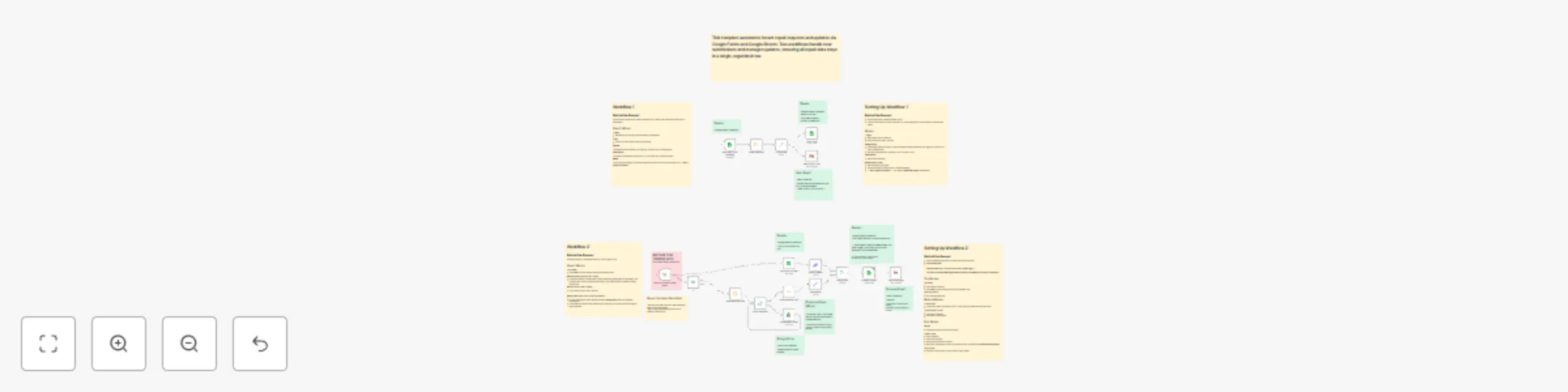
This workflow automates the repair request process between tenants and building managers , keeping all updates organized in a single spreadsheet. It is composed of two coordinated workflows , as tw...

Best for

  • Ticket Management automation workflows
  • advanced n8n builders looking for reusable templates

Tools used

n8n-nodes-base.googlesheets, n8n-nodes-base.googledrive, n8n-nodes-base.stickynote, n8n-nodes-base.set, n8n-nodes-base.gmail, n8n-nodes-base.splitinbatches, n8n-nodes-base.code, n8n-nodes-base.merge

Source and attribution

This workflow is cataloged by N8N Workflows and links back to its original n8n.io source page by Matt@VeraisonLabs.

Original n8n.io source

1.1 Workflow description

Title
Two-way property repair management system with Google Sheets & Drive
Workflow name
Two-way property repair management system with Google Sheets & Drive

This workflow automates the repair request process between tenants and building managers, keeping all updates organized in a single spreadsheet. It is composed of two coordinated workflows, as two separate triggers are required — one for new repair submissions and another for repair updates. A Unique Unit ID that corresponds to individual units is attributed to each request, and timestamps are used to coordinate repair updates with specific requests.

General use cases include:

  • Property managers who manage multiple buildings or units.
  • Building owners looking to centralize tenant repair communication.
  • Automation builders who want to learn multi-trigger workflow design in n8n.

⚙️ How It Works

Workflow 1 – New Repair Requests

Behind the Scenes: A tenant fills out a Google Form (“Repair Request Form”), which automatically adds a new row to a linked Google Sheet.

Steps:

  1. Trigger: Google Sheets rowAdded – runs when a new form entry appears.
  2. Extract & Format: Collects all relevant form data (address, unit, urgency, contacts).
  3. Generate Unit ID: Creates a standardized identifier (e.g., BUILDING-UNIT) for tracking.
  4. Email Notification: Sends the building manager a formatted email summarizing the repair details and including a link to a Repair Update Form (which activates Workflow 2).

Workflow 2 – Repair Updates

Behind the Scenes:
Triggered when the building manager submits a follow-up form (“Repair Update Form”).

Steps:

  1. Lookup by UUID: Uses the Unit ID from Workflow 1 to find the existing row in the Google Sheet.
  2. Conditional Logic:
    • If photos are uploaded: Saves each image to a Google Drive folder, renames files consistently, and adds URLs to the sheet.
    • If no photos: Skips the upload step and processes textual updates only.
  3. Merge & Update: Combines new data with existing repair info in the same spreadsheet row — enabling a full repair history in one place.

🧩 Requirements

  • Google Account (for Forms, Sheets, and Drive)
  • Gmail/email node connected for sending notifications
  • n8n credentials configured for Google API access

⚡ Setup Instructions (see more detail in workflow)

  1. Import both workflows into n8n, then copy one into a second workflow.
  2. Change manual trigger in workflow 2 to a n8n Form node.
  3. Connect Google credentials to all nodes.
  4. Update spreadsheet and folder IDs in the corresponding nodes.
  5. Customize email text, sender name, and form links for your organization.
  6. Test each workflow with a sample repair request and a repair update submission.

🛠️ Customization Ideas

  • Add Slack or Telegram notifications for urgent repairs.
  • Auto-create folders per building or unit for photo uploads.
  • Generate monthly repair summaries using Google Sheets triggers.
  • Add an AI node to create summaries/extract relevant repair data from repair request that include long submissions.

1.2 Logical Blocks

This catalog entry is organized from the workflow JSON. The node-level section below shows the executable blocks available for review before importing the template.

2. Block-by-Block Analysis

Block 1 - Get row(s) in sheet

Type / Role
n8n-nodes-base.googleSheets - googleSheets
Config choices
Version 4.7

Block 2 - Upload Repair Photo

Type / Role
n8n-nodes-base.googleDrive - googleDrive
Config choices
Version 3

Block 3 - Sticky Note

Type / Role
n8n-nodes-base.stickyNote - stickyNote
Config choices
Version 1

Block 4 - Sticky Note1

Type / Role
n8n-nodes-base.stickyNote - stickyNote
Config choices
Version 1

Block 5 - Sticky Note2

Type / Role
n8n-nodes-base.stickyNote - stickyNote
Config choices
Version 1

Block 6 - New details

Type / Role
n8n-nodes-base.set - set
Config choices
Version 3.4

Block 7 - Send a message

Type / Role
n8n-nodes-base.gmail - gmail
Config choices
Version 2.1

Block 8 - Photo Uploading

Type / Role
n8n-nodes-base.splitInBatches - splitInBatches
Config choices
Version 3

Block 9 - Combine Photo URLs

Type / Role
n8n-nodes-base.code - code
Config choices
Version 2

Block 10 - Separate Photo Files

Type / Role
n8n-nodes-base.code - code
Config choices
Version 2

Block 11 - Merge Data

Type / Role
n8n-nodes-base.merge - merge
Config choices
Version 3.2

Block 12 - Update w/ Repair

Type / Role
n8n-nodes-base.googleSheets - googleSheets
Config choices
Version 4.7

Block 13 - Existing Details

Type / Role
n8n-nodes-base.set - set
Config choices
Version 3.4

Block 14 - If

Type / Role
n8n-nodes-base.if - if
Config choices
Version 2.2

Block 15 - Sticky Note4

Type / Role
n8n-nodes-base.stickyNote - stickyNote
Config choices
Version 1

Block 16 - Sticky Note5

Type / Role
n8n-nodes-base.stickyNote - stickyNote
Config choices
Version 1

Block 17 - Sticky Note6

Type / Role
n8n-nodes-base.stickyNote - stickyNote
Config choices
Version 1

Block 18 - Sticky Note3

Type / Role
n8n-nodes-base.stickyNote - stickyNote
Config choices
Version 1

Block 19 - New repair form submitted

Type / Role
n8n-nodes-base.googleSheetsTrigger - googleSheetsTrigger
Config choices
Version 1

Block 20 - Isolate new entry

Type / Role
n8n-nodes-base.code - code
Config choices
Version 2

Block 21 - Report Alert + Info

Type / Role
n8n-nodes-base.gmail - gmail
Config choices
Version 2.1

Block 22 - Format Data

Type / Role
n8n-nodes-base.set - set
Config choices
Version 3.4

Block 23 - Add UUID #

Type / Role
n8n-nodes-base.googleSheets - googleSheets
Config choices
Version 4.7

Block 24 - Sticky Note7

Type / Role
n8n-nodes-base.stickyNote - stickyNote
Config choices
Version 1

Showing the first 24 of 32 workflow blocks. Download the JSON for the full node graph.

3. Summary Table

Workflow Two-way property repair management system with Google Sheets & Drive
Complexity advanced
Nodes 32
Categories Ticket Management
Author Matt@VeraisonLabs
Published 22 Oct 2025

4. Reproducing the Workflow from Scratch

  1. 1. Download the workflow JSON

    Use the JSON export at /data/workflows/10004/10004.json as the source template for this automation.

  2. 2. Import the template into n8n

    Open n8n, import the downloaded JSON, and review each node before activating the workflow.

  3. 3. Configure credentials and variables

    Replace placeholder credentials, API keys, webhook URLs, account IDs, and environment-specific values with your own settings.

  4. 4. Test with sample data

    Run the workflow manually or in a staging workspace, inspect node output, and confirm downstream systems receive the expected data.

  5. 5. Activate and monitor

    Enable the workflow only after testing, then monitor executions, errors, and rate limits during the first production runs.

5. General Notes & Resources

Review imported nodes carefully before activation. This catalog entry is intended to help you inspect the workflow structure, understand required services, and find related templates faster.

Node names, credentials, schedules, webhook paths, and external service limits may need adjustment for your workspace.

Frequently asked questions

What does Two-way property repair management system with Google Sheets & Drive do?

This workflow automates the repair request process between tenants and building managers , keeping all updates organized in a single spreadsheet. It is composed of two coordinated workflows , as tw...

What do I need before importing this workflow?

Review the workflow JSON, configure any required credentials in n8n, and test the automation in a safe workspace before using it in production.

Can I customize this workflow?

Yes. Use the block-by-block analysis and the downloadable JSON to inspect each node, then adjust credentials, prompts, schedules, filters, or destinations for your Ticket Management use case.