Twitter virtual AI influencer

Workflow preview

Workflow preview
100%
Twitter virtual AI influencer preview
Open on n8n.io

Important notice

This workflow is provided as-is. Please review and test before using in production.

1. Workflow Overview

Twitter Virtual AI Influencer Workflow Template This n8n workflow template empowers creators to launch a virtual AI influencer that tweets regularly, engaging audiences with a unique niche, writing...

Best for

  • Social Media automation workflows
  • Multimodal AI automation workflows
  • intermediate n8n builders looking for reusable templates

Tools used

n8n-nodes-base.stickynote, n8n-nodes-base.twitter, n8n-nodes-base.scheduletrigger, n8n-nodes-base.manualtrigger, n8n-nodes-base.if, @n8n/n8n-nodes-langchain.openai, n8n-nodes-base.set

Source and attribution

This workflow is cataloged by N8N Workflows and links back to its original n8n.io source page by Alex Grozav.

Original n8n.io source

1.1 Workflow description

Title
Twitter virtual AI influencer
Workflow name
Twitter virtual AI influencer

Twitter Virtual AI Influencer Workflow Template

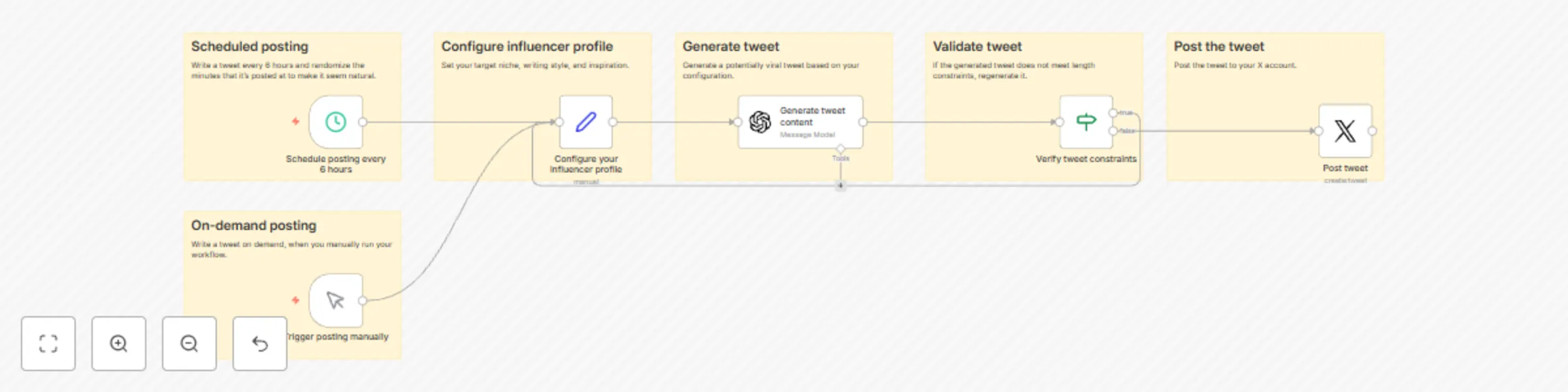
This n8n workflow template empowers creators to launch a virtual AI influencer that tweets regularly, engaging audiences with a unique niche, writing style, and inspiration. By automating content creation and posting, it ensures a consistent and natural online presence, tailored to your specific influencer profile.

Features

  • Scheduled Posting: Automates tweet posting every 6 hours, with randomized posting minutes to mimic natural activity.
  • On-Demand Posting: Offers flexibility with manual trigger options for immediate content sharing.
  • Influencer Profile Configuration: Customize your virtual influencer by defining a target niche, personal writing style, and sources of inspiration.
  • Content Generation: Leverages advanced AI to craft tweets that resonate with your audience, aiming for viral engagement.
  • Tweet Validation: Ensures all generated content adheres to Twitter's character limit, maintaining quality and relevance.

Workflow Steps

  1. Schedule Posting: Configured to post every 6 hours, this step introduces randomness in posting time to simulate human behavior.
  2. Trigger Posting Manually: Provides an option to manually initiate a tweet, offering control over the timing of your content.
  3. Configure Influencer Profile: Set up your influencer's niche, style, and inspiration to guide the AI in generating targeted content.
  4. Generate Tweet Content: Utilizes a sophisticated AI model to produce engaging tweets based on the configured profile.
  5. Validate Tweet: Checks if the generated tweet meets Twitter's length constraints, ensuring all content is ready for posting.
  6. Post Tweet: Finalizes the process by sharing the AI-generated tweet to your designated Twitter account.

Configuration Notes

  • Niche: Define a specific area of interest, such as "Modern Stoicism," to focus your influencer's content.
  • Writing Style: Customize the tone and style of the tweets to reflect a personal touch, enhancing relatability.
  • Inspiration: Input sources of inspiration, including books and philosophies, to steer the content generation process.

Getting Started

To deploy this template:

  1. Import the workflow into your n8n workspace.
  2. Customize the influencer profile settings to match your desired niche, style, and inspiration.
  3. Connect your Twitter account through the provided OAuth2 credentials setup.
  4. Activate the workflow to start building your virtual influencer's presence on Twitter.

Embrace the power of AI to create a distinctive and engaging virtual influencer, captivating your audience with minimal effort.

1.2 Logical Blocks

This catalog entry is organized from the workflow JSON. The node-level section below shows the executable blocks available for review before importing the template.

2. Block-by-Block Analysis

Block 1 - Sticky Note

Type / Role
n8n-nodes-base.stickyNote - stickyNote
Config choices
Version 1

Block 2 - Post tweet

Type / Role
n8n-nodes-base.twitter - twitter
Config choices
Version 2

Block 3 - Schedule posting every 6 hours

Type / Role
n8n-nodes-base.scheduleTrigger - scheduleTrigger
Config choices
Version 1.1

Block 4 - Trigger posting manually

Type / Role
n8n-nodes-base.manualTrigger - manualTrigger
Config choices
Version 1

Block 5 - Sticky Note1

Type / Role
n8n-nodes-base.stickyNote - stickyNote
Config choices
Version 1

Block 6 - Sticky Note3

Type / Role
n8n-nodes-base.stickyNote - stickyNote
Config choices
Version 1

Block 7 - Sticky Note4

Type / Role
n8n-nodes-base.stickyNote - stickyNote
Config choices
Version 1

Block 8 - Sticky Note5

Type / Role
n8n-nodes-base.stickyNote - stickyNote
Config choices
Version 1

Block 9 - Verify tweet constraints

Type / Role
n8n-nodes-base.if - if
Config choices
Version 2

Block 10 - Sticky Note2

Type / Role
n8n-nodes-base.stickyNote - stickyNote
Config choices
Version 1

Block 11 - Generate tweet content

Type / Role
@n8n/n8n-nodes-langchain.openAi - openAi
Config choices
Version 1

Block 12 - Configure your influencer profile

Type / Role
n8n-nodes-base.set - set
Config choices
Version 3.3

3. Summary Table

Workflow Twitter virtual AI influencer
Complexity intermediate
Nodes 12
Categories Social Media, Multimodal AI
Author Alex Grozav
Published 28 Feb 2024

4. Reproducing the Workflow from Scratch

  1. 1. Download the workflow JSON

    Use the JSON export at /data/workflows/2139/2139.json as the source template for this automation.

  2. 2. Import the template into n8n

    Open n8n, import the downloaded JSON, and review each node before activating the workflow.

  3. 3. Configure credentials and variables

    Replace placeholder credentials, API keys, webhook URLs, account IDs, and environment-specific values with your own settings.

  4. 4. Test with sample data

    Run the workflow manually or in a staging workspace, inspect node output, and confirm downstream systems receive the expected data.

  5. 5. Activate and monitor

    Enable the workflow only after testing, then monitor executions, errors, and rate limits during the first production runs.

5. General Notes & Resources

Review imported nodes carefully before activation. This catalog entry is intended to help you inspect the workflow structure, understand required services, and find related templates faster.

Node names, credentials, schedules, webhook paths, and external service limits may need adjustment for your workspace.

Frequently asked questions

What does Twitter virtual AI influencer do?

Twitter Virtual AI Influencer Workflow Template This n8n workflow template empowers creators to launch a virtual AI influencer that tweets regularly, engaging audiences with a unique niche, writing...

What do I need before importing this workflow?

Review the workflow JSON, configure any required credentials in n8n, and test the automation in a safe workspace before using it in production.

Can I customize this workflow?

Yes. Use the block-by-block analysis and the downloadable JSON to inspect each node, then adjust credentials, prompts, schedules, filters, or destinations for your Social Media, Multimodal AI use case.