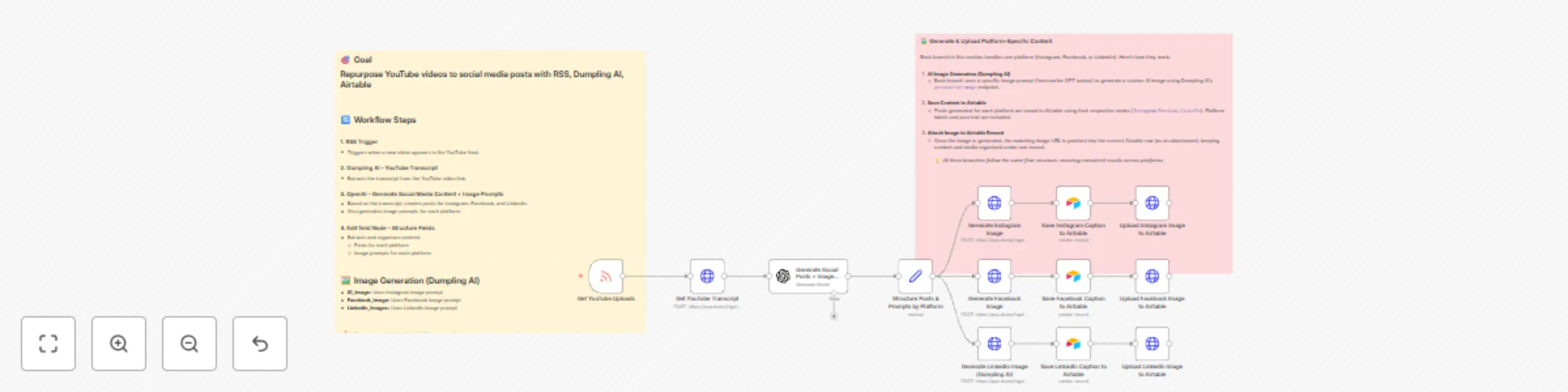
Turn YouTube RSS videos into social posts with Dumpling AI and Airtable

Workflow preview

Workflow preview
100%
Turn YouTube RSS videos into social posts with Dumpling AI and Airtable preview
Open on n8n.io

Important notice

This workflow is provided as-is. Please review and test before using in production.

1. Workflow Overview

Who is this for? This workflow is for content creators, social media managers, marketing teams, and virtual assistants who want to automatically repurpose YouTube videos into ready to post social m...

Best for

  • Content Creation automation workflows
  • Multimodal AI automation workflows
  • advanced n8n builders looking for reusable templates

Tools used

n8n-nodes-base.stickynote, n8n-nodes-base.httprequest, @n8n/n8n-nodes-langchain.openai, n8n-nodes-base.set, n8n-nodes-base.airtable, n8n-nodes-base.rssfeedreadtrigger

Source and attribution

This workflow is cataloged by N8N Workflows and links back to its original n8n.io source page by Yang.

Original n8n.io source

1.1 Workflow description

Title
Turn YouTube RSS videos into social posts with Dumpling AI and Airtable
Workflow name
Turn YouTube RSS videos into social posts with Dumpling AI and Airtable

Who is this for?

This workflow is for content creators, social media managers, marketing teams, and virtual assistants who want to automatically repurpose YouTube videos into ready-to-post social media content. If you need to quickly turn long-form videos into short posts for platforms like Instagram, Facebook, or LinkedIn, this workflow saves you hours of manual work.


What problem is this workflow solving?

Manually extracting ideas from YouTube videos, writing captions, creating images, and preparing social media posts takes a lot of time and effort.
This workflow automates the entire process: it reads the video, generates posts with captions and AI images, and organizes everything into Airtable.
It lets you focus more on growing your audience instead of spending hours repurposing content.


What this workflow does

  1. Watches a YouTube channel RSS feed for new videos.
  2. Extracts the video transcript automatically using Dumpling AI.
  3. Summarizes and transforms the transcript into 3 social media captions (Instagram, Facebook, LinkedIn) using OpenAI.
  4. Generates 3 unique AI image prompts.
  5. Sends the prompts to Dumpling AI to create realistic social media images.
  6. Saves the captions and attaches the AI images into Airtable, ready for posting.

Setup

  1. RSS Feed Setup

    • Get your YouTube channel’s RSS feed URL.
    • Insert the URL into the RSS Trigger node.
    • This will monitor for new YouTube uploads automatically.
  2. Dumpling AI Setup for Transcript Extraction

    • Sign up at Dumpling AI.
    • Get your Dumpling AI API Key.
    • In the first HTTP Request node after the RSS trigger, insert your API Key (use HTTP Header Authentication).
    • This sends the YouTube URL to Dumpling AI’s /extract-transcript endpoint.
  3. OpenAI Setup for Caption and Prompt Generation

    • Get your OpenAI API Key.
    • In the OpenAI node, connect your account.
    • The AI will:
      • Generate 3 platform-specific captions.
      • Generate 3 creative prompts to design images related to the video.
  4. Edit Fields Node

    • This node organizes the generated captions and prompts into separate fields for easy Airtable mapping.
    • Captions are split for Instagram, Facebook, and LinkedIn.
  5. Dumpling AI Setup for AI Image Generation

    • After the Edit Fields node, the second HTTP Request node sends the image prompt to Dumpling AI’s /generate-image endpoint.
    • This returns a realistic AI-generated image.
  6. Airtable Setup for Saving Posts (Without Image First)

    • Create a new base in Airtable with the following fields:
      • Platform (Single select: Instagram, Facebook, LinkedIn)
      • Content (Long text field)
      • Image (Attachment field)
    • Connect your Airtable Personal Access Token to the Airtable node.
    • The Airtable node saves the generated captions into separate records, initially without images.
  7. Upload Generated Images Back to Airtable

    • The third HTTP Request node PATCHES the Airtable record.
    • It updates the Image field with the generated AI image from Dumpling AI.
  8. Credentials Required

    • Dumpling AI API Key (for transcript extraction and AI image generation)
    • OpenAI API Key (for caption and prompt creation)
    • Airtable Personal Access Token (for inserting and updating records)

How to customize this workflow to your needs

  • Change the OpenAI prompt to generate captions in your brand tone (e.g., friendly, professional, witty).
  • Modify the image prompts to match your design style better.
  • Adjust the Airtable base fields if you want to add more platforms or content formats.
  • Add scheduling tools like Buffer or Metricool to automatically post from Airtable.

⚡ Quick Tips

  • Make sure Dumpling AI credits are active to allow transcript and image generation.
  • Set Airtable permissions properly so PATCH requests can update attachments.

1.2 Logical Blocks

This catalog entry is organized from the workflow JSON. The node-level section below shows the executable blocks available for review before importing the template.

2. Block-by-Block Analysis

Block 1 - Sticky Note

Type / Role
n8n-nodes-base.stickyNote - stickyNote
Config choices
Version 1

Block 2 - Sticky Note1

Type / Role
n8n-nodes-base.stickyNote - stickyNote
Config choices
Version 1

Block 3 - Get YouTube Transcript

Type / Role
n8n-nodes-base.httpRequest - httpRequest
Config choices
Version 4.2

Block 4 - Generate Social Posts + Image Prompts

Type / Role
@n8n/n8n-nodes-langchain.openAi - openAi
Config choices
Version 1.8

Block 5 - Structure Posts & Prompts by Platform

Type / Role
n8n-nodes-base.set - set
Config choices
Version 3.4

Block 6 - Generate Instagram Image

Type / Role
n8n-nodes-base.httpRequest - httpRequest
Config choices
Version 4.2

Block 7 - Generate Facebook Image

Type / Role
n8n-nodes-base.httpRequest - httpRequest
Config choices
Version 4.2

Block 8 - Generate LinkedIn Image (Dumpling AI)

Type / Role
n8n-nodes-base.httpRequest - httpRequest
Config choices
Version 4.2

Block 9 - Upload Instagram Image to Airtable

Type / Role
n8n-nodes-base.httpRequest - httpRequest
Config choices
Version 4.2

Block 10 - Upload Facebook Image to Airtable

Type / Role
n8n-nodes-base.httpRequest - httpRequest
Config choices
Version 4.2

Block 11 - Upload LinkedIn Image to Airtable

Type / Role
n8n-nodes-base.httpRequest - httpRequest
Config choices
Version 4.2

Block 12 - Save Instagram Caption to Airtable

Type / Role
n8n-nodes-base.airtable - airtable
Config choices
Version 2.1

Block 13 - Save Facebook Caption to Airtable

Type / Role
n8n-nodes-base.airtable - airtable
Config choices
Version 2.1

Block 14 - Save LinkedIn Caption to Airtable

Type / Role
n8n-nodes-base.airtable - airtable
Config choices
Version 2.1

Block 15 - Get YouTube Uploads

Type / Role
n8n-nodes-base.rssFeedReadTrigger - rssFeedReadTrigger
Config choices
Version 1

3. Summary Table

Workflow Turn YouTube RSS videos into social posts with Dumpling AI and Airtable
Complexity advanced
Nodes 15
Categories Content Creation, Multimodal AI
Author Yang
Published 28 Apr 2025

4. Reproducing the Workflow from Scratch

  1. 1. Download the workflow JSON

    Use the JSON export at /data/workflows/3776/3776.json as the source template for this automation.

  2. 2. Import the template into n8n

    Open n8n, import the downloaded JSON, and review each node before activating the workflow.

  3. 3. Configure credentials and variables

    Replace placeholder credentials, API keys, webhook URLs, account IDs, and environment-specific values with your own settings.

  4. 4. Test with sample data

    Run the workflow manually or in a staging workspace, inspect node output, and confirm downstream systems receive the expected data.

  5. 5. Activate and monitor

    Enable the workflow only after testing, then monitor executions, errors, and rate limits during the first production runs.

5. General Notes & Resources

Review imported nodes carefully before activation. This catalog entry is intended to help you inspect the workflow structure, understand required services, and find related templates faster.

Node names, credentials, schedules, webhook paths, and external service limits may need adjustment for your workspace.

Frequently asked questions

What does Turn YouTube RSS videos into social posts with Dumpling AI and Airtable do?

Who is this for? This workflow is for content creators, social media managers, marketing teams, and virtual assistants who want to automatically repurpose YouTube videos into ready to post social m...

What do I need before importing this workflow?

Review the workflow JSON, configure any required credentials in n8n, and test the automation in a safe workspace before using it in production.

Can I customize this workflow?

Yes. Use the block-by-block analysis and the downloadable JSON to inspect each node, then adjust credentials, prompts, schedules, filters, or destinations for your Content Creation, Multimodal AI use case.