Trello task management with Telegram notifications and Supabase database

Workflow preview

Workflow preview
100%
Trello task management with Telegram notifications and Supabase database preview
Open on n8n.io

Important notice

This workflow is provided as-is. Please review and test before using in production.

1. Workflow Overview

Trello Task Sync Assistant Description This n8n workflow automates task management by integrating Trello, Supabase, and Telegram to streamline card creation, user assignment, and due date notificat...

Best for

  • Project Management automation workflows
  • AI Chatbot automation workflows
  • advanced n8n builders looking for reusable templates

Tools used

n8n-nodes-base.trellotrigger, n8n-nodes-base.webhook, n8n-nodes-base.telegram, n8n-nodes-base.set, n8n-nodes-base.supabase, n8n-nodes-base.httprequest, n8n-nodes-base.if, n8n-nodes-base.code

Source and attribution

This workflow is cataloged by N8N Workflows and links back to its original n8n.io source page by Hermon.

Original n8n.io source

1.1 Workflow description

Title
Trello task management with Telegram notifications and Supabase database
Workflow name
Trello task management with Telegram notifications and Supabase database

Trello Task-Sync Assistant

Description

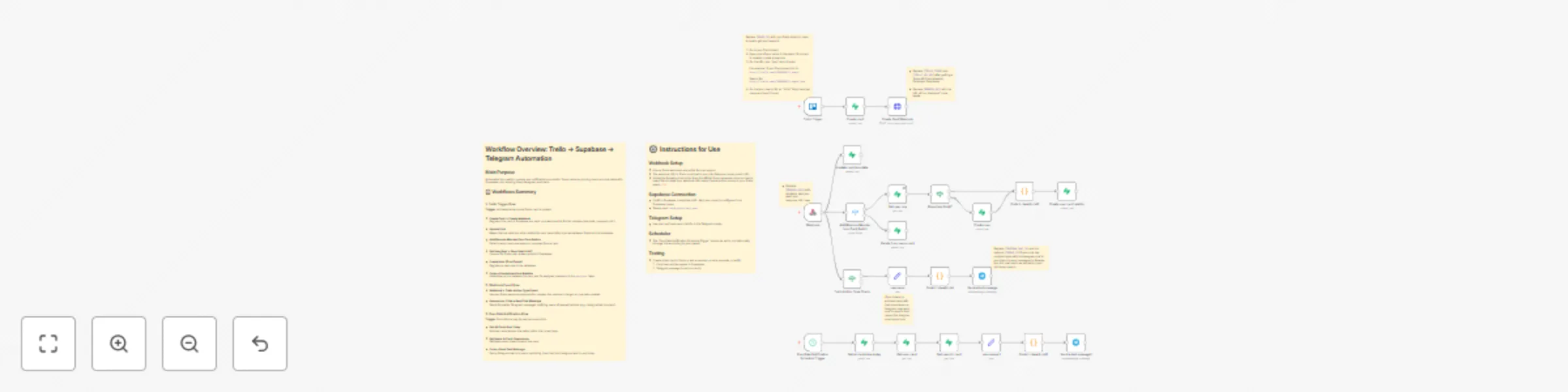
This n8n workflow automates task management by integrating Trello, Supabase, and Telegram to streamline card creation, user assignment, and due date notifications. It ensures seamless synchronization of Trello card data with a Supabase database and sends timely Telegram notifications to keep team members informed about task assignments and deadlines.

Key Features

  • Trello Card Syncing: Automatically registers new Trello cards in Supabase and keeps card details (e.g., due dates, URLs) updated.
  • User Management: Tracks Trello user assignments in Supabase, creating new user entries and linking them to cards as needed.
  • Real-Time Notifications: Sends Telegram messages when users are added to or removed from Trello cards, using dynamic, engaging message templates.
  • Due Date Reminders: Schedules daily checks to notify users via Telegram about tasks due on the current day.

Workflow Structure

  1. Trello Trigger Flow:

    • Trigger: Activates when a new Trello card is created.
    • Actions:
      • Registers the card in Supabase (cards table) with details like ID, name, and board.
      • Sets up a Trello webhook for real-time updates on the card.
      • Syncs due date changes to Supabase.
      • Detects member additions/removals, checks for existing users in Supabase, creates new user entries if needed, and links users to cards in the card_user table.
  2. Webhook Event Flow:

    • Trigger: Processes Trello webhook events (e.g., member changes, due date updates).
    • Actions:
      • Validates event types (add/remove member).
      • Maps Trello usernames to Telegram handles.
      • Sends formatted Telegram notifications with card details and playful, randomized messages for engagement.
  3. Due-Date Notification Flow:

    • Trigger: Runs twice daily (every 12 hours) via a scheduled trigger.
    • Actions:
      • Fetches cards due on the current day from Supabase.
      • Retrieves assigned users for each card.
      • Sends Telegram reminders with urgent, formatted messages including card name, board, URL, and due date.

Technical Details

  • Tools Used:
    • Trello: Triggers on card creation and updates via webhooks.
    • Supabase: Stores card, user, and card-user relationship data in cards, users, and card_user tables.
    • Telegram: Sends notifications using a bot.
  • Credentials Required:
    • Trello API key and token.
    • Supabase URL and key.
    • Telegram bot token and chat ID.
  • Scheduling: Due date checks run every 12 hours (adjustable).
  • Error Handling: Includes checks for user existence and conditional logic to manage add/remove events.

Use Case

Ideal for teams using Trello for project management, this workflow ensures real-time data syncing with Supabase and keeps members informed via Telegram, reducing manual oversight and improving task accountability. It’s particularly useful for remote or distributed teams needing automated task tracking and reminders.

Setup Requirements

  • Configure Trello webhooks to point to the n8n webhook URL.
  • Set up Supabase with the required tables (cards, users, card_user).
  • Provide Telegram bot token and chat IDs
  • Test the workflow by creating a Trello card, assigning a member, and setting a due date to verify Supabase entries and Telegram notifications.

This workflow enhances productivity by automating task synchronization and communication, ensuring no deadline is missed.

1.2 Logical Blocks

This catalog entry is organized from the workflow JSON. The node-level section below shows the executable blocks available for review before importing the template.

2. Block-by-Block Analysis

Block 1 - Trello Trigger

Type / Role
n8n-nodes-base.trelloTrigger - trelloTrigger
Config choices
Version 1

Block 2 - Webhook

Type / Role
n8n-nodes-base.webhook - webhook
Config choices
Version 2.1

Block 3 - Send a text message

Type / Role
n8n-nodes-base.telegram - telegram
Config choices
Version 1.2

Block 4 - username

Type / Role
n8n-nodes-base.set - set
Config choices
Version 3.4

Block 5 - Create card

Type / Role
n8n-nodes-base.supabase - supabase
Config choices
Version 1

Block 6 - Create Card Webhook

Type / Role
n8n-nodes-base.httpRequest - httpRequest
Config choices
Version 4.2

Block 7 - Get user row

Type / Role
n8n-nodes-base.supabase - supabase
Config choices
Version 1

Block 8 - Create user

Type / Role
n8n-nodes-base.supabase - supabase
Config choices
Version 1

Block 9 - Trello Action Type Check

Type / Role
n8n-nodes-base.if - if
Config choices
Version 2.2

Block 10 - Update card due-date

Type / Role
n8n-nodes-base.supabase - supabase
Config choices
Version 1

Block 11 - Create user card relation

Type / Role
n8n-nodes-base.supabase - supabase
Config choices
Version 1

Block 12 - Code in JavaScript1

Type / Role
n8n-nodes-base.code - code
Config choices
Version 2

Block 13 - Does User Exist?

Type / Role
n8n-nodes-base.if - if
Config choices
Version 2.2

Block 14 - Delete from users-card

Type / Role
n8n-nodes-base.supabase - supabase
Config choices
Version 1

Block 15 - Send a text message1

Type / Role
n8n-nodes-base.telegram - telegram
Config choices
Version 1.2

Block 16 - Code in JavaScript2

Type / Role
n8n-nodes-base.code - code
Config choices
Version 2

Block 17 - Get users in card

Type / Role
n8n-nodes-base.supabase - supabase
Config choices
Version 1

Block 18 - Get user-card

Type / Role
n8n-nodes-base.supabase - supabase
Config choices
Version 1

Block 19 - Code in JavaScript

Type / Role
n8n-nodes-base.code - code
Config choices
Version 2

Block 20 - Due-Date Notification Schedule Trigger

Type / Role
n8n-nodes-base.scheduleTrigger - scheduleTrigger
Config choices
Version 1.2

Block 21 - Get all cards due today

Type / Role
n8n-nodes-base.supabase - supabase
Config choices
Version 1

Block 22 - usernames 1

Type / Role
n8n-nodes-base.set - set
Config choices
Version 3.4

Block 23 - Add/Remove Member from Card Switch

Type / Role
n8n-nodes-base.switch - switch
Config choices
Version 3.2

Block 24 - Sticky Note

Type / Role
n8n-nodes-base.stickyNote - stickyNote
Config choices
Version 1

Showing the first 24 of 30 workflow blocks. Download the JSON for the full node graph.

3. Summary Table

Workflow Trello task management with Telegram notifications and Supabase database
Complexity advanced
Nodes 30
Categories Project Management, AI Chatbot
Author Hermon
Published 19 Oct 2025

4. Reproducing the Workflow from Scratch

  1. 1. Download the workflow JSON

    Use the JSON export at /data/workflows/9916/9916.json as the source template for this automation.

  2. 2. Import the template into n8n

    Open n8n, import the downloaded JSON, and review each node before activating the workflow.

  3. 3. Configure credentials and variables

    Replace placeholder credentials, API keys, webhook URLs, account IDs, and environment-specific values with your own settings.

  4. 4. Test with sample data

    Run the workflow manually or in a staging workspace, inspect node output, and confirm downstream systems receive the expected data.

  5. 5. Activate and monitor

    Enable the workflow only after testing, then monitor executions, errors, and rate limits during the first production runs.

5. General Notes & Resources

Review imported nodes carefully before activation. This catalog entry is intended to help you inspect the workflow structure, understand required services, and find related templates faster.

Node names, credentials, schedules, webhook paths, and external service limits may need adjustment for your workspace.

Frequently asked questions

What does Trello task management with Telegram notifications and Supabase database do?

Trello Task Sync Assistant Description This n8n workflow automates task management by integrating Trello, Supabase, and Telegram to streamline card creation, user assignment, and due date notificat...

What do I need before importing this workflow?

Review the workflow JSON, configure any required credentials in n8n, and test the automation in a safe workspace before using it in production.

Can I customize this workflow?

Yes. Use the block-by-block analysis and the downloadable JSON to inspect each node, then adjust credentials, prompts, schedules, filters, or destinations for your Project Management, AI Chatbot use case.