Block 1 - Process Form Data
- Type / Role
- n8n-nodes-base.code - code
- Config choices
- Version 2


 Early Deal
This workflow is provided as-is. Please review and test before using in production.
Description This n8n template automates PDF translation into 1 or 2 target languages while maintaining professional formatting. Users submit PDFs via web form and receive translated documents via e...
n8n-nodes-base.code, n8n-nodes-base.extractfromfile, n8n-nodes-base.googletranslate, n8n-nodes-base.httprequest, n8n-nodes-base.merge, n8n-nodes-base.formtrigger, n8n-nodes-base.if, n8n-nodes-base.datatable
This workflow is cataloged by N8N Workflows and links back to its original n8n.io source page by Sridevi Edupuganti.
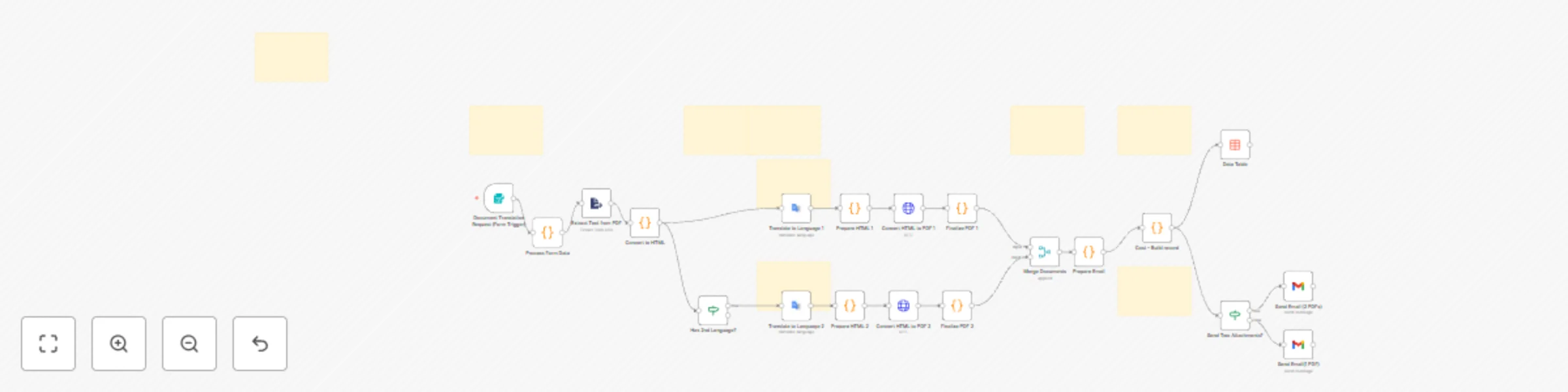
Original n8n.io sourceThis n8n template automates PDF translation into 1 or 2 target languages while maintaining professional formatting. Users submit PDFs via web form and receive translated documents via email with preserved headings, paragraphs, and bullet points.
• International Business Contracts • Multilingual Product Documentation • Educational Content Distribution • Healthcare Patient Information for Diverse patient population • Marketing Campaign Materials
• Accepts PDF uploads via web form
• Extracts and converts text to structured HTML
• Translates using Google Translate API (20+ languages including Hindi, Telugu, Spanish,
French, German, Chinese)
• Converts to professional PDFs with ConvertAPI
• Emails translated PDFs with cost breakdown
• Tracks expenses in data table for analytics
• Configure Google Cloud Service Account (Translation API enabled) • Add ConvertAPI Query Auth credentials • Set up Gmail OAuth2 with send permissions • Create n8n Data Table named cost_tracking • Activate workflow and access form via webhook URL
• Google Cloud account with Translation API • ConvertAPI account with credits • Gmail account for delivery • PDF files with selectable text (not scanned images)
• Edit CSS in "Prepare HTML" nodes for PDF styling • Update pricing in "Cost – Build record" node • Add languages in "Process Form Data" and form dropdown • Modify email template in Gmail nodes
Join n8n Discord or Community Forum
This catalog entry is organized from the workflow JSON. The node-level section below shows the executable blocks available for review before importing the template.
Showing the first 24 of 29 workflow blocks. Download the JSON for the full node graph.
| Workflow | Translate PDFs into multiple languages with Google Translate & ConvertAPI cost tracking |
|---|---|
| Complexity | advanced |
| Nodes | 29 |
| Categories | Document Extraction, Multimodal AI |
| Author | Sridevi Edupuganti |
| Published | 15 Nov 2025 |
Use the JSON export at /data/workflows/10864/10864.json as the source template for this automation.
Open n8n, import the downloaded JSON, and review each node before activating the workflow.
Replace placeholder credentials, API keys, webhook URLs, account IDs, and environment-specific values with your own settings.
Run the workflow manually or in a staging workspace, inspect node output, and confirm downstream systems receive the expected data.
Enable the workflow only after testing, then monitor executions, errors, and rate limits during the first production runs.
Review imported nodes carefully before activation. This catalog entry is intended to help you inspect the workflow structure, understand required services, and find related templates faster.
Node names, credentials, schedules, webhook paths, and external service limits may need adjustment for your workspace.
Description This n8n template automates PDF translation into 1 or 2 target languages while maintaining professional formatting. Users submit PDFs via web form and receive translated documents via e...
Review the workflow JSON, configure any required credentials in n8n, and test the automation in a safe workspace before using it in production.
Yes. Use the block-by-block analysis and the downloadable JSON to inspect each node, then adjust credentials, prompts, schedules, filters, or destinations for your Document Extraction, Multimodal AI use case.