Transforming scripts into engaging Instagram Reels with Blotato: featuring unique human review

Workflow preview

Workflow preview
100%
Transforming scripts into engaging Instagram Reels with Blotato: featuring unique human review preview
Open on n8n.io

Important notice

This workflow is provided as-is. Please review and test before using in production.

1. Workflow Overview

Stop wasting time on video editing! This template is designed for content creators and marketers who need a fast, scalable way to convert simple text scripts into polished, shareable AI generated v...

Best for

  • Content Creation automation workflows
  • Multimodal AI automation workflows
  • advanced n8n builders looking for reusable templates

Tools used

@n8n/n8n-nodes-langchain.informationextractor, @n8n/n8n-nodes-langchain.lmchatgooglegemini, n8n-nodes-base.formtrigger, @blotato/n8n-nodes-blotato.blotato, n8n-nodes-base.aggregate, n8n-nodes-base.if, n8n-nodes-base.wait, n8n-nodes-base.gmail

Source and attribution

This workflow is cataloged by N8N Workflows and links back to its original n8n.io source page by Maneeshwar.

Original n8n.io source

1.1 Workflow description

Title
Transforming scripts into engaging Instagram Reels with Blotato: featuring unique human review
Workflow name
Transforming scripts into engaging Instagram Reels with Blotato: featuring unique human review

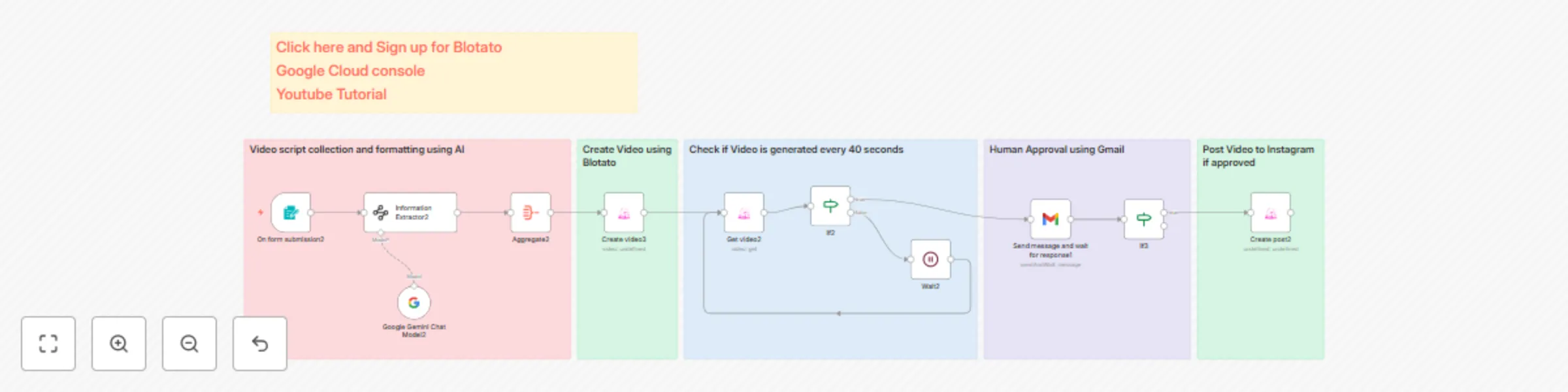
Stop wasting time on video editing! This template is designed for content creators and marketers who need a fast, scalable way to convert simple text scripts into polished, shareable AI-generated videos and publish them automatically to Instagram. The workflow includes a critical human review step to maintain quality control.

Prerequisites

To use this template, you must have the following:

  • An active n8n instance.
  • An active Blotato account (required for the AI video generation and Instagram upload API access).
  • The Blotato n8n node must be installed on your n8n instance.
  • A configured Gmail node to handle the human approval step.

How It Works (Workflow Breakdown)

This automation efficiently moves your content from a text script to a live Instagram post:

  1. Script Input (Form Node):
    • The workflow starts by accepting your script via a simple form input.
  2. Data Structuring (Information Extractor Node):
    • The raw script is processed to arrange the information into a specific JSON schema, ensuring the Blotato Create Content node receives the correct input format required for AI video generation.
  3. AI Video Generation (Blotato Node):
    • The process triggers the Blotato AI video generation. This process is set to run in a Queue mode.
  4. Status Check Loop (Loop, Wait, IF Nodes):
    • Since video generation takes time, the workflow enters a loop:
      • It uses a Wait node to pause for 80 seconds.
      • It then uses the Blotato Get Video node, combined with an IF node, to check the generation status.
      • This loop continues until the video is fully generated.
  5. Human Approval (Gmail Node):
    • Once the video is generated, the hosted video link is sent to your Gmail. The email includes two interactive buttons: "Approve" and "Disapprove."
  6. Instagram Upload (Blotato Node):
    • If you choose to "Approve" the video, the final step uses the Blotato node to automatically upload the finished video as an Instagram Reel.

Setup Instructions

  • Template Download: The full, free template is available here: Template JSON
  • Configuration Tutorial: For a visual, step-by-step guide on configuring the Blotato node and setting up the workflow, please watch the full tutorial: YouTube Tutorial
  • It takes 10 mins to configure the Workflow

1.2 Logical Blocks

This catalog entry is organized from the workflow JSON. The node-level section below shows the executable blocks available for review before importing the template.

2. Block-by-Block Analysis

Block 1 - Information Extractor2

Type / Role
@n8n/n8n-nodes-langchain.informationExtractor - informationExtractor
Config choices
Version 1.2

Block 2 - Google Gemini Chat Model2

Type / Role
@n8n/n8n-nodes-langchain.lmChatGoogleGemini - lmChatGoogleGemini
Config choices
Version 1

Block 3 - On form submission2

Type / Role
n8n-nodes-base.formTrigger - formTrigger
Config choices
Version 2.2

Block 4 - Create video3

Type / Role
@blotato/n8n-nodes-blotato.blotato - blotato
Config choices
Version 2

Block 5 - Aggregate2

Type / Role
n8n-nodes-base.aggregate - aggregate
Config choices
Version 1

Block 6 - Get video2

Type / Role
@blotato/n8n-nodes-blotato.blotato - blotato
Config choices
Version 2

Block 7 - If2

Type / Role
n8n-nodes-base.if - if
Config choices
Version 2.2

Block 8 - Wait2

Type / Role
n8n-nodes-base.wait - wait
Config choices
Version 1.1

Block 9 - Create post2

Type / Role
@blotato/n8n-nodes-blotato.blotato - blotato
Config choices
Version 2

Block 10 - Send message and wait for response1

Type / Role
n8n-nodes-base.gmail - gmail
Config choices
Version 2.1

Block 11 - If3

Type / Role
n8n-nodes-base.if - if
Config choices
Version 2.2

Block 12 - Sticky Note

Type / Role
n8n-nodes-base.stickyNote - stickyNote
Config choices
Version 1

Block 13 - Sticky Note1

Type / Role
n8n-nodes-base.stickyNote - stickyNote
Config choices
Version 1

Block 14 - Sticky Note2

Type / Role
n8n-nodes-base.stickyNote - stickyNote
Config choices
Version 1

Block 15 - Sticky Note3

Type / Role
n8n-nodes-base.stickyNote - stickyNote
Config choices
Version 1

Block 16 - Sticky Note4

Type / Role
n8n-nodes-base.stickyNote - stickyNote
Config choices
Version 1

Block 17 - Sticky Note5

Type / Role
n8n-nodes-base.stickyNote - stickyNote
Config choices
Version 1

3. Summary Table

Workflow Transforming scripts into engaging Instagram Reels with Blotato: featuring unique human review
Complexity advanced
Nodes 17
Categories Content Creation, Multimodal AI
Author Maneeshwar
Published 18 Oct 2025

4. Reproducing the Workflow from Scratch

  1. 1. Download the workflow JSON

    Use the JSON export at /data/workflows/9858/9858.json as the source template for this automation.

  2. 2. Import the template into n8n

    Open n8n, import the downloaded JSON, and review each node before activating the workflow.

  3. 3. Configure credentials and variables

    Replace placeholder credentials, API keys, webhook URLs, account IDs, and environment-specific values with your own settings.

  4. 4. Test with sample data

    Run the workflow manually or in a staging workspace, inspect node output, and confirm downstream systems receive the expected data.

  5. 5. Activate and monitor

    Enable the workflow only after testing, then monitor executions, errors, and rate limits during the first production runs.

5. General Notes & Resources

Review imported nodes carefully before activation. This catalog entry is intended to help you inspect the workflow structure, understand required services, and find related templates faster.

Node names, credentials, schedules, webhook paths, and external service limits may need adjustment for your workspace.

Frequently asked questions

What does Transforming scripts into engaging Instagram Reels with Blotato: featuring unique human review do?

Stop wasting time on video editing! This template is designed for content creators and marketers who need a fast, scalable way to convert simple text scripts into polished, shareable AI generated v...

What do I need before importing this workflow?

Review the workflow JSON, configure any required credentials in n8n, and test the automation in a safe workspace before using it in production.

Can I customize this workflow?

Yes. Use the block-by-block analysis and the downloadable JSON to inspect each node, then adjust credentials, prompts, schedules, filters, or destinations for your Content Creation, Multimodal AI use case.