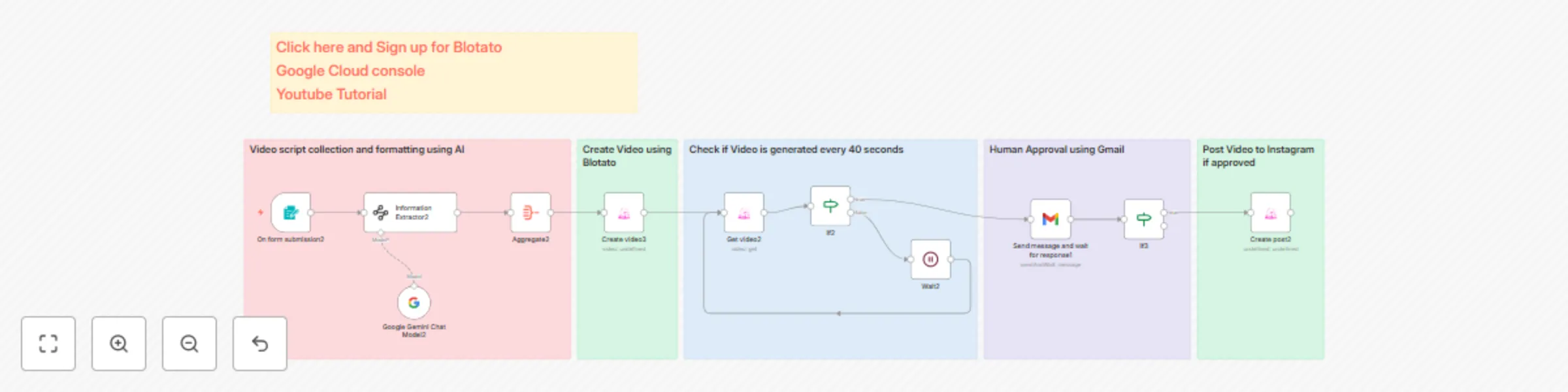
Transforming scripts into engaging Instagram Reels with Blotato: featuring unique human review
Stop wasting time on video editing! This template is designed for **content creators and marketers** who need a fast, scalable way to convert simple text scripts into polished, shareable AI-generated videos and publish them automatically to Instagram. The workflow includes a critical human review step to maintain quality control.
### **Prerequisites**
To use this template, you must have the following:
* An active n8n instance.
* An **active Blotato account** (required for the AI video generation and Instagram upload API access).
* The **Blotato n8n node** must be installed on your n8n instance.
* A configured **Gmail** node to handle the human approval step.
### **How It Works (Workflow Breakdown)**
This automation efficiently moves your content from a text script to a live Instagram post:
1. **Script Input (`Form` Node):**
* The workflow starts by accepting your script via a simple form input.
2. **Data Structuring (`Information Extractor` Node):**
* The raw script is processed to arrange the information into a specific JSON schema, ensuring the **Blotato Create Content** node receives the correct input format required for AI video generation.
3. **AI Video Generation (`Blotato` Node):**
* The process triggers the **Blotato AI video generation**. This process is set to run in a *Queue* mode.
4. **Status Check Loop (`Loop`, `Wait`, `IF` Nodes):**
* Since video generation takes time, the workflow enters a loop:
* It uses a **Wait** node to pause for 80 seconds.
* It then uses the **Blotato Get Video** node, combined with an **IF** node, to check the generation status.
* This loop continues until the video is fully generated.
5. **Human Approval (`Gmail` Node):**
* Once the video is generated, the hosted video link is sent to your Gmail. The email includes two interactive buttons: "Approve" and "Disapprove."
6. **Instagram Upload (`Blotato` Node):**
* If you choose to "Approve" the video, the final step uses the **Blotato** node to automatically upload the finished video as an Instagram Reel.
### **Setup Instructions**
* **Template Download:** The full, free template is available here: [Template JSON](https://github.com/MrKarne/youtube/blob/main/Blotato-Instagram-reel-automation.json)
* **Configuration Tutorial:** For a visual, step-by-step guide on configuring the Blotato node and setting up the workflow, please watch the full tutorial: [YouTube Tutorial](https://youtu.be/4UL1GrW09O0)
* It takes 10 mins to configure the Workflow