Transform text into AI videos with Google Veo3, Leonardo.ai and Claude 4

Workflow preview

Workflow preview
100%
Transform text into AI videos with Google Veo3, Leonardo.ai and Claude 4 preview
Open on n8n.io

Important notice

This workflow is provided as-is. Please review and test before using in production.

1. Workflow Overview

Google Veo 3 Prompt and Video Generator via Leonardo.ai + Claude 4 Transform text descriptions into cinematic videos using Google's Veo 3 model through Leonardo.ai's platform! What This Workf...

Best for

  • Content Creation automation workflows
  • Multimodal AI automation workflows
  • advanced n8n builders looking for reusable templates

Tools used

n8n-nodes-base.httprequest, n8n-nodes-base.set, n8n-nodes-base.googledrive, @n8n/n8n-nodes-langchain.lmchatanthropic, n8n-nodes-base.manualtrigger, n8n-nodes-base.wait, n8n-nodes-base.stickynote, @n8n/n8n-nodes-langchain.toolwikipedia

Source and attribution

This workflow is cataloged by N8N Workflows and links back to its original n8n.io source page by Alex Kim.

Original n8n.io source

1.1 Workflow description

Title
Transform text into AI videos with Google Veo3, Leonardo.ai and Claude 4
Workflow name
Transform text into AI videos with Google Veo3, Leonardo.ai and Claude 4

🎬 Google Veo 3 Prompt and Video Generator via Leonardo.ai + Claude 4

Transform text descriptions into cinematic videos using Google's Veo 3 model through Leonardo.ai's platform!

πŸš€ What This Workflow Does

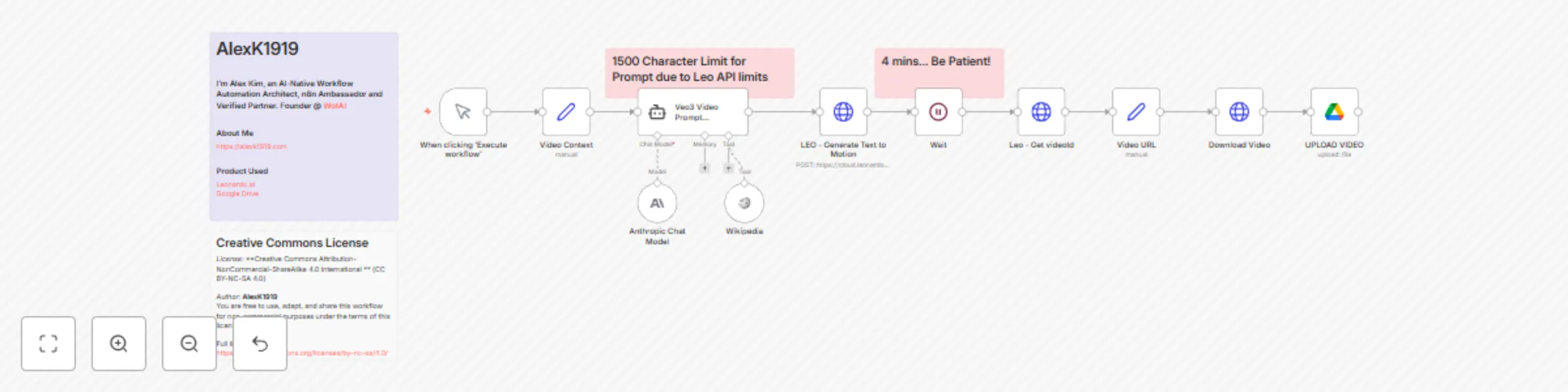
This advanced automation pipeline takes your creative ideas and turns them into professional-quality videos using Google's powerful Veo 3 model (accessed via Leonardo.ai), enhanced by Claude 4's sophisticated prompt engineering.

✨ Key Features

  • πŸ€– AI-Powered Prompt Enhancement: Uses Claude 4 Sonnet with Wikipedia integration to craft optimal Google Veo 3 prompts
  • πŸŽ₯ Professional Video Generation: Leverages Google's Veo 3 model through Leonardo.ai for high-quality text-to-video conversion
  • ☁️ Automatic Cloud Storage: Videos are automatically saved to your Google Drive
  • πŸ“‹ Structured Prompting: Follows Google Veo3 best practices with 8 essential elements (Subject, Context, Action, Style, Camera Motion, Composition, Ambiance, Audio)
  • ⚑ Hands-Off Processing: Set it and forget it - the workflow handles the entire pipeline

πŸ”§ How It Works

  1. Input Your Concept - Describe your video idea in the "Video Context" node
  2. AI Enhancement - Claude 4 transforms your description into a cinematic Google Veo 3 prompt using advanced techniques
  3. Video Generation - Google's Veo 3 model (via Leonardo.ai) creates your video (720p resolution, ~8 seconds)
  4. Smart Waiting - 4-minute processing buffer ensures completion
  5. Auto-Download - Retrieves the finished video from Leonardo's servers
  6. Cloud Storage - Uploads directly to your Google Drive folder

πŸ’‘ Perfect For

  • Content Creators looking to automate video production
  • Marketing Teams needing quick promotional videos
  • Educators creating engaging visual content
  • Social Media Managers generating scroll-stopping content
  • Creative Professionals exploring AI-assisted filmmaking

πŸ“‹ Requirements

  • Leonardo AI account with API access
  • Anthropic API key (Claude 4 Sonnet)
  • Google Drive integration
  • N8N instance (cloud or self-hosted)

πŸ‘¨β€πŸ’» About the Creator

Created by: AlexK1919 - AI-Native Workflow Automation Architect, n8n Ambassador and Verified Partner, Founder @ WotAI

If you'd like to review more Google Veo 3 Prompts organized by business category, check out over 9,000+ free, pre-made prompts at: Google Veo 3 Prompts

πŸ“„ License

This workflow is available under Creative Commons Attribution-NonCommercial-ShareAlike 4.0 International (CC BY-NC-SA 4.0) license. You are free to use, adapt, and share this workflow for non-commercial purposes under the terms of this license.

Full license details: https://creativecommons.org/licenses/by-nc-sa/4.0/

🎯 Example Output

Input: "Star Wars stormtrooper digging for uranium in desert, saying something funny"

The AI generates a structured prompt with:

  • Subject: Detailed character description
  • Context: Desert environment specifics
  • Action: Dynamic digging movements
  • Style: Cinematic vlog aesthetic
  • Camera: Appropriate angles and movement
  • Audio: Dialogue, sound effects, and music

βš™οΈ Setup Notes

  • Character Limit: Prompts are optimized for Leonardo's 1,500 character API limit
  • Processing Time: Allow 4+ minutes for Google Veo3 video generation
  • Quality: 720p resolution with native audio generation
  • Consistency: Uses advanced Google Veo3 prompting for reliable results

πŸ”„ Customization Options

  • Modify the prompt engineering system message for different styles
  • Adjust video resolution and model parameters
  • Change storage destination (Google Drive folder)
  • Add post-processing steps or notifications

πŸ“ˆ Why This Workflow Rocks

Unlike simple text-to-video tools, this workflow:

  • Intelligently enhances your prompts using AI for Google Veo 3
  • Follows industry best practices for Google Veo3 prompting
  • Automates the entire pipeline from idea to stored video
  • Leverages multiple AI models for superior results
  • Handles technical details like API limits and timing

🚨 Pro Tips

  1. Be specific in your initial context - detail creates better videos
  2. The workflow includes comprehensive Google Veo3 prompting guidelines
  3. Videos are typically 5-8 seconds - plan accordingly for longer content
  4. Experiment with different styles and camera movements optimized for Veo 3
  5. The AI can access Wikipedia for factual enhancement

Ready to revolutionize your video creation process?

Import this workflow and start generating professional videos with just a text description! Perfect for anyone looking to harness the power of AI for content creation.

Tags: #veo3 #GoogleVeo3 #AI #VideoGeneration #Leonardo #Claude #Automation #ContentCreation #GoogleAI

1.2 Logical Blocks

This catalog entry is organized from the workflow JSON. The node-level section below shows the executable blocks available for review before importing the template.

2. Block-by-Block Analysis

Block 1 - Leo - Get videoId

Type / Role
n8n-nodes-base.httpRequest - httpRequest
Config choices
Version 4.2

Block 2 - Video URL

Type / Role
n8n-nodes-base.set - set
Config choices
Version 3.4

Block 3 - Download Video

Type / Role
n8n-nodes-base.httpRequest - httpRequest
Config choices
Version 4.2

Block 4 - UPLOAD VIDEO

Type / Role
n8n-nodes-base.googleDrive - googleDrive
Config choices
Version 3

Block 5 - Anthropic Chat Model

Type / Role
@n8n/n8n-nodes-langchain.lmChatAnthropic - lmChatAnthropic
Config choices
Version 1.3

Block 6 - When clicking β€˜Execute workflow’

Type / Role
n8n-nodes-base.manualTrigger - manualTrigger
Config choices
Version 1

Block 7 - LEO - Generate Text to Motion

Type / Role
n8n-nodes-base.httpRequest - httpRequest
Config choices
Version 4.2

Block 8 - Wait

Type / Role
n8n-nodes-base.wait - wait
Config choices
Version 1.1

Block 9 - Sticky Note

Type / Role
n8n-nodes-base.stickyNote - stickyNote
Config choices
Version 1

Block 10 - Wikipedia

Type / Role
@n8n/n8n-nodes-langchain.toolWikipedia - toolWikipedia
Config choices
Version 1

Block 11 - Veo3 Video Prompt Generator

Type / Role
@n8n/n8n-nodes-langchain.agent - agent
Config choices
Version 1.7

Block 12 - Sticky Note1

Type / Role
n8n-nodes-base.stickyNote - stickyNote
Config choices
Version 1

Block 13 - Video Context

Type / Role
n8n-nodes-base.set - set
Config choices
Version 3.4

Block 14 - Sticky Note10

Type / Role
n8n-nodes-base.stickyNote - stickyNote
Config choices
Version 1

Block 15 - Sticky Note9

Type / Role
n8n-nodes-base.stickyNote - stickyNote
Config choices
Version 1

3. Summary Table

Workflow Transform text into AI videos with Google Veo3, Leonardo.ai and Claude 4
Complexity advanced
Nodes 15
Categories Content Creation, Multimodal AI
Author Alex Kim
Published 04 Jul 2025

4. Reproducing the Workflow from Scratch

  1. 1. Download the workflow JSON

    Use the JSON export at /data/workflows/5666/5666.json as the source template for this automation.

  2. 2. Import the template into n8n

    Open n8n, import the downloaded JSON, and review each node before activating the workflow.

  3. 3. Configure credentials and variables

    Replace placeholder credentials, API keys, webhook URLs, account IDs, and environment-specific values with your own settings.

  4. 4. Test with sample data

    Run the workflow manually or in a staging workspace, inspect node output, and confirm downstream systems receive the expected data.

  5. 5. Activate and monitor

    Enable the workflow only after testing, then monitor executions, errors, and rate limits during the first production runs.

5. General Notes & Resources

Review imported nodes carefully before activation. This catalog entry is intended to help you inspect the workflow structure, understand required services, and find related templates faster.

Node names, credentials, schedules, webhook paths, and external service limits may need adjustment for your workspace.

Frequently asked questions

What does Transform text into AI videos with Google Veo3, Leonardo.ai and Claude 4 do?

Google Veo 3 Prompt and Video Generator via Leonardo.ai + Claude 4 Transform text descriptions into cinematic videos using Google's Veo 3 model through Leonardo.ai's platform! What This Workf...

What do I need before importing this workflow?

Review the workflow JSON, configure any required credentials in n8n, and test the automation in a safe workspace before using it in production.

Can I customize this workflow?

Yes. Use the block-by-block analysis and the downloadable JSON to inspect each node, then adjust credentials, prompts, schedules, filters, or destinations for your Content Creation, Multimodal AI use case.