Block 1 - Fetch Articles
- Type / Role
- n8n-nodes-base.httpRequest - httpRequest
- Config choices
- Version 4.2


 Early Deal
This workflow is provided as-is. Please review and test before using in production.
Turn Your Reading Habit into a Content Creation Engine This workflow is built for one core purpose: to maximize the return on your reading time. It turns your passive consumption of articles and hi...
n8n-nodes-base.httprequest, n8n-nodes-base.splitout, n8n-nodes-base.code, n8n-nodes-base.filter, @n8n/n8n-nodes-langchain.chainllm, @n8n/n8n-nodes-langchain.lmchatopenrouter, n8n-nodes-base.markdown, n8n-nodes-base.stickynote
This workflow is cataloged by N8N Workflows and links back to its original n8n.io source page by Julian Kaiser.
Original n8n.io sourceThis workflow is built for one core purpose: to maximize the return on your reading time. It turns your passive consumption of articles and highlights into an active system for generating original content and rediscovering valuable ideas you may have forgotten.
End Writer's Block Before It Starts: This workflow is your personal content strategist. Instead of staring at a blank page, you'll start your week with a list of AI-generated content ideas—from LinkedIn posts and blog articles to strategic insights—all based on the topics you're already deeply engaged with. It finds the hidden connections between articles and suggests novel angles for your next piece.
Rescue Your Insights from the Digital Abyss: Readwise is fantastic for capturing highlights, but the best ones can get lost over time. This workflow acts as your personal curator, automatically excavating the most impactful quotes and notes from your recent reading. It doesn't just show them to you; it contextualizes them within the week's key themes, giving them new life and relevance.
Create an Intellectual Flywheel: By systematically analyzing your reading, generating content ideas, and saving those insights back into your "second brain," you create a powerful feedback loop. Your reading informs your content, and the process of creating content deepens your understanding, making every reading session more valuable than the last.
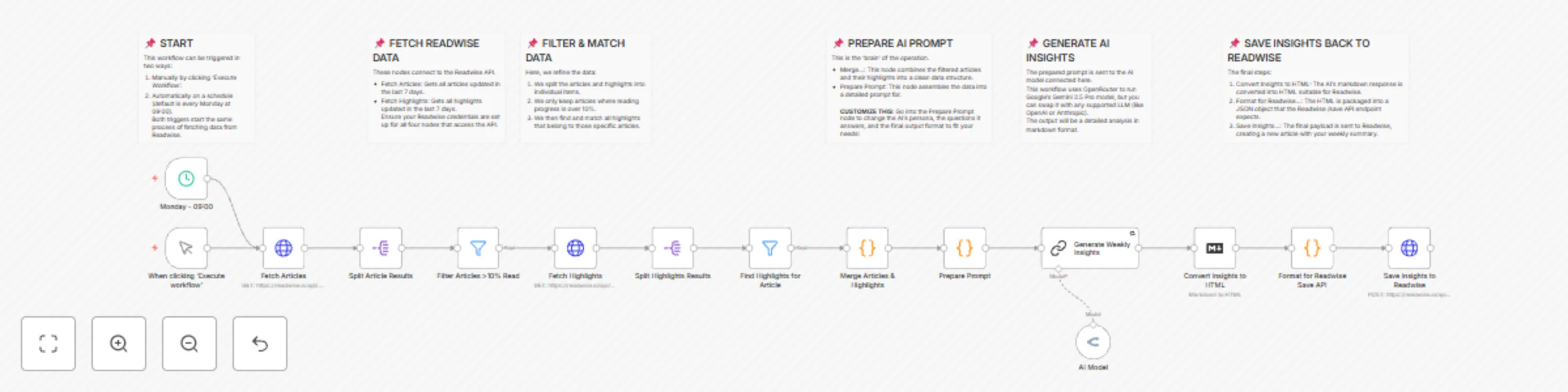
This workflow automates the process of generating a "Weekly Reading Insights" summary based on your activity in Readwise.
HTTP Request nodes and the two Fetch nodes with your Readwise API token Get from Reader API. Also check how to set up Header AuthOpenRouter Chat Model node. You can swap this for any other AI model if you prefer.Prepare Prompt Code node to adjust the persona, questions, and desired output format. This is where you can tailor the AI's analysis to your specific needs.Monday - 09:00 Schedule Trigger to run on your preferred day and time.This catalog entry is organized from the workflow JSON. The node-level section below shows the executable blocks available for review before importing the template.
| Workflow | Transform Readwise highlights into weekly content ideas with Gemini AI |
|---|---|
| Complexity | advanced |
| Nodes | 21 |
| Categories | Content Creation, AI Summarization |
| Author | Julian Kaiser |
| Published | 27 Oct 2025 |
Use the JSON export at /data/workflows/10217/10217.json as the source template for this automation.
Open n8n, import the downloaded JSON, and review each node before activating the workflow.
Replace placeholder credentials, API keys, webhook URLs, account IDs, and environment-specific values with your own settings.
Run the workflow manually or in a staging workspace, inspect node output, and confirm downstream systems receive the expected data.
Enable the workflow only after testing, then monitor executions, errors, and rate limits during the first production runs.
Review imported nodes carefully before activation. This catalog entry is intended to help you inspect the workflow structure, understand required services, and find related templates faster.
Node names, credentials, schedules, webhook paths, and external service limits may need adjustment for your workspace.
Turn Your Reading Habit into a Content Creation Engine This workflow is built for one core purpose: to maximize the return on your reading time. It turns your passive consumption of articles and hi...
Review the workflow JSON, configure any required credentials in n8n, and test the automation in a safe workspace before using it in production.
Yes. Use the block-by-block analysis and the downloadable JSON to inspect each node, then adjust credentials, prompts, schedules, filters, or destinations for your Content Creation, AI Summarization use case.