Transform old photos into animated videos with FLUX & Kling AI for social media

Workflow preview

Workflow preview
100%
Transform old photos into animated videos with FLUX & Kling AI for social media preview
Open on n8n.io

Important notice

This workflow is provided as-is. Please review and test before using in production.

1. Workflow Overview

This workflow contains community nodes that are only compatible with the self hosted version of n8n. Description See the transformation in action! Here's an example of what this workflow can achiev...

Best for

  • Content Creation automation workflows
  • Multimodal AI automation workflows
  • advanced n8n builders looking for reusable templates

Tools used

n8n-nodes-base.formtrigger, n8n-nodes-base.stickynote, n8n-nodes-base.httprequest, n8n-nodes-base.wait, n8n-nodes-base.if, n8n-nodes-base.googledrive, n8n-nodes-base.set, n8n-nodes-upload-post.uploadpost

Source and attribution

This workflow is cataloged by N8N Workflows and links back to its original n8n.io source page by Juan Carlos Cavero Gracia.

Original n8n.io source

1.1 Workflow description

Title
Transform old photos into animated videos with FLUX & Kling AI for social media
Workflow name
Transform old photos into animated videos with FLUX & Kling AI for social media

This workflow contains community nodes that are only compatible with the self-hosted version of n8n.

Description

See the transformation in action! Here's an example of what this workflow can achieve:

This automation template is designed for content creators, social media managers, and anyone looking to breathe new life into old family photos and historical images. It transforms any old black and white or sepia photograph into a colorized, animated video using cutting-edge AI technology, then automatically publishes the results across multiple social media platforms including Facebook, Instagram, YouTube, and X (Twitter).

The workflow combines powerful AI services to create engaging content from vintage photographs: first enhancing and colorizing the image using FLUX Kontext, then bringing it to life with realistic animations using Kling Video AI, and finally distributing the results across your social media channels automatically.

Note: The estimated cost per workflow execution is approximately $0.29 USD, covering the AI processing for both image colorization and video animation. The upload-post node only works for self-hosted n8n instances, but you can use the standard HTTP request node for uploading content on n8n Cloud.

Who Is This For?

  • Content Creators & Social Media Managers: Transform historical content into engaging videos that capture audience attention and drive engagement across platforms.
  • Family History Enthusiasts: Bring old family photos to life by adding color and motion, creating emotional connections with your audience.
  • Marketing Professionals: Leverage nostalgic content for brand storytelling, using vintage aesthetics to create compelling social media campaigns.
  • Digital Artists & Photo Restorers: Streamline the process of enhancing and sharing restored vintage photographs with automated AI enhancement.
  • Social Media Influencers: Create unique, eye-catching content from historical images that stands out in crowded social feeds.

What Problem Does This Workflow Solve?

Creating engaging social media content from old photos typically requires multiple manual steps: photo restoration, colorization, animation, and then individual posting to each platform. This workflow addresses these challenges by:

  • Automating Photo Enhancement: Uses advanced AI (FLUX Kontext) to automatically colorize and enhance old photographs, removing artifacts and improving quality.
  • Creating Dynamic Content: Transforms static images into animated videos using Kling Video AI, making historical photos come alive with natural movements.
  • Streamlining Multi-Platform Publishing: Automatically distributes the final animated videos across Facebook, Instagram, YouTube, and X with a single workflow execution.
  • Saving Time & Effort: Eliminates the need for manual photo editing, video creation, and individual social media posting.

How It Works

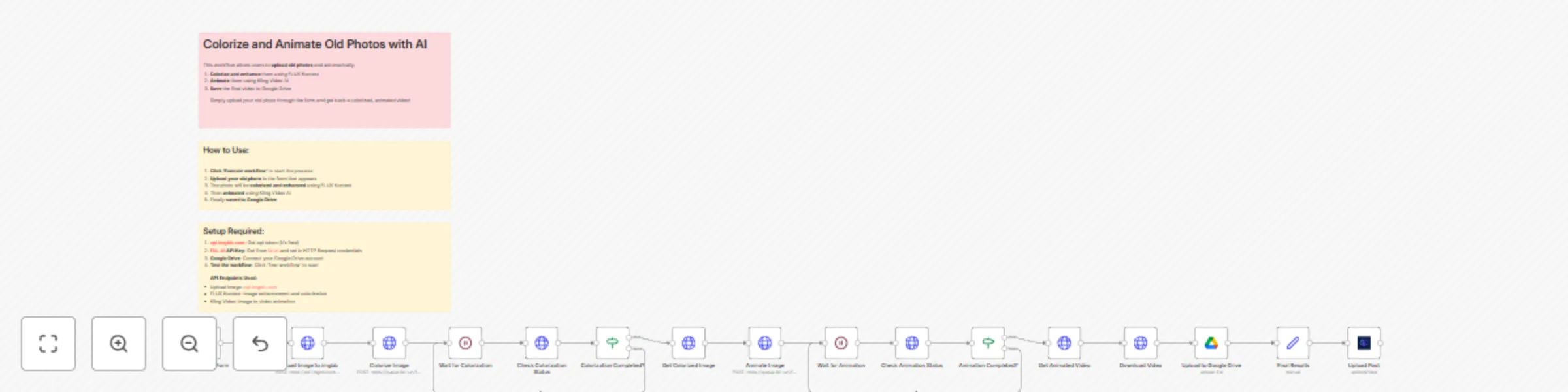
  1. Photo Upload: Users submit old photographs through a simple web form, with optional custom animation descriptions.
  2. Image Enhancement: The workflow uploads the photo to imgbb, then sends it to FLUX Kontext AI for colorization and quality enhancement.
  3. Animation Creation: The colorized image is processed by Kling Video AI to create a 5-second animated video with natural movements.
  4. Cloud Storage: The final video is automatically saved to Google Drive for backup and easy access.
  5. Multi-Platform Publishing: The animated video is simultaneously posted to Facebook, Instagram, YouTube, and X using the upload-post service.

Setup

  1. FAL.AI API Key: Sign up at fal.ai and add your API key to the HTTP Request nodes for both FLUX Kontext and Kling Video AI services.
  2. ImgBB API Token: Create a free account at api.imgbb.com to get an API token for image hosting, then update the "Upload Image to imgbb" node.
  3. Google Drive Connection: Connect your Google Drive account to enable automatic video storage and backup.
  4. Upload-Post Service: Create an account at upload-post.com to get your API credentials for multi-platform social media posting.
    • Important: The upload-post node currently only works with self-hosted n8n instances. For n8n Cloud users, replace the upload-post node with standard HTTP request nodes to publish to each social media platform individually.
  5. Form Customization: (Optional) Modify the form fields in the "Photo Upload Form" node to collect additional information or customize the user experience.

Requirements

  • Accounts: n8n, FAL.AI, ImgBB, Google Drive, upload-post.com
  • API Keys & Credentials: FAL.AI API Key, ImgBB API Token, Google Drive OAuth2, Upload-post.com API Token & User ID
  • File Types: Supports JPG, PNG image formats for photo uploads
  • Cost: Approximately $0.29 USD per workflow execution for AI processing

Transform your old photographs into viral social media content with this powerful AI-driven workflow that handles everything from restoration to distribution automatically.

1.2 Logical Blocks

This catalog entry is organized from the workflow JSON. The node-level section below shows the executable blocks available for review before importing the template.

2. Block-by-Block Analysis

Block 1 - Photo Upload Form

Type / Role
n8n-nodes-base.formTrigger - formTrigger
Config choices
Version 2.1

Block 2 - Workflow Description

Type / Role
n8n-nodes-base.stickyNote - stickyNote
Config choices
Version 1

Block 3 - Colorize Image

Type / Role
n8n-nodes-base.httpRequest - httpRequest
Config choices
Version 4.2

Block 4 - Wait for Colorization

Type / Role
n8n-nodes-base.wait - wait
Config choices
Version 1.1

Block 5 - Check Colorization Status

Type / Role
n8n-nodes-base.httpRequest - httpRequest
Config choices
Version 4.2

Block 6 - Colorization Completed?

Type / Role
n8n-nodes-base.if - if
Config choices
Version 2.2

Block 7 - Get Colorized Image

Type / Role
n8n-nodes-base.httpRequest - httpRequest
Config choices
Version 4.2

Block 8 - Animate Image

Type / Role
n8n-nodes-base.httpRequest - httpRequest
Config choices
Version 4.2

Block 9 - Wait for Animation

Type / Role
n8n-nodes-base.wait - wait
Config choices
Version 1.1

Block 10 - Check Animation Status

Type / Role
n8n-nodes-base.httpRequest - httpRequest
Config choices
Version 4.2

Block 11 - Animation Completed?

Type / Role
n8n-nodes-base.if - if
Config choices
Version 2.2

Block 12 - Get Animated Video

Type / Role
n8n-nodes-base.httpRequest - httpRequest
Config choices
Version 4.2

Block 13 - Download Video

Type / Role
n8n-nodes-base.httpRequest - httpRequest
Config choices
Version 4.2

Block 14 - Upload to Google Drive

Type / Role
n8n-nodes-base.googleDrive - googleDrive
Config choices
Version 3

Block 15 - Final Results

Type / Role
n8n-nodes-base.set - set
Config choices
Version 3.4

Block 16 - Usage Instructions

Type / Role
n8n-nodes-base.stickyNote - stickyNote
Config choices
Version 1

Block 17 - Setup Instructions

Type / Role
n8n-nodes-base.stickyNote - stickyNote
Config choices
Version 1

Block 18 - Upload Image to imgbb

Type / Role
n8n-nodes-base.httpRequest - httpRequest
Config choices
Version 4.2

Block 19 - Upload Post

Type / Role
n8n-nodes-upload-post.uploadPost - uploadPost
Config choices
Version 1

3. Summary Table

Workflow Transform old photos into animated videos with FLUX & Kling AI for social media
Complexity advanced
Nodes 19
Categories Content Creation, Multimodal AI
Author Juan Carlos Cavero Gracia
Published 07 Jul 2025

4. Reproducing the Workflow from Scratch

  1. 1. Download the workflow JSON

    Use the JSON export at /data/workflows/5755/5755.json as the source template for this automation.

  2. 2. Import the template into n8n

    Open n8n, import the downloaded JSON, and review each node before activating the workflow.

  3. 3. Configure credentials and variables

    Replace placeholder credentials, API keys, webhook URLs, account IDs, and environment-specific values with your own settings.

  4. 4. Test with sample data

    Run the workflow manually or in a staging workspace, inspect node output, and confirm downstream systems receive the expected data.

  5. 5. Activate and monitor

    Enable the workflow only after testing, then monitor executions, errors, and rate limits during the first production runs.

5. General Notes & Resources

Review imported nodes carefully before activation. This catalog entry is intended to help you inspect the workflow structure, understand required services, and find related templates faster.

Node names, credentials, schedules, webhook paths, and external service limits may need adjustment for your workspace.

Frequently asked questions

What does Transform old photos into animated videos with FLUX & Kling AI for social media do?

This workflow contains community nodes that are only compatible with the self hosted version of n8n. Description See the transformation in action! Here's an example of what this workflow can achiev...

What do I need before importing this workflow?

Review the workflow JSON, configure any required credentials in n8n, and test the automation in a safe workspace before using it in production.

Can I customize this workflow?

Yes. Use the block-by-block analysis and the downloadable JSON to inspect each node, then adjust credentials, prompts, schedules, filters, or destinations for your Content Creation, Multimodal AI use case.