Block 1 - Weekly Schedule
- Type / Role
- n8n-nodes-base.scheduleTrigger - scheduleTrigger
- Config choices
- Version 1.2


 Early Deal
This workflow is provided as-is. Please review and test before using in production.
Who is this for Entrepreneurs looking for verified technology to license. R&D Teams tracking aerospace innovation. Content Creators covering tech trends. How it works Fetch: Gets the latest patents...
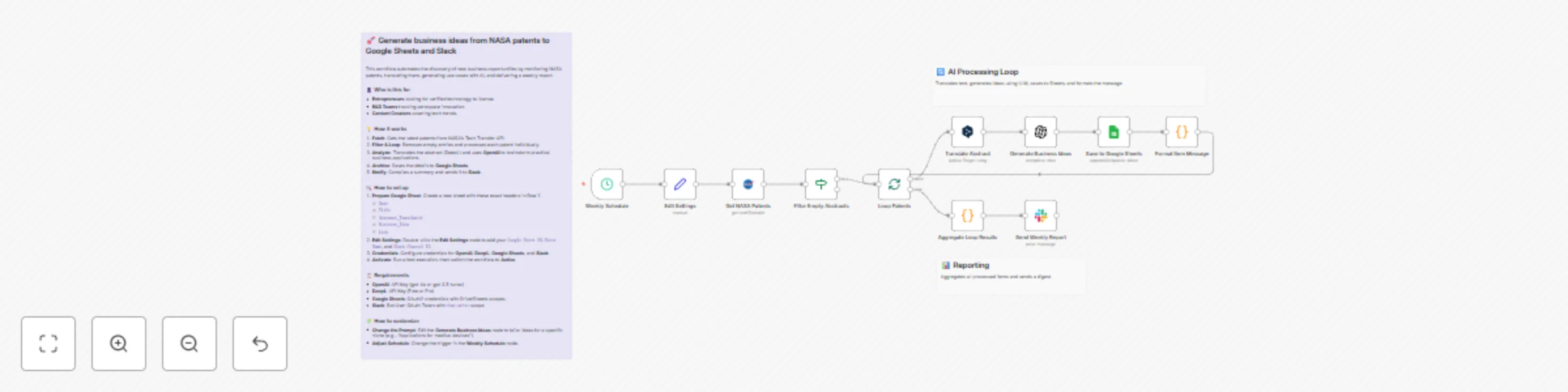
n8n-nodes-base.scheduletrigger, n8n-nodes-base.nasa, n8n-nodes-base.if, n8n-nodes-base.splitinbatches, n8n-nodes-base.deepl, n8n-nodes-base.openai, n8n-nodes-base.googlesheets, n8n-nodes-base.code
This workflow is cataloged by N8N Workflows and links back to its original n8n.io source page by Takumi Oku.
Original n8n.io sourceWho is this for Entrepreneurs looking for verified technology to license. R&D Teams tracking aerospace innovation. Content Creators covering tech trends. How it works Fetch: Gets the latest patents from NASA's Tech Transfer API. Filter & Loop: Removes empty entries and processes each patent individually. Analyze: Translates the abstract (DeepL) and uses OpenAI to brainstorm practical business applications. Archive: Saves the details to Google Sheets. Notify: Compiles a summary and sends it to Slack. How to set up Prepare Google Sheet: Create a new sheet with these exact headers in Row 1: Date Title Abstract_Translated Business_Idea Link Edit Settings: Double-click the Edit Settings node to add your Google Sheet ID, Sheet Name, and Slack Channel ID. Credentials: Configure credentials for OpenAI, DeepL, Google Sheets, and Slack. Activate: Run a test execution, then switch the workflow to Active. Requirements OpenAI: API Key (gpt-4o or gpt-3.5-turbo) DeepL: API Key (Free or Pro) Google Sheets: OAuth2 credentials with Drive/Sheets scopes. Slack: Bot User OAuth Token with chat:write scope. How to customize Change the Prompt: Edit the Generate Business Ideas node to tailor ideas for a specific niche (e.g., "Applications for medical devices"). Adjust Schedule: Change the trigger in the Weekly Schedule node to run daily or monthly. Different Output: Swap Slack for Microsoft Teams or Email nodes if preferred.
This catalog entry is organized from the workflow JSON. The node-level section below shows the executable blocks available for review before importing the template.
| Workflow | Transform NASA patents into business ideas with OpenAI and send to Google Sheets & Slack |
|---|---|
| Complexity | intermediate |
| Nodes | 14 |
| Categories | Market Research, AI Summarization |
| Author | Takumi Oku |
| Published | 27 Nov 2025 |
Use the JSON export at /data/workflows/11306/11306.json as the source template for this automation.
Open n8n, import the downloaded JSON, and review each node before activating the workflow.
Replace placeholder credentials, API keys, webhook URLs, account IDs, and environment-specific values with your own settings.
Run the workflow manually or in a staging workspace, inspect node output, and confirm downstream systems receive the expected data.
Enable the workflow only after testing, then monitor executions, errors, and rate limits during the first production runs.
Review imported nodes carefully before activation. This catalog entry is intended to help you inspect the workflow structure, understand required services, and find related templates faster.
Node names, credentials, schedules, webhook paths, and external service limits may need adjustment for your workspace.
Who is this for Entrepreneurs looking for verified technology to license. R&D Teams tracking aerospace innovation. Content Creators covering tech trends. How it works Fetch: Gets the latest patents...
Review the workflow JSON, configure any required credentials in n8n, and test the automation in a safe workspace before using it in production.
Yes. Use the block-by-block analysis and the downloadable JSON to inspect each node, then adjust credentials, prompts, schedules, filters, or destinations for your Market Research, AI Summarization use case.