Transform meeting transcripts into AI-generated presentations with Google Slides & Flux

Workflow preview

Workflow preview
100%
Transform meeting transcripts into AI-generated presentations with Google Slides & Flux preview
Open on n8n.io

Important notice

This workflow is provided as-is. Please review and test before using in production.

1. Workflow Overview

Transform meeting transcripts into fully customized, AI powered presentations automatically. This comprehensive 5 workflow automation system analyzes client conversations and generates professional...

Best for

  • Content Creation automation workflows
  • Multimodal AI automation workflows
  • advanced n8n builders looking for reusable templates

Tools used

n8n-nodes-base.formtrigger, n8n-nodes-base.httprequest, n8n-nodes-base.googlesheets, n8n-nodes-base.stickynote, @n8n/n8n-nodes-langchain.lmchatopenai, n8n-nodes-base.googledocs, @n8n/n8n-nodes-langchain.agent, n8n-nodes-base.converttofile

Source and attribution

This workflow is cataloged by N8N Workflows and links back to its original n8n.io source page by Joseph.

Original n8n.io source

1.1 Workflow description

Title
Transform meeting transcripts into AI-generated presentations with Google Slides & Flux
Workflow name
Transform meeting transcripts into AI-generated presentations with Google Slides & Flux

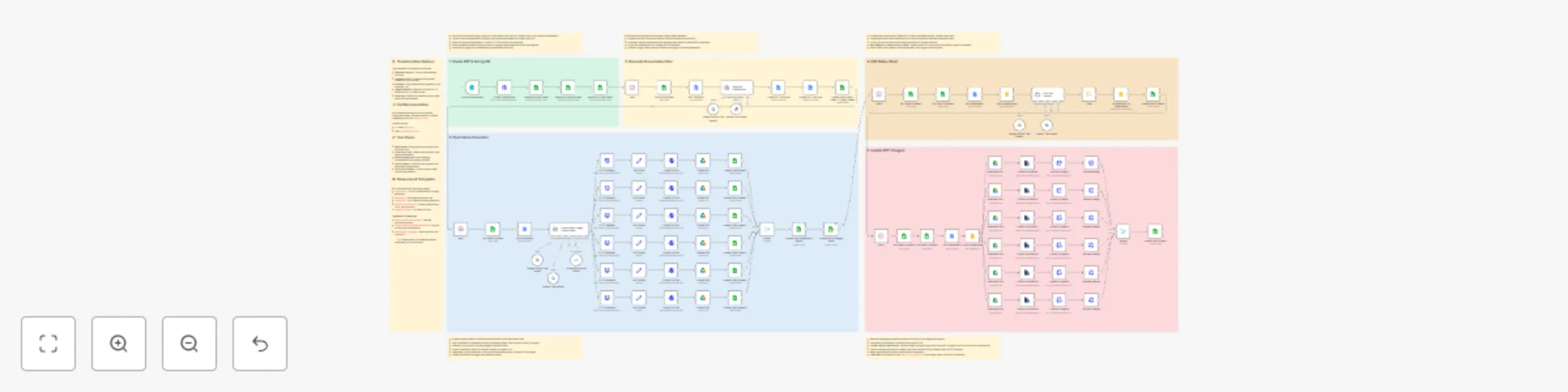
Transform meeting transcripts into fully customized, AI-powered presentations automatically. This comprehensive 5-workflow automation system analyzes client conversations and generates professional slide decks complete with personalized content and AI-generated illustrations.

🎯 What This Automation Does

This end-to-end solution takes a meeting transcript (Google Docs) and client information as input, then automatically:

  • Creates a presentation from your custom template
  • Generates a strategic presentation plan tailored to the client's needs
  • Creates custom illustrations using AI image generation
  • Populates slides with personalized text content
  • Inserts generated images into the appropriate slides
  • Delivers a client-ready presentation

Perfect for sales teams, consultants, agencies, and anyone who needs to create customized presentations at scale.

πŸ”§ How It Works

The automation is split into 5 interconnected workflows:

Workflow 1: Clone Presentation & Database Setup

  • Form trigger captures client name, transcript URL, and submission time
  • Clones your presentation template via Google Slides API
  • Saves presentation details to Google Sheets for tracking

Workflow 2: AI Presentation Plan Generation

  • Analyzes meeting transcript to understand client pain points
  • Generates comprehensive presentation structure and content strategy
  • Saves plan to Google Docs for review and tracking
  • Uses company profile (customizable) to match solutions to client needs

Workflow 3: AI Illustration Generation

  • AI agent creates image prompts based on presentation plan
  • Generates illustrations using Flux model via OpenRouter (nanobanana)
  • Uploads images to Google Drive for slide insertion
  • Tracks all generated assets in database

Workflow 4: Text Content Population

  • AI agent generates final presentation text from the plan
  • Replaces template placeholders with personalized content
  • Uses Object IDs to target specific text elements in slides
  • Updates slides using native n8n Google Slides node

Workflow 5: Image Insertion

  • Retrieves image Object IDs from presentation structure
  • Downloads illustrations from Google Drive
  • Converts images for ImgBB hosting (resolves Google Drive URL limitations)
  • Updates slide images via Google Slides API

πŸ“‹ Prerequisites

Required Accounts & API Keys:

  • Google Workspace (Drive, Slides, Docs)
  • OpenAI API (for AI agents)
  • OpenRouter API (for Flux image generation)
  • ImgBB API (free tier available)
  • Gemini API (optional, for additional AI tasks)

Setup Requirements:

  • Google Sheets database (template provided in article and inside the workflow)
  • Google Slides presentation template with standard Object IDs
  • Meeting transcript in Google Docs format

🎨 Customization Options

This automation is designed to be flexible:

  • Template Flexibility: Use any slide template structure
  • Company Profile: Customize the business context for your use case
  • AI Models: Swap OpenAI/Gemini agents for your preferred LLM
  • Image Generation: Replace Flux with DALL-E, Midjourney API, or other models
  • Slide Logic: Extend to dynamically select slides based on content needs

πŸ’‘ Key Technical Insights

  • Structured Output Handling: Uses JavaScript for reliable JSON parsing when AI output structure is complex
  • Object ID System: Template placeholders use unique IDs for precise element targeting
  • Image Hosting Workaround: ImgBB resolves Google Drive direct URL limitations in API calls
  • HTTP Request Nodes: Used for API operations not covered by native n8n nodes (copying presentations, image updates)

πŸ”— Full Documentation

For a detailed breakdown of each workflow, configuration steps, and best practices, read the complete guide on this Medium article

πŸš€ Use Cases

  • Sales Teams: Auto-generate pitch decks from discovery calls
  • Consulting Firms: Create client proposals from needs assessments
  • Marketing Agencies: Build campaign presentations from strategy sessions
  • Product Teams: Transform user research into stakeholder presentations
  • Training & Education: Convert session notes into learning materials

⚠️ Important Notes

  • Template must use consistent Object IDs for automation to work
  • Google Drive images require ImgBB hosting for reliable URL access
  • AI agent output structure is complex; JavaScript parsing recommended
  • Rate limits apply for API services (especially image generation)

πŸ“¦ Resources & Templates

API Services (Get Your Keys Here)

Templates & Examples

πŸ’‘ Tip: Make copies of all templates before using them in your workflows!


Have questions or improvements? Connect with me:

P.S: I'd love to hear how you adapt this for your workflow!

1.2 Logical Blocks

This catalog entry is organized from the workflow JSON. The node-level section below shows the executable blocks available for review before importing the template.

2. Block-by-Block Analysis

Block 1 - On form submission

Type / Role
n8n-nodes-base.formTrigger - formTrigger
Config choices
Version 2.2

Block 2 - Create Presentation

Type / Role
n8n-nodes-base.httpRequest - httpRequest
Config choices
Version 4.2

Block 3 - Append in Main Sheet

Type / Role
n8n-nodes-base.googleSheets - googleSheets
Config choices
Version 4.7

Block 4 - Append in Images Sheet

Type / Role
n8n-nodes-base.googleSheets - googleSheets
Config choices
Version 4.7

Block 5 - Append in Client Sheet

Type / Role
n8n-nodes-base.googleSheets - googleSheets
Config choices
Version 4.7

Block 6 - Sticky Note

Type / Role
n8n-nodes-base.stickyNote - stickyNote
Config choices
Version 1

Block 7 - OpenAI Chat Model

Type / Role
@n8n/n8n-nodes-langchain.lmChatOpenAi - lmChatOpenAi
Config choices
Version 1.2

Block 8 - Get Pending Row

Type / Role
n8n-nodes-base.googleSheets - googleSheets
Config choices
Version 4.7

Block 9 - Get Transcript

Type / Role
n8n-nodes-base.googleDocs - googleDocs
Config choices
Version 2

Block 10 - Generate Presentation Plan

Type / Role
@n8n/n8n-nodes-langchain.agent - agent
Config choices
Version 2.2

Block 11 - Update PPT Plan Doc

Type / Role
n8n-nodes-base.googleDocs - googleDocs
Config choices
Version 2

Block 12 - Create PPT Plan Doc

Type / Role
n8n-nodes-base.googleDocs - googleDocs
Config choices
Version 2

Block 13 - Update row in Main Sheet + Trigger Image Gen

Type / Role
n8n-nodes-base.googleSheets - googleSheets
Config choices
Version 4.7

Block 14 - Sticky Note1

Type / Role
n8n-nodes-base.stickyNote - stickyNote
Config choices
Version 1

Block 15 - Get a document

Type / Role
n8n-nodes-base.googleDocs - googleDocs
Config choices
Version 2

Block 16 - Convert to File

Type / Role
n8n-nodes-base.convertToFile - convertToFile
Config choices
Version 1.1

Block 17 - Edit Fields

Type / Role
n8n-nodes-base.set - set
Config choices
Version 3.4

Block 18 - HTTP Request1

Type / Role
n8n-nodes-base.httpRequest - httpRequest
Config choices
Version 4.2

Block 19 - Upload file

Type / Role
n8n-nodes-base.googleDrive - googleDrive
Config choices
Version 3

Block 20 - Structured Output Parser

Type / Role
@n8n/n8n-nodes-langchain.outputParserStructured - outputParserStructured
Config choices
Version 1.3

Block 21 - Google Gemini Chat Model

Type / Role
@n8n/n8n-nodes-langchain.lmChatGoogleGemini - lmChatGoogleGemini
Config choices
Version 1

Block 22 - Get row(s) in sheet

Type / Role
n8n-nodes-base.googleSheets - googleSheets
Config choices
Version 4.7

Block 23 - Update row in sheet

Type / Role
n8n-nodes-base.googleSheets - googleSheets
Config choices
Version 4.7

Block 24 - Convert to File1

Type / Role
n8n-nodes-base.convertToFile - convertToFile
Config choices
Version 1.1

Showing the first 24 of 107 workflow blocks. Download the JSON for the full node graph.

3. Summary Table

Workflow Transform meeting transcripts into AI-generated presentations with Google Slides & Flux
Complexity advanced
Nodes 107
Categories Content Creation, Multimodal AI
Author Joseph
Published 08 Oct 2025

4. Reproducing the Workflow from Scratch

  1. 1. Download the workflow JSON

    Use the JSON export at /data/workflows/9372/9372.json as the source template for this automation.

  2. 2. Import the template into n8n

    Open n8n, import the downloaded JSON, and review each node before activating the workflow.

  3. 3. Configure credentials and variables

    Replace placeholder credentials, API keys, webhook URLs, account IDs, and environment-specific values with your own settings.

  4. 4. Test with sample data

    Run the workflow manually or in a staging workspace, inspect node output, and confirm downstream systems receive the expected data.

  5. 5. Activate and monitor

    Enable the workflow only after testing, then monitor executions, errors, and rate limits during the first production runs.

5. General Notes & Resources

Review imported nodes carefully before activation. This catalog entry is intended to help you inspect the workflow structure, understand required services, and find related templates faster.

Node names, credentials, schedules, webhook paths, and external service limits may need adjustment for your workspace.

Frequently asked questions

What does Transform meeting transcripts into AI-generated presentations with Google Slides & Flux do?

Transform meeting transcripts into fully customized, AI powered presentations automatically. This comprehensive 5 workflow automation system analyzes client conversations and generates professional...

What do I need before importing this workflow?

Review the workflow JSON, configure any required credentials in n8n, and test the automation in a safe workspace before using it in production.

Can I customize this workflow?

Yes. Use the block-by-block analysis and the downloadable JSON to inspect each node, then adjust credentials, prompts, schedules, filters, or destinations for your Content Creation, Multimodal AI use case.