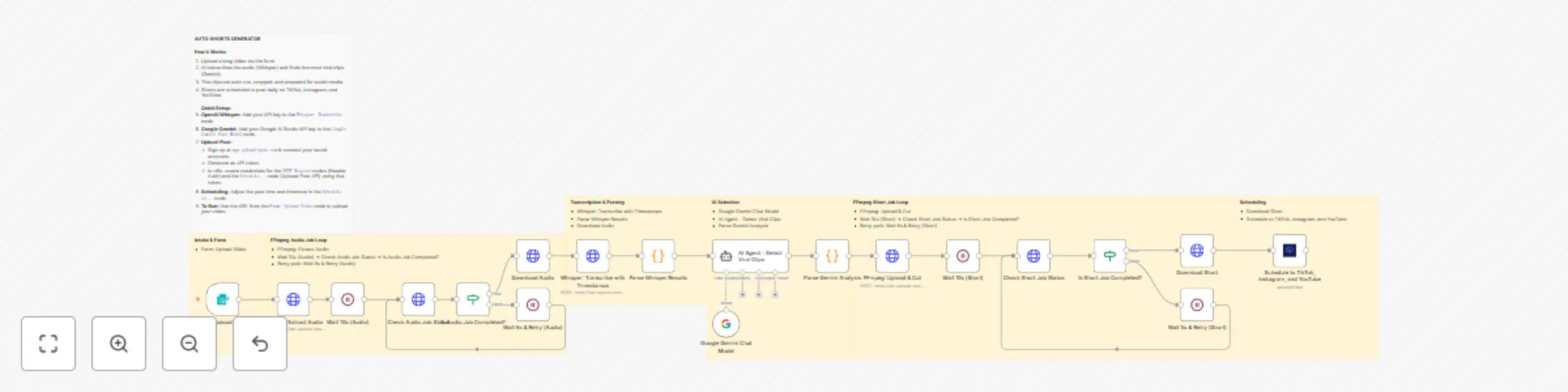
Transform long videos into viral shorts with AI and schedule to social media using Whisper & Gemini

Workflow preview

Workflow preview
100%
Transform long videos into viral shorts with AI and schedule to social media using Whisper & Gemini preview
Open on n8n.io

Important notice

This workflow is provided as-is. Please review and test before using in production.

1. Workflow Overview

This automation template turns any long video into multiple viral ready short clips and auto schedules them to TikTok, Instagram Reels, and YouTube Shorts. It works with b...

Best for

  • Content Creation automation workflows
  • Multimodal AI automation workflows
  • advanced n8n builders looking for reusable templates

Tools used

n8n-nodes-base.httprequest, n8n-nodes-upload-post.uploadpost, n8n-nodes-base.code, @n8n/n8n-nodes-langchain.lmchatgooglegemini, @n8n/n8n-nodes-langchain.agent, n8n-nodes-base.wait, n8n-nodes-base.if, n8n-nodes-base.formtrigger

Source and attribution

This workflow is cataloged by N8N Workflows and links back to its original n8n.io source page by Juan Carlos Cavero Gracia.

Original n8n.io source

1.1 Workflow description

Title
Transform long videos into viral shorts with AI and schedule to social media using Whisper & Gemini
Workflow name
Transform long videos into viral shorts with AI and schedule to social media using Whisper & Gemini

This automation template turns any long video into multiple viral-ready short clips and auto-schedules them to TikTok, Instagram Reels, and YouTube Shorts. It works with both vertical and horizontal inputs and respects the original input resolution (no unnecessary upscaling), cropping or letterboxing intelligently when needed. The workflow automatically extracts between 3 and 6 clips (based on video length and the most engaging segments) and schedules one short per consecutive day—e.g., 3 clips → the next 3 days, 6 clips → the next 6 days.

Note: This workflow uses OpenAI Whisper for word-level transcription, Google’s Gemini for clip selection and metadata, and Upload-Post’s FFmpeg API for GPU-accelerated cutting/cropping and social scheduling. You can use the same Upload-Post API token for both FFmpeg jobs and publishing uploads. Upload-Post also offers a generous free trial with no credit card required.

Who Is This For?

  • Creators & Editors: Batch-convert long talks/podcasts into daily Shorts/Reels/TikToks.
  • Agencies & Social Teams: Turn webinars/interviews into a reliable short-form stream.
  • Brands & Founders: Maintain a steady posting cadence with minimal hands-on editing.

What Problem Does This Workflow Solve?

Manual clipping is slow and inconsistent. This workflow:

  • Finds Hooks Automatically: AI picks 3–6 high-retention segments from transcript + timestamps (count scales with video length/quality).
  • Cuts Cleanly: Absolute-second FFmpeg timing to avoid mid-word cuts.
  • Vertical & Horizontal Friendly: Handles both orientations and respects source resolution.
  • Schedules for You: Posts one clip per day on consecutive days.

How It Works

  1. Form Upload: Submit your long video.
  2. Audio Extraction: FFmpeg job extracts audio for accurate ASR.
  3. Whisper Transcription: Word-level timestamps enable precise clipping.
  4. AI Clip Mining (Gemini): Detects 3–6 “viral” moments (15–60s) and generates titles/descriptions.
  5. Cut & Crop (FFmpeg): GPU pipeline produces clean clips; preserves input resolution/orientation when possible and crops/pads appropriately for target platforms.
  6. Status & Download: Polls job status and retrieves the final clips.
  7. Auto-Scheduling (Consecutive Days): Schedules one short per day starting tomorrow, for as many days as clips were produced (e.g., 3 clips → 3 days, 6 clips → 6 days) at a configurable time (default 20:00 Europe/Madrid).

Setup

  1. OpenAI (Whisper): Add your OpenAI API credentials.
  2. Google Gemini: Add Gemini credentials used by the AI Agent node.
  3. Upload-Post (free trial no credit card required): Generate your api token https://app.upload-post.com/ connect your social media accounts and add your API token credentials in n8n (same token works for FFmpeg jobs and publishing).
  4. Scheduling: Adjust posting time/intervals and timezone (Europe/Madrid by default).
  5. Metadata Mapping: Titles/descriptions are auto-generated per platform; tweak as needed.

Requirements

  • Accounts: n8n, OpenAI, Google (Gemini), Upload-Post, and social platform connections.
  • API Keys: OpenAI token, Gemini credentials, Upload-Post token.
  • Budget: Whisper + Gemini inference + FFmpeg compute + optional posting costs.

Features

  • Word-Accurate Cuts: Absolute-second timecodes with subtle pre/post-roll.
  • Orientation-Aware: Supports vertical and horizontal inputs; preserves source resolution where possible.
  • Platform-Optimized Output: 9:16-ready delivery with smart crop/pad behavior.
  • Consecutive-Day Scheduler: 3–6 clips → 3–6 consecutive posting days, automatically.
  • Retry & Polling: Built-in waits and status checks for robust processing.
  • Modular: Swap models, adjust clip count/length, or add/remove platforms quickly.

Turn long-form video into a consistent sequence of Shorts/Reels/TikToks—automatically, day after day, while respecting your source resolution.

1.2 Logical Blocks

This catalog entry is organized from the workflow JSON. The node-level section below shows the executable blocks available for review before importing the template.

2. Block-by-Block Analysis

Block 1 - Download Audio

Type / Role
n8n-nodes-base.httpRequest - httpRequest
Config choices
Version 4.2

Block 2 - FFmpeg: Extract Audio

Type / Role
n8n-nodes-base.httpRequest - httpRequest
Config choices
Version 4.2

Block 3 - Schedule to TikTok, Instagram, and YouTube

Type / Role
n8n-nodes-upload-post.uploadPost - uploadPost
Config choices
Version 1

Block 4 - Parse Whisper Results

Type / Role
n8n-nodes-base.code - code
Config choices
Version 2

Block 5 - Google Gemini Chat Model

Type / Role
@n8n/n8n-nodes-langchain.lmChatGoogleGemini - lmChatGoogleGemini
Config choices
Version 1

Block 6 - AI Agent - Select Viral Clips

Type / Role
@n8n/n8n-nodes-langchain.agent - agent
Config choices
Version 2.2

Block 7 - Whisper: Transcribe with Timestamps

Type / Role
n8n-nodes-base.httpRequest - httpRequest
Config choices
Version 4.2

Block 8 - Wait 5s & Retry (Audio)

Type / Role
n8n-nodes-base.wait - wait
Config choices
Version 1.1

Block 9 - Is Audio Job Completed?

Type / Role
n8n-nodes-base.if - if
Config choices
Version 2

Block 10 - Check Audio Job Status

Type / Role
n8n-nodes-base.httpRequest - httpRequest
Config choices
Version 4.2

Block 11 - Wait 10s (Audio)

Type / Role
n8n-nodes-base.wait - wait
Config choices
Version 1.1

Block 12 - Form: Upload Video

Type / Role
n8n-nodes-base.formTrigger - formTrigger
Config choices
Version 2.1

Block 13 - Wait 5s & Retry (Short)

Type / Role
n8n-nodes-base.wait - wait
Config choices
Version 1.1

Block 14 - Download Short

Type / Role
n8n-nodes-base.httpRequest - httpRequest
Config choices
Version 4.2

Block 15 - Is Short Job Completed?

Type / Role
n8n-nodes-base.if - if
Config choices
Version 2

Block 16 - Check Short Job Status

Type / Role
n8n-nodes-base.httpRequest - httpRequest
Config choices
Version 4.2

Block 17 - Wait 10s (Short)

Type / Role
n8n-nodes-base.wait - wait
Config choices
Version 1.1

Block 18 - Parse Gemini Analysis

Type / Role
n8n-nodes-base.code - code
Config choices
Version 2

Block 19 - Sticky Note

Type / Role
n8n-nodes-base.stickyNote - stickyNote
Config choices
Version 1

Block 20 - FFmpeg: Upload & Cut

Type / Role
n8n-nodes-base.httpRequest - httpRequest
Config choices
Version 4.2

Block 21 - Section: Intake & Form

Type / Role
n8n-nodes-base.stickyNote - stickyNote
Config choices
Version 1

Block 22 - Section: Transcription & Parsing

Type / Role
n8n-nodes-base.stickyNote - stickyNote
Config choices
Version 1

Block 23 - Section: AI Selection (Gemini)

Type / Role
n8n-nodes-base.stickyNote - stickyNote
Config choices
Version 1

Block 24 - Section: FFmpeg Audio Job Loop

Type / Role
n8n-nodes-base.stickyNote - stickyNote
Config choices
Version 1

Showing the first 24 of 26 workflow blocks. Download the JSON for the full node graph.

3. Summary Table

Workflow Transform long videos into viral shorts with AI and schedule to social media using Whisper & Gemini
Complexity advanced
Nodes 26
Categories Content Creation, Multimodal AI
Author Juan Carlos Cavero Gracia
Published 18 Oct 2025

4. Reproducing the Workflow from Scratch

  1. 1. Download the workflow JSON

    Use the JSON export at /data/workflows/9867/9867.json as the source template for this automation.

  2. 2. Import the template into n8n

    Open n8n, import the downloaded JSON, and review each node before activating the workflow.

  3. 3. Configure credentials and variables

    Replace placeholder credentials, API keys, webhook URLs, account IDs, and environment-specific values with your own settings.

  4. 4. Test with sample data

    Run the workflow manually or in a staging workspace, inspect node output, and confirm downstream systems receive the expected data.

  5. 5. Activate and monitor

    Enable the workflow only after testing, then monitor executions, errors, and rate limits during the first production runs.

5. General Notes & Resources

Review imported nodes carefully before activation. This catalog entry is intended to help you inspect the workflow structure, understand required services, and find related templates faster.

Node names, credentials, schedules, webhook paths, and external service limits may need adjustment for your workspace.

Frequently asked questions

What does Transform long videos into viral shorts with AI and schedule to social media using Whisper & Gemini do?

This automation template turns any long video into multiple viral ready short clips and auto schedules them to TikTok, Instagram Reels, and YouTube Shorts. It works with b...

What do I need before importing this workflow?

Review the workflow JSON, configure any required credentials in n8n, and test the automation in a safe workspace before using it in production.

Can I customize this workflow?

Yes. Use the block-by-block analysis and the downloadable JSON to inspect each node, then adjust credentials, prompts, schedules, filters, or destinations for your Content Creation, Multimodal AI use case.