Transform image to Lego style using line and Dall-E

Workflow preview

Workflow preview
100%
Transform image to Lego style using line and Dall-E preview
Open on n8n.io

Important notice

This workflow is provided as-is. Please review and test before using in production.

1. Workflow Overview

Who is this for? This workflow is designed for: Content creators , artists, or hobbyists looking to experiment with AI generated art. Small business owners or marketers using LEGO style designs for...

Best for

  • Content Creation automation workflows
  • Multimodal AI automation workflows
  • intermediate n8n builders looking for reusable templates

Tools used

n8n-nodes-base.webhook, n8n-nodes-base.httprequest, @n8n/n8n-nodes-langchain.openai

Source and attribution

This workflow is cataloged by N8N Workflows and links back to its original n8n.io source page by Boriwat Chanruang.

Original n8n.io source

1.1 Workflow description

Title
Transform image to Lego style using line and Dall-E
Workflow name
Transform image to Lego style using line and Dall-E
Who is this for?

This workflow is designed for:

  • Content creators, artists, or hobbyists looking to experiment with AI-generated art.
  • Small business owners or marketers using LEGO-style designs for branding or promotions.
  • Developers or AI enthusiasts wanting to automate image transformations through messaging platforms like LINE.

What problem is this workflow solving?
  • Simplifies the process of creating custom AI-generated LEGO-style images.
  • Automates the manual effort of transforming user-uploaded images into AI-generated artwork.
  • Bridges the gap between messaging platforms (LINE) and advanced AI tools (DALL·E).
  • Provides a seamless system for users to upload an image and receive an AI-transformed output without technical expertise.

What this workflow does
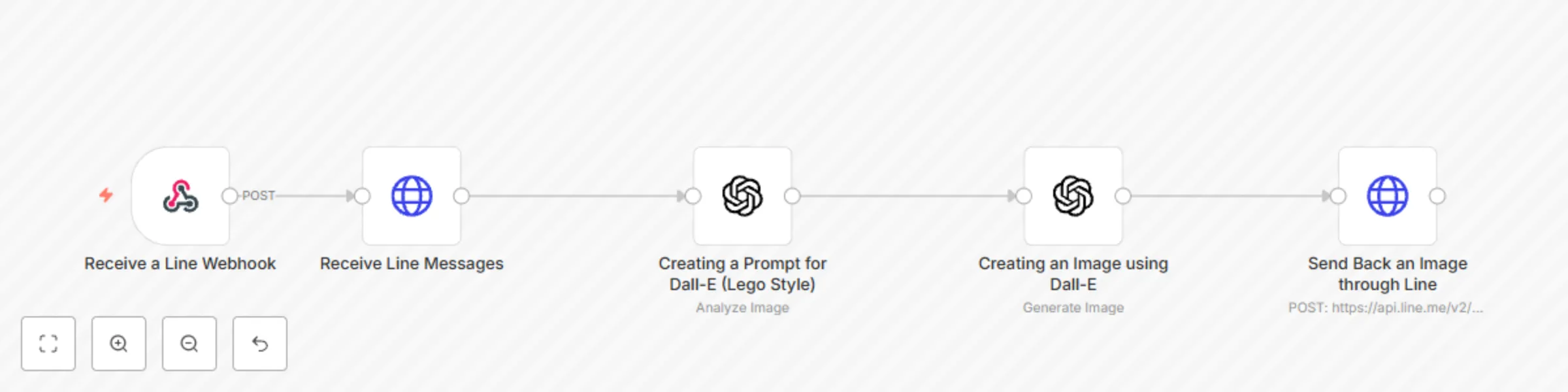
  1. Image Upload via LINE:
    • Users send an image to the LINE chatbot.
  2. AI-Powered Prompt Creation:
    • GPT generates a prompt to describe the uploaded image for LEGO-style conversion.
  3. AI Image Generation:
    • DALL·E 3 processes the prompt and creates a LEGO-style isometric image.
  4. Image Delivery:
    • The generated image is returned to the user in LINE.

Setup
Prerequisites
  • LINE Developer Account with API credentials.
  • Access to OpenAI API with DALL·E and GPT-4 capabilities.
  • A configured n8n instance to run this workflow.
Steps
  1. Environment Setup:
    • Add your LINE API Token and OpenAI credentials as environment variables (LINE_API_TOKEN, OPENAI_API_KEY) in n8n.
  2. Configure LINE Webhook:
    • Point the LINE webhook to your n8n instance.
  3. Connect OpenAI:
    • Set up OpenAI API credentials in the workflow nodes for GPT-4 and DALL·E.
  4. Test Workflow:
    • Upload a sample image in LINE and ensure it returns the LEGO-style AI image.

How to customize this workflow to your needs
  • Localization:
    • Modify response messages in LINE to fit your audience's language and tone.
  • Integration:
    • Add nodes to send notifications through other platforms like Slack or email.
  • Image Style:
    • Replace the LEGO-style image prompt with other artistic styles or themes.

Advanced Use Cases
  1. Art Contests:
    • Users upload images and receive AI-enhanced outputs for community voting or branding.
  2. Marketing Campaigns:
    • Quickly generate creative visual content for ads and promotions using customer-submitted photos.
  3. Education:
    • Use the workflow to teach students about AI-generated art and automation through a hands-on approach.

Tips for Optimization
  • Error Handling:
    • Add fallback nodes to handle invalid images or API errors gracefully.
  • Logging:
    • Implement a logging mechanism to track requests and outputs for debugging and analytics.
  • Scalability:
    • Use queue-based systems or cloud scaling to handle large volumes of image requests.

Enhancements
  • Add sticky notes in n8n to provide inline instructions for configuring each node.
  • Create a tutorial video or documentation for first-time users to set up and customize the workflow.
  • Include advanced filters to allow users to select from multiple styles beyond LEGO (e.g., pixel art, watercolor).

This workflow enables seamless interaction between messaging platforms and advanced AI capabilities, making it highly versatile for various creative and business applications.

1.2 Logical Blocks

This catalog entry is organized from the workflow JSON. The node-level section below shows the executable blocks available for review before importing the template.

2. Block-by-Block Analysis

Block 1 - Receive a Line Webhook

Type / Role
n8n-nodes-base.webhook - webhook
Config choices
Version 2

Block 2 - Receive Line Messages

Type / Role
n8n-nodes-base.httpRequest - httpRequest
Config choices
Version 4.2

Block 3 - Creating an Image using Dall-E

Type / Role
@n8n/n8n-nodes-langchain.openAi - openAi
Config choices
Version 1.7

Block 4 - Creating a Prompt for Dall-E (Lego Style)

Type / Role
@n8n/n8n-nodes-langchain.openAi - openAi
Config choices
Version 1.7

Block 5 - Send Back an Image through Line

Type / Role
n8n-nodes-base.httpRequest - httpRequest
Config choices
Version 4.2

3. Summary Table

Workflow Transform image to Lego style using line and Dall-E
Complexity intermediate
Nodes 5
Categories Content Creation, Multimodal AI
Author Boriwat Chanruang
Published 17 Jan 2025

4. Reproducing the Workflow from Scratch

  1. 1. Download the workflow JSON

    Use the JSON export at /data/workflows/2738/2738.json as the source template for this automation.

  2. 2. Import the template into n8n

    Open n8n, import the downloaded JSON, and review each node before activating the workflow.

  3. 3. Configure credentials and variables

    Replace placeholder credentials, API keys, webhook URLs, account IDs, and environment-specific values with your own settings.

  4. 4. Test with sample data

    Run the workflow manually or in a staging workspace, inspect node output, and confirm downstream systems receive the expected data.

  5. 5. Activate and monitor

    Enable the workflow only after testing, then monitor executions, errors, and rate limits during the first production runs.

5. General Notes & Resources

Review imported nodes carefully before activation. This catalog entry is intended to help you inspect the workflow structure, understand required services, and find related templates faster.

Node names, credentials, schedules, webhook paths, and external service limits may need adjustment for your workspace.

Frequently asked questions

What does Transform image to Lego style using line and Dall-E do?

Who is this for? This workflow is designed for: Content creators , artists, or hobbyists looking to experiment with AI generated art. Small business owners or marketers using LEGO style designs for...

What do I need before importing this workflow?

Review the workflow JSON, configure any required credentials in n8n, and test the automation in a safe workspace before using it in production.

Can I customize this workflow?

Yes. Use the block-by-block analysis and the downloadable JSON to inspect each node, then adjust credentials, prompts, schedules, filters, or destinations for your Content Creation, Multimodal AI use case.