B

Boriwat Chanruang

3
Workflows

Workflows by Boriwat Chanruang
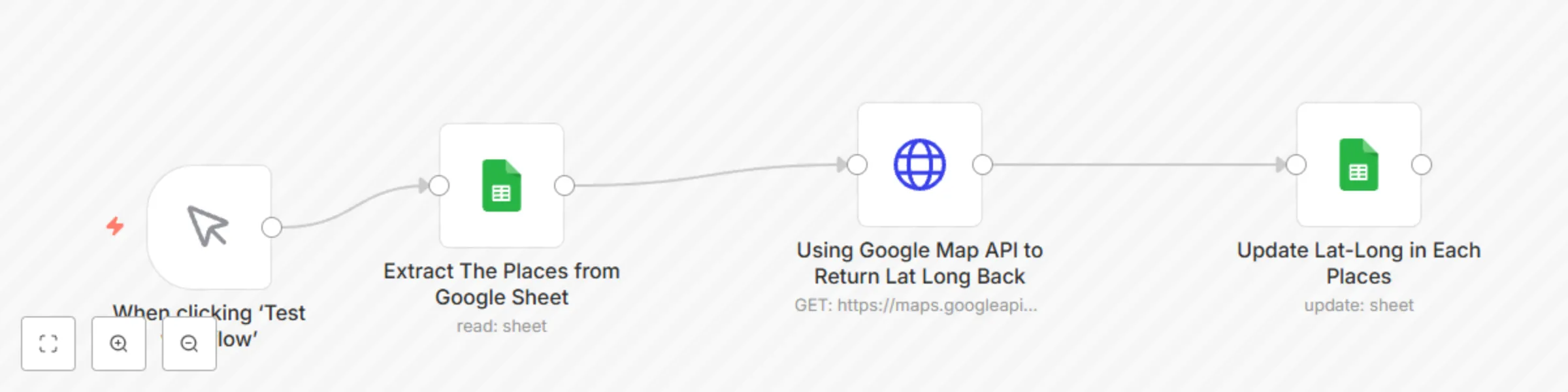
Workflow preview: Convert addresses to latLong with Google Sheets and Google Maps API
Free beginner

Convert addresses to latLong with Google Sheets and Google Maps API

#### **Template Detail** This template automates the process of converting a list of addresses into their latitude and longitude (LatLong) coordinates using Google Sheets and the Google Maps API. It's designed for businesses, developers, and analysts who need accurate geolocation data for use cases like delivery routing, event planning, or market analysis. --- #### **What the Template Does** 1. **Fetch Address Data**: Retrieves addresses from a Google Sheet. 2. **Google Maps API Integration**: Sends each address to the Google Maps API and retrieves the corresponding LatLong coordinates. 3. **Update Google Sheets**: Automatically updates the same Google Sheet with the LatLong data for each address. --- #### **Enhancements** 1. **Google Sheets Template**: Provide a pre-configured Google Sheets template that users can copy. Example link: [Google Sheets Template](https://docs.google.com/spreadsheets/d/1VvFne32djbKeo-g5pbpOaFKxU-ps0LyVVKsBbIUjRxk/edit?usp=sharing). Columns required: - **Address**: Column to input addresses. - **LatLong**: Column for the latitude and longitude results. --- #### **Updated Workflow Structure** 1. **Trigger**: - A manual trigger node starts the workflow. 2. **Retrieve Data from Google Sheets**: - Fetch addresses from a Google Sheet. 3. **Send to Google Maps API**: - For each address, retrieve the LatLong coordinates directly via the Google Maps API. 4. **Update Google Sheets**: - Write the LatLong results back into the Google Sheet. --- #### **Steps to Use** 1. **Prepare Google Sheet**: - Copy the provided Google Sheets template and add your addresses to the `Address` column. 2. **Configure Google Cloud API**: - Enable the Maps API for your Google Cloud project. - Generate an API key with the required permissions. 3. **Run the Workflow**: - Start the workflow in n8n; it will process the addresses automatically. - Updated LatLong data will appear in the corresponding Google Sheet. 4. **Review the Results**: - Use the enriched LatLong data for mapping or analysis.

B
Boriwat Chanruang
Document Extraction
17 Jan 2025
3491
0
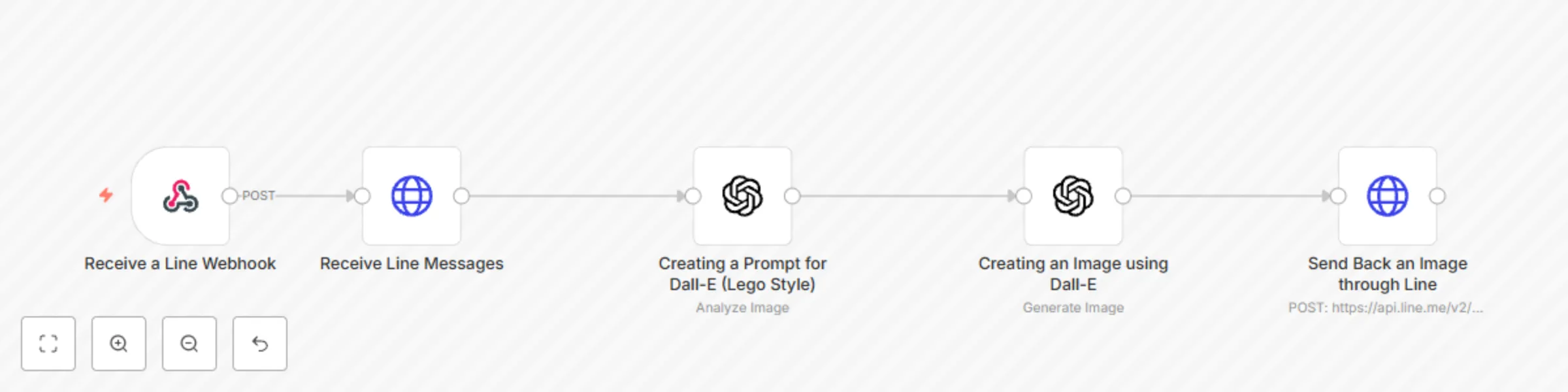
Workflow preview: Transform image to Lego style using line and Dall-E
Free intermediate

Transform image to Lego style using line and Dall-E

#### **Who is this for?** This workflow is designed for: - **Content creators**, artists, or hobbyists looking to experiment with AI-generated art. - **Small business owners** or **marketers** using LEGO-style designs for branding or promotions. - **Developers** or **AI enthusiasts** wanting to automate image transformations through messaging platforms like LINE. --- #### **What problem is this workflow solving?** - Simplifies the process of creating custom AI-generated LEGO-style images. - Automates the manual effort of transforming user-uploaded images into AI-generated artwork. - Bridges the gap between messaging platforms (LINE) and advanced AI tools (DALL·E). - Provides a seamless system for users to upload an image and receive an AI-transformed output without technical expertise. --- #### **What this workflow does** 1. **Image Upload via LINE**: - Users send an image to the LINE chatbot. 2. **AI-Powered Prompt Creation**: - GPT generates a prompt to describe the uploaded image for LEGO-style conversion. 3. **AI Image Generation**: - DALL·E 3 processes the prompt and creates a LEGO-style isometric image. 4. **Image Delivery**: - The generated image is returned to the user in LINE. --- #### **Setup** ##### **Prerequisites** - **LINE Developer Account** with API credentials. - Access to **OpenAI API** with DALL·E and GPT-4 capabilities. - A configured **n8n instance** to run this workflow. ##### **Steps** 1. **Environment Setup**: - Add your LINE API Token and OpenAI credentials as environment variables (`LINE_API_TOKEN`, `OPENAI_API_KEY`) in n8n. 2. **Configure LINE Webhook**: - Point the LINE webhook to your n8n instance. 3. **Connect OpenAI**: - Set up OpenAI API credentials in the workflow nodes for GPT-4 and DALL·E. 4. **Test Workflow**: - Upload a sample image in LINE and ensure it returns the LEGO-style AI image. --- #### **How to customize this workflow to your needs** - **Localization**: - Modify response messages in LINE to fit your audience's language and tone. - **Integration**: - Add nodes to send notifications through other platforms like Slack or email. - **Image Style**: - Replace the LEGO-style image prompt with other artistic styles or themes. --- #### **Advanced Use Cases** 1. **Art Contests**: - Users upload images and receive AI-enhanced outputs for community voting or branding. 2. **Marketing Campaigns**: - Quickly generate creative visual content for ads and promotions using customer-submitted photos. 3. **Education**: - Use the workflow to teach students about AI-generated art and automation through a hands-on approach. --- #### **Tips for Optimization** - **Error Handling**: - Add fallback nodes to handle invalid images or API errors gracefully. - **Logging**: - Implement a logging mechanism to track requests and outputs for debugging and analytics. - **Scalability**: - Use queue-based systems or cloud scaling to handle large volumes of image requests. --- #### **Enhancements** - Add sticky notes in n8n to provide inline instructions for configuring each node. - Create a tutorial video or documentation for first-time users to set up and customize the workflow. - Include advanced filters to allow users to select from multiple styles beyond LEGO (e.g., pixel art, watercolor). This workflow enables seamless interaction between messaging platforms and advanced AI capabilities, making it highly versatile for various creative and business applications.

B
Boriwat Chanruang
Content Creation
17 Jan 2025
1890
0
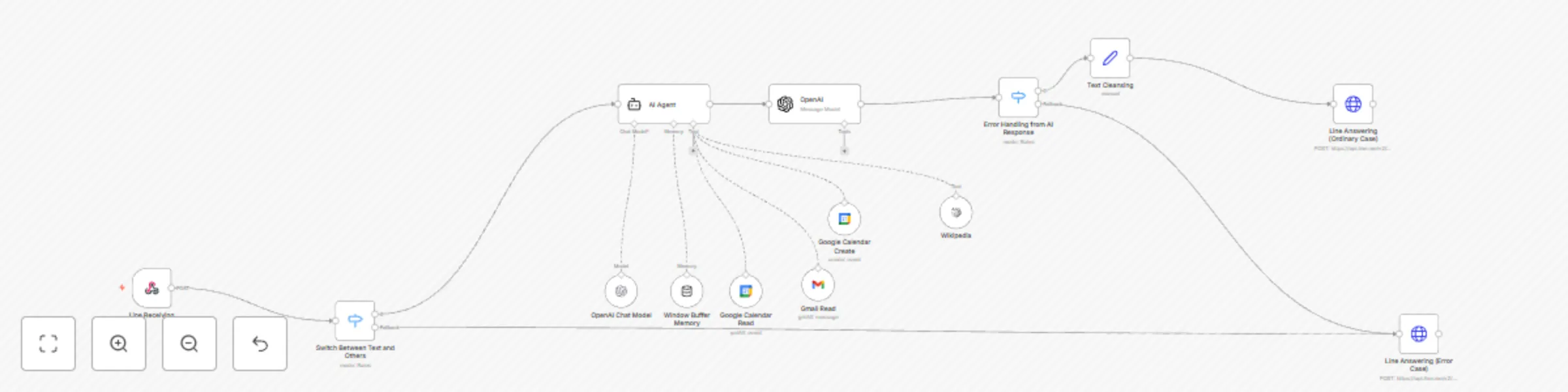
Workflow preview: LINE assistant with Google Calendar and Gmail integration
Free intermediate

LINE assistant with Google Calendar and Gmail integration

### **Who is this for?** - This workflow is for small business owners, personal assistants, or project managers who rely on multiple platforms for communication and scheduling. - Ideal for users managing customer support, personal scheduling, or group event coordination via LINE, Google Calendar, and Gmail. --- ### **What problem is this workflow solving?** - Reduces the manual effort needed to manage conversations, schedule events, and handle email communications. - Provides an intelligent system for replying to user messages and fetching relevant calendar or email information in real time. - Bridges the gap between messaging platforms and productivity tools, improving efficiency. --- ### **What this workflow does** - **LINE Chatbot Automation**: Automatically processes and responds to messages received via LINE. - **Google Calendar Management**: Retrieves upcoming events or schedules new events dynamically based on user queries. - **Email Retrieval**: Fetches recent emails using Gmail and filters them based on user instructions. - **AI-Powered Replies**: Uses OpenAI GPT to interpret user queries and provide tailored responses. --- ### **Setup** 1. **Prerequisites**: - LINE Developer account and API access. - Google Calendar and Gmail accounts with OAuth credentials. - An n8n instance with access to environment variables. 2. **Steps**: - Set up environment variables (`LINE_API_TOKEN` and `DYNAMIC_EMAIL`). - Configure API credentials for Google Calendar and Gmail in n8n. - Test the workflow by sending a sample message via LINE. 3. **Enhancements**: - Use sticky notes to provide inline instructions for each node. - Include a video walkthrough or a step-by-step document for first-time users. --- ### **How to customize this workflow to your needs** - **Localization**: Modify responses in the AI Agent node to match the language and tone of your audience. - **Integration**: Add more integrations like Slack or Microsoft Teams for additional notifications. - **Advanced Filters**: Add specific conditions to Gmail or Google Calendar nodes to fetch only relevant data, such as events with specific keywords or emails from certain senders. --- ### **Advanced Use Cases** - **Customer Support**: Automatically schedule meetings with clients based on their messages in LINE. - **Event Management**: Handle RSVP confirmations, event reminders, and email follow-ups for planned events. - **Personalized Assistant**: Use the workflow to act as a personal virtual assistant that syncs your schedule, replies to messages, and summarizes emails. --- ### **Tips for Optimization** - **Edit Fields Node**: Add a centralized node to configure dynamic inputs (e.g., tokens, emails, or thresholds) for easy updates. - **Fallback Responses**: Use a switch node to handle unrecognized input gracefully and provide clear feedback to users. - **Logs and Monitoring**: Add nodes to log interactions and track message flows for debugging or analytics. --- Let me know if you'd like me to expand on any specific section or add more customization ideas!

B
Boriwat Chanruang
Support Chatbot
23 Dec 2024
2711
0