Block 1 - Sticky Note
- Type / Role
- n8n-nodes-base.stickyNote - stickyNote
- Config choices
- Version 1


 Early Deal
This workflow is provided as-is. Please review and test before using in production.
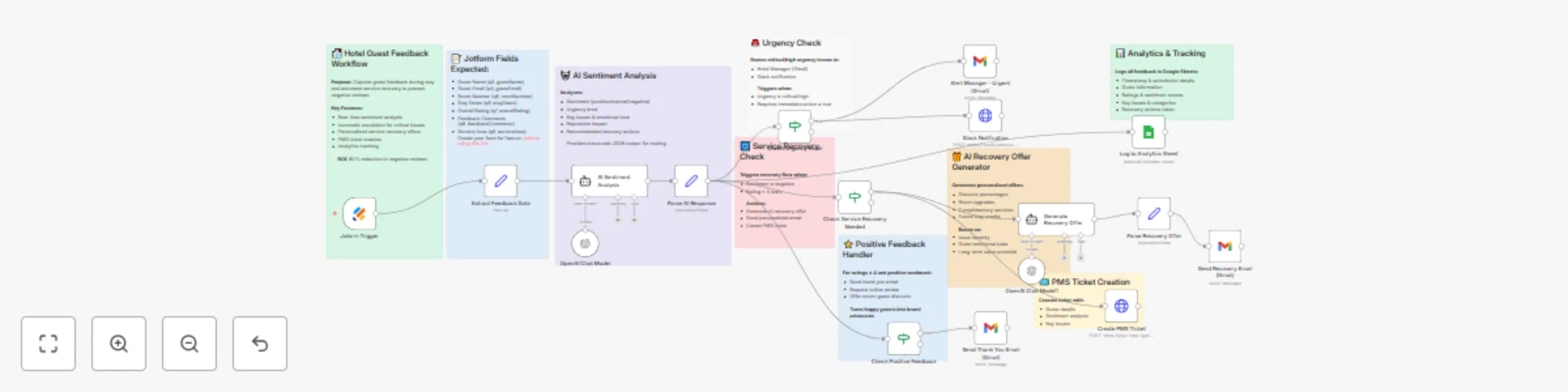
Transform guest complaints into loyalty opportunities achieving 60% reduction in negative reviews, 85% faster service recovery, and turning dissatisfied guests into brand advocates through AI power...
n8n-nodes-base.stickynote, n8n-nodes-base.set, @n8n/n8n-nodes-langchain.agent, n8n-nodes-base.if, n8n-nodes-base.gmail, n8n-nodes-base.httprequest, n8n-nodes-base.googlesheets, n8n-nodes-base.jotformtrigger
This workflow is cataloged by N8N Workflows and links back to its original n8n.io source page by Jitesh Dugar.
Original n8n.io sourceTransform guest complaints into loyalty opportunities - achieving 60% reduction in negative reviews, 85% faster service recovery, and turning dissatisfied guests into brand advocates through AI-powered sentiment analysis and automated response workflows.
Revolutionizes hotel guest experience management with AI-driven sentiment analysis and proactive service recovery:
📝 Real-Time Feedback Capture - Jotform collects guest feedback during their stay, not after checkout
🤖 AI Sentiment Analysis - GPT-4 analyzes feedback across sentiment, urgency, and reputation impact
🚨 Instant Escalation - Critical issues immediately alert managers via email and Slack
💝 Personalized Recovery Offers - AI generates custom compensation (upgrades, discounts, credits)
📧 Automated Guest Communication - Sends recovery offers to unhappy guests, thank-you notes to satisfied ones
🎫 PMS Integration - Creates tickets in your Property Management System with full context
⭐ Review Generation - Encourages happy guests to share experiences on Google, TripAdvisor, Booking.com
📊 Complete Analytics - Tracks all feedback with sentiment scores for trend analysis
🎯 Proactive Prevention - Resolves issues before guests post negative online reviews
💰 ROI Tracking - Measures service recovery effectiveness and guest satisfaction improvements
AI Guest Experience Analyst: GPT-4 analyzes feedback across 10+ dimensions including sentiment scoring, urgency classification, and reputation impact assessment
Intelligent Routing: Automatically escalates critical/high-urgency issues to hotel management within minutes
Personalized Service Recovery: AI generates tailored compensation offers based on issue severity, guest emotional state, and long-term value potential
Multi-Channel Alerts: Instant notifications via Gmail and Slack ensure no critical feedback is missed
Sentiment Scoring: 0-100 numerical sentiment scores enable data-driven trend analysis
Category Detection: AI identifies issue categories (cleanliness, staff, amenities, noise, etc.)
Reputation Impact Assessment: Predicts likelihood of negative online review (low/medium/high)
Recovery Action Suggestions: AI recommends specific steps to resolve each guest concern
Positive Feedback Amplification: Automatically requests online reviews from satisfied guests with incentivized return offers
Property Management Integration: Creates structured tickets with all AI insights for staff follow-up
Complete Audit Trail: Google Sheets logging enables performance tracking and staff training insights
Cost Optimization: AI balances recovery offer value against long-term guest lifetime value
Boutique Hotels: 20-100 rooms requiring personalized guest experience management
Hotel Chains: Multi-property operations standardizing service recovery protocols
Resorts: Large properties with multiple service areas (spa, dining, housekeeping, etc.)
Business Hotels: Corporate-focused properties prioritizing fast issue resolution
Vacation Rentals: Airbnb management companies handling guest communications at scale
Hostels: Budget accommodations building reputation through responsive service
Extended Stay Properties: Long-term guest relationships requiring proactive care
Conference Centers: Event venues managing large groups and critical feedback
Jotform - Guest feedback form (free tier works)
Create your form for free on Jotform using this link
OpenAI API - GPT-4 for AI sentiment analysis (~$0.10-0.30 per feedback)
Gmail - Automated notifications to managers and guests
Google Sheets - Feedback database and analytics dashboard
Slack - Real-time alerts to management team
Property Management System - Automated ticket creation (via API)
YOUR_GOOGLE_SHEET_ID in workflowYOUR/SLACK/WEBHOOK in workflow[email protected][email protected]Service Recovery Tiers: Adjust compensation levels based on issue severity and guest value
Auto-Approval Thresholds: Set limits for automatic vs manager-approved recovery offers
AI Prompt Tuning: Customize sentiment analysis criteria for your brand standards
Multi-Language Support: Add translation nodes for international guests
Guest Segmentation: VIP guests receive premium recovery offers
Timing Rules: Different workflows for during-stay vs post-checkout feedback
Review Platform Integration: Direct API connections to TripAdvisor, Google Reviews
Staff Training Alerts: Route feedback to specific department managers
Competitive Analysis: Track sentiment vs competitor properties
Seasonal Adjustments: Higher compensation during peak season to retain bookings
Loyalty Program Integration: Award points as part of service recovery
Follow-Up Sequences: Automated check-ins after issue resolution
60% reduction in negative online reviews - Proactive resolution before guests post publicly
85% faster service recovery - Automated workflows vs manual monitoring
40% increase in repeat bookings - Effective recovery turns complainers into loyalists
95% manager response rate - Instant alerts ensure nothing falls through cracks
3x increase in positive review requests - Automated outreach to satisfied guests
75% cost reduction in review management - Less time fighting bad reviews
90% guest satisfaction with recovery - Personalized, immediate responses
100% feedback tracking - Complete audit trail for quality improvement
50% improvement in staff training - Data-driven insights on recurring issues
30% reduction in compensation costs - AI optimizes offer value vs actual resolution
Scenario: Guest in oceanview suite complains about noisy pool area disrupting afternoon nap. Rating: 2/5. Feedback submitted at 2:47 PM during stay.
AI Analysis: Sentiment = negative (35/100), Urgency = high, Impact = high reputation risk. Key issue: noise disturbance. Category: amenities/environment.
Automated Response:
Result: $200 recovery cost prevents $5,000+ in future lost bookings from negative review. Guest becomes repeat customer, books 3 more stays over next year.
Scenario: Corporate traveler rates stay 5/5, praises front desk staff professionalism and fast WiFi. Checkout feedback at 7:23 AM.
AI Analysis: Sentiment = positive (92/100), Urgency = low, Categories: staff excellence, amenities.
Automated Response:
Result: Positive review attracts 12 new corporate bookings over next quarter. Guest becomes regular weekly visitor. Zero manual effort required.
Scenario: Guest complains about unclean bathroom, slow check-in, and uncomfortable bed. Rating: 1/5. Multiple critical issues.
AI Analysis: Sentiment = negative (15/100), Urgency = CRITICAL, Impact = very high reputation risk. Categories: cleanliness, operations, room quality.
Automated Response:
Result: Guest accepts recovery offer, doesn't post negative review. Systemic cleaning issue identified and corrected across all 150 locations, preventing 1,000+ potential complaints.
Scenario: Couple celebrating anniversary rates stay 4/5, mentions minor issue with breakfast timing but overall lovely experience.
AI Analysis: Sentiment = positive (78/100), Urgency = low, Issue noted: breakfast service timing, Categories: dining, overall satisfaction.
Automated Response:
Result: Couple posts glowing TripAdvisor review, becomes annual anniversary tradition. Breakfast timing adjusted based on feedback trend analysis. Personal touch strengthens brand loyalty.
Scenario: Family of 4 complains about overbooked pool area, long wait times at restaurant, stressed staff. Rating: 3/5. Peak season capacity issues.
AI Analysis: Sentiment = neutral-negative (45/100), Urgency = medium, Categories: capacity management, staffing, amenities access. AI notes this is systemic, not individual service failure.
Automated Response:
Result: Family accepts offer, enjoys remaining days. Operations team adds staff for following weekend. Feedback trends identify need for reservation system improvements, implemented before next season.
QR Code Distribution: Place QR codes linking to feedback form in every room, at checkout desk, and in common areas
Timing Optimization: Send feedback requests on Day 2 of stay (not checkout) to enable real-time recovery
Manager Training: Educate managers on interpreting AI sentiment scores and urgency classifications
Recovery Budgets: Set department budgets for service recovery offers ($50-500 per incident)
Review Monitoring: Cross-reference internal feedback with online reviews to measure prevention effectiveness
Staff Recognition: Share positive feedback with staff members mentioned by name
Trend Analysis: Weekly reviews of Google Sheets data to identify recurring issues
Seasonal Patterns: Track sentiment scores across different seasons and events
Competitor Benchmarking: Compare your sentiment scores to industry averages
Follow-Up Surveys: Send 30-day post-stay surveys to guests who received service recovery
Loyalty Integration: Higher-tier loyalty members receive premium recovery offers
Language Customization: For international properties, adjust AI prompts for cultural norms
Response Time Tracking: Monitor average time from feedback to resolution
Cost-Benefit Analysis: Track recovery offer costs vs prevented negative review impact
Success Metrics Dashboard: Create Google Data Studio dashboard from Sheets data
This workflow demonstrates advanced automation:
AI Agents with Multi-Dimensional Analysis: Sentiment scoring, urgency classification, impact assessment, and recovery recommendations
Conditional Logic Routing: Different workflows for positive, negative, and critical feedback
Real-Time Alerting: Multi-channel notifications (email + Slack) for urgent issues
Dynamic Content Generation: AI creates personalized emails based on sentiment analysis
API Integration Patterns: Property Management System ticket creation via HTTP requests
Data Aggregation: Complete feedback logging for business intelligence and reporting
Natural Language Processing: AI extracts key issues, categories, and emotional tone from free-text feedback
Decision Support Systems: Provides managers with AI recommendations and key considerations
Approval Workflows: Optional manager approval step for high-value recovery offers
Guest Communication Templates: Professional, empathetic email templates for all scenarios
Review Management ROI: Compare cost of service recovery vs reputation management services (typically $500-2000/month)
Guest Lifetime Value: Track repeat booking rates for guests who received service recovery vs those who didn't
Online Reputation Score: Monitor aggregate rating improvements on Google, TripAdvisor, Booking.com
Staff Efficiency: Calculate hours saved vs manual feedback monitoring and response
Revenue Protection: Estimate revenue preserved by preventing negative reviews (avg negative review costs hotel $2,000-5,000 in lost bookings)
Recovery Success Rate: Percentage of negative feedback resolved without resulting in online reviews
Response Time: Average minutes from feedback submission to initial response
First-Contact Resolution: Percentage of issues resolved without multiple interactions
Training ROI: Reduction in recurring issues after staff training based on feedback trends
Competitive Positioning: Sentiment score comparison vs competitor properties
Import this template and turn guest feedback into your competitive advantage with AI-powered insights and automation! 🏨✨
Questions or customization? The workflow includes detailed sticky notes explaining each AI analysis component and decision logic.
This catalog entry is organized from the workflow JSON. The node-level section below shows the executable blocks available for review before importing the template.
Showing the first 24 of 26 workflow blocks. Download the JSON for the full node graph.
| Workflow | Transform hotel guest feedback with GPT-4 sentiment analysis & service recovery |
|---|---|
| Complexity | advanced |
| Nodes | 26 |
| Categories | Support Chatbot, AI Summarization |
| Author | Jitesh Dugar |
| Published | 17 Oct 2025 |
Use the JSON export at /data/workflows/9811/9811.json as the source template for this automation.
Open n8n, import the downloaded JSON, and review each node before activating the workflow.
Replace placeholder credentials, API keys, webhook URLs, account IDs, and environment-specific values with your own settings.
Run the workflow manually or in a staging workspace, inspect node output, and confirm downstream systems receive the expected data.
Enable the workflow only after testing, then monitor executions, errors, and rate limits during the first production runs.
Review imported nodes carefully before activation. This catalog entry is intended to help you inspect the workflow structure, understand required services, and find related templates faster.
Node names, credentials, schedules, webhook paths, and external service limits may need adjustment for your workspace.
Transform guest complaints into loyalty opportunities achieving 60% reduction in negative reviews, 85% faster service recovery, and turning dissatisfied guests into brand advocates through AI power...
Review the workflow JSON, configure any required credentials in n8n, and test the automation in a safe workspace before using it in production.
Yes. Use the block-by-block analysis and the downloadable JSON to inspect each node, then adjust credentials, prompts, schedules, filters, or destinations for your Support Chatbot, AI Summarization use case.