Transform cloud documentation into security baselines with OpenAI and GDrive

Workflow preview

Workflow preview
100%
Transform cloud documentation into security baselines with OpenAI and GDrive preview
Open on n8n.io

Important notice

This workflow is provided as-is. Please review and test before using in production.

1. Workflow Overview

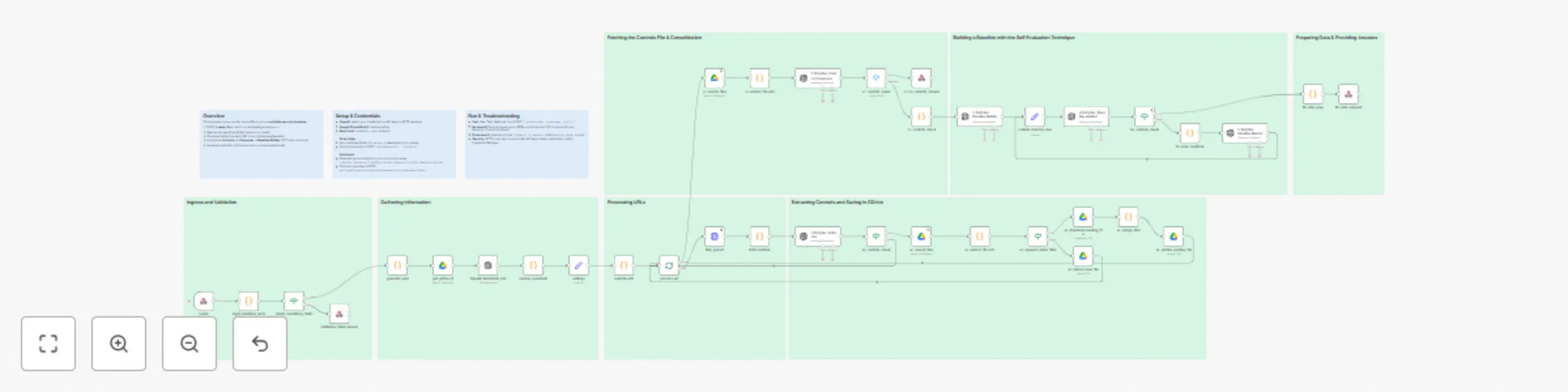
What this template does Transforms provider documentation (URLs) into an auditable, enforceable multicloud security control baseline . It: Fetches and sanitizes HTML Uses AI to extract security req...

Best for

  • AI Summarization automation workflows
  • Multimodal AI automation workflows
  • advanced n8n builders looking for reusable templates

Tools used

n8n-nodes-base.if, n8n-nodes-base.code, n8n-nodes-base.webhook, n8n-nodes-base.set, n8n-nodes-base.httprequest, @n8n/n8n-nodes-langchain.openai, n8n-nodes-base.splitinbatches, n8n-nodes-base.googledrive

Source and attribution

This workflow is cataloged by N8N Workflows and links back to its original n8n.io source page by Raphael De Carvalho Florencio.

Original n8n.io source

1.1 Workflow description

Title
Transform cloud documentation into security baselines with OpenAI and GDrive
Workflow name
Transform cloud documentation into security baselines with OpenAI and GDrive

What this template does

Transforms provider documentation (URLs) into an auditable, enforceable multicloud security control baseline. It:

  • Fetches and sanitizes HTML
  • Uses AI to extract security requirements (strict 3-line TXT blocks)
  • Composes enforceable controls (strict 7-line TXT blocks with true-equivalence consolidation)
  • Builds the final baseline (TXT or JSON, see Outputs) with a Technology: header
  • Returns a downloadable artifact via webhook and can append/create the file in Google Drive

Why it’s useful

Eliminates manual copy-paste and produces a consistent, portable baseline ready for review, audit, or enforcement tooling—ideal for rapidly generating or refreshing baselines across cloud providers and services.

Multicloud support

The workflow is multicloud by design. Provide the target cloud in the request and run the same pipeline for:

  • AWS, Azure, GCP (out of the box)
  • Extensible to other providers/services by adjusting prompts and routing logic

How it works (high level)

  1. POST /create (Basic Auth) with { cloudProvider, technology, urls[] }
  2. Input validation → generate uuid → resolve Google Drive folder (search-or-create)
  3. Download & sanitize each URL
  4. AI pipeline: Extractor → Composer → Baseline Builder → (optional) Baseline Auditor
  5. Append/create file in Drive and return a downloadable artifact (TXT/JSON) via webhook

Request (webhook)

Method: POST URL: https://<your-n8n>/webhook/create Auth: Basic Auth Headers: Content-Type: application/json

Example input (Postman/CLI)

{
  "cloudProvider": "aws",
  "technology": "Amazon S3",
  "urls": [
    "https://docs.aws.amazon.com/AmazonS3/latest/userguide/security-best-practices.html",
    "https://www.trendmicro.com/cloudoneconformity/knowledge-base/aws/S3/",
    "https://repost.aws/knowledge-center/secure-s3-resources"
  ]
}

Field reference

  • cloudProvider (string, required) — case-insensitive. Supported: aws, azure, gcp.
  • technology (string, required) — e.g., "Amazon S3", "Azure Storage", "Google Cloud Storage".
  • urls (string[], required) — 1–20 http(s) URLs (official/reputable docs).

Optional (Google Drive destination):

  • gdriveTargetId (string) — Google Drive folderId used for append/create.
  • gdrivePath (string) — Path like "DefySec/Baselines" (folders are created if missing).
  • gdriveTargetName (string) — Folder name to find/create under root.

Optional (Assistant overrides):

  • assistantExtractorId, assistantComposerId, assistantBaselineId, assistantAuditorId (strings)

Resolution precedence

  1. Drive: gdriveTargetIdgdrivePathgdriveTargetName → default folder.
  2. Assistants: explicit IDs above → dynamic resolution by name (expects 1_DefySec_Extractor, 2_DefySec_Control_Composer, 3_DefySec Baseline Builder, 4_DefySec_Baseline_Auditor).

Validation

  • Rejects empty urls or non-http(s) schemes; normalizes cloudProvider to aws|azure|gcp.
  • Sanitizes fetched HTML (removes scripts/styles/headers) before AI steps.

Outputs

  • Primary: downloadable TXT file controls_<technology>_<timestamp>.txt (via webhook).
  • Composer outcomes: if no groups to consolidate → NO_CONTROLS_TO_BE_CONSOLIDATED; if nothing valid remains → NO_CONTROLS_FOUND.
  • JSON path: when the Builder stage is configured for JSON-only output (strict schema), the workflow returns a .json artifact and the Auditor validates it (see next section).

Techniques used (from the built-in assistants)

  • Provider-aware extraction with strict TXT contract (3 lines): Extractor limits itself to the declared provider/technology, outputs only Description/Reference/SecurityObjective, and applies a reflexive quality check before emitting.
  • Normalization & strict header parsing: Composer normalizes whitespace/fences, requires the CloudProvider/Technology header, and ignores anything outside the exact 3-line block shape.
  • True-equivalence grouping & consolidation: Composer groups only when intent, enforcement locus/mechanism, scope, and mode/setting all match—otherwise items remain distinct.
  • 7-line enforceable control format: Composer renders each (consolidated or unique) control in exactly seven labeled lines to keep results auditable and automatable.
  • Builder with JSON-only schema & technology inference: Builder parses 7-line blocks, infers technology, consolidates true equivalents again if needed, and returns pure JSON matching a canonical schema (with counters in meta).
  • Self-evaluation loop (Auditor): Auditor unwraps transport, validates schema & content, checks provider terminology/scope/automation, and returns either GOOD_ENOUGH or a JSON instruction set for the Builder to fix and re-emit—enabling reflective improvement.
  • Reference prioritization: Across stages, official provider documentation is preferred in References (AWS/Azure/GCP).

Customization & extensions

  • Prompt-reflective techniques: keep (or extend) the Auditor loop to add more review passes and quality gates.
  • Compliance assistants: add assistants to analyze/label controls for HIPAA, PCI DSS, SOX (and others), emitting mappings, gaps, and remediation notes.
  • Implementation context: feed internal implementation docs, runbooks, or Architecture Decision Records (ADRs); use these as grounding to generate or refine controls (works with local/self-hosted LLMs, too).
  • Local/self-hosted LLMs: swap OpenAI nodes for your on-prem LLM endpoint while keeping the pipeline.
  • Provider-specific outputs: extend the final stage to export Policy-as-Code or IaC snippets (Rego/Sentinel, CloudFormation Guard, Bicep/ARM, Terraform validations).

Assistant configuration & prompts

Security & privacy

  • No hardcoded secrets in HTTP nodes; use n8n’s Credential Manager.
  • Drive operations are optional and folder-scoped.
  • For sensitive environments, switch to a local LLM and provide only sanitized/approved inputs.

Quick test (curl)

curl -X POST "https://<your-n8n>/webhook/create" \
  -u "<user>:<pass>" \
  -H "Content-Type: application/json" \
  -d '{
        "cloudProvider":"aws",
        "technology":"Amazon S3",
        "urls":[
          "https://docs.aws.amazon.com/AmazonS3/latest/userguide/security-best-practices.html"
        ]
      }' \
  -OJ

1.2 Logical Blocks

This catalog entry is organized from the workflow JSON. The node-level section below shows the executable blocks available for review before importing the template.

2. Block-by-Block Analysis

Block 1 - check_mandatory_fields

Type / Role
n8n-nodes-base.if - if
Config choices
Version 2.2

Block 2 - generate_uuid

Type / Role
n8n-nodes-base.code - code
Config choices
Version 2

Block 3 - create

Type / Role
n8n-nodes-base.webhook - webhook
Config choices
Version 2

Block 4 - settings

Type / Role
n8n-nodes-base.set - set
Config choices
Version 3.4

Block 5 - http_get_url

Type / Role
n8n-nodes-base.httpRequest - httpRequest
Config choices
Version 4.2

Block 6 - html_sanitizer

Type / Role
n8n-nodes-base.code - code
Config choices
Version 2

Block 7 - 1_DefySec_Extractor

Type / Role
@n8n/n8n-nodes-langchain.openAi - openAi
Config choices
Version 1.8

Block 8 - explode_urls

Type / Role
n8n-nodes-base.code - code
Config choices
Version 2

Block 9 - process_url

Type / Role
n8n-nodes-base.splitInBatches - splitInBatches
Config choices
Version 3

Block 10 - ec_search_files

Type / Role
n8n-nodes-base.googleDrive - googleDrive
Config choices
Version 3

Block 11 - ec_append_create_filter

Type / Role
n8n-nodes-base.if - if
Config choices
Version 2.2

Block 12 - ec_upload_new_file

Type / Role
n8n-nodes-base.googleDrive - googleDrive
Config choices
Version 3

Block 13 - ec_update_existing_file

Type / Role
n8n-nodes-base.googleDrive - googleDrive
Config choices
Version 3

Block 14 - ec_download_existing_file

Type / Role
n8n-nodes-base.googleDrive - googleDrive
Config choices
Version 3

Block 15 - ec_merge_data

Type / Role
n8n-nodes-base.code - code
Config choices
Version 2

Block 16 - ec_extract_file_info

Type / Role
n8n-nodes-base.code - code
Config choices
Version 2

Block 17 - cc_search_files

Type / Role
n8n-nodes-base.googleDrive - googleDrive
Config choices
Version 3

Block 18 - cc_extract_file_info

Type / Role
n8n-nodes-base.code - code
Config choices
Version 2

Block 19 - 2_DefySec_Control_Composer

Type / Role
@n8n/n8n-nodes-langchain.openAi - openAi
Config choices
Version 1.8

Block 20 - ec_controls_check

Type / Role
n8n-nodes-base.if - if
Config choices
Version 2.2

Block 21 - cc_controls_router

Type / Role
n8n-nodes-base.switch - switch
Config choices
Version 3.2

Block 22 - cc_no_controls_answer

Type / Role
n8n-nodes-base.respondToWebhook - respondToWebhook
Config choices
Version 1.4

Block 23 - 3_DefySec Baseline Builder

Type / Role
@n8n/n8n-nodes-langchain.openAi - openAi
Config choices
Version 1.8

Block 24 - cc_controls_check

Type / Role
n8n-nodes-base.code - code
Config choices
Version 2

Showing the first 24 of 46 workflow blocks. Download the JSON for the full node graph.

3. Summary Table

Workflow Transform cloud documentation into security baselines with OpenAI and GDrive
Complexity advanced
Nodes 46
Categories AI Summarization, Multimodal AI
Author Raphael De Carvalho Florencio
Published 18 Aug 2025

4. Reproducing the Workflow from Scratch

  1. 1. Download the workflow JSON

    Use the JSON export at /data/workflows/7529/7529.json as the source template for this automation.

  2. 2. Import the template into n8n

    Open n8n, import the downloaded JSON, and review each node before activating the workflow.

  3. 3. Configure credentials and variables

    Replace placeholder credentials, API keys, webhook URLs, account IDs, and environment-specific values with your own settings.

  4. 4. Test with sample data

    Run the workflow manually or in a staging workspace, inspect node output, and confirm downstream systems receive the expected data.

  5. 5. Activate and monitor

    Enable the workflow only after testing, then monitor executions, errors, and rate limits during the first production runs.

5. General Notes & Resources

Review imported nodes carefully before activation. This catalog entry is intended to help you inspect the workflow structure, understand required services, and find related templates faster.

Node names, credentials, schedules, webhook paths, and external service limits may need adjustment for your workspace.

Frequently asked questions

What does Transform cloud documentation into security baselines with OpenAI and GDrive do?

What this template does Transforms provider documentation (URLs) into an auditable, enforceable multicloud security control baseline . It: Fetches and sanitizes HTML Uses AI to extract security req...

What do I need before importing this workflow?

Review the workflow JSON, configure any required credentials in n8n, and test the automation in a safe workspace before using it in production.

Can I customize this workflow?

Yes. Use the block-by-block analysis and the downloadable JSON to inspect each node, then adjust credentials, prompts, schedules, filters, or destinations for your AI Summarization, Multimodal AI use case.