Raphael De Carvalho Florencio
Workflows by Raphael De Carvalho Florencio
Transform cloud documentation into security baselines with OpenAI and GDrive
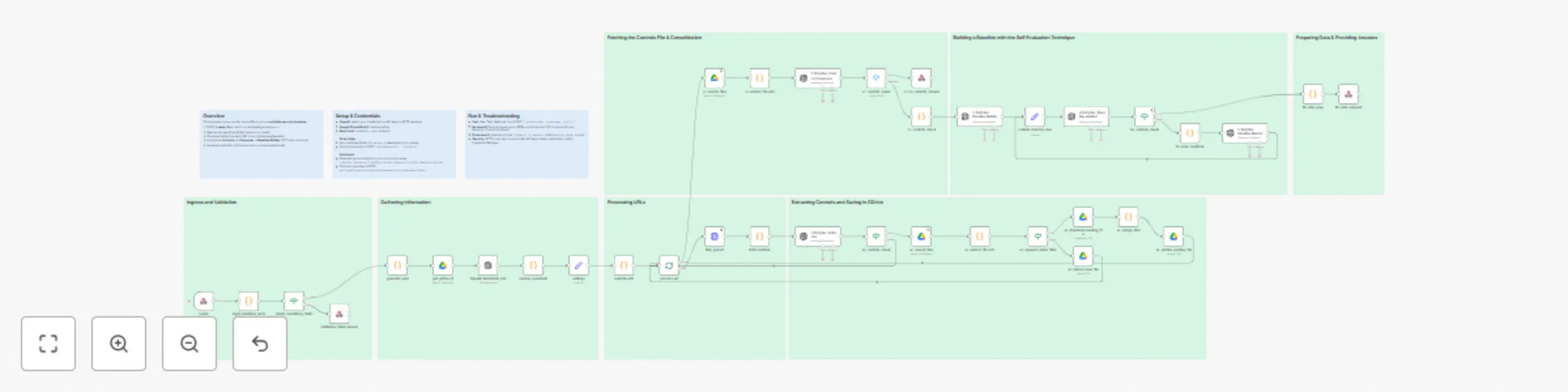
## What this template does Transforms provider documentation (URLs) into an **auditable, enforceable multicloud security control baseline**. It: * Fetches and sanitizes HTML * Uses AI to **extract security requirements** (strict 3-line TXT blocks) * **Composes enforceable controls** (strict 7-line TXT blocks with true-equivalence consolidation) * **Builds the final baseline** (TXT or JSON, see *Outputs*) with a `Technology:` header * Returns a downloadable artifact via webhook and can **append/create** the file in Google Drive ## Why it’s useful Eliminates manual copy-paste and produces a consistent, portable baseline ready for review, audit, or enforcement tooling—ideal for rapidly generating or refreshing baselines across cloud providers and services. ## Multicloud support The workflow is **multicloud by design**. Provide the target cloud in the request and run the same pipeline for: * **AWS**, **Azure**, **GCP** (out of the box) * Extensible to other providers/services by adjusting prompts and routing logic ## How it works (high level) 1. `POST /create` (Basic Auth) with `{ cloudProvider, technology, urls[] }` 2. Input validation → generate `uuid` → resolve Google Drive folder (search-or-create) 3. Download & sanitize each URL 4. AI pipeline: **Extractor → Composer → Baseline Builder → (optional) Baseline Auditor** 5. Append/create file in Drive and return a **downloadable artifact** (TXT/JSON) via webhook ## Request (webhook) **Method:** `POST` **URL:** `https://<your-n8n>/webhook/create` **Auth:** Basic Auth **Headers:** `Content-Type: application/json` ### Example input (Postman/CLI) ```json { "cloudProvider": "aws", "technology": "Amazon S3", "urls": [ "https://docs.aws.amazon.com/AmazonS3/latest/userguide/security-best-practices.html", "https://www.trendmicro.com/cloudoneconformity/knowledge-base/aws/S3/", "https://repost.aws/knowledge-center/secure-s3-resources" ] } ``` ## Field reference * `cloudProvider` *(string, required)* — case-insensitive. Supported: `aws`, `azure`, `gcp`. * `technology` *(string, required)* — e.g., `"Amazon S3"`, `"Azure Storage"`, `"Google Cloud Storage"`. * `urls` *(string\[], required)* — 1–20 `http(s)` URLs (official/reputable docs). **Optional (Google Drive destination):** * `gdriveTargetId` *(string)* — Google Drive **folderId** used for append/create. * `gdrivePath` *(string)* — Path like `"DefySec/Baselines"` (folders are created if missing). * `gdriveTargetName` *(string)* — Folder name to find/create under `root`. **Optional (Assistant overrides):** * `assistantExtractorId`, `assistantComposerId`, `assistantBaselineId`, `assistantAuditorId` *(strings)* **Resolution precedence** 1. Drive: `gdriveTargetId` → `gdrivePath` → `gdriveTargetName` → default folder. 2. Assistants: explicit IDs above → dynamic resolution by name (expects `1_DefySec_Extractor`, `2_DefySec_Control_Composer`, `3_DefySec Baseline Builder`, `4_DefySec_Baseline_Auditor`). ## Validation * Rejects empty `urls` or non-`http(s)` schemes; normalizes `cloudProvider` to `aws|azure|gcp`. * Sanitizes fetched HTML (removes scripts/styles/headers) before AI steps. ## Outputs * **Primary:** downloadable **TXT** file `controls_<technology>_<timestamp>.txt` (via webhook). * **Composer outcomes:** if no groups to consolidate → `NO_CONTROLS_TO_BE_CONSOLIDATED`; if nothing valid remains → `NO_CONTROLS_FOUND`.  * **JSON path:** when the Builder stage is configured for **JSON-only** output (strict schema), the workflow returns a `.json` artifact and the Auditor validates it (see next section).  ## Techniques used (from the built-in assistants) * **Provider-aware extraction with strict TXT contract (3 lines):** Extractor limits itself to the declared provider/technology, outputs only `Description/Reference/SecurityObjective`, and applies a **reflexive quality check** before emitting.  * **Normalization & strict header parsing:** Composer normalizes whitespace/fences, requires the `CloudProvider/Technology` header, and ignores anything outside the exact 3-line block shape.  * **True-equivalence grouping & consolidation:** Composer groups **only** when intent, enforcement locus/mechanism, scope, and mode/setting all match—otherwise items remain distinct.  * **7-line enforceable control format:** Composer renders each (consolidated or unique) control in **exactly seven labeled lines** to keep results auditable and automatable.  * **Builder with JSON-only schema & technology inference:** Builder parses 7-line blocks, infers `technology`, consolidates true equivalents again if needed, and returns **pure JSON** matching a canonical schema (with counters in `meta`).  * **Self-evaluation loop (Auditor):** Auditor **unwraps transport**, validates **schema & content**, checks provider terminology/scope/automation, and returns either `GOOD_ENOUGH` or a **JSON instruction set** for the Builder to fix and re-emit—enabling reflective improvement.  * **Reference prioritization:** Across stages, official provider documentation is preferred in `References` (AWS/Azure/GCP).  ## Customization & extensions * **Prompt-reflective techniques:** keep (or extend) the Auditor loop to add more review passes and quality gates.  * **Compliance assistants:** add assistants to analyze/label controls for **HIPAA, PCI DSS, SOX** (and others), emitting mappings, gaps, and remediation notes. * **Implementation context:** feed internal implementation docs, runbooks, or **Architecture Decision Records (ADRs)**; use these as **grounding** to generate or refine controls (works with local/self-hosted LLMs, too). * **Local/self-hosted LLMs:** swap OpenAI nodes for your on-prem LLM endpoint while keeping the pipeline. * **Provider-specific outputs:** extend the final stage to export Policy-as-Code or IaC snippets (Rego/Sentinel, CloudFormation Guard, Bicep/ARM, Terraform validations). ## Assistant configuration & prompts * Full assistant configurations and prompts (Extractor, Composer, Baseline Builder, **Baseline Auditor**) are available here: **[https://github.com/followdrabbit/n8nlabs/tree/main/Lab03%20-%20Multicloud%20AI%20Security%20Control%20Baseline%20Builder/Assistants](https://github.com/followdrabbit/n8nlabs/tree/main/Lab03%20-%20Multicloud%20AI%20Security%20Control%20Baseline%20Builder/Assistants)** ## Security & privacy * No hardcoded secrets in HTTP nodes; use n8n’s Credential Manager. * Drive operations are optional and folder-scoped. * For sensitive environments, switch to a local LLM and provide only sanitized/approved inputs. ## Quick test (curl) ```bash curl -X POST "https://<your-n8n>/webhook/create" \ -u "<user>:<pass>" \ -H "Content-Type: application/json" \ -d '{ "cloudProvider":"aws", "technology":"Amazon S3", "urls":[ "https://docs.aws.amazon.com/AmazonS3/latest/userguide/security-best-practices.html" ] }' \ -OJ ```
AI lyrics study bot for Telegram — Translation, summary, vocabulary
## What this workflow is (About) This workflow turns a Telegram bot into an **AI-powered lyrics assistant**. Users send a command plus a **lyrics URL**, and the flow **downloads, cleans, and analyzes** the text, then replies on Telegram with translated lyrics, summaries, vocabulary, poetic devices, or an interpretation—**all generated by AI (OpenAI)**. ## What problems it solves * Centralizes **lyrics retrieval + cleanup + AI analysis** in one automated flow * Produces **study-ready outputs** (translation, vocabulary, figures of speech) * Saves time for **teachers, learners, and music enthusiasts** with instant results in chat ## Key features * **AI analysis** using OpenAI (no secrets hardcoded; uses n8n Credentials) * **Line-by-line translation**, **concise summaries**, **vocabulary lists** * **Poetic/literary device detection** and **emotional/symbolic interpretation** * Robust **ETL** (extract, download, sanitize) and **error handling** * Clear **Sticky Notes** documenting routing, ETL, AI prompts, and messaging ## Who it’s for * Language learners & teachers * Musicians, lyricists, and music bloggers * Anyone studying lyrics for meaning, style, or vocabulary ## Input & output * **Input:** Telegram command with a public **lyrics URL** * **Output:** Telegram messages (Markdown/MarkdownV2), split into chunks if long ## How it works * **Telegram → Webhook** receives a user message (e.g., `/get_lyrics <URL>`). * **Routing (If/Switch)** detects which command was sent. * **Extract URL + Download (HTTP Request)** fetches the lyrics page. * **Cleanup (Code)** strips HTML/scripts/styles and normalizes whitespace. * **OpenAI (Chat)** formats the result per command (translation, summary, vocabulary, analysis). * **Telegram (Send Message)** returns the final text; long outputs are split into chunks. * **Error handling** replies with friendly guidance for unsupported/incomplete commands. ## Set up steps 1. **Create a Telegram bot** with **@BotFather** and copy the bot token. 2. In n8n, create **Credentials → Telegram API** and paste your token (no hardcoded keys in nodes). 3. Create **Credentials → OpenAI** and paste your API key. 4. **Import the workflow** and set a short webhook path (e.g., `/lyrics-bot`). 5. **Publish** the webhook and set it on Telegram: ```text https://api.telegram.org/bot<YOUR_BOT_TOKEN>/setWebhook?url=https://[YOUR_DOMAIN]/webhook/lyrics-bot ``` 6. (Optional) Restrict update types: ```bash curl -X POST https://api.telegram.org/bot<YOUR_BOT_TOKEN>/setWebhook \ -H "Content-Type: application/json" \ -d '{ "url": "https://[YOUR_DOMAIN]/webhook/lyrics-bot", "allowed_updates": ["message"] }' ``` 7. **Test** by sending `/start` and then `/get_lyrics <PUBLIC_URL>` to your bot. 8. If messages are long, ensure **MarkdownV2** is used and special characters are escaped.