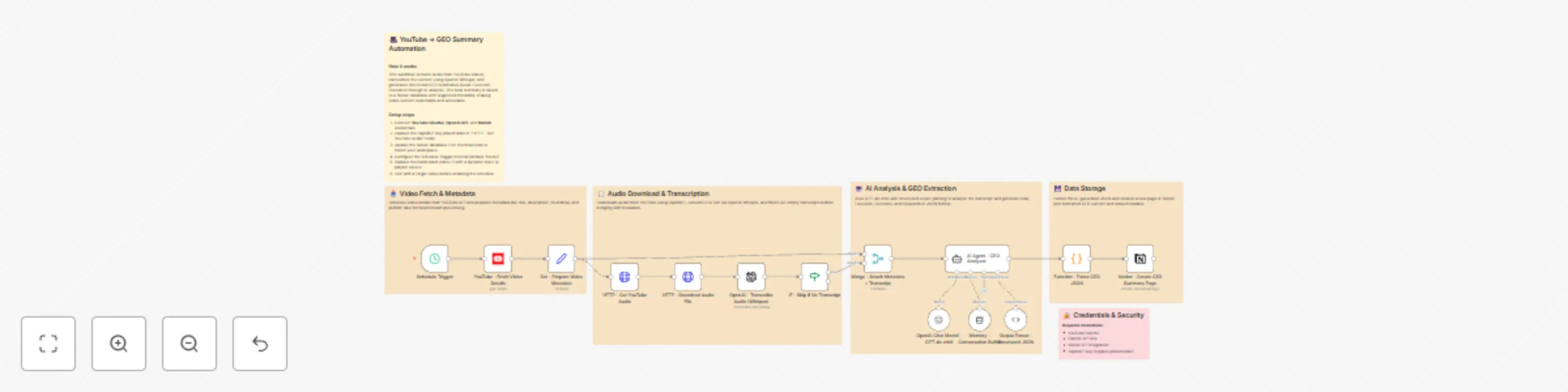
Transcribe YouTube videos & create GEO summaries with Whisper and GPT-4o-mini in Notion

Workflow preview

Workflow preview
100%
Transcribe YouTube videos & create GEO summaries with Whisper and GPT-4o-mini in Notion preview
Open on n8n.io

Important notice

This workflow is provided as-is. Please review and test before using in production.

1. Workflow Overview

Description Automate your YouTube research workflow by extracting audio from any video, transcribing it with Whisper AI, and generating structured GEO (Goal–Execution–Outcome) summaries using GP...

Best for

  • Document Extraction automation workflows
  • AI Summarization automation workflows
  • advanced n8n builders looking for reusable templates

Tools used

n8n-nodes-base.stickynote, n8n-nodes-base.scheduletrigger, n8n-nodes-base.set, n8n-nodes-base.httprequest, n8n-nodes-base.if, n8n-nodes-base.merge, n8n-nodes-base.code, n8n-nodes-base.notion

Source and attribution

This workflow is cataloged by N8N Workflows and links back to its original n8n.io source page by Rahul Joshi.

Original n8n.io source

1.1 Workflow description

Title
Transcribe YouTube videos & create GEO summaries with Whisper and GPT-4o-mini in Notion
Workflow name
Transcribe YouTube videos & create GEO summaries with Whisper and GPT-4o-mini in Notion

📊 Description

Automate your YouTube research workflow by extracting audio from any video, transcribing it with Whisper AI, and generating structured GEO (Goal–Execution–Outcome) summaries using GPT-4o-mini. 🎥🤖 This template transforms unstructured video content into actionable, searchable insights that are automatically stored in Notion with rich metadata. It’s ideal for creators, educators, analysts, and knowledge workers who want to convert long videos into concise, high-quality summaries without manual effort. Perfect for content indexing, research automation, and knowledge-base enrichment. 📚✨

🔁 What This Template Does

• Triggers on a schedule to continuously process new YouTube videos. ⏰ • Fetches video metadata (title, description, thumbnails, published date) via the YouTube API. 🎥 • Downloads audio using RapidAPI and prepares it for transcription. 🎧 • Transcribes audio into text using OpenAI Whisper. 📝 • Skips invalid entries when no transcript is generated. 🚫 • Merges the transcript with metadata for richer AI context. 🔗 • Uses GPT-4o-mini to generate Goal, Execution, Outcome, and Keywords via structured JSON. 🤖📊 • Parses the AI-generated JSON into Notion-friendly formats. 🔍 • Creates a Notion page with GEO sections, keywords, and video metadata. 📄🏷️ • Produces a fully searchable knowledge record for every processed video. 📚✨

⭐ Key Benefits

✅ Converts long YouTube videos into concise, structured knowledge ✅ AI-powered GEO summaries improve comprehension and recall ✅ Zero manual transcription or note-taking — 100% automated ✅ Seamless Notion integration creates a powerful video knowledge base ✅ Works on autopilot with scheduled triggers ✅ Saves hours for educators, researchers, analysts, and content teams

🧩 Features

  • YouTube API integration for metadata retrieval
  • RapidAPI audio downloader
  • OpenAI Whisper transcription
  • GPT-4o-mini structured analysis through LangChain
  • Memory buffer + structured JSON parser for consistent results
  • Automatic Notion page creation
  • Fail-safe transcript validation (IF node)
  • Metadata + transcript merging for richer AI context
  • GEO (Goal–Execution–Outcome) summarization workflow

🔐 Requirements

  • YouTube OAuth2 credentials
  • OpenAI API key (Whisper + GPT-4o-mini)
  • Notion API integration token + database ID
  • RapidAPI key for YouTube audio downloading
  • n8n with LangChain nodes enabled

🎯 Target Audience

  • YouTubers and content creators archiving their content
  • Researchers and educators summarizing long videos
  • Knowledge managers building searchable Notion databases
  • Automation teams creating video intelligence workflows

🛠️ Step-by-Step Setup Instructions

  • Add YouTube OAuth2, OpenAI, Notion, and RapidAPI credentials. 🔑
  • Replace the placeholder RapidAPI key in the “Get YouTube Audio” node. ⚙️
  • Update the Notion database ID where summaries should be stored. 📄
  • Configure the Schedule Trigger interval based on your needs. ⏰
  • Replace the hardcoded video ID (if present) with dynamic input or playlist logic. 🔗
  • Test with a sample video to verify transcription + AI + Notion output. ▶️
  • Enable the workflow to run automatically. 🚀

1.2 Logical Blocks

This catalog entry is organized from the workflow JSON. The node-level section below shows the executable blocks available for review before importing the template.

2. Block-by-Block Analysis

Block 1 - Sticky Note - Overview

Type / Role
n8n-nodes-base.stickyNote - stickyNote
Config choices
Version 1

Block 2 - Sticky Note - Fetch

Type / Role
n8n-nodes-base.stickyNote - stickyNote
Config choices
Version 1

Block 3 - Sticky Note - Audio

Type / Role
n8n-nodes-base.stickyNote - stickyNote
Config choices
Version 1

Block 4 - Sticky Note - AI

Type / Role
n8n-nodes-base.stickyNote - stickyNote
Config choices
Version 1

Block 5 - Sticky Note - Storage

Type / Role
n8n-nodes-base.stickyNote - stickyNote
Config choices
Version 1

Block 6 - Sticky Note - Security

Type / Role
n8n-nodes-base.stickyNote - stickyNote
Config choices
Version 1

Block 7 - Schedule Trigger

Type / Role
n8n-nodes-base.scheduleTrigger - scheduleTrigger
Config choices
Version 1.2

Block 8 - Set - Prepare Video Metadata

Type / Role
n8n-nodes-base.set - set
Config choices
Version 3.4

Block 9 - HTTP - Download Audio File

Type / Role
n8n-nodes-base.httpRequest - httpRequest
Config choices
Version 4.2

Block 10 - IF - Skip if No Transcript

Type / Role
n8n-nodes-base.if - if
Config choices
Version 2.1

Block 11 - Merge - Attach Metadata + Transcript

Type / Role
n8n-nodes-base.merge - merge
Config choices
Version 3

Block 12 - Function - Parse GEO JSON

Type / Role
n8n-nodes-base.code - code
Config choices
Version 2

Block 13 - Notion - Create GEO Summary Page

Type / Role
n8n-nodes-base.notion - notion
Config choices
Version 2.2

Block 14 - HTTP - Get YouTube Audio

Type / Role
n8n-nodes-base.httpRequest - httpRequest
Config choices
Version 4.2

Block 15 - YouTube - Fetch Video Details

Type / Role
n8n-nodes-base.youTube - youTube
Config choices
Version 1

Block 16 - OpenAI - Transcribe Audio (Whisper)

Type / Role
@n8n/n8n-nodes-langchain.openAi - openAi
Config choices
Version 1.8

Block 17 - OpenAI Chat Model - GPT-4o-mini

Type / Role
@n8n/n8n-nodes-langchain.lmChatOpenAi - lmChatOpenAi
Config choices
Version 1.2

Block 18 - Memory - Conversation Buffer

Type / Role
@n8n/n8n-nodes-langchain.memoryBufferWindow - memoryBufferWindow
Config choices
Version 1.3

Block 19 - Output Parser - Structured JSON

Type / Role
@n8n/n8n-nodes-langchain.outputParserStructured - outputParserStructured
Config choices
Version 1.3

Block 20 - AI Agent - GEO Analyzer

Type / Role
@n8n/n8n-nodes-langchain.agent - agent
Config choices
Version 2.1

3. Summary Table

Workflow Transcribe YouTube videos & create GEO summaries with Whisper and GPT-4o-mini in Notion
Complexity advanced
Nodes 20
Categories Document Extraction, AI Summarization
Author Rahul Joshi
Published 21 Nov 2025

4. Reproducing the Workflow from Scratch

  1. 1. Download the workflow JSON

    Use the JSON export at /data/workflows/11083/11083.json as the source template for this automation.

  2. 2. Import the template into n8n

    Open n8n, import the downloaded JSON, and review each node before activating the workflow.

  3. 3. Configure credentials and variables

    Replace placeholder credentials, API keys, webhook URLs, account IDs, and environment-specific values with your own settings.

  4. 4. Test with sample data

    Run the workflow manually or in a staging workspace, inspect node output, and confirm downstream systems receive the expected data.

  5. 5. Activate and monitor

    Enable the workflow only after testing, then monitor executions, errors, and rate limits during the first production runs.

5. General Notes & Resources

Review imported nodes carefully before activation. This catalog entry is intended to help you inspect the workflow structure, understand required services, and find related templates faster.

Node names, credentials, schedules, webhook paths, and external service limits may need adjustment for your workspace.

Frequently asked questions

What does Transcribe YouTube videos & create GEO summaries with Whisper and GPT-4o-mini in Notion do?

Description Automate your YouTube research workflow by extracting audio from any video, transcribing it with Whisper AI, and generating structured GEO (Goal–Execution–Outcome) summaries using GP...

What do I need before importing this workflow?

Review the workflow JSON, configure any required credentials in n8n, and test the automation in a safe workspace before using it in production.

Can I customize this workflow?

Yes. Use the block-by-block analysis and the downloadable JSON to inspect each node, then adjust credentials, prompts, schedules, filters, or destinations for your Document Extraction, AI Summarization use case.