Transcribe WhatsApp audio messages with Whisper AI via Groq

Workflow preview

Workflow preview
100%
Transcribe WhatsApp audio messages with Whisper AI via Groq preview
Open on n8n.io

Important notice

This workflow is provided as-is. Please review and test before using in production.

1. Workflow Overview

WhatsApp Audio Transcriber Bot Overview Automatically transcribe WhatsApp audio messages to text using AI powered speech recognition. This workflow receives audio messages via webhook, processes th...

Best for

  • Document Extraction automation workflows
  • Multimodal AI automation workflows
  • intermediate n8n builders looking for reusable templates

Tools used

n8n-nodes-base.webhook, n8n-nodes-base.set, n8n-nodes-base.switch, n8n-nodes-base.converttofile, n8n-nodes-base.httprequest, n8n-nodes-evolution-api.evolutionapi

Source and attribution

This workflow is cataloged by N8N Workflows and links back to its original n8n.io source page by Noriwal AlMa Jr.

Original n8n.io source

1.1 Workflow description

Title
Transcribe WhatsApp audio messages with Whisper AI via Groq
Workflow name
Transcribe WhatsApp audio messages with Whisper AI via Groq

WhatsApp Audio Transcriber Bot

Overview

Automatically transcribe WhatsApp audio messages to text using AI-powered speech recognition. This workflow receives audio messages via webhook, processes them through Groq's Whisper API, and replies with the transcribed text in the same conversation.

Use Cases

  • Accessibility: Help users with hearing impairments access audio content
  • Workplace Communication: Quickly scan audio messages in professional settings
  • Language Learning: Get text versions of audio for better comprehension
  • Meeting Notes: Convert voice messages to searchable text format
  • Multilingual Support: Transcribe audio in Portuguese (configurable for other languages)

How it Works

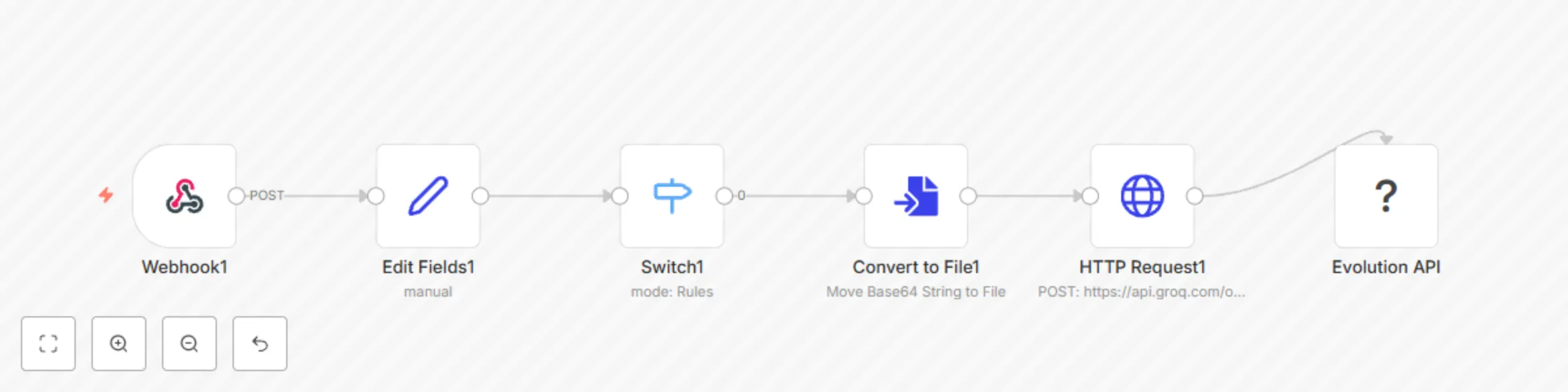
  1. Message Reception: Webhook receives WhatsApp messages in real-time
  2. Audio Detection: Filters only audio messages using Switch node
  3. Format Conversion: Converts base64 audio to MP3 file format
  4. AI Transcription: Processes audio through Groq API with Whisper Large V3 model
  5. Response Delivery: Sends transcribed text back to the original conversation

Key Features

  • Real-time Processing: Instant transcription of incoming audio messages
  • High Accuracy: Uses Whisper Large V3 model for reliable transcription
  • Auto-Reply: Automatically responds in the same WhatsApp conversation
  • Message Quoting: References the original audio message in the reply
  • Portuguese Optimized: Configured for Brazilian Portuguese transcription
  • Self-Message Filtering: Ignores messages sent by the bot itself

Prerequisites

Required Services

  • Evolution API: WhatsApp integration service
  • Groq API: AI transcription service (Whisper model)
  • n8n Instance: Workflow automation platform

API Keys & Configuration

  • Groq API key (set as environment variable: GROQ_API_KEY)
  • Evolution API instance properly configured
  • Webhook URL configured in Evolution API

Setup Instructions

  1. Import Workflow: Import the JSON workflow into your n8n instance
  2. Configure Environment: Set GROQ_API_KEY environment variable
  3. Setup Webhook: Configure Evolution API to send messages to the webhook endpoint
  4. Test Connection: Send a test audio message to verify the workflow

Workflow Nodes

  • Webhook: Receives WhatsApp messages from Evolution API
  • Edit Fields: Extracts relevant data (number, name, message, audio)
  • Switch: Filters only audio messages (audioMessage type)
  • Convert to File: Transforms base64 audio to MP3 format
  • HTTP Request: Sends audio to Groq API for transcription
  • Evolution API: Sends transcribed text back to WhatsApp

Configuration Options

Groq API Settings

  • Model: whisper-large-v3
  • Language: pt (Portuguese)
  • Temperature: 0 (maximum accuracy)
  • Response Format: json

Customization Options

  • Change language by modifying the language parameter
  • Adjust temperature for different accuracy/creativity balance
  • Modify response format for different output styles

Response Format

*Mensagem transcrita automaticamente.*
[Transcribed text content]

Technical Specifications

  • Input: Base64 encoded audio from WhatsApp
  • Output: Plain text transcription
  • Processing Time: Typically 2-5 seconds per audio message
  • Supported Audio: MP3 format (converted from WhatsApp audio)
  • Language: Portuguese (configurable)

Troubleshooting

  • No Response: Check Groq API key and webhook configuration
  • Poor Transcription: Ensure audio quality and check language settings
  • Error Messages: Monitor n8n execution logs for detailed error information

Version History

  • v0.0.1: Initial release with basic transcription functionality

1.2 Logical Blocks

This catalog entry is organized from the workflow JSON. The node-level section below shows the executable blocks available for review before importing the template.

2. Block-by-Block Analysis

Block 1 - Webhook1

Type / Role
n8n-nodes-base.webhook - webhook
Config choices
Version 2

Block 2 - Edit Fields1

Type / Role
n8n-nodes-base.set - set
Config choices
Version 3.4

Block 3 - Switch1

Type / Role
n8n-nodes-base.switch - switch
Config choices
Version 3.2

Block 4 - Convert to File1

Type / Role
n8n-nodes-base.convertToFile - convertToFile
Config choices
Version 1.1

Block 5 - HTTP Request1

Type / Role
n8n-nodes-base.httpRequest - httpRequest
Config choices
Version 4.2

Block 6 - Evolution API

Type / Role
n8n-nodes-evolution-api.evolutionApi - evolutionApi
Config choices
Version 1

3. Summary Table

Workflow Transcribe WhatsApp audio messages with Whisper AI via Groq
Complexity intermediate
Nodes 6
Categories Document Extraction, Multimodal AI
Author Noriwal AlMa Jr
Published 17 Jul 2025

4. Reproducing the Workflow from Scratch

  1. 1. Download the workflow JSON

    Use the JSON export at /data/workflows/6077/6077.json as the source template for this automation.

  2. 2. Import the template into n8n

    Open n8n, import the downloaded JSON, and review each node before activating the workflow.

  3. 3. Configure credentials and variables

    Replace placeholder credentials, API keys, webhook URLs, account IDs, and environment-specific values with your own settings.

  4. 4. Test with sample data

    Run the workflow manually or in a staging workspace, inspect node output, and confirm downstream systems receive the expected data.

  5. 5. Activate and monitor

    Enable the workflow only after testing, then monitor executions, errors, and rate limits during the first production runs.

5. General Notes & Resources

Review imported nodes carefully before activation. This catalog entry is intended to help you inspect the workflow structure, understand required services, and find related templates faster.

Node names, credentials, schedules, webhook paths, and external service limits may need adjustment for your workspace.

Frequently asked questions

What does Transcribe WhatsApp audio messages with Whisper AI via Groq do?

WhatsApp Audio Transcriber Bot Overview Automatically transcribe WhatsApp audio messages to text using AI powered speech recognition. This workflow receives audio messages via webhook, processes th...

What do I need before importing this workflow?

Review the workflow JSON, configure any required credentials in n8n, and test the automation in a safe workspace before using it in production.

Can I customize this workflow?

Yes. Use the block-by-block analysis and the downloadable JSON to inspect each node, then adjust credentials, prompts, schedules, filters, or destinations for your Document Extraction, Multimodal AI use case.