Transcribe WhatsApp audio messages with Whisper AI via Groq
# WhatsApp Audio Transcriber Bot
## Overview
Automatically transcribe WhatsApp audio messages to text using AI-powered speech recognition. This workflow receives audio messages via webhook, processes them through Groq's Whisper API, and replies with the transcribed text in the same conversation.
## Use Cases
- **Accessibility**: Help users with hearing impairments access audio content
- **Workplace Communication**: Quickly scan audio messages in professional settings
- **Language Learning**: Get text versions of audio for better comprehension
- **Meeting Notes**: Convert voice messages to searchable text format
- **Multilingual Support**: Transcribe audio in Portuguese (configurable for other languages)
## How it Works
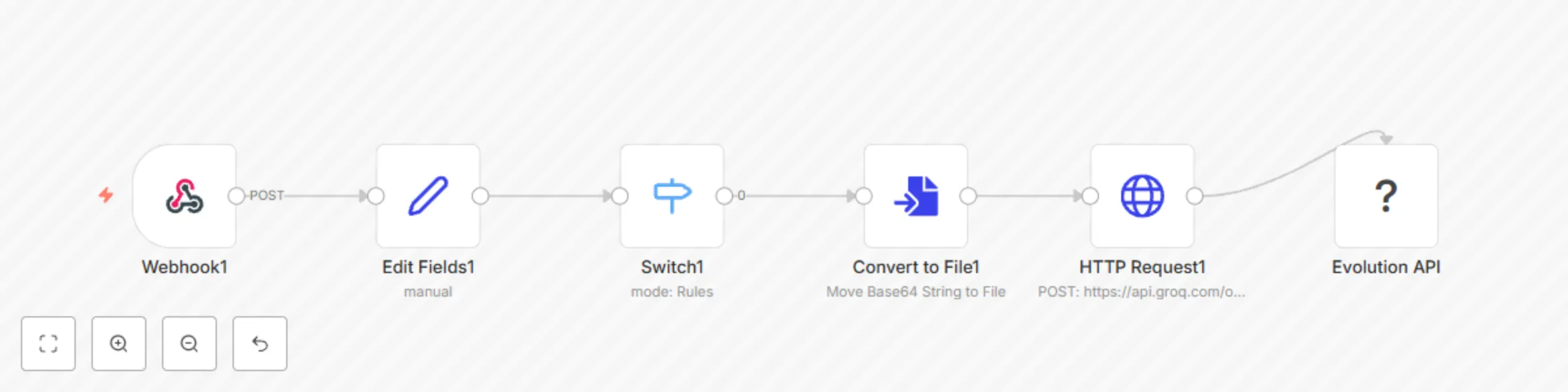
1. **Message Reception**: Webhook receives WhatsApp messages in real-time
2. **Audio Detection**: Filters only audio messages using Switch node
3. **Format Conversion**: Converts base64 audio to MP3 file format
4. **AI Transcription**: Processes audio through Groq API with Whisper Large V3 model
5. **Response Delivery**: Sends transcribed text back to the original conversation
## Key Features
- ✅ **Real-time Processing**: Instant transcription of incoming audio messages
- ✅ **High Accuracy**: Uses Whisper Large V3 model for reliable transcription
- ✅ **Auto-Reply**: Automatically responds in the same WhatsApp conversation
- ✅ **Message Quoting**: References the original audio message in the reply
- ✅ **Portuguese Optimized**: Configured for Brazilian Portuguese transcription
- ✅ **Self-Message Filtering**: Ignores messages sent by the bot itself
## Prerequisites
### Required Services
- **Evolution API**: WhatsApp integration service
- **Groq API**: AI transcription service (Whisper model)
- **n8n Instance**: Workflow automation platform
### API Keys & Configuration
- Groq API key (set as environment variable: `GROQ_API_KEY`)
- Evolution API instance properly configured
- Webhook URL configured in Evolution API
## Setup Instructions
1. **Import Workflow**: Import the JSON workflow into your n8n instance
2. **Configure Environment**: Set `GROQ_API_KEY` environment variable
3. **Setup Webhook**: Configure Evolution API to send messages to the webhook endpoint
4. **Test Connection**: Send a test audio message to verify the workflow
## Workflow Nodes
- **Webhook**: Receives WhatsApp messages from Evolution API
- **Edit Fields**: Extracts relevant data (number, name, message, audio)
- **Switch**: Filters only audio messages (`audioMessage` type)
- **Convert to File**: Transforms base64 audio to MP3 format
- **HTTP Request**: Sends audio to Groq API for transcription
- **Evolution API**: Sends transcribed text back to WhatsApp
## Configuration Options
### Groq API Settings
- **Model**: `whisper-large-v3`
- **Language**: `pt` (Portuguese)
- **Temperature**: `0` (maximum accuracy)
- **Response Format**: `json`
### Customization Options
- Change language by modifying the `language` parameter
- Adjust temperature for different accuracy/creativity balance
- Modify response format for different output styles
## Response Format
```
*Mensagem transcrita automaticamente.*
[Transcribed text content]
```
## Technical Specifications
- **Input**: Base64 encoded audio from WhatsApp
- **Output**: Plain text transcription
- **Processing Time**: Typically 2-5 seconds per audio message
- **Supported Audio**: MP3 format (converted from WhatsApp audio)
- **Language**: Portuguese (configurable)
## Troubleshooting
- **No Response**: Check Groq API key and webhook configuration
- **Poor Transcription**: Ensure audio quality and check language settings
- **Error Messages**: Monitor n8n execution logs for detailed error information
## Version History
- **v0.0.1**: Initial release with basic transcription functionality