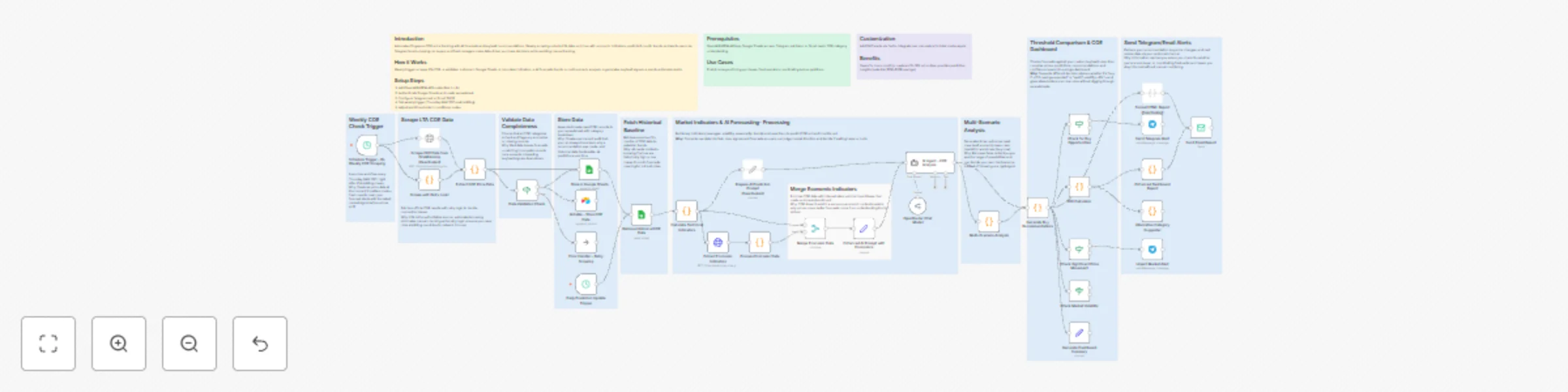
Track Singapore COE prices with AI forecasting & smart buy recommendations via Telegram

Workflow preview

Workflow preview
100%
Track Singapore COE prices with AI forecasting & smart buy recommendations via Telegram preview
Open on n8n.io

Important notice

This workflow is provided as-is. Please review and test before using in production.

1. Workflow Overview

Introduction Automates Singapore COE price tracking with AI forecasts and buy/wait recommendations. Weekly scraping collects LTA data, enriches with economic indicators, predicts 6 month trends, an...

Best for

  • Market Research automation workflows
  • AI Summarization automation workflows
  • advanced n8n builders looking for reusable templates

Tools used

n8n-nodes-base.scheduletrigger, n8n-nodes-base.httprequest, n8n-nodes-base.code, n8n-nodes-base.googlesheets, n8n-nodes-base.set, @n8n/n8n-nodes-langchain.agent, n8n-nodes-base.emailsend, n8n-nodes-base.if

Source and attribution

This workflow is cataloged by N8N Workflows and links back to its original n8n.io source page by Cheng Siong Chin.

Original n8n.io source

1.1 Workflow description

Title
Track Singapore COE prices with AI forecasting & smart buy recommendations via Telegram
Workflow name
Track Singapore COE prices with AI forecasting & smart buy recommendations via Telegram

Introduction

Automates Singapore COE price tracking with AI forecasts and buy/wait recommendations. Weekly scraping collects LTA data, enriches with economic indicators, predicts 6-month trends, and alerts users via Telegram/email—helping car buyers and fleet managers make data-driven purchase decisions while avoiding manual tracking.

How it Works

Weekly trigger scrapes LTA COE → validates → stores in Google Sheets → calculates indicators → AI forecasts trends → multi-scenario analysis → generates buy/wait signals → sends actionable alerts.

Setup Steps

  1. Add OpenAI/NVIDIA API credentials in n8n
  2. Authenticate Google Sheets and create spreadsheet
  3. Configure Telegram bot or Gmail SMTP
  4. Set weekly trigger (Thursday 9AM SGT post-bidding)
  5. Adjust alert thresholds in conditional nodes

Workflow

Schedule Trigger → Scrape COE → Validate → Store Sheets → Fetch Historical → Calculate Indicators → AI Prediction → Merge Economics → Multi-Scenario Analysis → Compare Conditions → Generate Dashboard → Send Alerts

Workflow Steps

  1. Scraping: Fetch LTA COE results with retry logic
  2. Validation: Check completeness, flag anomalies
  3. Storage: Append timestamped records to Sheets
  4. Enrichment: Calculate moving averages, volatility, seasonality
  5. AI Analysis: Forecast next 6 months with confidence intervals
  6. Decision Engine: Output buy/wait/monitor recommendation
  7. Reporting: Create dashboard and send alerts via Telegram/email

Prerequisites

OpenAI/NVIDIA API key, Google Sheets access, Telegram bot token or Gmail, basic COE category understanding

Use Cases

First-time buyers timing purchases, fleet operators coordinating bulk acquisitions

Customization

Add SMS alerts via Twilio, integrate loan calculators for total cost analysis

Benefits

Saves 5+ hours monthly, captures 10–18% price dips, provides predictive insights (potential $10K–$25K savings)

1.2 Logical Blocks

This catalog entry is organized from the workflow JSON. The node-level section below shows the executable blocks available for review before importing the template.

2. Block-by-Block Analysis

Block 1 - Schedule Trigger - Bi-Weekly COE Scraping

Type / Role
n8n-nodes-base.scheduleTrigger - scheduleTrigger
Config choices
Version 1.2

Block 2 - Scrape COE Data from OneMotoring

Type / Role
n8n-nodes-base.httpRequest - httpRequest
Config choices
Version 4.2

Block 3 - Extract COE Price Data

Type / Role
n8n-nodes-base.code - code
Config choices
Version 2

Block 4 - Store in Google Sheets

Type / Role
n8n-nodes-base.googleSheets - googleSheets
Config choices
Version 4.5

Block 5 - Retrieve Historical COE Data

Type / Role
n8n-nodes-base.googleSheets - googleSheets
Config choices
Version 4.5

Block 6 - Calculate Technical Indicators

Type / Role
n8n-nodes-base.code - code
Config choices
Version 2

Block 7 - Prepare AI Prediction Prompt

Type / Role
n8n-nodes-base.set - set
Config choices
Version 3.4

Block 8 - AI Agent - COE Analysis

Type / Role
@n8n/n8n-nodes-langchain.agent - agent
Config choices
Version 1.7

Block 9 - Generate Buy Recommendations

Type / Role
n8n-nodes-base.code - code
Config choices
Version 2

Block 10 - Format HTML Report

Type / Role
n8n-nodes-base.code - code
Config choices
Version 2

Block 11 - Send Email Report

Type / Role
n8n-nodes-base.emailSend - emailSend
Config choices
Version 2.1

Block 12 - Check for Buy Opportunities

Type / Role
n8n-nodes-base.if - if
Config choices
Version 2.1

Block 13 - Send Telegram Alert

Type / Role
n8n-nodes-base.telegram - telegram
Config choices
Version 1.2

Block 14 - Generate Dashboard Summary

Type / Role
n8n-nodes-base.set - set
Config choices
Version 3.4

Block 15 - OpenRouter Chat Model

Type / Role
@n8n/n8n-nodes-langchain.lmChatOpenRouter - lmChatOpenRouter
Config choices
Version 1

Block 16 - Airtable - Store COE Data

Type / Role
n8n-nodes-base.airtable - airtable
Config choices
Version 2

Block 17 - Data Validation Check

Type / Role
n8n-nodes-base.if - if
Config choices
Version 2.1

Block 18 - Error Handler - Retry Scraping

Type / Role
n8n-nodes-base.noOp - noOp
Config choices
Version 1

Block 19 - Scrape with Retry Logic

Type / Role
n8n-nodes-base.code - code
Config choices
Version 2

Block 20 - Extract Economic Indicators

Type / Role
n8n-nodes-base.httpRequest - httpRequest
Config choices
Version 4.2

Block 21 - Process Economic Data

Type / Role
n8n-nodes-base.code - code
Config choices
Version 2

Block 22 - Enhanced AI Prompt with Economics

Type / Role
n8n-nodes-base.set - set
Config choices
Version 3.4

Block 23 - Multi-Scenario Analysis

Type / Role
n8n-nodes-base.code - code
Config choices
Version 2

Block 24 - ROI Calculator

Type / Role
n8n-nodes-base.code - code
Config choices
Version 2

Showing the first 24 of 44 workflow blocks. Download the JSON for the full node graph.

3. Summary Table

Workflow Track Singapore COE prices with AI forecasting & smart buy recommendations via Telegram
Complexity advanced
Nodes 44
Categories Market Research, AI Summarization
Author Cheng Siong Chin
Published 08 Nov 2025

4. Reproducing the Workflow from Scratch

  1. 1. Download the workflow JSON

    Use the JSON export at /data/workflows/10625/10625.json as the source template for this automation.

  2. 2. Import the template into n8n

    Open n8n, import the downloaded JSON, and review each node before activating the workflow.

  3. 3. Configure credentials and variables

    Replace placeholder credentials, API keys, webhook URLs, account IDs, and environment-specific values with your own settings.

  4. 4. Test with sample data

    Run the workflow manually or in a staging workspace, inspect node output, and confirm downstream systems receive the expected data.

  5. 5. Activate and monitor

    Enable the workflow only after testing, then monitor executions, errors, and rate limits during the first production runs.

5. General Notes & Resources

Review imported nodes carefully before activation. This catalog entry is intended to help you inspect the workflow structure, understand required services, and find related templates faster.

Node names, credentials, schedules, webhook paths, and external service limits may need adjustment for your workspace.

Frequently asked questions

What does Track Singapore COE prices with AI forecasting & smart buy recommendations via Telegram do?

Introduction Automates Singapore COE price tracking with AI forecasts and buy/wait recommendations. Weekly scraping collects LTA data, enriches with economic indicators, predicts 6 month trends, an...

What do I need before importing this workflow?

Review the workflow JSON, configure any required credentials in n8n, and test the automation in a safe workspace before using it in production.

Can I customize this workflow?

Yes. Use the block-by-block analysis and the downloadable JSON to inspect each node, then adjust credentials, prompts, schedules, filters, or destinations for your Market Research, AI Summarization use case.