Track SDK documentation drift with GitHub, Notion, Google Sheets, and Slack

Workflow preview

Workflow preview
100%
Track SDK documentation drift with GitHub, Notion, Google Sheets, and Slack preview
Open on n8n.io

Important notice

This workflow is provided as-is. Please review and test before using in production.

1. Workflow Overview

Description Automatically track SDK releases from GitHub, compare documentation freshness in Notion, and send Slack alerts when docs lag behind. This workflow ensures documentation stays in sync...

Best for

  • Engineering automation workflows
  • advanced n8n builders looking for reusable templates

Tools used

n8n-nodes-base.stickynote, n8n-nodes-base.githubtrigger, n8n-nodes-base.github, n8n-nodes-base.set, n8n-nodes-base.googlesheets, n8n-nodes-base.notion, n8n-nodes-base.merge, n8n-nodes-base.code

Source and attribution

This workflow is cataloged by N8N Workflows and links back to its original n8n.io source page by Rahul Joshi.

Original n8n.io source

1.1 Workflow description

Title
Track SDK documentation drift with GitHub, Notion, Google Sheets, and Slack
Workflow name
Track SDK documentation drift with GitHub, Notion, Google Sheets, and Slack

πŸ“Š Description

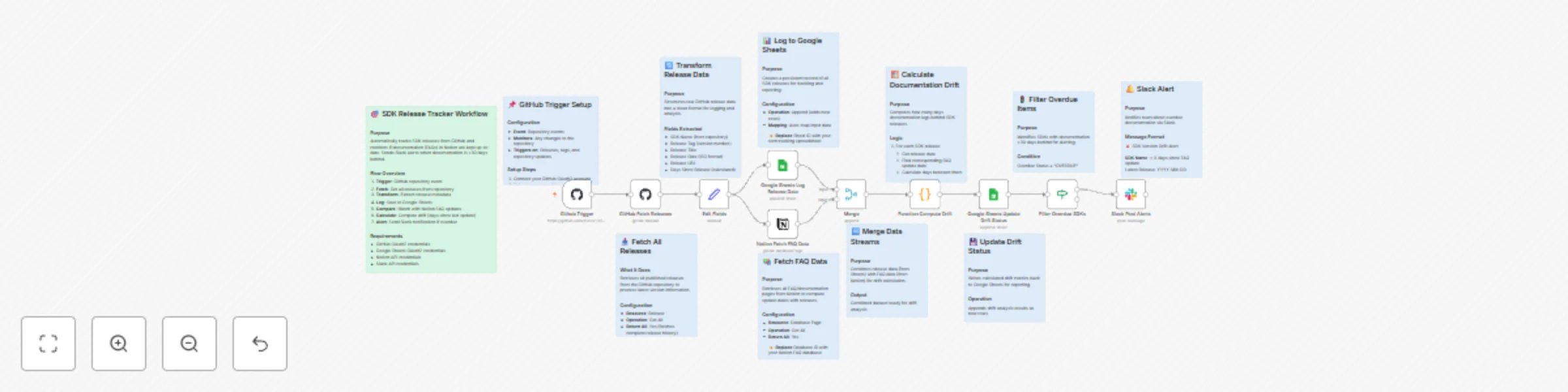
Automatically track SDK releases from GitHub, compare documentation freshness in Notion, and send Slack alerts when docs lag behind. This workflow ensures documentation stays in sync with releases, improves visibility, and reduces version drift across teams. πŸš€πŸ“šπŸ’¬

What This Template Does

  • Step 1: Listens to GitHub repository events to detect new SDK releases. 🧩
  • Step 2: Fetches release metadata including version, tag, and publish date. πŸ“¦
  • Step 3: Logs release data into Google Sheets for record-keeping and analysis. πŸ“Š
  • Step 4: Retrieves FAQ or documentation data from Notion. πŸ“š
  • Step 5: Merges GitHub and Notion data to calculate documentation drift. πŸ”
  • Step 6: Flags SDKs whose documentation is over 30 days out of date. ⚠️
  • Step 7: Sends detailed Slack alerts to notify responsible teams. πŸ””

Key Benefits

βœ… Keeps SDK documentation aligned with product releases βœ… Prevents outdated information from reaching users βœ… Provides centralized release tracking in Google Sheets βœ… Sends real-time Slack alerts for overdue updates βœ… Strengthens DevRel and developer experience operations

Features

  • GitHub release trigger for real-time monitoring
  • Google Sheets logging for tracking and auditing
  • Notion database integration for documentation comparison
  • Automated drift calculation (days since last update)
  • Slack notifications for overdue documentation

Requirements

  • GitHub OAuth2 credentials
  • Notion API credentials
  • Google Sheets OAuth2 credentials
  • Slack Bot token with chat:write permissions
  • Target Audience
  • Developer Relations (DevRel) and SDK engineering teams
  • Product documentation and technical writing teams
  • Project managers tracking SDK and doc release parity

Step-by-Step Setup Instructions

  • Connect your GitHub account and select your SDK repository.
  • Replace YOUR_GOOGLE_SHEET_ID and YOUR_SHEET_GID with your tracking spreadsheet.
  • Add your Notion FAQ database ID.
  • Configure your Slack channel ID for alerts.
  • Run once manually to validate setup, then enable automation.

1.2 Logical Blocks

This catalog entry is organized from the workflow JSON. The node-level section below shows the executable blocks available for review before importing the template.

2. Block-by-Block Analysis

Block 1 - Sticky Note

Type / Role
n8n-nodes-base.stickyNote - stickyNote
Config choices
Version 1

Block 2 - Sticky Note1

Type / Role
n8n-nodes-base.stickyNote - stickyNote
Config choices
Version 1

Block 3 - Sticky Note2

Type / Role
n8n-nodes-base.stickyNote - stickyNote
Config choices
Version 1

Block 4 - Sticky Note3

Type / Role
n8n-nodes-base.stickyNote - stickyNote
Config choices
Version 1

Block 5 - Sticky Note4

Type / Role
n8n-nodes-base.stickyNote - stickyNote
Config choices
Version 1

Block 6 - Sticky Note5

Type / Role
n8n-nodes-base.stickyNote - stickyNote
Config choices
Version 1

Block 7 - Sticky Note6

Type / Role
n8n-nodes-base.stickyNote - stickyNote
Config choices
Version 1

Block 8 - Sticky Note7

Type / Role
n8n-nodes-base.stickyNote - stickyNote
Config choices
Version 1

Block 9 - Sticky Note8

Type / Role
n8n-nodes-base.stickyNote - stickyNote
Config choices
Version 1

Block 10 - Sticky Note9

Type / Role
n8n-nodes-base.stickyNote - stickyNote
Config choices
Version 1

Block 11 - Sticky Note10

Type / Role
n8n-nodes-base.stickyNote - stickyNote
Config choices
Version 1

Block 12 - Github Trigger

Type / Role
n8n-nodes-base.githubTrigger - githubTrigger
Config choices
Version 1

Block 13 - GitHub Fetch Releases

Type / Role
n8n-nodes-base.github - github
Config choices
Version 1

Block 14 - Edit Fields

Type / Role
n8n-nodes-base.set - set
Config choices
Version 3.4

Block 15 - Google Sheets Log Release Data

Type / Role
n8n-nodes-base.googleSheets - googleSheets
Config choices
Version 4.4

Block 16 - Notion Fetch FAQ Data

Type / Role
n8n-nodes-base.notion - notion
Config choices
Version 2.2

Block 17 - Merge

Type / Role
n8n-nodes-base.merge - merge
Config choices
Version 3

Block 18 - Function Compute Drift

Type / Role
n8n-nodes-base.code - code
Config choices
Version 2

Block 19 - Google Sheets Update Drift Status

Type / Role
n8n-nodes-base.googleSheets - googleSheets
Config choices
Version 4.4

Block 20 - Filter Overdue SDKs

Type / Role
n8n-nodes-base.if - if
Config choices
Version 2

Block 21 - Slack Post Alerts

Type / Role
n8n-nodes-base.slack - slack
Config choices
Version 2.2

3. Summary Table

Workflow Track SDK documentation drift with GitHub, Notion, Google Sheets, and Slack
Complexity advanced
Nodes 21
Categories Engineering
Author Rahul Joshi
Published 30 Oct 2025

4. Reproducing the Workflow from Scratch

  1. 1. Download the workflow JSON

    Use the JSON export at /data/workflows/10337/10337.json as the source template for this automation.

  2. 2. Import the template into n8n

    Open n8n, import the downloaded JSON, and review each node before activating the workflow.

  3. 3. Configure credentials and variables

    Replace placeholder credentials, API keys, webhook URLs, account IDs, and environment-specific values with your own settings.

  4. 4. Test with sample data

    Run the workflow manually or in a staging workspace, inspect node output, and confirm downstream systems receive the expected data.

  5. 5. Activate and monitor

    Enable the workflow only after testing, then monitor executions, errors, and rate limits during the first production runs.

5. General Notes & Resources

Review imported nodes carefully before activation. This catalog entry is intended to help you inspect the workflow structure, understand required services, and find related templates faster.

Node names, credentials, schedules, webhook paths, and external service limits may need adjustment for your workspace.

Frequently asked questions

What does Track SDK documentation drift with GitHub, Notion, Google Sheets, and Slack do?

Description Automatically track SDK releases from GitHub, compare documentation freshness in Notion, and send Slack alerts when docs lag behind. This workflow ensures documentation stays in sync...

What do I need before importing this workflow?

Review the workflow JSON, configure any required credentials in n8n, and test the automation in a safe workspace before using it in production.

Can I customize this workflow?

Yes. Use the block-by-block analysis and the downloadable JSON to inspect each node, then adjust credentials, prompts, schedules, filters, or destinations for your Engineering use case.