Block 1 - Schedule Trigger
- Type / Role
- n8n-nodes-base.scheduleTrigger - scheduleTrigger
- Config choices
- Version 1.2


 Early Deal
This workflow is provided as-is. Please review and test before using in production.
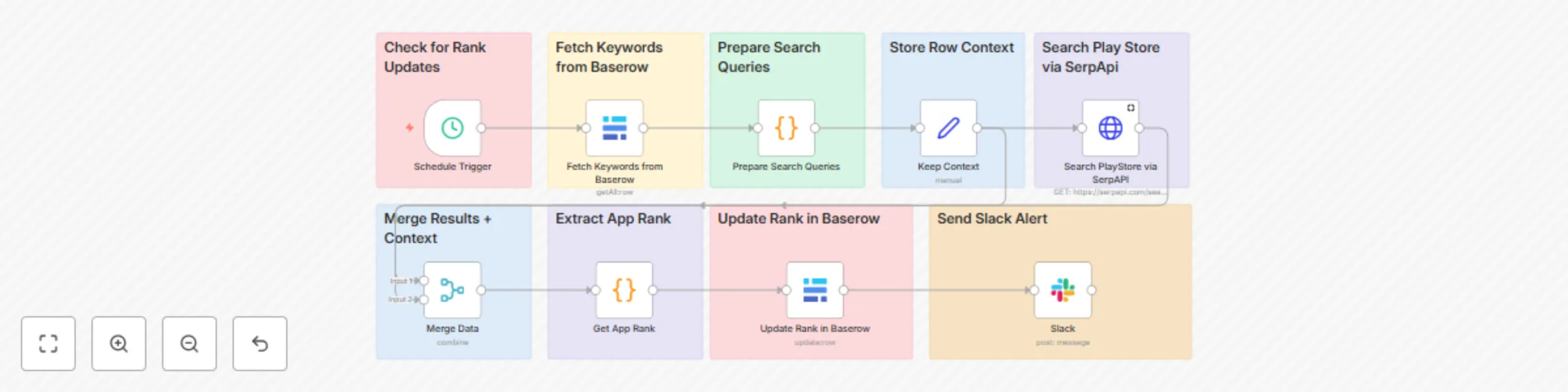
Automatically track your Android app’s keyword rankings on Google Play. This workflow checks ranks via SerpApi, updates a Baserow table, and posts a heads up in Slack so your team can review change...
n8n-nodes-base.scheduletrigger, n8n-nodes-base.set, n8n-nodes-base.slack, n8n-nodes-base.stickynote, n8n-nodes-base.baserow, n8n-nodes-base.code, n8n-nodes-base.httprequest, n8n-nodes-base.merge
This workflow is cataloged by N8N Workflows and links back to its original n8n.io source page by Arunava.
Original n8n.io sourceASO teams tracking daily keyword positions
Growth & marketing standups that want quick rank visibility
Lightweight historical logging without a full BI stack
Runs on a schedule (e.g., weekly)
Queries SerpApi for each keyword’s Play Store ranking
Saves results to Baserow: Current Rank, Previous Rank, Last modified
Sends a Slack alert: “Ranks updated — review in Baserow”
SerpApi account & API key
Baserow account + API token
Slack connection (bot/app or credential in n8n)
Create a new table (any name). Add user-field names exactly:
Keywords (text)
Current Rank (number)
Previous Rank (number)
Last modified (date/time)
Optional fields you can add later: Notes, Locale, Store Country, App Package ID.
Baserow: add your API token and select your Database and Table in the Baserow nodes.
Slack: connect your Slack account/workspace in the Slack node.
SerpApi: open the HTTP Request node and put your API key under Query Parameters → api_key = YOUR_KEY.
In the Baserow (Update Row) node, map:
Row ID → {{$json.id}}
Current Rank → {{$json["Current Rank"]}}
Previous Rank → your code node should set this (the template copies the old “Current Rank” into “Previous Rank” before writing the new one)
Last modified → {{$now}} (or the timestamp you compute)
If you prefer a single daily Slack summary instead of multiple pings, add a Code node after updates to aggregate lines and send one message.
Treat 0 or missing ranks as “not found” and flag them in Slack if helpful.
For multi-country tracking, include hl/gl (locale/country) in your SerpApi query params and store them as columns.
I’m happy to help you get this running smoothly—or tailor it to your brand.
Reach out to me via email: [email protected]
This catalog entry is organized from the workflow JSON. The node-level section below shows the executable blocks available for review before importing the template.
| Workflow | Track play store app rankings with SerpApi, Baserow & Slack alerts |
|---|---|
| Complexity | advanced |
| Nodes | 18 |
| Categories | Market Research |
| Author | Arunava |
| Published | 29 Aug 2025 |
Use the JSON export at /data/workflows/8036/8036.json as the source template for this automation.
Open n8n, import the downloaded JSON, and review each node before activating the workflow.
Replace placeholder credentials, API keys, webhook URLs, account IDs, and environment-specific values with your own settings.
Run the workflow manually or in a staging workspace, inspect node output, and confirm downstream systems receive the expected data.
Enable the workflow only after testing, then monitor executions, errors, and rate limits during the first production runs.
Review imported nodes carefully before activation. This catalog entry is intended to help you inspect the workflow structure, understand required services, and find related templates faster.
Node names, credentials, schedules, webhook paths, and external service limits may need adjustment for your workspace.
Automatically track your Android app’s keyword rankings on Google Play. This workflow checks ranks via SerpApi, updates a Baserow table, and posts a heads up in Slack so your team can review change...
Review the workflow JSON, configure any required credentials in n8n, and test the automation in a safe workspace before using it in production.
Yes. Use the block-by-block analysis and the downloadable JSON to inspect each node, then adjust credentials, prompts, schedules, filters, or destinations for your Market Research use case.